
Guide
How to use AI on WhatsApp and Telegram
Since 15 January 2026, ChatGPT and other general-purpose assistants can no longer run through WhatsApp's business platform. Here are the options that remain, who can read your messages with each, and how to set up your own private assistant in either app.
The short answer
On WhatsApp, the built-in Meta AI is the only general assistant WhatsApp officially offers; OpenAI's 1-800-ChatGPT stopped working there on 15 January 2026 after Meta changed its business terms. On Telegram, many AI bots exist, and you can also create your own bot connected to an AI agent on your computer. The most private option in either app is your own agent: it runs on your Mac, answers through your chat app, and can use a model that runs locally, so no AI company sees your messages. Each option has a different privacy trade-off, set out below.
What changed on WhatsApp
In October 2025 Meta added an “AI Providers” section to the WhatsApp Business Solution terms. It bars companies whose main offering is a general-purpose AI assistant from distributing it through the WhatsApp Business API. The rule applied to new users from 15 October 2025 and to everyone from 15 January 2026. OpenAI said 1-800-ChatGPT would stop working on WhatsApp after that date, and other general assistants on the platform were affected the same way. Business bots for support, bookings or order tracking are still allowed.
Meta AI, which Meta builds into WhatsApp itself, isn't distributed through the Business API, so the rule doesn't touch it. The change applies to businesses using WhatsApp's official API. It doesn't cover software you run yourself on your own account, but WhatsApp doesn't officially support that either (more below).
Your options, compared
| Option | Where the AI runs | Who can read your messages to it | What it can do |
|---|---|---|---|
| Meta AI in WhatsApp | Meta's servers | Meta | Answers questions, makes images; can't act on your computer |
| A third-party AI bot on Telegram | The bot maker's servers, plus the AI company it uses | Telegram (cloud chats aren't end-to-end encrypted), the bot's owner and their AI provider | Varies by bot |
| Your own agent, on Telegram | Your computer | Telegram (in transit and storage), and an online AI company only if you connected one | Whatever your agent can do: research, files, reminders, routines |
| Your own agent, on WhatsApp (linked device) | Your computer | Only your devices: WhatsApp messages are end-to-end encrypted to your linked devices, and an online AI company only if you connected one | Same as above; carries a risk to the WhatsApp account (see below) |
Telegram: private enough, and officially supported
Telegram has an official bot platform, so running your own assistant there is allowed and stable. You create a bot (with Telegram's @BotFather, or a helper that does it for you) and connect it to your agent. Only accounts you allow can talk to it.
Know the privacy limits: Telegram's own FAQ says only secret chats are end-to-end encrypted. Ordinary chats, including chats with bots, use client-server encryption and are stored in Telegram's cloud, where Telegram holds the keys. Telegram also notes that when you use AI through a third-party bot, “you are using a third-party service, not Telegram”, so that bot's privacy policy applies.
If the bot is your own and the agent runs on your Mac, the third party is you. What remains is Telegram itself carrying the messages.
WhatsApp: end-to-end encrypted, but unofficial
WhatsApp lets you link extra devices to your account, the way WhatsApp Web works. Agent software on your computer can link as one of those devices, read what you send in your chat with yourself, and reply there. Because the agent is on your own device, the messages stay end-to-end encrypted between your phone and your computer.
WhatsApp doesn't officially support assistants on personal accounts. Linking agent software works through an unofficial bridge, the same kind of technology as third-party WhatsApp Web clients, and WhatsApp may restrict accounts that use one. If your WhatsApp account matters to your work, use Telegram for your assistant.
Set up your own assistant in either app
With Kaairos (no terminal)
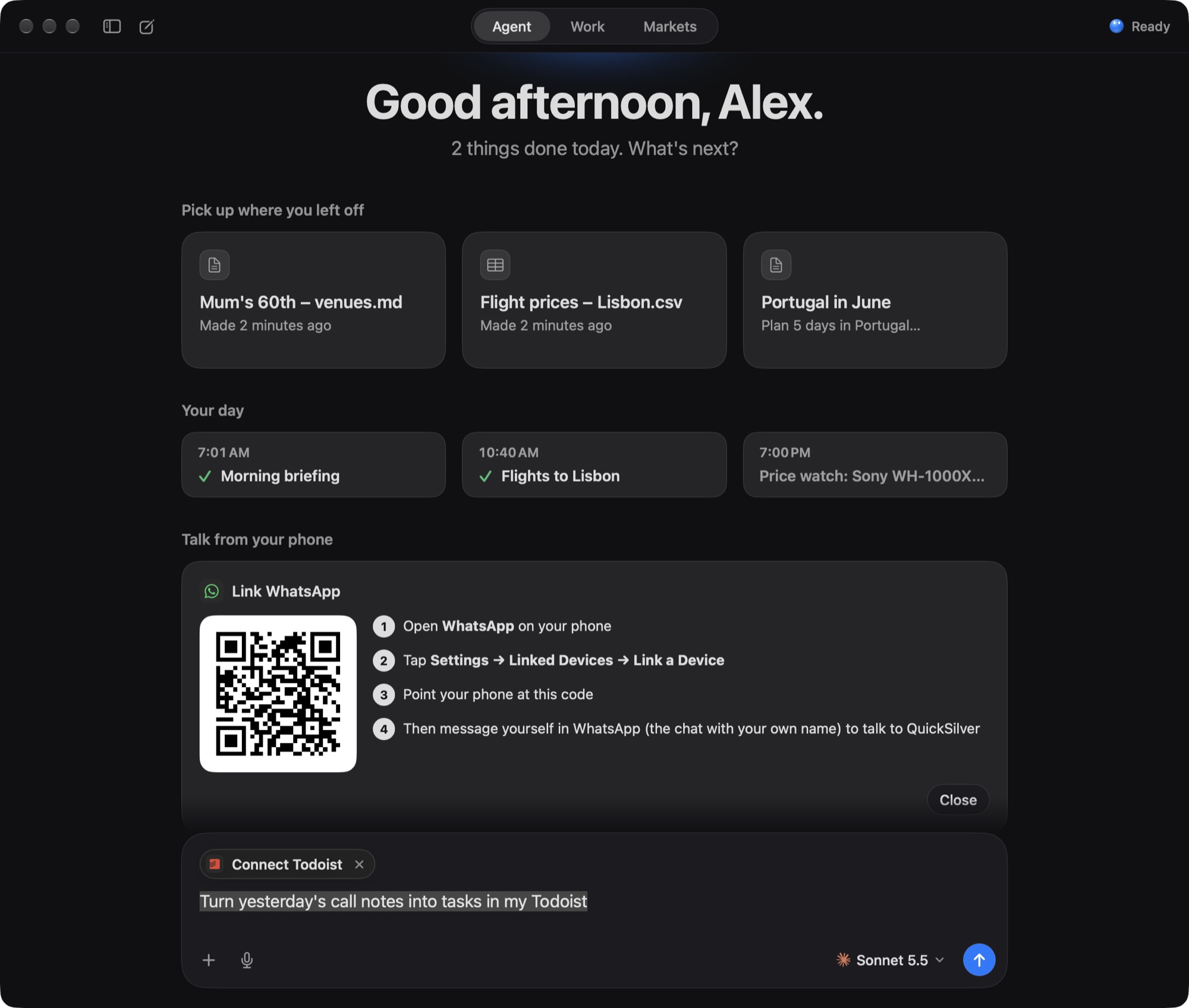
- Open Kaairos. On the home screen, under Talk from your phone, choose Show Code next to Telegram or WhatsApp.
- Telegram: scan the code with your phone's camera. Telegram opens and creates your own bot, connected to your Mac. Only your Telegram account can talk to it.
- WhatsApp: on your phone open WhatsApp › Settings › Linked Devices › Link a Device, and point the phone at the code. Then message yourself (the chat with your own name).
- Send a message or a voice note. Voice notes are transcribed on your Mac.
- To keep it answering when the Kaairos window is closed, turn on Keep working when closed. Your Mac still needs to be on and awake.
With Hermes Agent from the command line
If you run the open-source Hermes Agent yourself, run hermes gateway setup and follow the steps for Telegram or WhatsApp, then hermes gateway status to check it. You'll create the Telegram bot token yourself with @BotFather and keep the gateway running as a service.
What's worth doing from your phone
A chat app is the most natural place for an assistant you carry around. Things that work well once your own agent is connected:
- A morning briefing delivered at 7: weather, what you follow, your reminders (how).
- Alerts when a price drops or seats open (how).
- Voice note to document: talk through a proposal on a walk, get a finished file back (how).
- Reminders that keep nudging until you reply “done” (how).
- Research on the go: “compare these three e-bikes and send me the pick” (how).
Telegram or WhatsApp for your own assistant?
| Telegram | ||
|---|---|---|
| Officially supported for your own assistant | Yes, through Telegram's bot platform | No: links as a device through an unofficial bridge |
| Risk to your account | None from the bot itself | WhatsApp may restrict accounts that use an unofficial bridge |
| Encryption of your messages to the assistant | Client-server; stored in Telegram's cloud | End-to-end to your own linked devices |
| Where you talk to it | Its own chat, like any contact | The chat with yourself |
| Voice notes and files | Yes | Yes |
| Who else can message it | Only accounts you allow | Only you (it's your own self-chat) |
| Our recommendation | The default choice | If you accept the account risk |
What your own assistant can and can't see
A common worry is that linking an assistant lets it read all your chats. With a well-built setup, it shouldn't:
- On Telegram, your bot only receives messages sent to the bot. It can't read your other chats.
- On WhatsApp, a linked device technically receives your messages, like WhatsApp Web does. A careful assistant only answers in your chat with yourself and ignores the rest. Kaairos answers in the self-chat; check how any tool you use behaves before linking it.
- Either way, what you send to the assistant goes to whichever AI it uses: nobody else if it's a local model on your computer, or the AI company if you connected one.
Voice notes: where they're turned into text
Voice notes are some of the most personal things people send. Where they're transcribed matters:
| Setup | Where your voice is transcribed |
|---|---|
| A hosted AI bot | On the bot maker's or its AI provider's servers |
| Your own agent with a cloud transcription service | On that service's servers |
| Your own agent with a local speech model | On your own computer; the audio isn't sent to a transcription company |
Kaairos includes a speech model in the app, so voice notes from Telegram or WhatsApp are transcribed on your Mac and nothing downloads the first time you send one.
If your assistant stops answering
- Is the computer on and awake? Your own assistant runs there. A sleeping Mac can't answer.
- Is the app running? In Kaairos, turn on Keep working when closed so it answers after you close the window.
- WhatsApp: check the agent is still listed under Settings › Linked Devices on your phone. If it isn't, link it again.
- Telegram: check you're messaging the right bot, and that the bot wasn't deleted in @BotFather.
- Look for a problem message in the app's phone settings; in Kaairos that's Settings › Phone & messages, with Fix.
Ideas by situation
| Where you are | What to send | What comes back |
|---|---|---|
| Walking | A voice note: “turn this into a proposal for the café refit” | A finished document in the same chat |
| In a shop | “Is the Bosch or the Dyson better for a flat with a dog? Owner complaints only.” | A pick with reasons and sources |
| Travelling | “Find me a pharmacy open now near Rossio, Lisbon.” | Options with opening times and links |
| At dinner | “Remind me to book the car service tomorrow at 9.” | A reminder at 9, on your phone |
| Commuting | “What did I ask you to keep an eye on this week?” | A list of your routines and their latest results |
Setting expectations
An assistant that runs on your own computer behaves a little differently from a hosted chatbot. Simple replies arrive in seconds; tasks that browse several sites can take a few minutes, and you'll get the answer when it's ready rather than a typing indicator the whole time. A local model on your Mac is usually slower than the fastest online models on long tasks. In exchange, it can do things a hosted bot can't: use files on your Mac, keep routines running and send you results without you asking again.
Sources
- TechCrunch: WhatsApp changes its terms to bar general-purpose chatbots from its platform (18 October 2025)
- 9to5Mac: Meta kicking ChatGPT out of WhatsApp (22 October 2025)
- Telegram FAQ (secret chats, cloud chats, third-party AI bots)
- Hermes Agent documentation (supported messaging platforms)
Fair questions
Can I still use ChatGPT on WhatsApp?
No. OpenAI's 1-800-ChatGPT stopped working on WhatsApp on 15 January 2026, after Meta's new terms for AI providers took effect.
Which AI is available in WhatsApp now?
Meta AI is built in. General assistants from other companies can't use WhatsApp's business platform. You can run your own agent on your computer and link it as a device, unofficially.
Is it safe to connect an AI to my WhatsApp?
Your messages stay end-to-end encrypted to your own linked devices, but linking agent software uses an unofficial bridge, and WhatsApp may restrict accounts that use one. Telegram is the safer choice.
Are Telegram bots private?
Chats with bots aren't end-to-end encrypted; they're stored in Telegram's cloud. A third-party bot's owner and its AI provider can also see what you send. Your own bot, connected to an agent on your computer, removes the third party.
Can an AI on Telegram understand voice messages?
Many can. In Kaairos, voice notes are transcribed on your Mac with a speech model built into the app.
Does my computer need to be on?
For your own agent, yes: it runs on your computer and answers while it's on and awake.
Can I add an AI assistant to a WhatsApp group?
Third-party general assistants can't use WhatsApp's business platform any more, and running your own through an unofficial bridge in groups adds risk for everyone in the group. Keep your own assistant in your self-chat or on Telegram.
Is Telegram or WhatsApp better for an AI assistant?
Telegram, for most people: it officially supports bots, so there's no risk to your account. WhatsApp's advantage is end-to-end encryption to your own devices, at the cost of using an unofficial bridge.
Can I send photos and files to my assistant?
Yes, in both apps. Your own agent receives them on your computer and can read documents, and look at photos if its model can see images.
Do I need a second phone number for my own assistant?
No. On Telegram your assistant is a bot with its own name, so you chat with it like a contact. On WhatsApp you talk to it in the chat with yourself, using your existing number.
Download and go
Your AI agent, already set up.
One button to set up. Its own private AI, free. Claude, ChatGPT or Gemini when you want more.
A Mac with Apple silicon (M1 or later), macOS 15 Sequoia or later. 14-day refund.