
Compare
OpenClaw alternatives in 2026
OpenClaw is the biggest open-source personal agent, and for many people it's the right one. People look elsewhere for a few common reasons: setup, safety defaults, privacy, or a Mac that's too old for its app. Here are the alternatives, matched to the reason.
The short answer
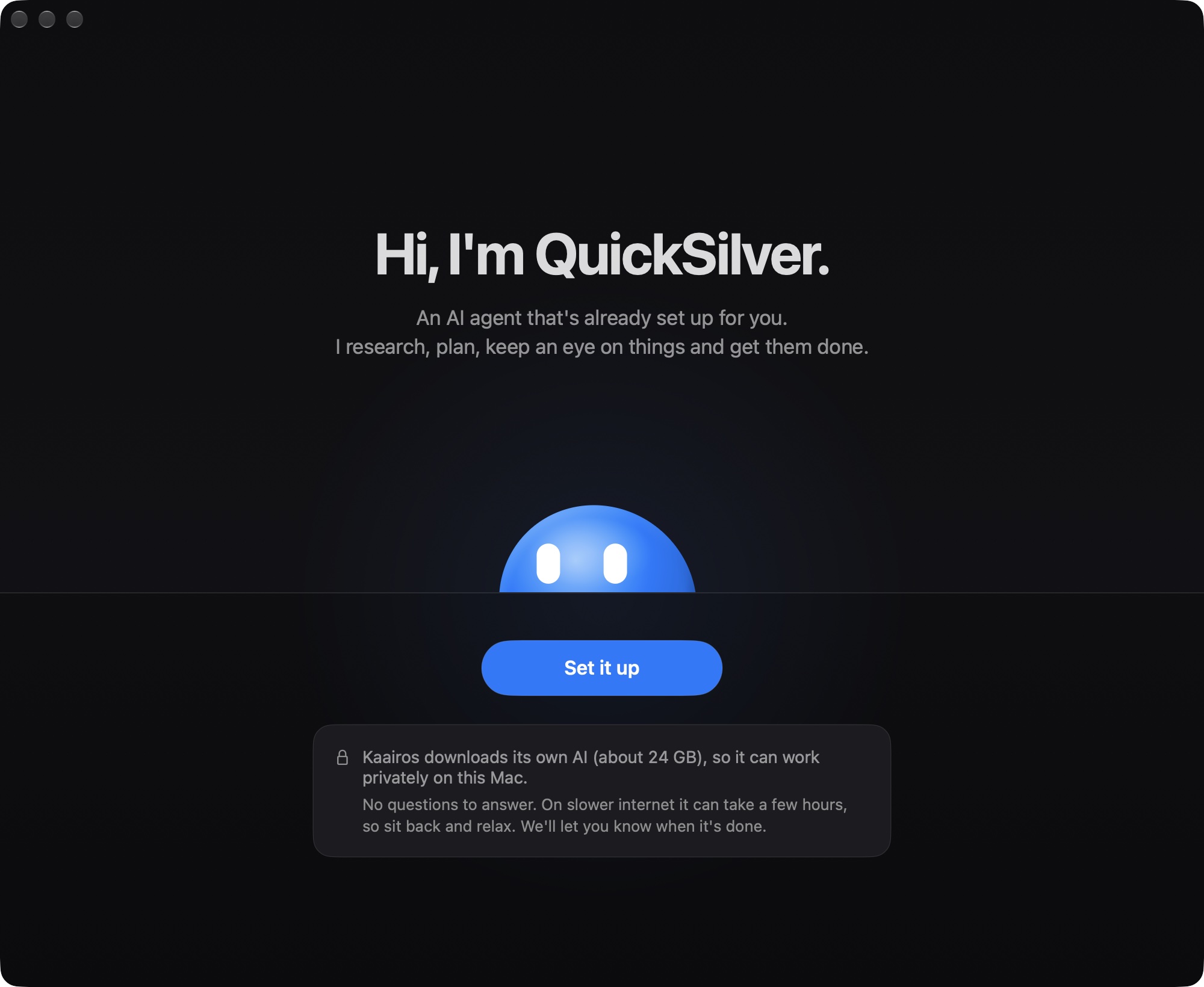
If you want another open-source agent, Hermes Agent (or its Hermes Desktop app) is the closest match, with a learning loop and stricter approval defaults. If you want no setup and private AI on a Mac, Kaairos. If you want a cloud agent that just works, Claude Cowork, ChatGPT Work or Manus Studio. If documents are the main job, AnythingLLM. For building on a native Mac harness, Osaurus.
We make Kaairos, so we have a stake in this list. We've tried to be fair: every fact about another product comes from its own site or docs (linked in Sources), we say where others are better, and we haven't ranked anything on benchmarks we didn't run.
Why people look for an OpenClaw alternative
These are the reasons that come up, and what OpenClaw's own docs say about each:
- Setup. OpenClaw installs with a script or npm, then
openclaw onboard --install-daemon, and you choose a model provider and connect channels. That's quick for developers and a wall for others. - Safety defaults. Its docs say tools run on the host for the main session unless you configure sandboxing, that allowlists are “not a shell security boundary”, and to treat third-party skills as untrusted code.
- Mac version. The macOS menu bar app needs macOS 26.2 (Tahoe) or later.
- Privacy. Private use means setting up a local model yourself, through Ollama or LM Studio.
- Fit. Some people want an agent that learns their routines rather than one wired to thirty channels.
Four questions to narrow it down
- Will you use a terminal? If not, rule out the self-installed agents and look at Kaairos or a cloud agent.
- Must the agent's thinking stay on your computer? Then you need a local model: Kaairos has one built in; Hermes, AnythingLLM and Osaurus can use one you set up. Manus, Cowork and ChatGPT Work think in the cloud.
- Which chat apps do you need? WhatsApp and Telegram are covered by Kaairos, Hermes and OpenClaw. For Signal, Slack, Discord or iMessage, look at Hermes Agent or stay with OpenClaw.
- Which computers? Kaairos is Mac only. Hermes and OpenClaw run almost everywhere; Cowork and ChatGPT also run on the web.
The alternatives at a glance
| Alternative | Best if you want | Open source | Local AI | Phone / chat apps | Mac requirement | Price |
|---|---|---|---|---|---|---|
| Hermes Agent | Open source that learns skills, stricter approvals | Yes (MIT) | Ollama, llama.cpp, vLLM, LM Studio | 20+ platforms incl. Telegram, WhatsApp, Signal | Installer; Hermes Desktop on macOS 12+ | Free |
| Kaairos | No setup, private AI included, on a Mac | Built on Hermes (MIT); app is commercial | Built in, set up for you (32 GB) | Telegram, WhatsApp by QR code | Apple silicon, macOS 15+ | $29 once |
| Manus Studio | A cloud brain with hands on your Mac | No | No | Manus phone app | Apple silicon | Free credits; Pro from $20/mo |
| Claude Cowork | Claude's models; schedules with the Mac off | No | No | Claude app | macOS 13+ | From $20/mo |
| AnythingLLM | Documents plus agents, free | Yes (MIT) | Built-in engine | Android app | M-series, 16 GB recommended | Desktop free |
| Osaurus | A native Mac harness to build on | Yes (MIT) | MLX and Apple models | Not its focus | macOS 15.5+, Apple silicon | Free |
| ChatGPT Work | ChatGPT's models, local or cloud | No | No | ChatGPT app | ChatGPT desktop app | See chatgpt.com/pricing |
OpenClaw and the two closest alternatives, in depth
Setup
| OpenClaw | Hermes Agent | Kaairos | |
|---|---|---|---|
| Install | Script or npm, then onboard the daemon | One-line installer, or Hermes Desktop | Download, click Set it up |
| Choosing a model | You choose | You choose | Chosen for your Mac; change any time |
| Config files | Yes | Yes | None; everything in Settings |
Models
| OpenClaw | Hermes Agent | Kaairos | |
|---|---|---|---|
| Local AI | Ollama, LM Studio | Ollama, llama.cpp, vLLM, LM Studio | Private AI built in (llama.cpp) |
| Online AI | Many providers | Many providers, any OpenAI-compatible endpoint | ChatGPT plan, 19 services by key, your own endpoint |
| Hybrid routing | You configure | You configure | Automatic: main brain, routines, helpers, backup |
Abilities
| OpenClaw | Hermes Agent | Kaairos | |
|---|---|---|---|
| Chat channels | 33 | 20+ | Telegram and WhatsApp |
| Scheduling | Cron, watchers, webhooks, Gmail triggers | Cron in plain language | Routines gallery or plain words |
| Skills | ClawHub registry | Learns its own; Skills Hub | Learns its own; Nous Research catalog |
| Memory | Markdown files, hybrid search | Curated memory, session search | Hermes memory, shown on the Work tab |
| Desktop apps | Mac (26.2+), Windows, Linux, iOS, Android | Mac, Windows | Mac |
Safety
| OpenClaw | Hermes Agent | Kaairos | |
|---|---|---|---|
| Approvals | Allowlists; sandbox opt-in | Smart approvals by default | Three plain levels; default asks before risky steps |
| Unattended runs | Per your config | Risky actions denied by default | Risky actions wait for you |
| Undo | Not covered | Checkpoints available | Checkpoints on by default |
Price
| OpenClaw | Hermes Agent | Kaairos | |
|---|---|---|---|
| Software | Free (MIT) | Free (MIT) | $29 once |
Each alternative, briefly
Hermes Agent: the closest open-source match
Same shape as OpenClaw (open source, MIT, runs on your machine, chat gateway, scheduler, skills), with a different centre: an agent that writes and improves its own skills, curated memory, and approvals that deny risky actions by default when no one is watching. Its channel list is shorter but covers the big ones. Choose it if you liked OpenClaw's freedom but want an agent that learns and stricter defaults.
Kaairos: Hermes, set up for you on a Mac
If the reason you're leaving is setup, Kaairos is Hermes Agent with none: the engine is inside the app, the private AI is downloaded and sized for your Mac, and WhatsApp or Telegram is a QR code. Approvals are in plain words, and changed files are snapshotted. Choose it if you want an OpenClaw-style assistant on your phone without a terminal. Skip it if you need Windows, Linux or 30 channels.
Manus Studio: a cloud agent with hands on your Mac
Manus plans in its cloud and runs commands on your Mac, with a phone app to watch and steer live. Choose it if you want a capable cloud brain and don't mind credits.
Claude Cowork: Claude's agent, in the cloud
Anthropic's agent mode in the Claude app, with scheduled tasks that run in the cloud while your computer is off. Choose it if you already pay for Claude and the work isn't sensitive.
AnythingLLM: documents first
Free, open-source workspaces for chatting with documents, with agent skills, MCP and Scheduled Tasks. Choose it if your agent mostly works over your own files.
Osaurus: build your own
An open-source native macOS harness for local and cloud models, with MLX and MCP. Choose it if you want a foundation to build agents on.
ChatGPT Work: if you live in ChatGPT
OpenAI's way to delegate tasks, with Local and Cloud modes in the desktop app and scheduled tasks on paid plans. Choose it if you already pay for ChatGPT.
Moving one job over: a price watch with a phone alert
A typical OpenClaw job: watch a product and message you on WhatsApp when it drops below a price. In OpenClaw, that's a condition watcher or cron rule with output to your WhatsApp channel. In Hermes Agent, a cron job in plain language delivered to WhatsApp through the gateway. In Kaairos:
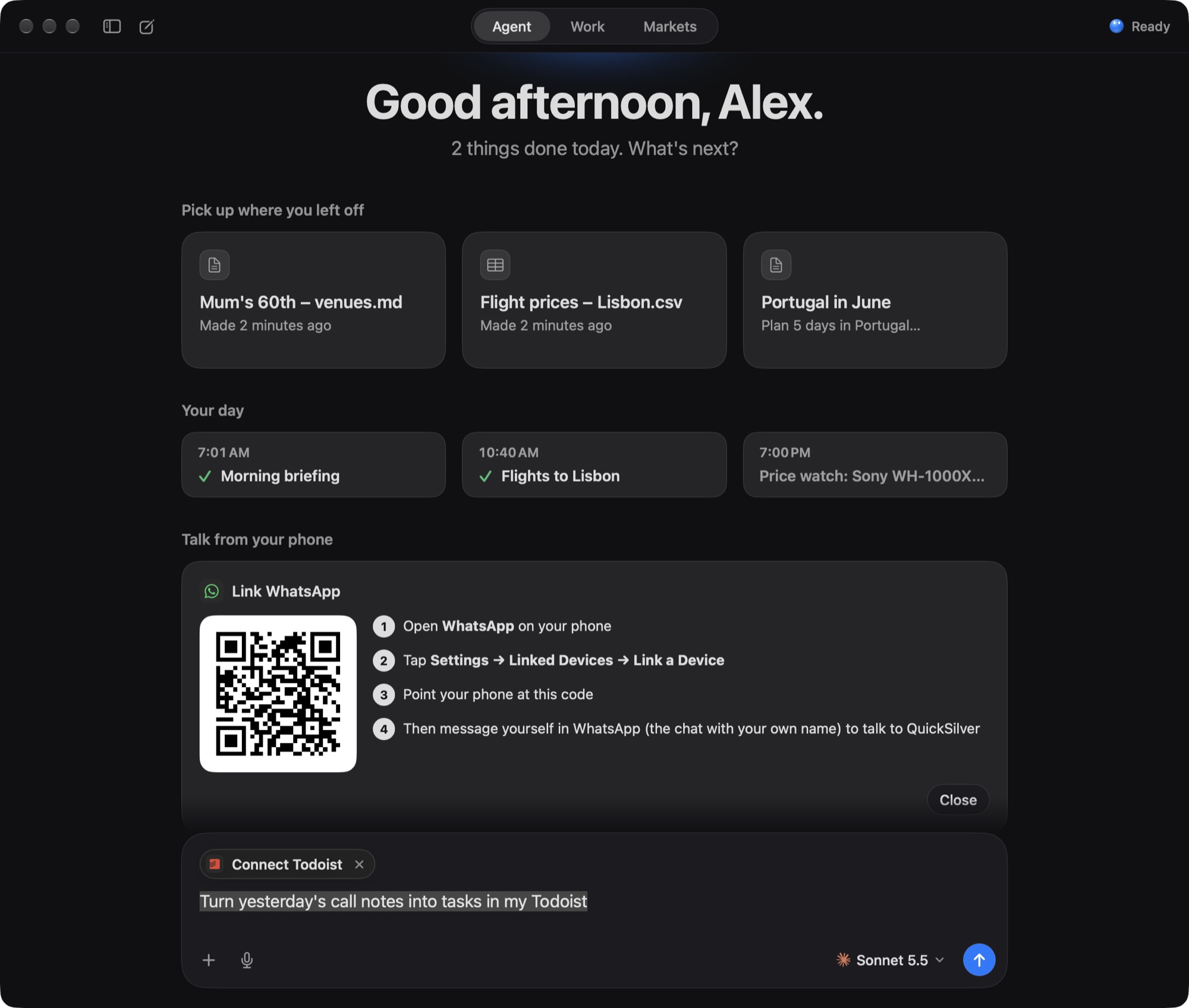
- Click Set it up once, then scan the WhatsApp code on the home screen.
- Pick Price and availability watch in New routine, or send the request from WhatsApp itself.
- QuickSilver checks on schedule using the private AI and messages you when the price drops.
Watch the Dyson V15 at John Lewis and Argos. Message me if it's under £450 or comes back in stock.
Watching both, twice a day. Today: £549.99 at John Lewis, out of stock at Argos. I'll message you here as soon as either changes.
Privacy and safety across the alternatives
Safety is the most common reason people give for leaving, so it's worth comparing defaults rather than possibilities. Any of these can be made careful with enough configuration; what matters for most people is what happens out of the box.
- OpenClaw: tools run on the host for the main session unless you set up sandboxing; unknown DM senders must pair first.
- Hermes Agent:
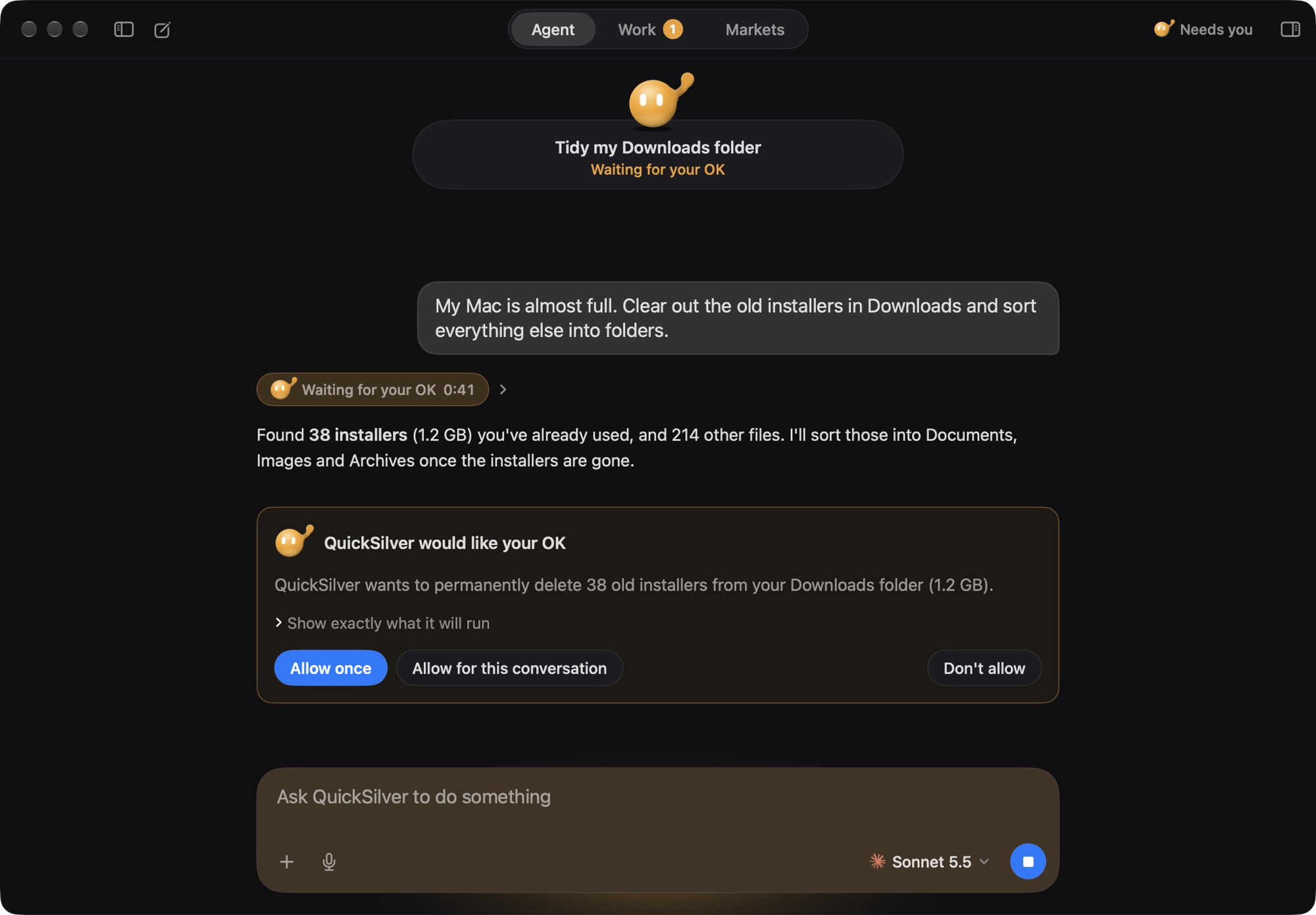
smartapprovals by default, unattended jobs deny risky actions, a hardline blocklist applies even in YOLO mode, and DM pairing uses codes you approve. - Kaairos: Hermes's protections plus three plain levels in Settings (Always ask, Ask before anything risky, Just get it done), approval cards that explain what and why, and file snapshots on by default.
- Manus Studio: Approve for me by default, which auto-approves actions it judges safe; switch to Ask for approval to confirm each one.
- Claude Cowork: Auto by default on individual and Team plans, which checks each action; Manual asks before acting.
And where your data goes:
- Self-hosted and open (Hermes Agent, AnythingLLM, Osaurus): private if you choose a local model; your provider sees your chats otherwise.
- Cloud agents (Manus, Claude Cowork, ChatGPT Work): the planning model runs on the vendor's servers, so what the agent reads goes there.
- Kaairos: the private AI is the default for routines, nothing goes to an AI company without an account you connect, and the notch or menu bar shows live what goes online.
Year-one cost
- OpenClaw, Hermes Agent, AnythingLLM Desktop, Osaurus: $0, plus online model usage if any.
- Kaairos: $29 once, plus online AI if you add it.
- Manus Pro: from $20 × 12 = $240. Claude Pro: $204 yearly or $240 monthly.
- ChatGPT Work: part of ChatGPT plans; check OpenAI's pricing.
Keeping OpenClaw too
You don't have to switch. OpenClaw and Kaairos keep separate folders and engines, so both can live on one Mac. Just don't link the same WhatsApp or Telegram account to both, or you'll get two answers to every message.
When to stay with OpenClaw
- You use many chat channels beyond WhatsApp and Telegram.
- You want native apps on every platform, including Linux and Android.
- You rely on ClawHub skills, condition watchers or webhooks.
- You like plain Markdown memory you can read and edit.
- You're comfortable configuring sandboxing and reviewing skills.
Sources
Fair questions
What is the best OpenClaw alternative?
For open source, Hermes Agent by Nous Research. For no setup on a Mac with private AI, Kaairos. For a cloud agent, Claude Cowork, ChatGPT Work or Manus Studio.
Is there an OpenClaw alternative for non-technical people?
Yes. Kaairos is a Mac app that sets up an agent, its private AI and WhatsApp or Telegram access with one button and a QR code. Cloud agents like Claude Cowork also need no setup.
Is Hermes Agent better than OpenClaw?
Different, not better. Hermes focuses on an agent that learns skills and has stricter approval defaults; OpenClaw has far more chat channels and platform apps.
Is there a free OpenClaw alternative?
Hermes Agent, AnythingLLM Desktop and Osaurus are free and open source under the MIT licence.
Which OpenClaw alternative works on older Macs?
OpenClaw's Mac app needs macOS 26.2. Hermes Desktop lists macOS 12 or later, and Kaairos needs macOS 15 or later on Apple silicon.
Can I keep OpenClaw and try an alternative?
Yes. Use a different WhatsApp or Telegram account for each, so they don't both answer.
Is OpenClaw safe?
Its own docs are candid: tools run on the host unless you set up sandboxing, inbound messages should be treated as untrusted, and third-party skills should be read before enabling. Many people run it safely with that care.
Download and go
Your AI agent, already set up.
One button to set up. Its own private AI, free. Claude, ChatGPT or Gemini when you want more.
A Mac with Apple silicon (M1 or later), macOS 15 Sequoia or later. 14-day refund.