
Compare
Kaairos vs Raycast AI
Raycast is a launcher that many Mac users live in, and Raycast AI puts the leading models a keystroke away. Kaairos is an agent app that does longer jobs on its own and runs a private AI on the Mac. Different shapes, some overlap.
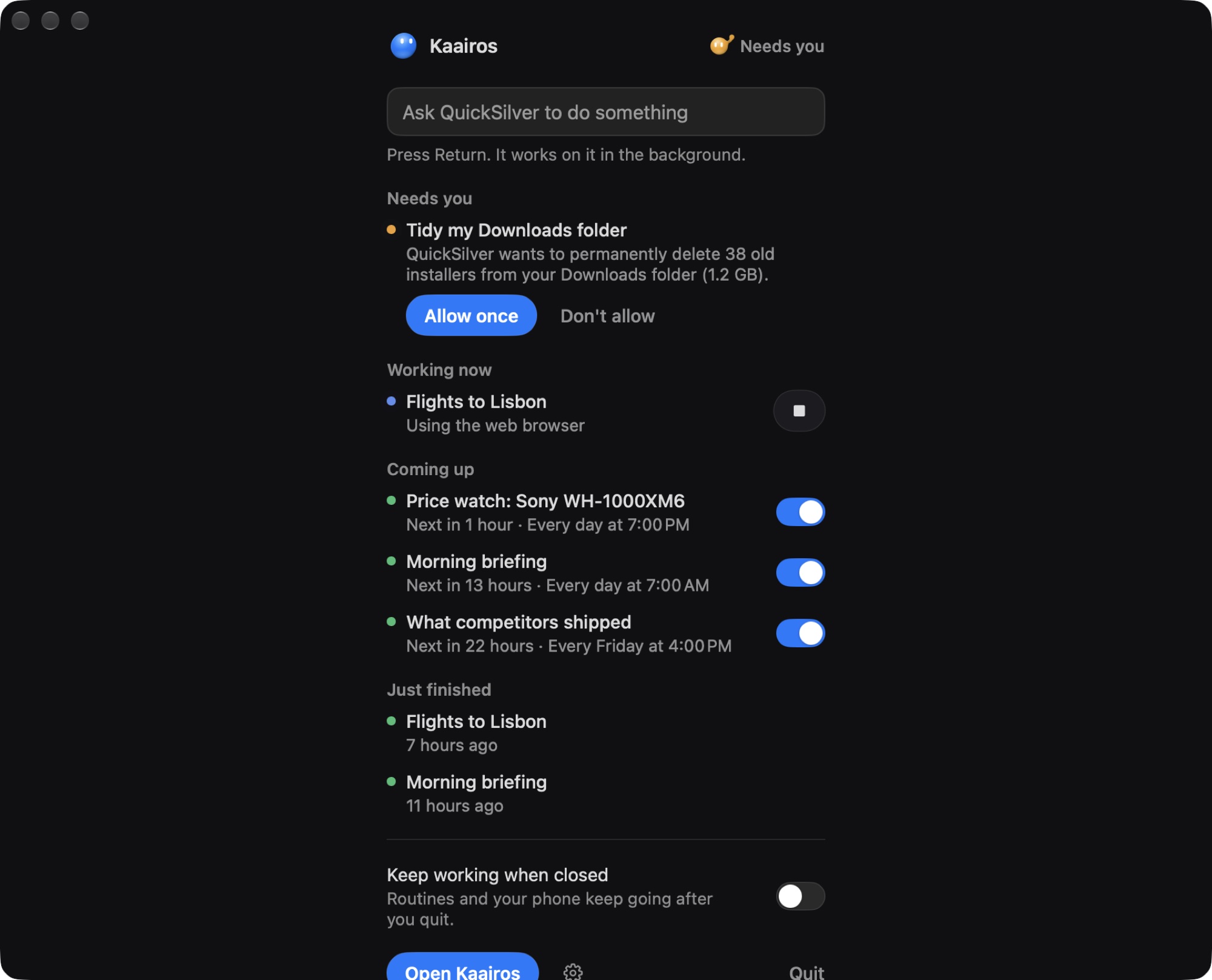
The short answer
Raycast AI is the fastest way to reach a top model from the keyboard, run saved AI commands on selected text and use MCP tools, from $10 a month. Kaairos is for handing off whole jobs: research, routines, price watches and replies on WhatsApp, with its own private AI, for $29 once. Keyboard power users often want Raycast; people who want things done want Kaairos.
Side by side
What it is
| Kaairos | Raycast AI | |
|---|---|---|
| Product | A Mac app: an AI agent that's already set up, built on Hermes Agent by Nous Research | A Mac launcher with AI built in: Quick AI, AI Chat, AI Commands, AI Extensions, Agents, Skills, MCP and Automations |
| Made by | Stuvio | Raycast |
| Setup | Download, open, click Set it up. No terminal, no config files, no API key needed | Install Raycast, sign in; AI needs a paid plan |
| How you reach it | Its window, a menu bar panel, the notch, Telegram and WhatsApp | A keyboard shortcut from anywhere; also Windows and iOS apps |
Models
| Kaairos | Raycast AI | |
|---|---|---|
| AI on your Mac | Yes: downloads its own open-weight AI (about 24 GB) and runs it on the Mac with llama.cpp. Needs 32 GB of memory | Local models through Ollama, which you install and manage (Pro); no credits used, works offline |
| Online AI | Optional: Sign in with ChatGPT (your ChatGPT plan), or your own key for Claude, OpenAI, Gemini, OpenRouter and 15 more services, or any OpenAI-compatible endpoint | Models from OpenAI, Anthropic, Google and Perplexity on Raycast's plans; your own key; or a Claude or ChatGPT subscription |
| Top-tier models | Whatever you connect | On Plus, Max and Enterprise |
Abilities
| Kaairos | Raycast AI | |
|---|---|---|
| Quick questions from the keyboard | Ask from the menu bar panel | Its core strength: Quick AI and AI Chat |
| AI on selected text | No | AI Commands: saved prompts on shortcuts |
| Web and browser | Yes: searches the web and uses a real browser, shown live in the chat | Web answers via its models and extensions |
| Your files and apps | Yes, on the Mac; deletes and other risky steps wait for your OK; changed files are snapshotted so they can be undone | AI Extensions act through your installed Raycast extensions |
| Schedules | Yes: routines from a gallery or in plain words; run on the private AI by default; the Mac must be on and awake | Automations: run AI prompts once, hourly or daily (Pro); Mac awake with Raycast open; up to 20 per device |
| Phone | Telegram and WhatsApp, linked by scanning a QR code; voice notes transcribed on the Mac | Raycast for iOS |
| MCP | Yes: connectors from an approved catalog (Notion, Linear, Asana, Dropbox, Stripe and others); reads freely, changes need approval | Local (stdio) and remote (HTTP, OAuth) servers, on Pro |
| Pictures and video | Keyless photo and video search shown in replies; image and video generation through Higgsfield or an image service on your account | Image attachments in chat |
| Screen awareness and dictation | Can use apps on the Mac with your permission; voice notes from the phone | Screen Awareness and Dictation |
Safety and privacy
| Kaairos | Raycast AI | |
|---|---|---|
| Approvals | Three levels: Always ask, Ask before anything risky (default), Just get it done | Not covered in the docs we checked |
| Prompts on the vendor's servers | Stuvio has no servers in the conversation path | Raycast says it doesn't log or retain prompts; models it provides are zero data retention, with listed exceptions |
| Your own key | Called directly from your Mac | Anthropic, Google and OpenAI requests pass through Raycast's servers; OpenRouter and custom providers go direct |
| Local models | Nothing leaves the Mac | Nothing sent to Raycast or anyone else |
Platforms and price
| Kaairos | Raycast AI | |
|---|---|---|
| Platforms | Mac with Apple silicon (M1 or later), macOS 15 or later. No Windows, Linux or phone app yet | macOS Tahoe on Apple silicon for AI, Windows, iOS |
| Price | $29 at launch, then $80, once, for 3 Macs and every 1.x update; 14-day refund. Online AI, if you add it, is paid to that company | Free plan has no AI. Pro $10 a month or $96 a year (500 AI credits a month); Plus $20 or $192 (3,000); Max $50 or $480 (7,500) |
What each is really for
Raycast AI: AI at the speed of a keystroke
Raycast replaces Spotlight for a lot of Mac users, and its AI features follow the same idea: whatever you're doing, a shortcut brings up a model. Rewrite the selected paragraph with an AI Command. Ask a quick question in Quick AI. Let AI Extensions act through tools you already use in Raycast, or connect MCP servers. Its newer Automations run a prompt once, hourly or daily. If you're keyboard-driven and want the best online models close at hand, it's hard to beat.
It's built around online models and a subscription. Local models are supported through Ollama, which you install and choose models for yourself.
Kaairos: hand off the whole job
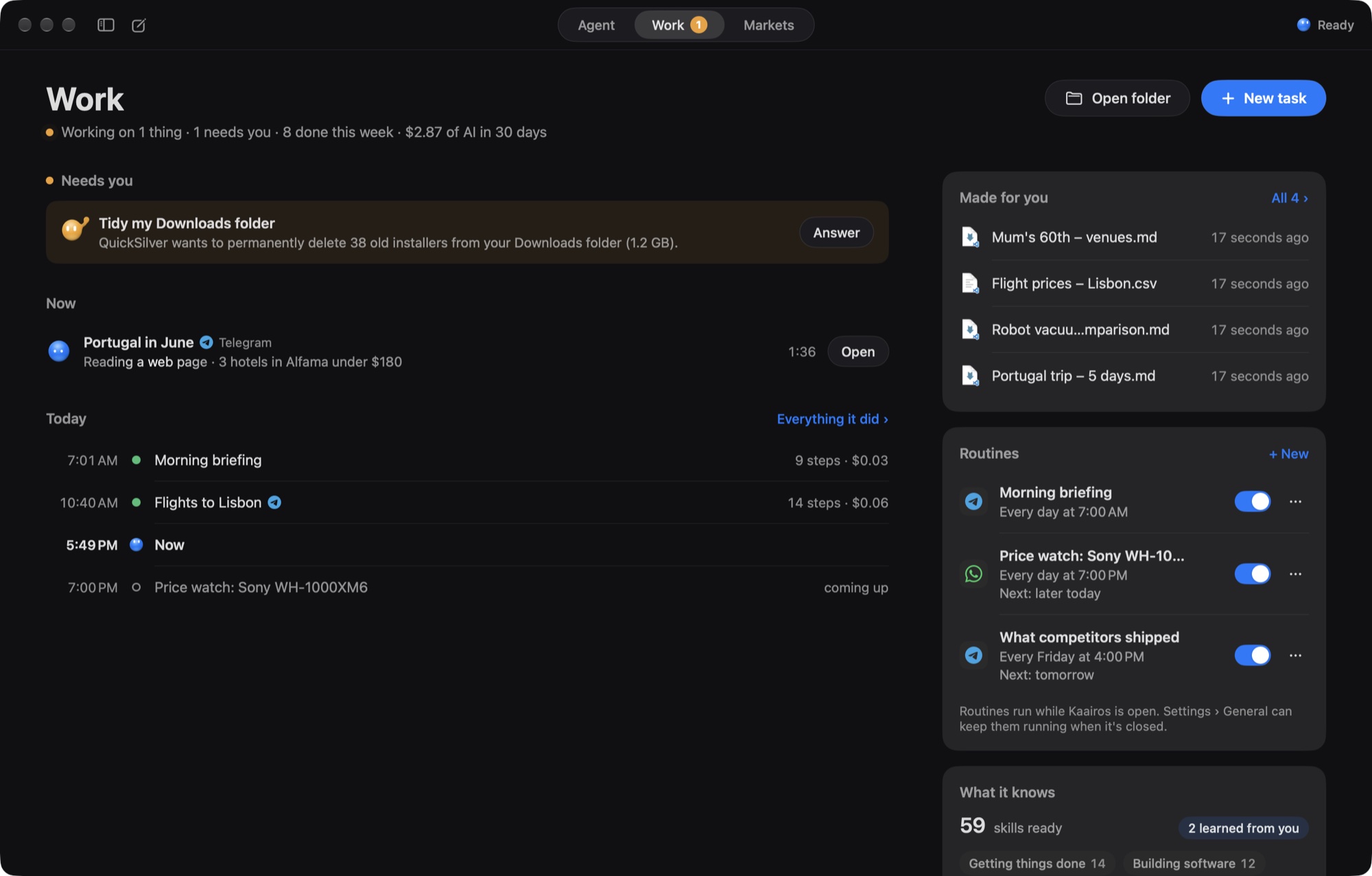
Kaairos is less about speed and more about delegation. You describe an outcome and QuickSilver works through it: search, open pages in a real browser, compare, write a file, set a routine, ask before anything risky. It keeps a memory of what it has learned about you. It reaches you on Telegram or WhatsApp, so you can send it a voice note on the bus and get the answer back in the same chat.
Its private AI comes with it. Setup picks an open-weight model that fits your Mac and downloads it, so there's nothing to install separately and no subscription.
The same task in both: watch a product for a price drop
You want to know when a pair of headphones drops under $250.
In Raycast AI
- On Raycast Pro, open AI and create an Automation.
- Write the prompt: check the price of the headphones on a retailer's page and tell you if it's under $250.
- Choose how often: hourly or daily.
- Keep the Mac awake with Raycast open; a missed run happens the next time Raycast launches.
- Read the result in Raycast. Each run uses AI credits unless you pick a local Ollama model.
In Kaairos
- Pick Price and availability watch in New routine, or ask in a chat.
- QuickSilver finds the product, opens the page in a browser and notes today's price.
- It checks on the schedule you said, on the private AI, at no cost per run.
- When the price drops, it tells you, on Telegram or WhatsApp if you've linked one.
Watch the Sony WH-1000XM6 at Best Buy and Amazon. Tell me if either goes under $250.
Watching both. Today: $329.99 at Best Buy, $318 at Amazon. I'll check twice a day and message you on WhatsApp the moment either is under $250, with the link.
Privacy, side by side
Raycast publishes a clear AI privacy page. It says it doesn't log or retain prompts, that the models it provides run under zero data retention (with stated exceptions), and that your data isn't used for training. Two details are worth knowing: requests made with your own Anthropic, Google or OpenAI key pass through Raycast's servers, and image attachments are uploaded for chat history. Local Ollama models send nothing to anyone.
Kaairos has no Stuvio server in the conversation path at all. On the private AI, nothing you ask leaves the Mac except the web pages it fetches to do the job. With an online AI connected, chats routed to it go straight from your Mac to that company.
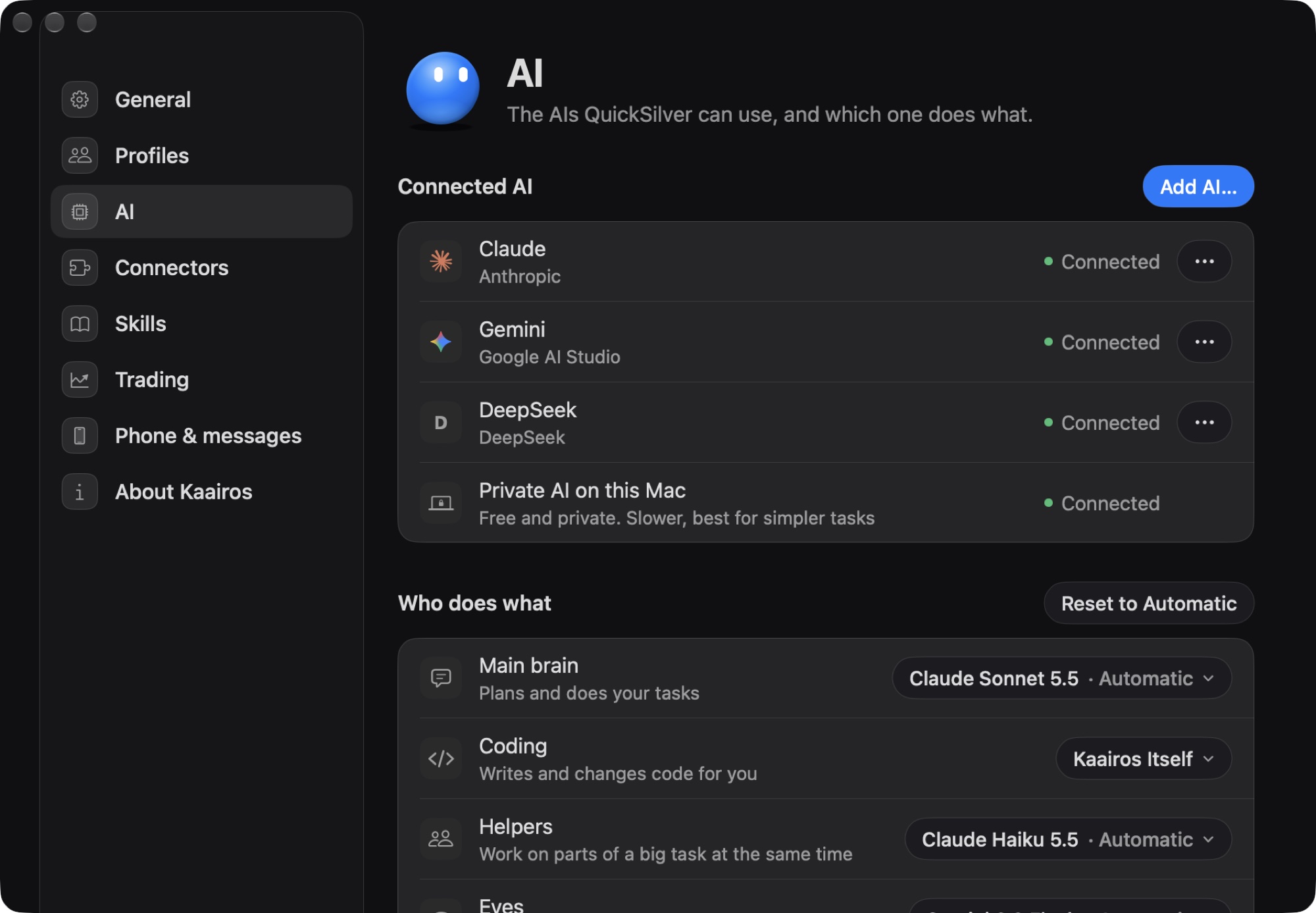
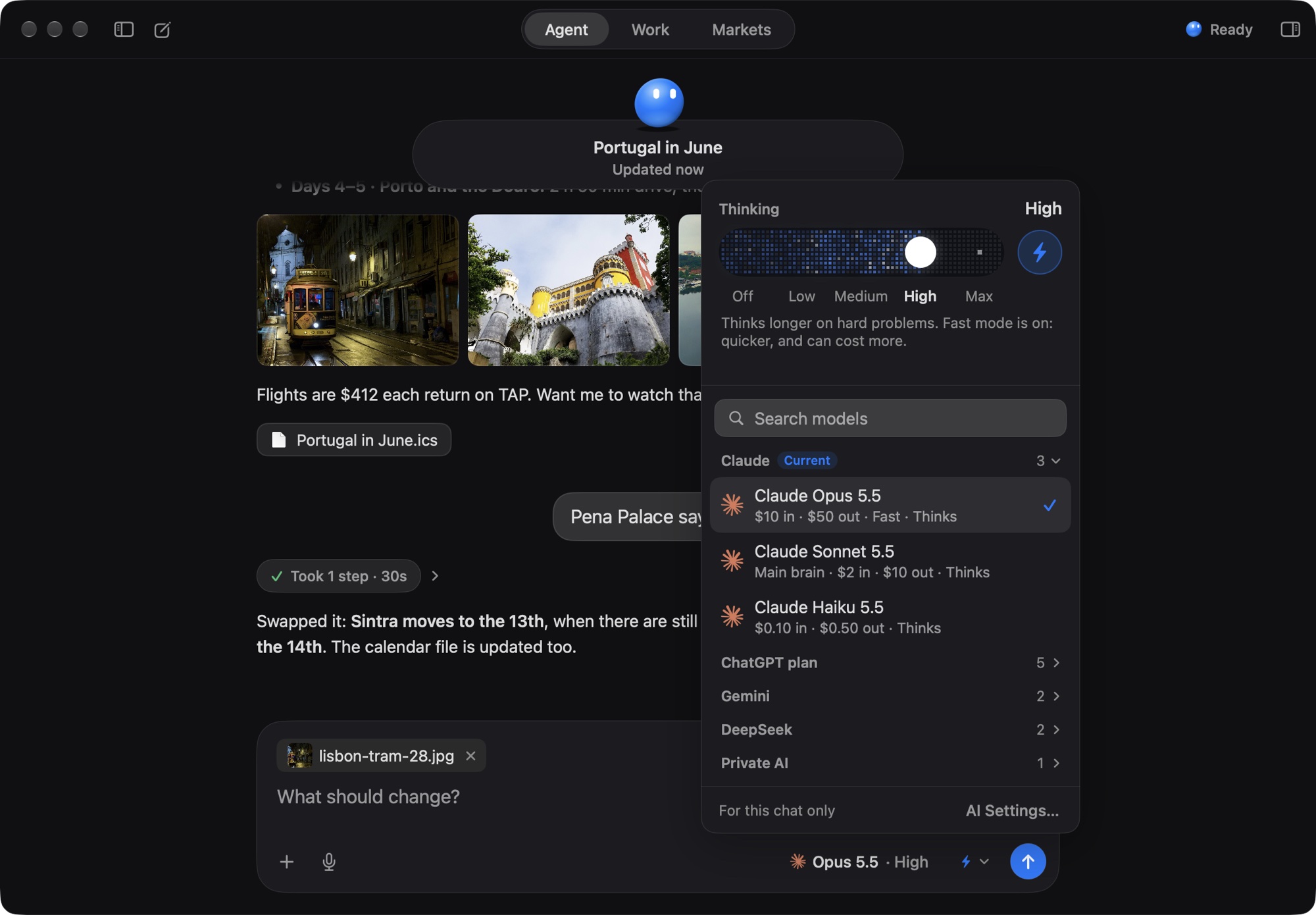
Both let you pick a model per conversation. Raycast's model menu covers its hosted models, your keys and Ollama. Kaairos's model picker shows each connected service with its prices, the private AI, and a thinking slider from Off to Max.
What it costs in the first year
- Kaairos: $29 once. Year one: $29. The private AI is free to use; an online AI you add is billed by that company.
- Raycast Pro: $96 billed yearly, or $10 × 12 = $120 monthly. Includes 500 AI credits a month, local models and MCP.
- Raycast Plus: $192 yearly, or $20 × 12 = $240. Max: $480 yearly, or $50 × 12 = $600.
- Both: $29 + $96 = $125 in year one (US prices), on Raycast Pro billed yearly.
Using them together
They sit comfortably on one Mac. Use Raycast for the quick things you do with the keyboard: rewrite this, translate that, ask a fast question. Use Kaairos for things that take many steps or should keep running: a weekly research brief, a watch on a restock, a reminder that nags until a bill is paid, or anything you want to start from your phone.
When to choose Raycast AI instead
- You live in the keyboard and want AI one shortcut away, everywhere.
- You want AI Commands on selected text in any app.
- You already use Raycast extensions and want AI to act through them.
- You want access to many top online models under one subscription.
- You also use Windows or want an iPhone app from the same company.
Sources
Fair questions
Is Raycast AI free?
No. Raycast's pricing page says AI isn't available on the Free plan. Pro is $10 a month or $96 a year with 500 AI credits a month.
Can Raycast AI use local models?
Yes, through Ollama on Pro. You install Ollama and the models yourself; chats on them use no credits and work offline.
Does Raycast support MCP?
Yes, on Pro: local stdio servers and remote HTTP servers with OAuth. On iOS, only HTTP servers.
Can Raycast AI run on a schedule?
Yes. Automations run AI prompts once, hourly or daily on Pro, while the Mac is awake and Raycast is open.
Is Kaairos a launcher like Raycast?
No. You can ask from the menu bar panel, but Kaairos is an agent that does multi-step jobs, runs routines and answers on Telegram or WhatsApp.
Can Kaairos use my ChatGPT or Claude subscription like Raycast can?
Kaairos can use a ChatGPT plan through Sign in with ChatGPT. For Claude it needs an Anthropic API key; it can't use a Claude Pro or Max subscription.
Which is more private?
Both offer a fully local option. Kaairos's private AI is set up for you and is the default for routines; Raycast's local models come through Ollama. With online models, Raycast routes some own-key requests through its servers, and Kaairos calls the provider directly.
Download and go
Your AI agent, already set up.
One button to set up. Its own private AI, free. Claude, ChatGPT or Gemini when you want more.
A Mac with Apple silicon (M1 or later), macOS 15 Sequoia or later. 14-day refund.