
Compare
Kaairos vs AnythingLLM
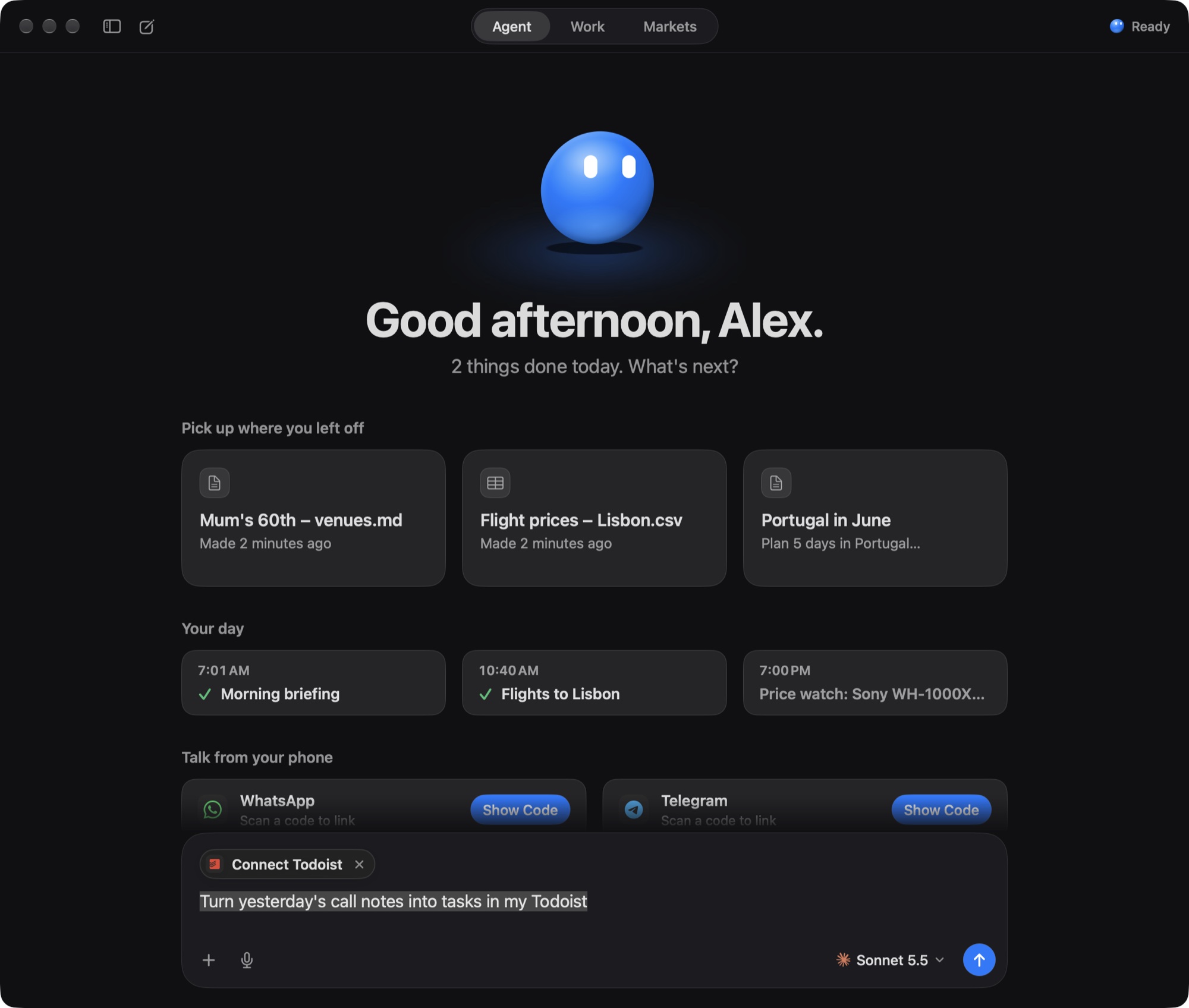
AnythingLLM, by Mintplex Labs, is an all-in-one AI workspace: chat with documents, run agents with skills and MCP, schedule tasks, on desktop or self-hosted. Kaairos is a Mac app that sets up an agent for you and keeps it running.
The short answer
AnythingLLM is free, MIT-licensed and broad: document workspaces, an @agent with built-in skills, MCP, Agent Flows and scheduled tasks, on Mac, Windows, Linux or a server. Kaairos is narrower and finished: one Mac app, set up in one click, with its own private AI, a routines gallery and Telegram or WhatsApp access. AnythingLLM for documents and control; Kaairos for an agent that just works.
Side by side
What it is
| Kaairos | AnythingLLM Desktop | |
|---|---|---|
| Product | A Mac app: an AI agent that's already set up, built on Hermes Agent by Nous Research | An all-in-one AI app: document chat (RAG) in workspaces, agents, and a local model engine |
| Made by | Stuvio | Mintplex Labs |
| Setup | Download, open, click Set it up. No terminal, no config files, no API key needed | Install, choose an LLM provider (its built-in engine or another), choose embedder and vector database (LanceDB by default) |
| Versions | One Mac app | Desktop (Mac, Windows, Linux), Docker for self-hosting and teams, and a hosted cloud |
Models
| Kaairos | AnythingLLM Desktop | |
|---|---|---|
| Local AI | Yes: downloads its own open-weight AI (about 24 GB) and runs it on the Mac with llama.cpp. Needs 32 GB of memory | Built-in engine (powered by Lemonade and llama.cpp) runs local models on CPU or GPU; you choose models |
| Online AI | Optional: Sign in with ChatGPT (your ChatGPT plan), or your own key for Claude, OpenAI, Gemini, OpenRouter and 15 more services, or any OpenAI-compatible endpoint | Many providers |
| Model choice | Chosen for you, or per chat | Per workspace |
Abilities
| Kaairos | AnythingLLM Desktop | |
|---|---|---|
| Chat with documents | Reads files you point it to | Its core strength: workspaces with PDF, DOCX, TXT and more |
| Agent | QuickSilver, always an agent | Start a chat with @agent |
| Web | Yes: searches the web and uses a real browser, shown live in the chat | Web Browsing and Web Scraping skills |
| Files | Yes, on the Mac; deletes and other risky steps wait for your OK; changed files are snapshotted so they can be undone | Save Files and File System Agent skills |
| Other built-in skills | Charts in replies, photos and video in replies, memory, skills learned from you | Chart Generation, SQL Agent, Document Generation, Gmail, Google Calendar, Outlook |
| Schedules | Yes: routines from a gallery or in plain words; run on the private AI by default; the Mac must be on and awake | Scheduled Tasks: recurring prompts on a cron schedule with full agent capabilities |
| Custom tools | Skills from Nous Research's catalog and skills it learns | Agent Flows (build your own tools), custom skills |
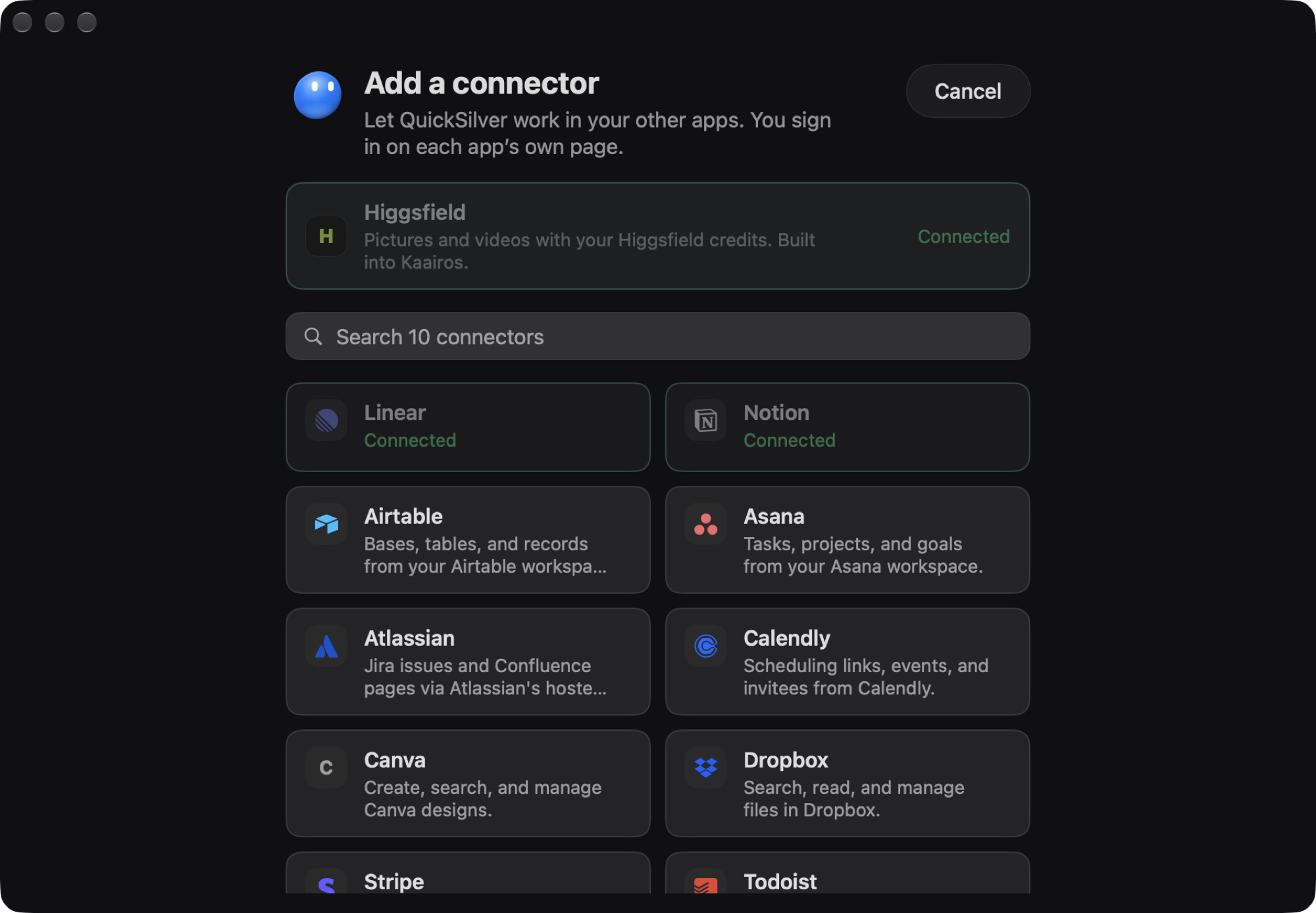
| MCP | Yes: connectors from an approved catalog (Notion, Linear, Asana, Dropbox, Stripe and others); reads freely, changes need approval | Agents can use MCP servers you add |
| Phone | Telegram and WhatsApp, linked by scanning a QR code; voice notes transcribed on the Mac | An open-source Android app (a local-first agent); no iOS app mentioned |
Safety and privacy
| Kaairos | AnythingLLM Desktop | |
|---|---|---|
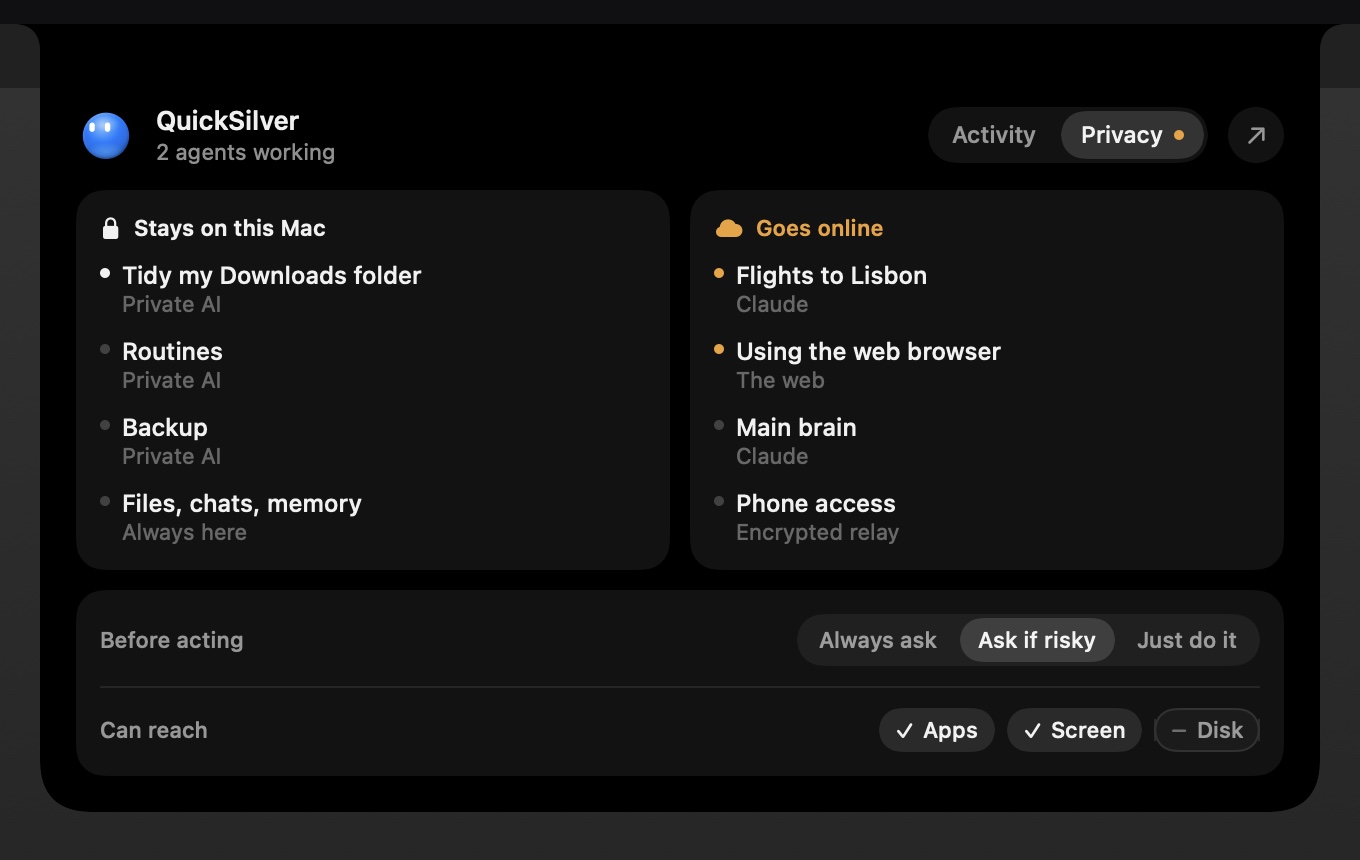
| Approvals | Three levels: Always ask, Ask before anything risky (default), Just get it done | Not covered in the docs we checked |
| Undo | Changed files are snapshotted | Not covered in the docs we checked |
| Telemetry | None in the app | Anonymous telemetry (PostHog) on by default; turn off in Privacy settings or with DISABLE_TELEMETRY |
| What leaves the Mac | Chats you give an online AI you connect, web searches and pages it visits, Telegram/WhatsApp messages, the model download, updates and licence checks | With local models, only telemetry unless disabled; providers you add get those chats |
Platforms and price
| Kaairos | AnythingLLM Desktop | |
|---|---|---|
| Mac requirements | Apple silicon, macOS 15+; 32 GB for the private AI | Any M-series Mac for local models; 16 GB recommended; Intel slower |
| Price and licence | $29 at launch, then $80, once, for 3 Macs and every 1.x update; 14-day refund. Online AI, if you add it, is paid to that company | Desktop free (MIT); hosted plans $50 and $99 a month; Enterprise by quote |
What each is really for
AnythingLLM: a private AI workspace you shape
AnythingLLM started as the easy way to chat with your own documents privately, and it's grown into a full workbench. Workspaces keep documents and chats separate. The @agent can browse, scrape, save files, query a database, draw charts and work with Gmail, Calendar or Outlook. You can add MCP servers, build your own tools with Agent Flows, and schedule tasks on a cron. It's free, open source, and runs on a laptop or a server for a team.
The cost of that range is choices. You pick a provider, a model, an embedder and a vector store, and decide which skills to switch on. For many people that's exactly the point.
Kaairos: an agent that's ready on day one
Kaairos makes those choices for you. Click Set it up and it downloads a private AI sized for your Mac, applies safe defaults and is ready to work. It's always an agent, so there's no mode to switch into. Routines come from a gallery or a sentence. Your phone is a QR code away. Approvals are explained in plain words, and file changes are snapshotted so they can be undone. If you want more, Settings has the model picker, connectors and profiles, but you never touch a config file.
Connected apps work differently too. AnythingLLM lets you add any MCP server you like, which is flexible and puts the vetting on you. Kaairos offers connectors from an approved catalog (Notion, Linear, Asana, Dropbox, Stripe and others), each signing in on its own page; QuickSilver can read through them freely, and changes need your approval.
The same task in both: a weekly competitor digest
Every Friday, collect news about three competitors and write a short digest.
In AnythingLLM
- Choose an LLM that's good at tool use, and turn on the Web Browsing and Web Scraping skills.
- In a workspace, try the job once with
@agentto check the output. - Create a Scheduled Task with the prompt and a cron schedule for Fridays.
- Read the digest in AnythingLLM after it runs.
In Kaairos
- Pick Competitor news watch in New routine, or ask in a chat.
- Name the companies and the day; QuickSilver confirms it in plain words.
- It runs on the private AI every Friday and sends the digest to Telegram or WhatsApp if linked.
Every Friday at 4, give me a digest of news about Notion, Coda and Craft: launches, pricing changes and hires. Keep it short.
Set for Fridays at 4:00, sent to Telegram. Each company gets up to three bullets with a link, and I'll say “nothing new” rather than pad it.
Privacy, side by side
Both can run fully on your own computer. In AnythingLLM, choose its built-in local engine and the default local vector database, and your documents and chats stay on the machine. Its README says it collects anonymous telemetry by default with no IP or identifying information, and you can switch that off in the Privacy settings.
Kaairos has no telemetry. Its private AI is the default for routines, and if you connect an online AI, Kaairos shows which chats are on it.
| Kaairos (private AI) | AnythingLLM (local engine and LanceDB) | |
|---|---|---|
| Your chats | On the Mac | On the computer |
| Your documents | Read where they are, on the Mac | Embedded into a local vector database |
| Usage data | None collected | Anonymous telemetry unless you turn it off |
| Web pages for agent tasks | Fetched from your Mac | Fetched from your computer by the browsing skills |
| Online AI | Only chats routed to a service you connect | Only workspaces set to an online provider |
The practical advice is the same for both: decide which jobs may use an online AI, and keep everything else on the local model. In Kaairos that's the Who does what section of Settings → AI; in AnythingLLM it's the provider you set for each workspace.
What it costs in the first year
- AnythingLLM Desktop: free. Year one: $0, on a Mac with 16 GB recommended.
- AnythingLLM hosted: $50 × 12 = $600 on Basic, or $99 × 12 = $1,188 on Pro.
- Kaairos: $29 once. Year one: $29, on a Mac with 32 GB for the private AI.
With either, online AI you add is paid to that company.
Using them together
A good split: AnythingLLM as the place where you keep and question large document collections, Kaairos for the standing jobs and the phone. They don't share data or settings, so there's nothing to configure between them.
When to choose AnythingLLM instead
- Chatting with large collections of documents is the main job.
- You want free and open source, and to choose every part: model, embedder, vector store.
- You want to build your own tools with Agent Flows.
- You need Windows or Linux, or a self-hosted server for a team with permissions.
- Your Mac has 16 GB of memory and you want local models.
Sources
Fair questions
Is AnythingLLM free?
The desktop app is free and MIT-licensed. Hosted plans are $50 and $99 a month, with Enterprise by quote.
Does AnythingLLM have agents?
Yes. Start a chat with @agent to use skills such as web browsing, scraping, saving files, charts, SQL, Gmail, Calendar and Outlook. It can also use MCP servers and Agent Flows.
Can AnythingLLM run tasks on a schedule?
Yes. Scheduled Tasks run recurring prompts on a cron schedule with full agent capabilities.
Does AnythingLLM collect telemetry?
Its README says it collects anonymous usage telemetry by default, with no IP or identifying information, and you can turn it off in the app's Privacy settings or with DISABLE_TELEMETRY.
What Mac do I need for AnythingLLM?
Its docs say any M-series Mac can run local models, with 16 GB of memory recommended; Intel Macs are slower.
Is AnythingLLM private?
It can be fully local: use its built-in engine and the default LanceDB vector database, and turn off telemetry in the Privacy settings. Workspaces set to an online provider send those chats to that provider.
Does AnythingLLM have a phone app?
Mintplex Labs lists an open-source Android app, described as a local-first AI agent. No iOS app is mentioned. Kaairos reaches you on Telegram or WhatsApp from any phone.
How is Kaairos different from AnythingLLM?
Kaairos is a Mac app set up in one click, always acting as an agent, with routines from a gallery, Telegram and WhatsApp access, plain-words approvals and undo. AnythingLLM is broader, open source and more configurable.
Download and go
Your AI agent, already set up.
One button to set up. Its own private AI, free. Claude, ChatGPT or Gemini when you want more.
A Mac with Apple silicon (M1 or later), macOS 15 Sequoia or later. 14-day refund.