
Use case · Write
Talk it through on a walk. The finished document comes back.
On a walk or in the car, send QuickSilver a voice note from your phone: the proposal you need to write, a letter, a plan. A few minutes later the finished document comes back in the same chat, as a file, ready to send. Your voice is turned into text on your Mac, by a speech model that ships inside Kaairos.
What comes back
Not a transcript. A transcript of a rambling voice note is still a rambling voice note. QuickSilver works out what the document is for, puts your points in order, fills in the structure the document type needs, and writes it properly. Then it sends the file back.
(voice note, 1:42) “So the café on the harbour wants the refit quote… new counter, the lighting, they want it done before Easter, I said six weeks… around eighteen thousand plus VAT, half up front… mention we did the bakery on Rua Nova… turn this into a proper proposal and send it back.”
Here's the proposal for the Harbour Café refit: scope (new counter, lighting), a six-week timeline finishing before Easter, €18,000 plus VAT with 50% on signing, and the Rua Nova bakery as a reference. I left the start date blank because you didn't give one. (Proposal – Harbour Café refit.docx)
Make the payment 40% up front and add a line about cleanup.
Done: 40% on signing, 60% on completion, and daily cleanup is in the scope. (Proposal – Harbour Café refit.docx)
Notice the second message: it says what it left out. When your note doesn't say something a document needs (a date, a name, a price), QuickSilver leaves a clear gap or asks, rather than making it up.
Who it's for
- Trades and freelancers who quote on site and type it up at night.
- Anyone who thinks better out loud: the walk-and-talk draft of a cover letter, a complaint, a plan.
- People who find typing hard, or who'd rather not do it on a phone.
- Anyone with sensitive notes who doesn't want their voice sent to a transcription service.
Set it up, step by step
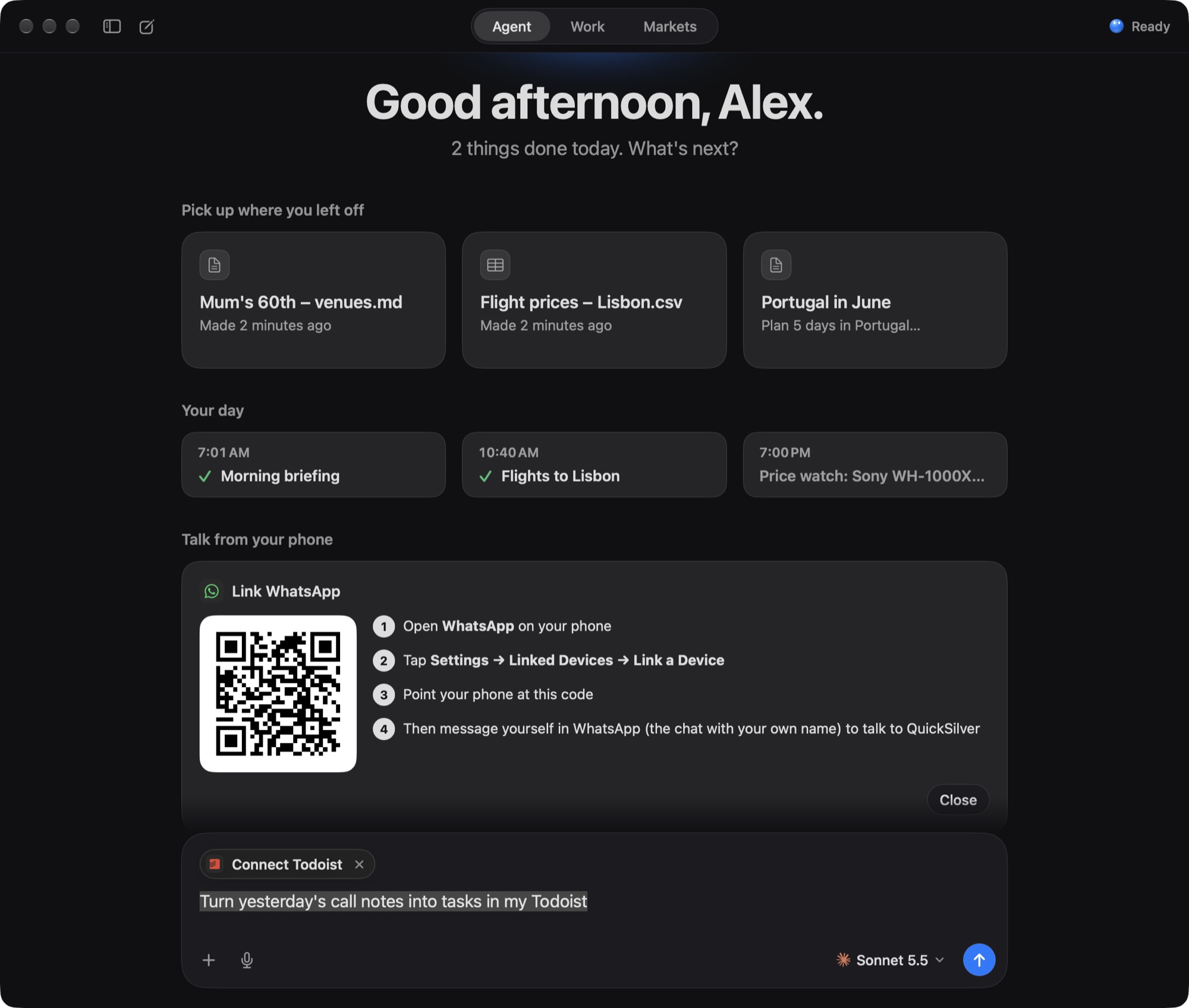
- On the Kaairos home screen, under Talk from your phone, choose Show Code next to Telegram or WhatsApp, and scan it with your phone.
- In Telegram (your Kaairos bot) or WhatsApp (the chat with yourself), hold the microphone button and talk. Say what you want at the start or the end: “turn this into a proposal”, “write this up as a letter to the landlord”.
- Send it. Your Mac transcribes it, QuickSilver writes the document, and the file comes back in the same chat. A copy is saved in your Kaairos folder and listed in Work › Made for you.
- Reply with changes in text or another voice note. Each reply updates the document.
On the Mac you can talk to QuickSilver directly in the chat as well; the phone is just the handiest place to record.
The words to use
Say four things somewhere in the note, and the document comes out right the first time:
- What it is: proposal, letter, plan, minutes, job description, complaint.
- Who it's for: “for the café owner”, “to my landlord”, “for the team”.
- The facts: prices, dates, names, numbers. Say numbers slowly.
- The format: “as a Word document”, “as a PDF”, “just reply in the chat”.
“Turn this into a [one-page proposal] for [the café owner]. Keep my prices exactly as I said them. Formal but friendly. Send it back as a [Word document], and list anything you had to guess.”
Want it in your usual style? Send QuickSilver a past document once and say “write my proposals like this from now on”. It remembers, and the skill it writes for itself shows under Settings › Skills › Learned from you.
Variations
A letter
“Write this up as a polite but firm letter to my landlord about the boiler, and suggest Thursday morning for the repair.”
Meeting notes
“These are my notes from the site meeting. Turn them into minutes with decisions and actions, who and by when.”
A plan
“Turn this into a one-page plan for the garden: what to do each month from March to June.”
A job ad
“Write a job ad for a part-time barista from this. Keep it under 200 words.”
An email draft
“Draft a reply to the supplier from this, and send it back as text I can paste.” (QuickSilver drafts; it doesn't send email.)
A to-do list
“Pull out every task from this note as a checklist, with anything that has a date first.”
What stays on your Mac
Transcription is done on your Mac by faster-whisper, an efficient build of OpenAI's open-source Whisper speech model, using its “base” size. It ships inside Kaairos, so nothing downloads on your first voice note and your recording isn't sent to a transcription service. The writing is done by your main brain: the private AI on your Mac, or the online AI you connected.
| Step | Where it happens | What leaves your Mac |
|---|---|---|
| Recording and sending the note | Your phone, through Telegram or WhatsApp | The audio passes through Telegram's or WhatsApp's servers to reach your Mac |
| Turning speech into text | Your Mac (faster-whisper) | Nothing |
| Writing the document | Your main brain | With an online AI: the transcript goes to that company. With the private AI: nothing |
| Making the file | Your Mac, saved in your Kaairos folder | Nothing |
| Sending the file back | Telegram or WhatsApp | The file passes through their servers |
For a document that should never leave the Mac's AI, either set the main brain to the private AI in Settings › AI › Who does what, or record on the Mac and choose Private AI in that chat's model picker. Sending the voice note from your phone still goes through Telegram or WhatsApp.
What it costs
Transcription is free: it runs on your Mac. The writing is a short job. Assumption: 3 model calls averaging 10,000 input tokens, and 3,000 output tokens for the document. On Claude Sonnet 5.5 ($2 / $10 per million): 30,000 × $2/M + 3,000 × $10/M ≈ $0.09 a document. On Claude Haiku 5.5, well under a cent. On the private AI or your ChatGPT plan, no per-token bill. Prices from Anthropic's price list.
What it can't do
- The speech model is small. Whisper's base model is quick and runs on any Mac, but it's less accurate than the larger ones: noisy streets, strong accents, several people talking and unusual names trip it up. Check names and numbers in the result.
- It isn't a meeting recorder. Send notes, not hour-long recordings of a room.
- It doesn't send the document on for you by email; there's no email connection. You forward the file.
- PDF and Word need a helper the first time. QuickSilver makes these with small free libraries it may install the first time you ask; you'll see that step, and with Always ask first it asks before installing. A Markdown or plain-text reply needs nothing.
- It writes what you said. It structures and polishes; it doesn't check your prices or your legal wording. Read it before you send it.
Troubleshooting
| Problem | Fix |
|---|---|
| A name or number is wrong | Correct it in a reply: “the client is Ines Calado, not Agnes”. Say numbers digit by digit in future notes. |
| No reply to the voice note | Your Mac must be on and awake with Kaairos running or Keep working when closed on. Check the phone is still linked in Settings › Phone & messages. |
| It replied in the chat instead of a file | Say “send it as a Word document” (or PDF). |
| The tone is off | “Less formal”, “shorter sentences”, “sound like the attached letter”. |
Fair questions
Does transcription work offline?
Yes. The speech model ships inside the app and runs on your Mac. Sending a voice note from your phone needs Telegram or WhatsApp, which need the internet.
Is my voice sent to OpenAI or anyone else?
Not for transcription: that happens on your Mac with an open-source Whisper model. The audio travels through Telegram or WhatsApp to reach your Mac. The transcript goes to an online AI only if your main brain is one.
Which languages does it understand?
Whisper's models are multilingual, so you can speak other languages, but the small base model is noticeably more accurate in English than in less common languages.
What file formats can I get?
Markdown or plain text straight away; Word (.docx) and PDF once QuickSilver has its helper libraries, which it can install the first time you ask.
How long can a voice note be?
A few minutes works well. Very long recordings take longer to transcribe and are harder to turn into one clear document; split them by topic.
Can I do this on the Mac without a phone?
Yes. Talk to QuickSilver in a chat on the Mac and ask for the document there.
Download and go
Your AI agent, already set up.
One button to set up. Its own private AI, free. Claude, ChatGPT or Gemini when you want more.
A Mac with Apple silicon (M1 or later), macOS 15 Sequoia or later. 14-day refund.