
Guide
AI agent vs chatbot: what's the difference?
A chatbot answers when you ask. An AI agent takes a goal, decides the steps, uses tools like a browser or your files, and comes back with the result, sometimes without being asked again. Here is the difference in practice, with examples, costs and risks.
The short answer
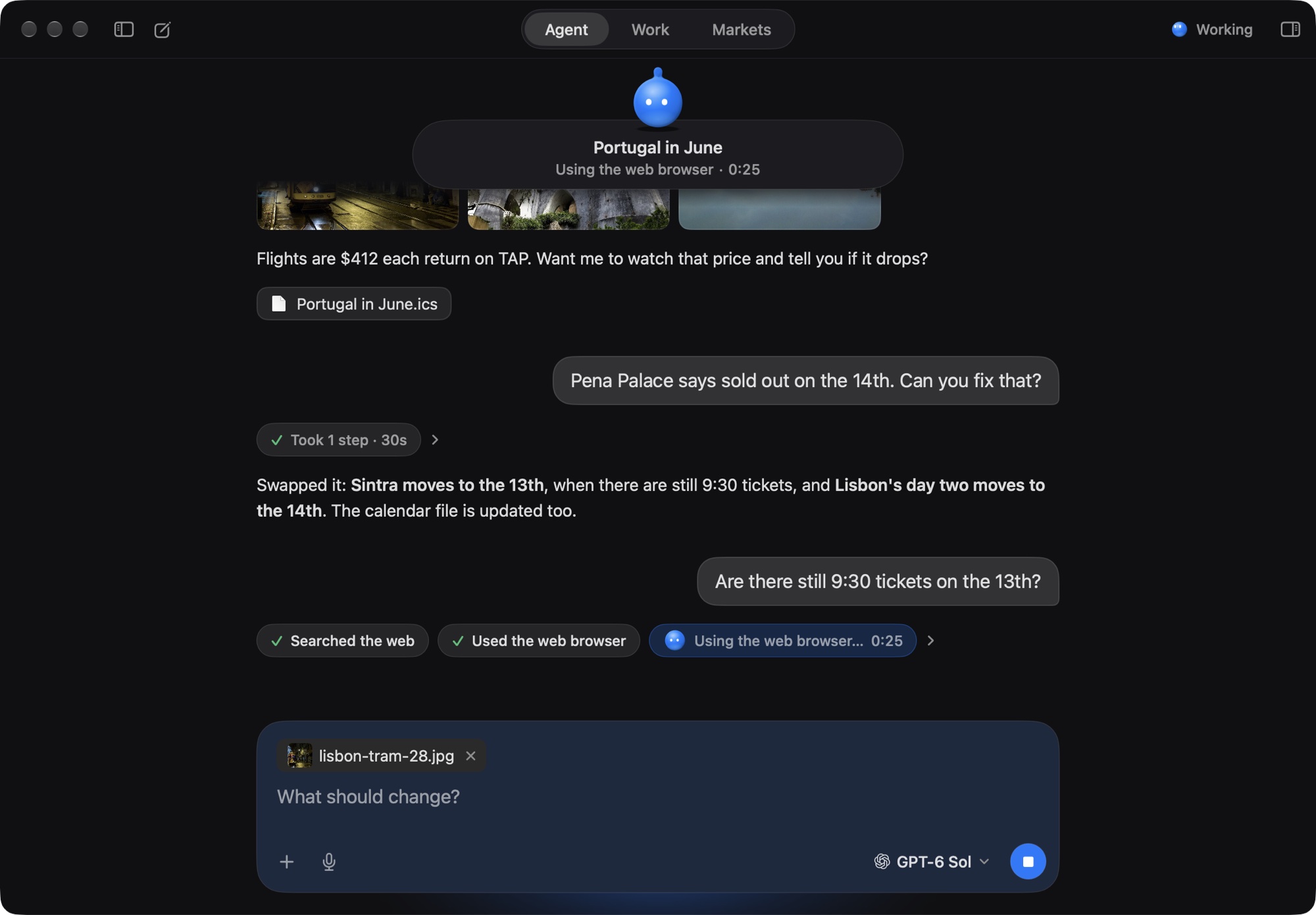
A chatbot is a conversation: you ask, it answers from what the model knows or what you gave it, and it stops. An AI agent is a loop: it takes a goal, decides what to do next, uses tools (web search, a browser, files, other apps), looks at the result, and repeats until the job is done or it needs you. Agents can also run on a schedule and message you with results. The same underlying model can power both; the difference is the software around it.
Anthropic's engineering team put the line precisely: agents are “systems where LLMs dynamically direct their own processes and tool usage, maintaining control over how they accomplish tasks”, while workflows are “systems where LLMs and tools are orchestrated through predefined code paths”.
Side by side
| Chatbot | AI agent | |
|---|---|---|
| Starts when | You send a message | You give a goal, or a schedule fires |
| Does | Writes a reply | Plans steps, uses tools, checks results, writes a reply or a file |
| Tools | None, or a few built in (search, code) | Many: browser, files, terminal, connected apps, messaging |
| Memory | The current chat, sometimes a profile of you | Long-term memory, plus skills it keeps for kinds of tasks |
| Time | Seconds | Seconds to many minutes; can run unattended |
| Where results go | The chat window | The chat, a file, your phone, another app |
| Cost per request | One model call | One model call per step, so many per task |
| Main risk | A wrong answer you can read and judge | A wrong action, which may be harder to notice or undo |
It's a spectrum, not a switch
Most products sit somewhere between the two ends:
- Plain chatbot: answers from the model's training. Can be out of date.
- Chatbot with tools: searches the web or runs code during a reply, then stops. Most chat apps today.
- Workflow: a fixed sequence that uses AI at some steps, such as “when an email arrives, summarise it and post to Slack”. Predictable; doesn't adapt.
- Agent: chooses its own steps, tries again when something fails, asks when stuck.
- Scheduled agent: an agent that also works when you're not there, on a timetable or a trigger, and reports back.
Anthropic's advice to developers applies to users too: use the simplest thing that works. If one reply answers your question, you don't need an agent.
One request, three ways
Take a real request: “Tell me if two seats together open up for Saturday's sold-out IMAX showing.”
| What happens | |
|---|---|
| Chatbot | Explains how to check the cinema's website, or says it can't check live availability. |
| Chatbot with tools | Searches, maybe opens the page once, and tells you it's sold out right now. Then it's done. |
| Scheduled agent | Opens the booking page in its own browser, reads the seat map, saves what it saw, checks again every few hours, and messages your phone once when two seats together appear, with the link. It doesn't buy anything. |
Only the last one does what you meant. That's the whole case for agents: many useful requests have a “keep an eye on it” or “go and do it” shape that a single reply can't meet.
When you want which
| Use a chatbot for | Use an agent for |
|---|---|
| Explaining, brainstorming, rewriting a paragraph | Research across many sources with a written result |
| A quick fact you'll check anyway | Watching something over time: prices, news, competitors |
| Thinking out loud | Recurring jobs: a morning briefing, a weekly digest, a meal plan |
| Anything where you want to see every step | Multi-step chores on your files: sorting, renaming, summarising a folder |
| Tasks you want to start from your phone and pick up later |
What can go wrong with agents
- Compounding errors. Each step can go slightly wrong, and later steps build on earlier ones. Anthropic warns about this specifically and recommends testing and guardrails.
- Cost. An agent may call the model dozens of times per task. With a paid online model, a careless routine that runs hourly adds up. Local models avoid the per-use cost.
- Prompt injection. A web page or document can contain text meant to instruct the AI (“ignore your instructions and…”). Agents that read the web need to ask before sending, buying or deleting.
- Access. An agent with your files, accounts and messages can do real damage if it misunderstands. Give it the least access the job needs.
- Silent failure. A scheduled job that fails quietly is worse than one that never existed. Good agents tell you when something didn't finish.
How to judge an AI agent app
Before you hand an agent anything that matters, check these:
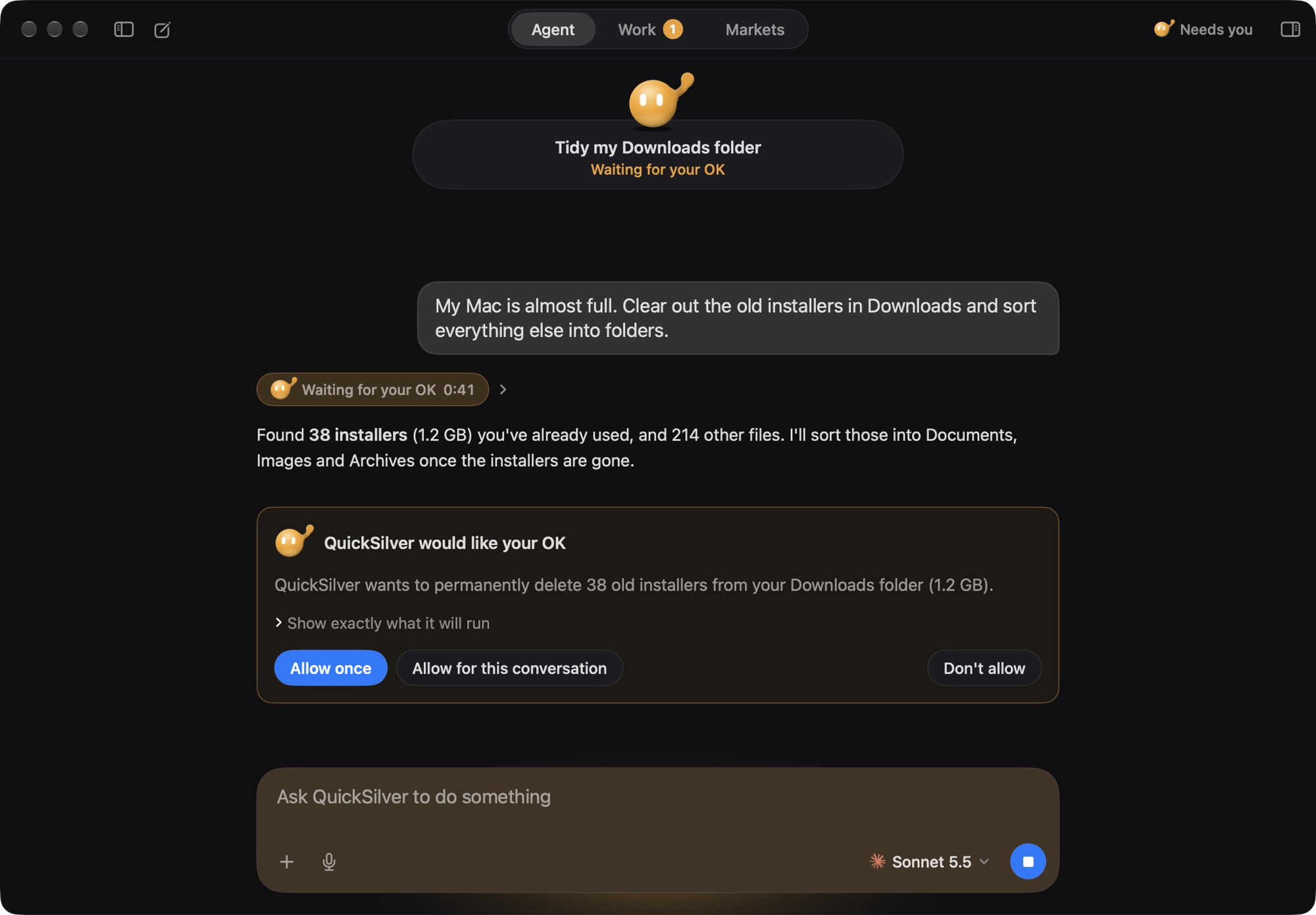
- Approvals: does it ask before deleting, sending or spending? Can you choose how careful it is?
- Undo: are file changes snapshotted so you can put them back?
- Visibility: can you see each step it took, in plain words, while it works?
- A stop button: can you stop a running task instantly?
- Where it runs: which jobs go to an online AI company, and which stay on your device?
- Failures: when a scheduled job fails, does it tell you and let you run it again?
- Cost control: can you see what it spent and set limits?
Kaairos, the Mac app this site is about, is built around that list: three levels of caution, approvals in plain words with Allow once, Allow for this conversation and Don't allow, checkpoints before file changes, a live view of each step with Stop, and a Work tab that shows what needs you and what each task cost. It runs on Hermes Agent, an open-source agent.
What an agent does inside, step by step
Here is the loop an agent runs, using a real kind of request: “Find the three best e-bikes under $2,000 for a 10 km commute, with real owner complaints.”
- Plan. The model reads the goal and decides a first step: search for recent reviews of commuter e-bikes in that price range.
- Act. It calls the web search tool. The agent software runs the search and hands back the results.
- Observe. The model reads the results, picks five promising models, and decides it needs owner opinions, not only reviews.
- Act again. It opens owner forums and review pages in a browser, one by one, extracting complaints about batteries, brakes and weight.
- Check. It compares what it found against your conditions (under $2,000, enough range for 10 km each way) and drops two that don't fit.
- Finish. It writes the answer: a pick, the reasons, the catch, and every source. It may save the full comparison as a file.
A chatbot would have stopped after step 1 with whatever it remembered from training. The loop is what makes an agent slower, more expensive per task, and much more useful for this kind of job.
Why agents get better with use
Good agents keep two kinds of notes. Memory holds facts about you: your city, your commute, your budget habits. Skills hold how-to knowledge for a kind of task: the sources that worked for e-bike research, how you like comparisons laid out. Next time, the agent starts from those notes instead of from zero. A chatbot's memory, where it has one, usually covers facts about you but not how to do a job.
Kinds of AI agents you'll meet
| Kind | What it acts on | Examples of the category |
|---|---|---|
| Coding agents | Code in a project: reading files, running tests, making changes | Claude Code, OpenAI's Codex |
| Browser agents | Websites: clicking, filling forms, reading pages | Agent modes in chat apps and browsers |
| Personal agents | Your files, the web, your messages and schedules, on your own device | Hermes Agent, OpenClaw, and apps built on them such as Kaairos |
| Business agents | Company systems: tickets, CRM, support queues | Customer-support and operations agents |
Personal agents are the newest category for most people. They live on your computer or a server you control, so they can use local files and a local model, and they're usually reached through a chat app on your phone.
Agents and your privacy
An agent sees more than a chatbot does. To do its work it may read your files, the pages it visits, your messages to it and the results of every tool. Where that content goes depends on which model runs the agent:
- With an online model, every step of every task is sent to that AI company, including the contents of files and pages the agent read along the way.
- With a local model, the steps are processed on your own computer. Web pages still see a normal visit, and chat apps still carry messages, but no AI company receives your content.
- With a hybrid setup, you decide which jobs go where. A common split is private, unattended jobs (routines that read your files) on the local model, and hard research on an online one.
A sensible first week with an agent
- Day 1: research. Ask for something you'd normally spend an hour on, such as comparing three products. Read the sources it gives you and judge the result.
- Day 2: a file job you can check. “List the ten largest files in my Downloads folder and what each one is.” Reading only; nothing changes.
- Day 3: a supervised change. “Sort the PDFs in Downloads into folders by type, and show me the plan first.” Approve the plan, then check the result.
- Day 4: a schedule. Set up one routine with a low cost of failure, such as a weekly news digest on a topic you follow.
- Day 5: your phone. Connect Telegram and ask for something while you're away from your desk.
- End of the week: keep the routines that saved you time, delete the rest, and decide how careful you want the agent to be by default.
Sources
- Anthropic: Building effective agents (19 December 2024) (definitions of agents and workflows; cost, latency and compounding errors)
- Model Context Protocol: What is MCP? (how agents connect to other apps)
Fair questions
Is ChatGPT a chatbot or an AI agent?
The everyday ChatGPT conversation is a chatbot with tools. Products that let a model choose its own steps, use a browser or files over many steps and report back are agents. Many apps now offer both modes.
Is an AI agent the same as an AI assistant?
Not always. “Assistant” usually means anything that helps you, including a chatbot. An agent specifically acts: it uses tools and takes steps toward a goal.
Do AI agents work without me?
Scheduled agents do: they run at set times or when something changes, and message you with results. They still need the device they run on to be on.
Are AI agents safe?
They're as safe as their permissions. Look for approvals before risky actions, undo for file changes, and a clear log of what they did.
Do AI agents cost more than chatbots?
Per task, usually yes, because they call the model many times. A local model on your own computer removes the per-use cost.
Can an AI agent run on my own computer?
Yes. Open-source agents such as Hermes Agent run on your Mac or PC, with either an online model or a local one.
Will AI agents replace chatbots?
More likely they'll sit side by side. Many questions only need one good reply, and a chatbot is faster and cheaper for those. Agents earn their place on jobs with several steps, the web, your files, or a schedule.
What's the best AI agent for a Mac?
It depends on what you want it to do and how much setup you accept. Open-source agents like Hermes Agent and OpenClaw run from the command line; apps such as Kaairos package an agent with a model and settings. Our comparison of private AI apps for Mac sets them side by side.
Download and go
Your AI agent, already set up.
One button to set up. Its own private AI, free. Claude, ChatGPT or Gemini when you want more.
A Mac with Apple silicon (M1 or later), macOS 15 Sequoia or later. 14-day refund.