
Guide
What is MCP, the Model Context Protocol?
MCP is an open standard that lets an AI app connect to other software, such as Notion, a database or your files, in one consistent way. Here is how it works, who supports it in late 2026, what to watch out for, and how to use it without writing code.
The short answer
MCP (Model Context Protocol) is an open-source standard for connecting AI applications to external systems: data sources, tools and workflows. An app that speaks MCP can use any MCP “server”, whether it's a Notion connector, a GitHub connector or a local file server, without custom code for each. The official site describes it as “a USB-C port for AI applications”. Anthropic created it; since 9 December 2025 it has been developed under the Linux Foundation's Agentic AI Foundation, and it's supported by Claude, ChatGPT, Gemini, Microsoft Copilot, VS Code and Cursor, among others.
The problem it solves
Before MCP, every AI app had to build its own integration with every service: one for Notion in app A, another for Notion in app B, and so on. With 10 AI apps and 100 services that's up to 1,000 separate integrations, each maintained differently.
For you, the difference shows up as choice. A connector built once for MCP works in every app that supports it, so the service you rely on is more likely to be available in the AI app you prefer, and switching apps doesn't mean losing your connections. For the companies building services, it means one integration to maintain instead of dozens, which is why so many published one so quickly.
MCP turns that into 10 + 100: each AI app implements MCP once, as a client, and each service publishes one MCP server. Any client can then use any server. The Linux Foundation's announcement counted more than 10,000 published MCP servers at the end of 2025.
How it works
Three participants
| Participant | What it is | Example |
|---|---|---|
| Host | The AI application you use | Claude Desktop, VS Code, an agent app |
| Client | A connection the host keeps open to one server | One client per connected server |
| Server | A program that offers capabilities to AI apps | A Notion server, a filesystem server, a Sentry server |
What a server can offer
- Tools: actions the AI can call, such as “create a page”, “search issues” or “run a query”.
- Resources: data the AI can read for context, such as file contents or database records.
- Prompts: reusable templates that help structure a task.
Servers can also ask the user for information through elicitation, for example to confirm an action. The messages themselves are JSON-RPC 2.0.
Local and remote servers
MCP has two transports. Stdio runs a server as a small program on your own machine (a “local” server). Streamable HTTP connects to a server on the internet (a “remote” server), usually with an OAuth sign-in so you approve access on the service's own page, the same way you'd sign in to any app.
What happens during one request
- You ask: “Add these three action items to my Notion meeting page.”
- The host has already asked the Notion server which tools it offers (
tools/list) and showed them to the model. - The model decides to call the Notion server's tool for adding content, with the page and the items as arguments.
- The host sends that
tools/callto the server, which talks to Notion with your permission. - The result comes back to the model, which tells you it's done, with a link.
Where MCP is in late 2026
- Governance. On 9 December 2025 the Linux Foundation formed the Agentic AI Foundation, with Anthropic's MCP, Block's goose and OpenAI's AGENTS.md as founding projects. MCP is no longer one company's protocol.
- Support. The official docs list Claude and ChatGPT among clients, plus developer tools like VS Code and Cursor; the Linux Foundation's announcement also names Gemini and Microsoft Copilot.
- The current specification is version
2026-07-28. It makes the protocol stateless (every request carries its version and capabilities), adds aserver/discoverrequest, and deprecates the older roots, sampling and logging features.
MCP compared with APIs, plugins and skills
| What it is | Who uses it | |
|---|---|---|
| An API | A service's own interface for software, different for every service | Developers writing code against one service |
| MCP | One standard way for AI apps to use many services' tools and data | AI apps; you, through the app |
| A plugin or extension | Code built for one specific app | That app only |
| A skill | Written instructions that teach an agent how to do a kind of task well | The agent, alongside its tools |
MCP and skills work together: MCP gives an agent the ability to act in Notion; a skill tells it how you like meeting notes laid out there.
The risks, and how to stay safe
Connecting an AI to your apps means it can read, and possibly change, real data. The protocol's own documentation has a security best-practices section; in everyday terms:
- Use servers from the service itself or a source you trust. A local MCP server is a program that runs on your computer.
- Grant the least access. If a connector offers read-only access, start there.
- Keep approvals for changes. An AI that reads a malicious page or document can be tricked into misusing a connected tool (prompt injection). Requiring your OK for writes contains that.
- Review sign-ins. Remote servers sign in with OAuth on the service's page; you can revoke access there later.
- Disconnect what you don't use. Fewer connections, fewer ways to go wrong.
How to use MCP without writing code
Most people never see the protocol: they pick an app from a list and sign in. In Claude, ChatGPT and many agent apps this is called a connector.
In Kaairos, which is built on the Hermes Agent engine, it works like this:
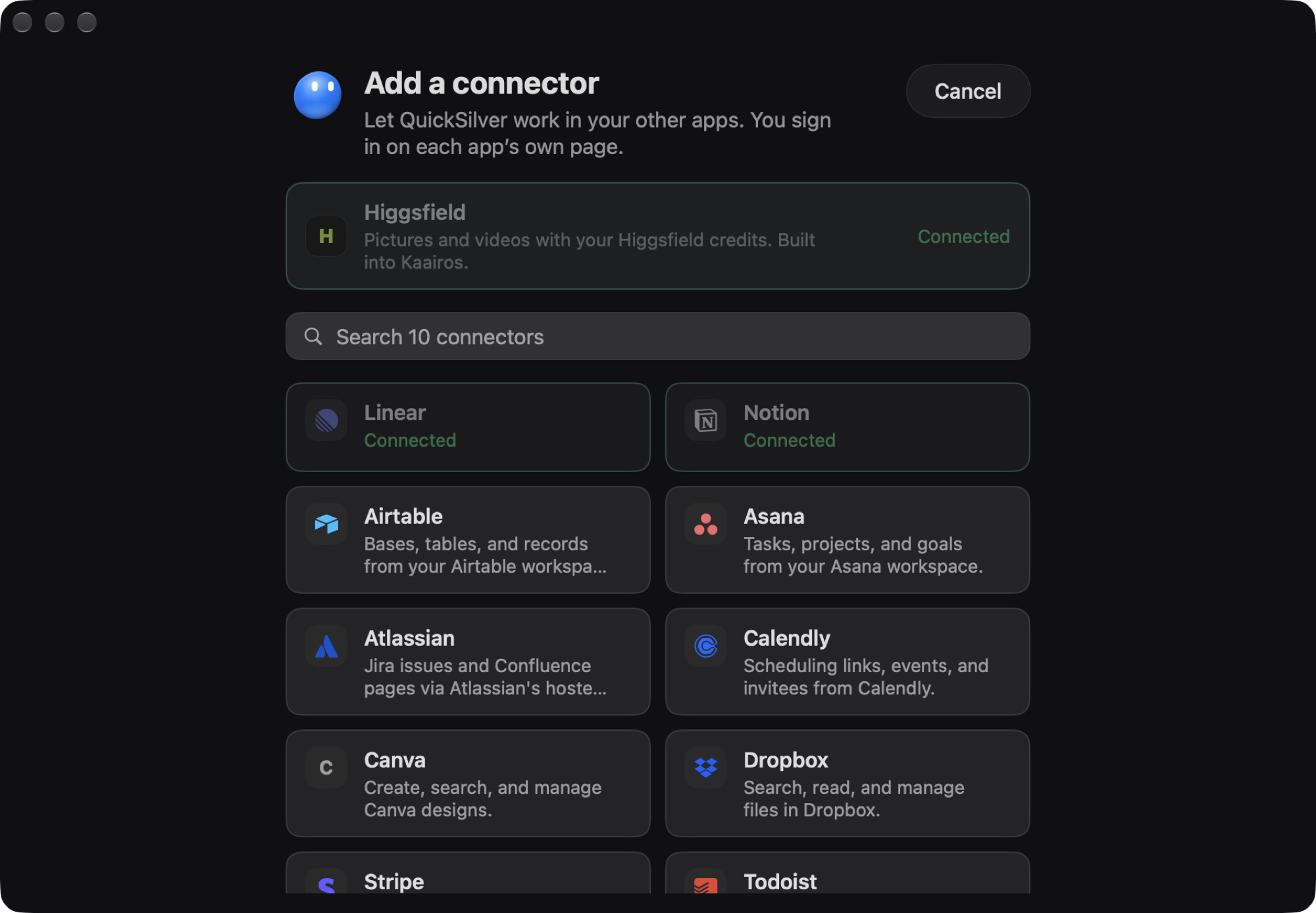
- Open Settings › Connectors and choose Add Connector….
- Pick an app from the engine's approved catalog: for example Airtable, Asana, Atlassian, Calendly, Canva, Dropbox, Linear, Notion, Stripe or Todoist.
- Sign in on that app's own page. Back in Kaairos it shows as connected.
- Ask for something in plain words: “Add the action items from this chat to my Linear project.”
Kaairos adds every connector as untrusted: QuickSilver, its agent, reads from connected apps freely and asks your OK before adding or changing anything in them. If you leave a sign-in halfway, the connector is removed again.
What people connect through MCP
| Kind of server | Examples | What you can ask |
|---|---|---|
| Notes and docs | Notion, Atlassian Confluence | “Add these meeting decisions to the project page” |
| Tasks and projects | Linear, Asana, Todoist, Jira | “Create an issue for each bug in this list, assigned to me” |
| Files | Dropbox; the reference filesystem server | “Find last year's insurance renewal letter” |
| Scheduling | Calendly | “Send me my booking link for a 30-minute slot” |
| Design and media | Canva, Higgsfield | “Make a poster from this headline” |
| Payments and data | Stripe, Airtable | “How many new subscribers did we get this week?” |
| Developer tools | Sentry, GitHub | “What's the most frequent error since yesterday's release?” |
Local or remote server: which is better?
| Local (stdio) | Remote (Streamable HTTP) | |
|---|---|---|
| Runs | As a small program on your computer | On the service's own servers |
| Sign-in | Usually a key or file access you configure | Usually OAuth on the service's sign-in page |
| Good for | Files and apps on your machine, offline use | Cloud services like Notion or Linear |
| Watch out for | It runs with your computer's permissions; install only trusted ones | It sees what you send it; revoke access on the service when done |
For developers: building a server
The project publishes official SDKs in several languages, a reference set of servers, and the MCP Inspector, a tool for testing a server by hand. A minimal server declares its tools with a name, a human-readable title, a description and a JSON Schema for its inputs; clients discover them with tools/list and call them with tools/call. Results can be text, images, audio, links to resources or structured JSON. Start from the official “Build servers” guide on modelcontextprotocol.io, test with the Inspector, then try your server in a client you use.
Common misconceptions
- “MCP is an AI model.” It isn't. It's a protocol; any model in any MCP-capable app can use it.
- “MCP is only for Claude.” It started at Anthropic but is now a Linux Foundation project used by ChatGPT, Gemini, Copilot and many others.
- “Connecting a server gives the AI full control.” It gives the AI the tools that server offers. The app decides whether to ask you first; good apps ask before changes.
- “MCP replaces APIs.” Servers are usually built on top of a service's API. MCP is the layer that makes them usable by AI apps in a standard way.
Worked example: from meeting notes to tasks
Here is MCP doing real work, end to end, in an agent app with Linear connected:
- You paste meeting notes and ask: “Turn this into action items and create a Linear issue for each one that's ours.”
- The agent reads the notes and drafts six action items with owners and due dates. Two belong to another team, so it leaves those out.
- It asks the Linear server which tools it offers and finds one for creating issues.
- Because creating issues changes something in Linear, the app asks your OK and shows the four issues it's about to create.
- You approve. The agent calls the tool four times; Linear returns a link for each new issue.
- The reply lists the four issues with links, and the two items it left for the other team.
The agent decided what to do; MCP gave it a standard way to do it in Linear; the app's approval step kept you in charge of the change.
Five questions before you connect a server
- Who publishes it? The service itself, a well-known project, or an unknown account?
- What can it do? Read only, or also create, change and delete?
- What will it see? Everything in the account, or one workspace or folder?
- Will the app ask before changes? If not, can you make it?
- How do you disconnect it? In the app, and on the service's own security page.
Sources
- Model Context Protocol: What is MCP? (definition, USB-C analogy, clients)
- Model Context Protocol: Architecture overview (hosts, clients, servers, primitives, transports, version 2026-07-28)
- Linux Foundation: Formation of the Agentic AI Foundation (9 December 2025) (founding projects, 10,000+ servers, adopters)
Fair questions
What does MCP stand for?
Model Context Protocol: an open standard for connecting AI applications to tools, data and workflows.
Who created MCP?
Anthropic introduced it. Since December 2025 it has been a project of the Agentic AI Foundation at the Linux Foundation.
Does ChatGPT support MCP?
Yes. The MCP documentation lists ChatGPT among supported clients, alongside Claude, VS Code and Cursor.
What is an MCP server?
A program that offers tools, data or prompts to AI apps. It can run on your computer (local) or on the internet (remote).
Is MCP safe?
The protocol is a way of connecting; safety depends on which servers you add and what they're allowed to do. Use trusted servers, grant the least access and keep approvals for changes.
Do I need to code to use MCP?
No. Apps with connector lists let you pick a service and sign in. Code is only needed to build a new server.
What's the difference between MCP and an API?
An API is one service's interface. MCP is a common layer that lets AI apps use many services' capabilities the same way.
Is MCP free to use?
Yes. The protocol, its specification and official SDKs are open source. A service you connect to may charge for its own plan, as it would anyway.
Does MCP work with local AI models?
Yes. MCP connects the app to tools; it doesn't care which model the app uses. An agent running a local model on your Mac can use MCP connectors just as one using an online model can.
Download and go
Your AI agent, already set up.
One button to set up. Its own private AI, free. Claude, ChatGPT or Gemini when you want more.
A Mac with Apple silicon (M1 or later), macOS 15 Sequoia or later. 14-day refund.