
Compare
Kaairos vs Jan
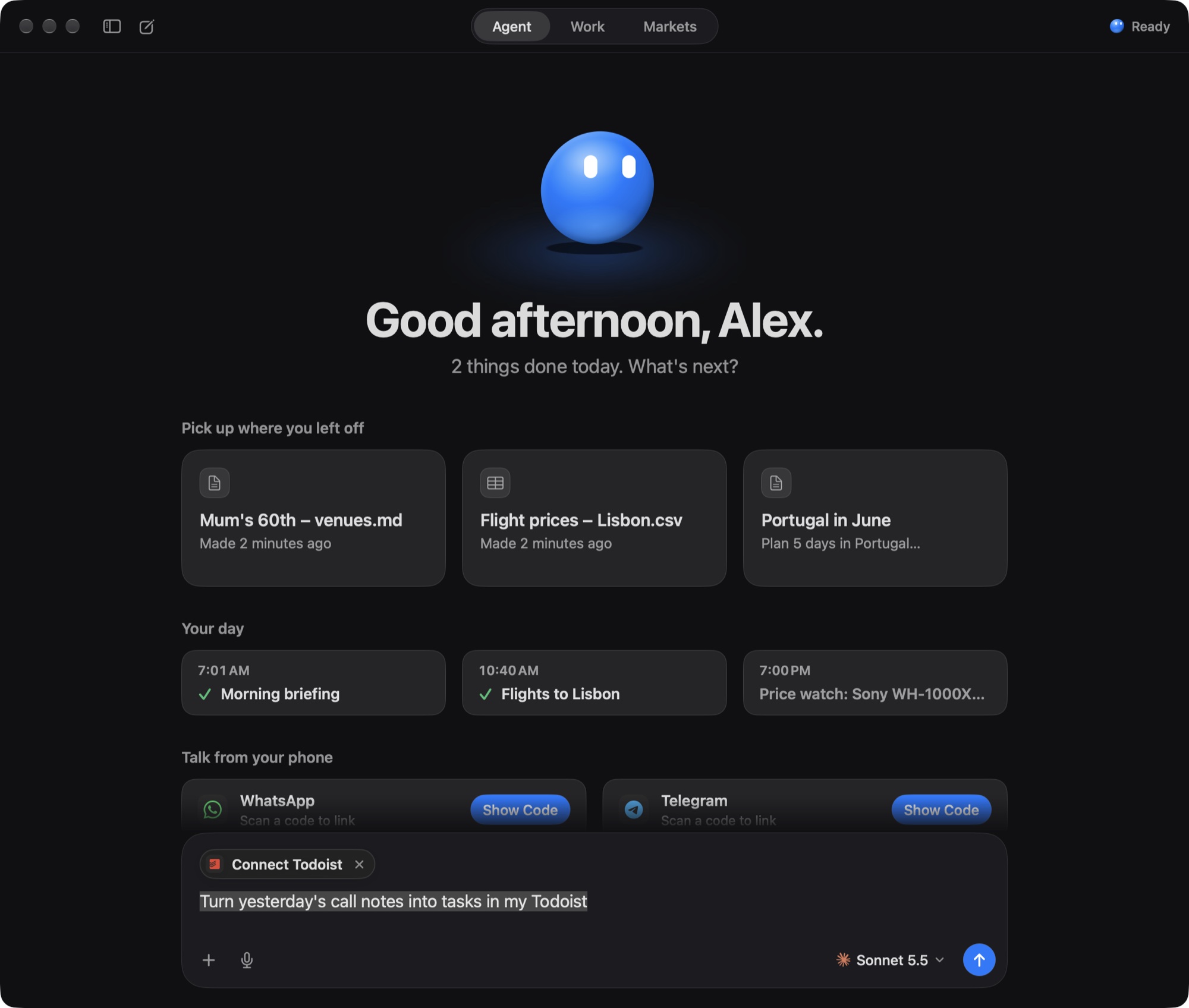
Both put privacy first and both run AI on your own Mac. Jan is a free, open-source app for chatting with local and online models, with a local API for other apps. Kaairos is an agent that brings its own private AI and does tasks for you, on a schedule and from your phone.
The short answer
Choose Jan if you want a free, open-source (Apache 2.0) app to chat with local models you pick yourself, on 8 or 16 GB Macs, Windows or Linux, with a local API for other apps. Choose Kaairos if you want a private agent that's already set up: it picks its own AI, runs routines like a morning briefing or a price watch, and reaches you on Telegram or WhatsApp.
At a glance
What it is and who it's for
| Kaairos | Jan | |
|---|---|---|
| What it is | An AI agent app for the Mac that's already set up: it researches, plans, watches things and does tasks | An open-source app that runs AI models on your computer, described by its makers as an “open source alternative to ChatGPT that runs 100% offline” |
| Made by | Stuvio, built on Hermes Agent by Nous Research (MIT) | Menlo Research |
| Best for | People who want results (briefings, watches, reminders, research) without choosing models | People who want to choose, run and compare open models privately, or serve them to other apps |
| Main way you use it | Ask in plain words; it works through the steps, and routines run by themselves | A chat window with a model picker, projects and assistants |
Setup
| Kaairos | Jan | |
|---|---|---|
| Install | Open the DMG, drag to Applications, press Set it up | Open the DMG, drag to Applications, launch |
| First AI | Picks a private AI that fits your Mac's memory and downloads it (about 24 GB, resumable) | Downloads its default model on first launch; more from the Hub |
| Terminal needed | No | No for the desktop app (Jan Agent, the separate command-line agent, installs from a terminal) |
| Account or API key needed | No (licence key for the paid app; AI accounts optional) | No for local models; an API key for each cloud provider |
Models
| Kaairos | Jan | |
|---|---|---|
| Local runtime | Hermes' own llama.cpp server, built in | llama.cpp (GGUF), and MLX models on Apple silicon |
| Choosing a local model | Done for you: one open-weight model from a curated catalog, sized to your Mac. No model browser | You pick in the Hub, which marks each model Fits, May be slow or Won't fit; any GGUF from Hugging Face |
| Memory for local AI | 32 GB or more | 8 GB for about 3B models, 16 GB for about 7B, 32 GB for about 13B (Jan's guidance) |
| Online AI | Optional: Sign in with ChatGPT, 19 services with your own key (Claude, OpenAI, Gemini, OpenRouter, DeepSeek and more), or Your Own Endpoint | Optional: OpenAI, Anthropic, Google, Groq, Mistral, OpenRouter and others, with your own key |
| Mixing local and online | Automatic: online AI for conversations, private AI for routines and as backup | You pick the model per chat |
| Local API for other apps | No | Yes, OpenAI-compatible, at http://127.0.0.1:1337/v1 by default |
What it can do
| Kaairos | Jan | |
|---|---|---|
| Chat | Yes | Yes |
| Search the web | Yes, and it opens pages in its own browser when a site needs one | Yes: built-in web search and fetch (Exa by default, keyless; Tavily, SearXNG or You.com) |
| Documents | Reads files you share and writes results into its Kaairos folder | Projects index PDFs, Office files and code for every chat in the project |
| Longer tasks on its own | Yes, with live steps and a Stop button | Cowork (preview, nightly builds only) reads and writes files, runs sandboxed commands and researches |
| Schedules and routines | Yes: plain words or a gallery of 13 ready-made routines | Not in Jan's desktop docs |
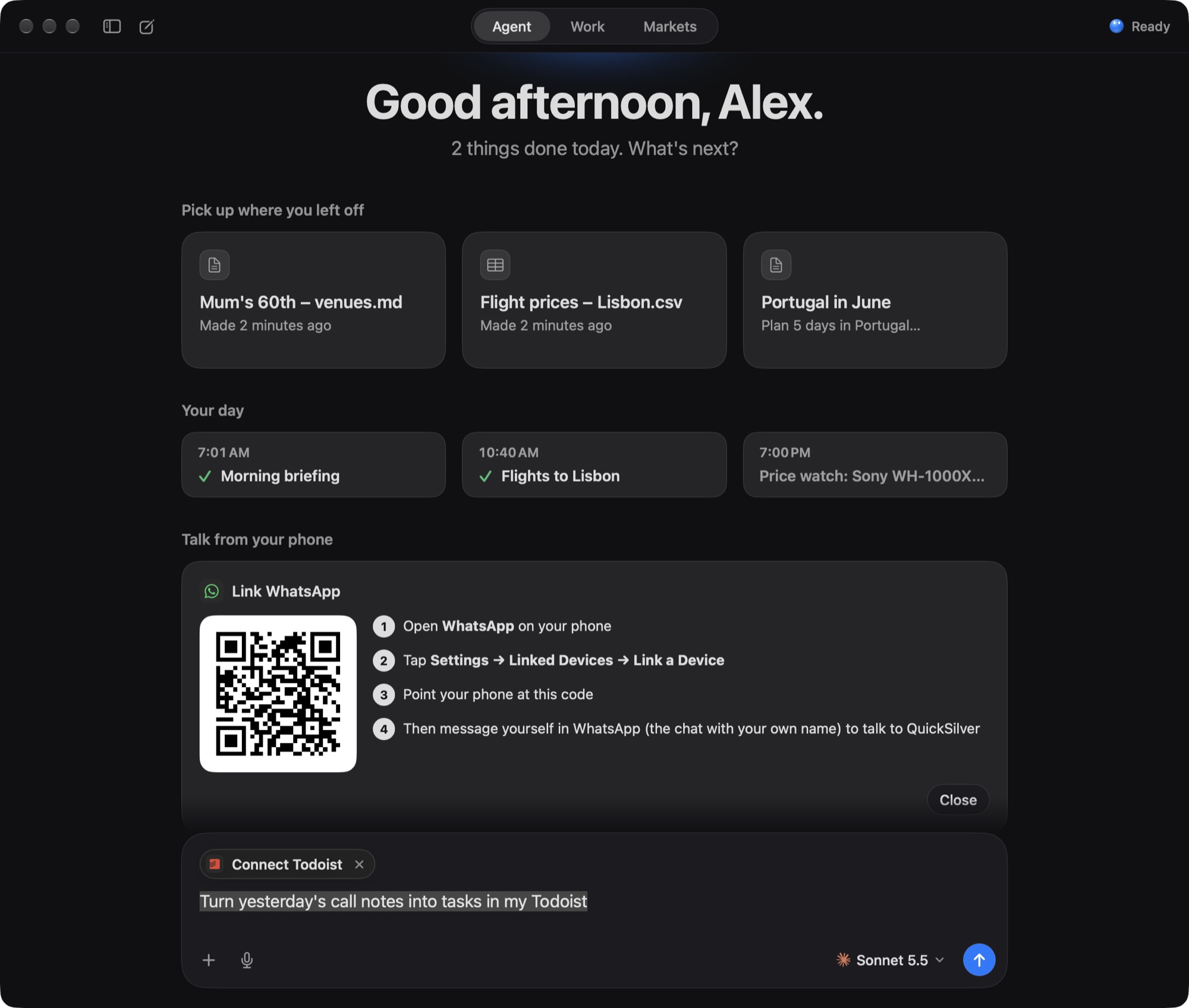
| From your phone | Telegram and WhatsApp, linked by scanning a code | No phone app or chat link documented for Jan Desktop |
| Voice | Dictation, and voice notes transcribed on the Mac | Audio files as input, with a model that accepts audio |
| Pictures and video | Finds photos and videos without a key, draws charts; generation with your own image service or Higgsfield | Images as input with a vision model; HTML and SVG previews |
| MCP and connectors | Connectors from an approved catalog (Notion, Linear, Asana, Dropbox, Stripe and more), signing in on their own page | Any MCP server you add by command (needs Node.js or Python) |
| Skills and memory | Learns skills and remembers what you prefer; skills from Nous Research's catalog | Assistants (saved instructions); memory is marked “Coming Soon” on Jan's home page |
Safety
| Kaairos | Jan | |
|---|---|---|
| Approvals | Three levels; default asks before deleting, buying or sending | Each MCP tool call needs approval unless you allow all; Cowork has a read-only Plan mode |
| Undo | Snapshots of files it changes | Review “Agent changes” in Cowork before keeping them |
| Commands | Only with approval at the default level; a hard-line blocklist stays on at every level | Cowork shell commands run in an OS sandbox, or the shell tool isn't offered |
Privacy
| Kaairos | Jan | |
|---|---|---|
| Fully offline possible | Yes, with its private AI (web tasks need the internet) | Yes, with local models |
| Usage analytics | None in the app; the engine's metrics are switched off | Opt-in product analytics (active users, retention) through PostHog EU, chosen at first launch |
| Where your data lives | ~/.kaairos and the Kaairos folder | ~/Library/Application Support/Jan/data |
Platforms, licence, price and support
| Kaairos | Jan | |
|---|---|---|
| Platforms | Mac only | macOS, Windows, Linux |
| Mac requirements | Apple silicon, macOS 15 or later, about 30 GB free | Apple silicon, macOS 13.6 or later, 10 GB free |
| Intel Macs | No | Not supported since v0.8.0; local models don't run since v0.8.5 |
| Licence | Proprietary app; its engine, Hermes Agent, is MIT | Open source, Apache 2.0 |
| Price | $29 at launch, then $80, once, for 3 Macs and every 1.x update; 14-day refund | Free |
| Updates | App updates from Stuvio; the engine is updated with the app, never on its own | Frequent releases on GitHub (v0.8.8 on 28 October 2026) |
| Support | Email, support@stuvio.co | Community (GitHub and Discord) and docs |
What each is really for
Jan: an open, private home for models
Jan's makers call it an open-source alternative to ChatGPT that runs offline, and that is what it does well. You download it, it fetches a default model, and you chat. The Hub shows which models will fit your computer before you download them, you can paste any GGUF model from Hugging Face, and on Apple silicon you can also import MLX models. Cloud models sit in the same picker when you want more power.
Around the chat, Jan adds the tools of a good workspace: projects that index your documents, assistants with saved instructions, built-in web search, MCP servers for tools, and a local OpenAI-compatible server so other apps and scripts can use your models. It is free, Apache 2.0, and runs on Mac, Windows and Linux. A newer Cowork mode, still a preview in nightly builds, lets Jan take on multi-step tasks in a sandbox.
Jan fits people who enjoy choosing models, want something fully open, need Windows or Linux, or have a Mac with 8 or 16 GB of memory.
Kaairos: an agent that keeps working
Kaairos starts from the job rather than the model. Press Set it up and it chooses a private AI for your Mac, downloads it and switches on safe defaults. You never see a model list unless you want one. Then you ask for outcomes: a briefing every weekday, a watch on a flight price, a reminder that keeps nudging, a research brief with sources. It does the searching, browsing and writing, shows each step in plain words, and asks before anything risky.
The other half is that it keeps going when you're not looking. Routines run on a schedule, results can arrive in Telegram or WhatsApp, and you can ask from your phone and get the answer in the same chat. If you connect Claude, ChatGPT or Gemini, conversations use it while routines stay on the private AI, and the private AI answers if the online one fails.
Kaairos fits people with an Apple silicon Mac who want a private assistant that does things, and who never want to think about quantization, context length or ports.
The same job in both
Job 1: “Every weekday at 8, send me a briefing on my phone”
In Jan. Jan's desktop documentation doesn't describe scheduled tasks or a way to message your phone, so the closest you can get is a saved assistant you open each morning:
- In Jan, create an assistant with the
+button and give it instructions such as “Give me the weather for Lisbon and the five most important news stories about renewable energy, with links.” - Choose a model that supports tools (for local models, turn on tool calling in the model's settings), so it can use Jan's built-in web search.
- Each morning, open Jan, start a chat with that assistant and send “Go”. Read the answer on the Mac, or copy it to your phone yourself.
If you want it on a schedule, you would need to script it yourself against Jan's local API with your own scheduler and messaging, which is a developer project.
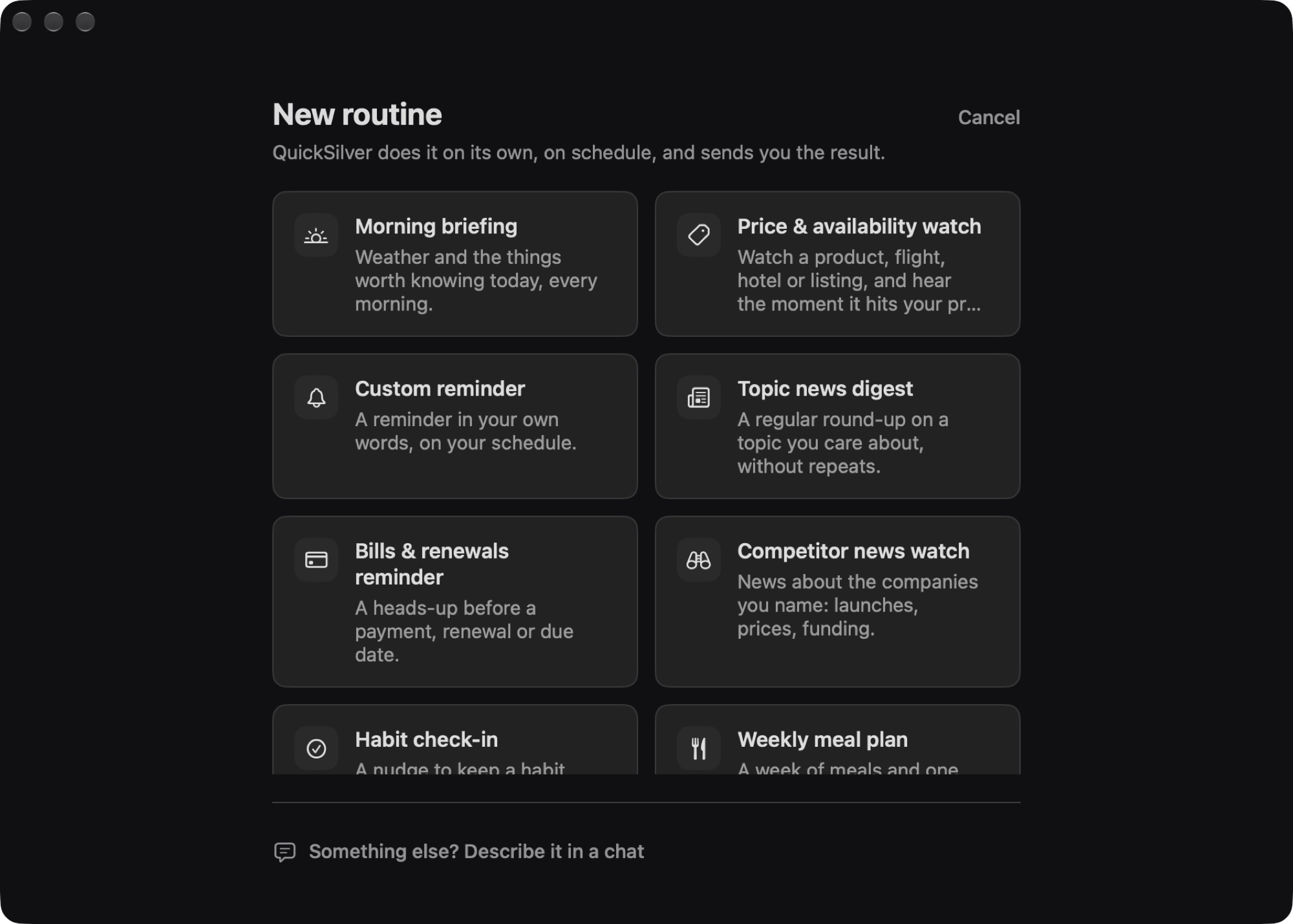
In Kaairos. It's a routine, made once:
- Link Telegram (or WhatsApp) by scanning the code on the home screen.
- In the Work tab, choose New routine, pick Morning briefing, fill in your city and topics, and choose Telegram as where results go. Or just ask, as below.
- From then on it runs every weekday at 8 on the private AI, and the briefing arrives in your Telegram chat. With Keep working when closed on, it runs with the app closed too, as long as the Mac is on and awake.
Every weekday at 8, send me a briefing on Telegram: Lisbon weather, and the top renewable energy news with links.
Done. I've set up a routine for weekdays at 8:00 AM: Lisbon weather and the top renewable energy stories with links, sent to your Telegram chat. It runs on the private AI on this Mac. You can pause it any time in the Work tab.
Good morning. Lisbon: 19°C, clear, light wind from the north. Three stories worth your time today, each with a two-line summary and the link.
Job 2: “Answer questions about these 40 contracts, privately”
This is a job where Jan is very good.
In Jan:
- Press ⌘P to make a project, for example “Lease contracts”.
- Click Add in the Files panel and add the PDFs and Word files. Jan chunks and indexes them; each shows its size and chunk count.
- Pick a local model and ask questions in any chat in that project. Jan's docs say files are processed locally and never leave your device with a local model.
In Kaairos:
- Share the files in a chat (drag them in) and ask: “Read these leases and make me a table of rent, end date and notice period for each.”
- With no online AI connected, the private AI does the work on the Mac. The result is saved as a file in its Kaairos folder and shows up under Made for you in the Work tab.
The difference: Jan keeps a searchable knowledge base per project that every later chat can draw on. Kaairos treats it as a task: it reads, produces a document and remembers what it learned, but it has no project-style document index. If your work is mostly asking questions of a fixed set of documents, Jan's projects are the better fit.
Privacy, side by side
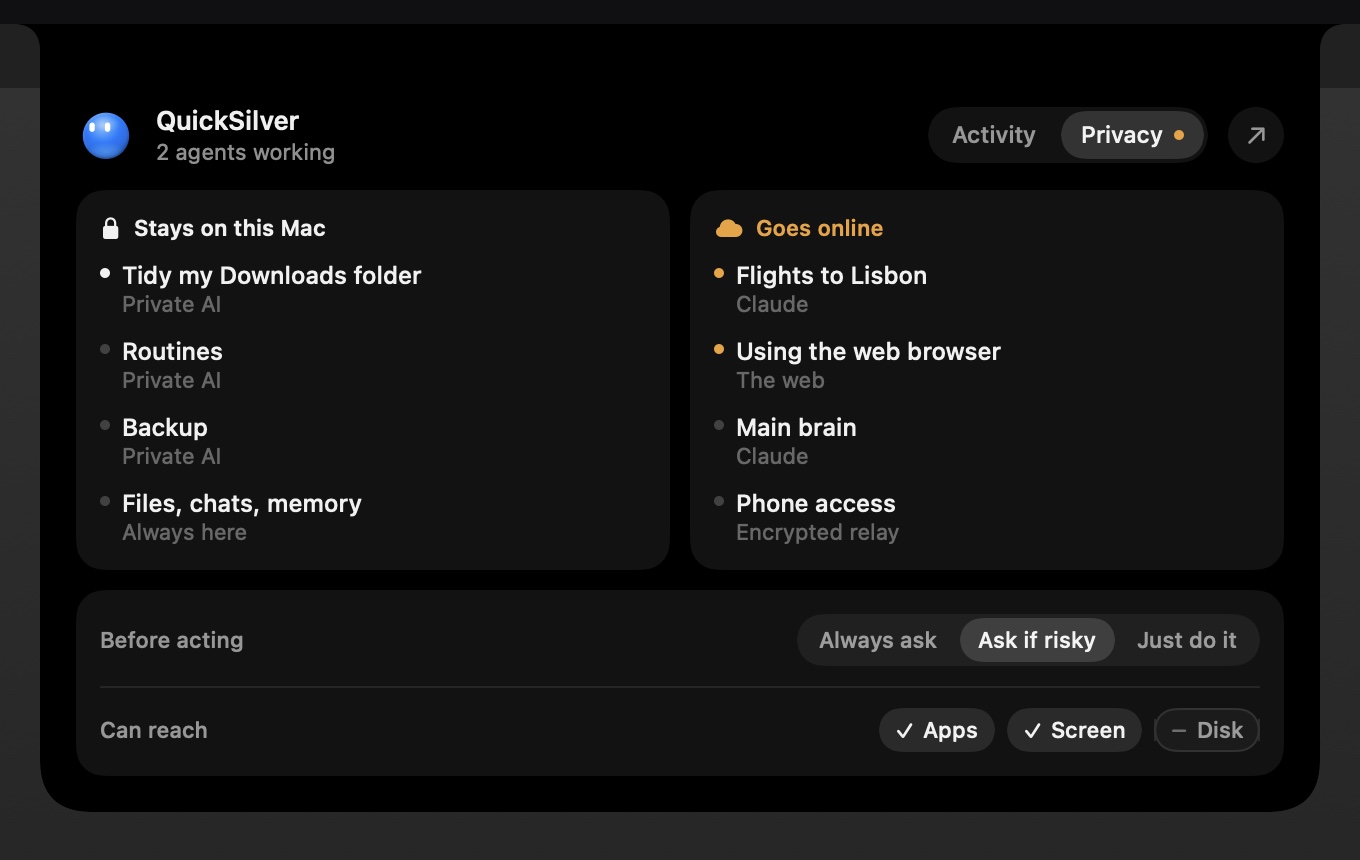
Both can run with nothing leaving your Mac except what has to. Here is what goes out in each, and to whom.
| What | Kaairos | Jan |
|---|---|---|
| Your chats, with local AI only | Stay on the Mac | Stay on the computer |
| Your chats, with an online AI | Sent to the company you connected (for example Anthropic or OpenAI). Routines stay on the private AI by default | Sent to the provider you picked for that chat |
| Web searches | Go out to the web, and pages it visits see a normal visit | Go to the search provider you choose (Exa by default) and the sites fetched |
| Phone messages | Pass through Telegram or WhatsApp, if you link them | Not applicable |
| Connected apps or tools | Calls go to that service (Notion, Linear and so on) | Depends on the MCP servers you add |
| Usage analytics | None | Opt-in, counted against a random ID (PostHog EU) |
| Model download | Once, during setup, checked file by file | From Hugging Face when you download |
| Other | App updates and licence checks (Polar) | Not stated on Jan's privacy page |
One practical difference: Kaairos's notch panel (or menu bar panel on Macs without a notch) shows what stays on the Mac and what goes online, live, as each task runs. In Jan you know by which model you picked.
Hardware and cost
Memory
This is the biggest practical difference. Jan's own guidance is that 8 GB of memory runs models of about 3B parameters comfortably, 16 GB about 7B and 32 GB about 13B. So Jan gives you local AI on almost any Apple silicon Mac.
Kaairos's private AI needs 32 GB or more. Agents need a capable model with a long context (Kaairos guarantees at least 64,000 tokens), and the smallest model in its curated catalog is about 16.5 GB, which doesn't fit 8, 16 or 24 GB Macs. On those Macs, Kaairos works once you connect an online AI, and setup tells you so. See how much memory local AI needs.
Year one
- Jan, local models only: $0. It's free and open source.
- Jan with a cloud provider: $0 + whatever that provider bills for your use.
- Kaairos on a 32 GB Mac, private AI only: $29 + $0 = $29, for up to 3 Macs, with every 1.x update (US price).
- Kaairos with Sign in with ChatGPT: $29 + the ChatGPT plan you already pay for. Routines still run on the private AI at no extra cost.
- Kaairos with an API key: $29 + what that company bills for your use. The Work tab shows your AI cost over the last 30 days.
If your Mac has 16 GB and you want to pay nothing, Jan is the answer. If you want an agent that does work on a schedule, Kaairos's $29 is the whole software cost.
Using them together
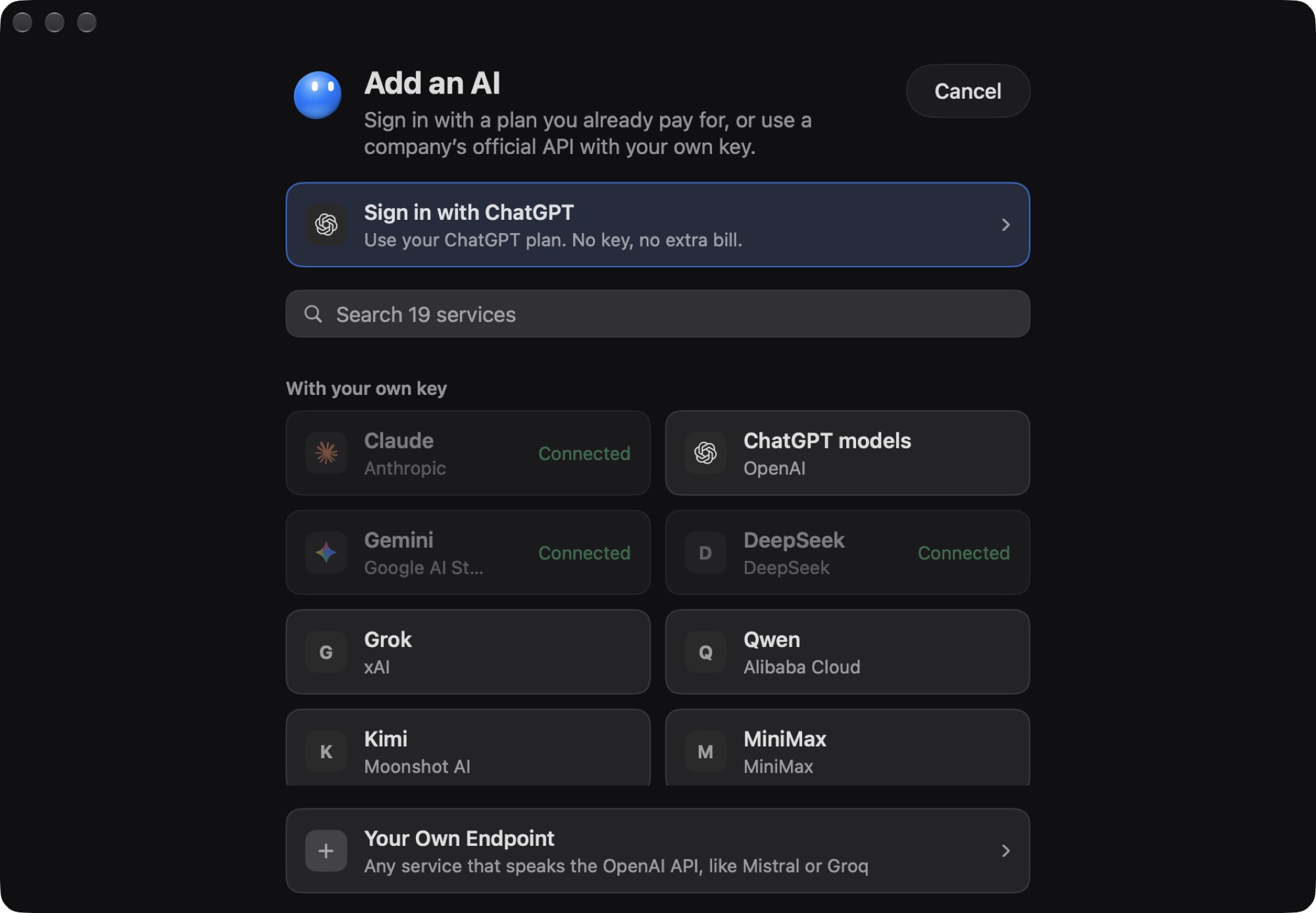
You don't have to choose. Jan's local API server speaks the OpenAI API, and Kaairos can use any service that does, so Kaairos can use a model you run in Jan:
- In Jan, go to Settings › Local API Server, choose the model under Default Model, and click Start Server. It listens on
http://127.0.0.1:1337/v1by default. - In Kaairos, open Settings › AI › Add AI… and choose Your Own Endpoint.
- Enter a name (“Jan”), the address
http://127.0.0.1:1337/v1, and the model's name as Jan shows it. Leave the API key empty unless you set one in Jan. - Press Test Connection, then Add. The model now appears in Kaairos's model picker.
This is useful on a Mac where you already keep a favourite model in Jan. Keep both apps' memory use in mind: two local models loaded at once can be too much for one Mac.
When to choose Jan instead
- Your Mac has 8, 16 or 24 GB of memory and you want local AI with no account at all.
- You want a free app, or fully open-source software (Apache 2.0) you can inspect and build.
- You use Windows or Linux, or want the same app on several kinds of computer.
- You want to try many models, compare quantizations and tune parameters yourself.
- You need a local OpenAI-compatible server for your own code, scripts or other apps.
- Your work is mostly asking questions of a set of documents, which Jan's projects handle well.
- You want to add any MCP server you like, not only ones from a catalog.
Switching between them
- Chats don't carry over. Jan keeps its threads in its own data folder; Kaairos starts fresh. Export anything you want to keep as files and share them with Kaairos.
- Models don't carry over directly. Kaairos downloads its own private AI. To keep using a model you run in Jan, connect it as Your Own Endpoint (above).
- Cloud keys carry over by hand. Paste the same OpenAI, Anthropic, Google, OpenRouter or other keys into Kaairos's Settings › AI.
- Assistants become instructions or profiles. Jan's saved instructions can become a Kaairos profile with its own personality, model and skills, or just a line you tell Kaairos to remember.
- MCP servers don't carry over. Kaairos uses connectors from its own approved catalog.
- You can keep both. They don't share folders or settings, so running both on one Mac is fine, memory permitting.
Sources
- Jan on GitHub: description, platforms, cloud providers, local API on port 1337, MCP
- Jan's LICENSE file: Apache License 2.0
- Jan home page: free and open source, memory marked Coming Soon
- Jan docs: install on Mac: Apple silicon, macOS 13.6+, memory guidance, 10 GB disk, Intel support, data folder
- Jan docs: Quickstart: default model downloaded on first launch, no API key for local models
- Jan docs: Hub: fit labels, Hugging Face import, llama.cpp and MLX, cloud providers
- Jan docs: Local API Server:
127.0.0.1:1337/v1, optional API key - Jan docs: MCP: adding servers, per-call approval
- Jan docs: Web Search: Exa (default), Tavily, SearXNG, You.com
- Jan docs: Cowork: preview in nightly builds, sandbox, Plan mode
- Jan docs: Projects and File Upload
- Jan docs: Assistants
- Jan docs: Privacy: opt-in analytics through PostHog EU
- Jan docs: Jan Agent: terminal agent, preview
- Jan changelog: v0.8.3 to v0.8.8
- Kaairos facts: the app's own code and Kaairos facts
Fair questions
Is Jan really free and open source?
Yes. Jan is free to download and its code on GitHub is under the Apache License 2.0, which Menlo Research publishes in the repository's LICENSE file. Some comparison sites list it as AGPL or MIT; the current LICENSE file says Apache 2.0.
Is Jan AI safe to use?
Jan is open source, so its code can be inspected, and with local models your chats stay on your computer. Analytics are opt-in and, per Jan's privacy page, count only active users and retention against a random ID. As with any app that runs MCP servers or commands, the risk comes from what you connect; Jan asks before each MCP tool call by default.
What Mac do I need for Jan?
An Apple silicon Mac (M1 or newer) on macOS 13.6 or later, with 10 GB free. Jan suggests 8 GB of memory for models around 3B, 16 GB for about 7B and 32 GB for about 13B. Intel Macs aren't supported for local models in current versions.
Jan vs LM Studio: which is better on a Mac?
Both are good apps for running local models. Jan is open source (Apache 2.0) and adds projects, assistants, web search and a Cowork preview; LM Studio is free but closed source. If you want an agent that does tasks on a schedule rather than a model runner, neither is built for that; see Kaairos vs LM Studio.
Can Jan run tasks on a schedule or message my phone?
Jan's desktop docs don't describe scheduled tasks, and there's no phone app or chat-app link for Jan Desktop documented. Jan's docs overview mentions agents acting through WhatsApp, Discord or Slack, but the Jan Agent documentation describes a terminal agent, and we couldn't find setup steps for messaging. Kaairos does both: routines on a schedule, and Telegram or WhatsApp.
Does Kaairos work on a 16 GB Mac like Jan does?
Yes, but not with its own private AI. Kaairos's private AI needs 32 GB or more. On a 16 GB Mac it works once you connect an online AI, such as Sign in with ChatGPT or a Claude key, or a model you serve from Jan through Your Own Endpoint.
Can I use a Jan model inside Kaairos?
Yes. Start Jan's Local API Server, then add it in Kaairos under Settings › AI › Add AI… › Your Own Endpoint with the address http://127.0.0.1:1337/v1 and the model's name. Test Connection tells you if it answers.
Which is more private, Jan or Kaairos?
Both can keep everything on your Mac with a local model, and both send your messages to an online provider only if you choose one. Kaairos has no analytics at all; Jan's are opt-in. Kaairos also keeps routines on the private AI by default even after you connect an online AI.
Is there a Jan alternative that does things, not just chat?
Jan's own Cowork mode (a preview in nightly builds) can work through multi-step tasks with files and commands. Kaairos is built around doing things: web research and browsing, routines, reminders, price watches and results sent to your phone, with approvals and undo.
Download and go
Your AI agent, already set up.
One button to set up. Its own private AI, free. Claude, ChatGPT or Gemini when you want more.
A Mac with Apple silicon (M1 or later), macOS 15 Sequoia or later. 14-day refund.