
Compare
Kaairos vs Msty
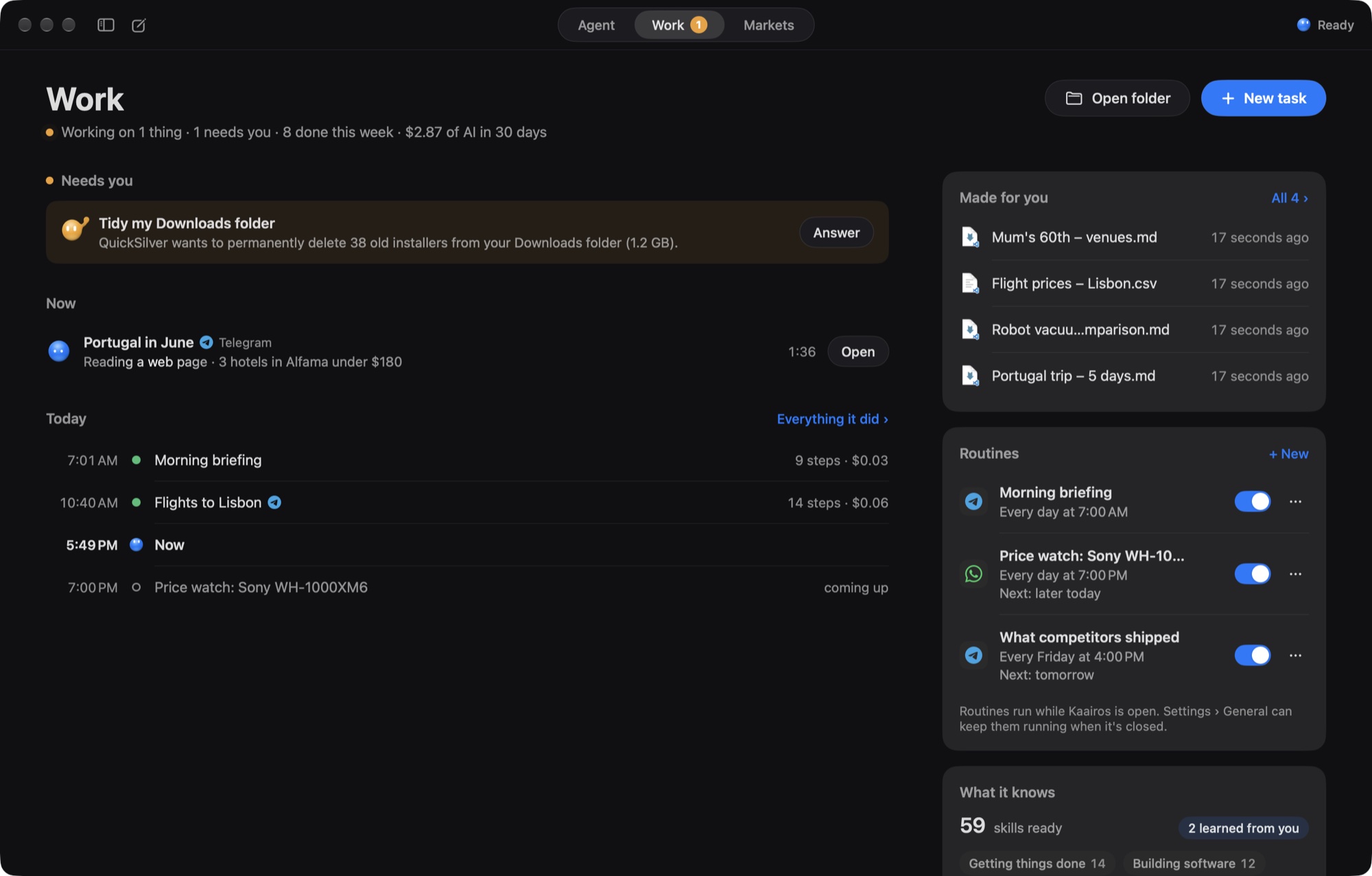
Both mix private AI on your computer with online AI. Msty Studio is a workspace for chatting with many models, comparing them and grounding answers in your documents, and Msty Go (in beta) runs agents. Kaairos is one Mac app that arrives set up as an agent: it does tasks, runs routines and answers on your phone.
The short answer
Choose Msty Studio if you want a free, cross-platform workspace to chat with many local and online models, compare them side by side and ground answers in your own documents. Choose Kaairos if you have a Mac and want an AI agent that is already set up: it picks and runs a private AI for you, does tasks, runs routines on a schedule and answers you on Telegram or WhatsApp, for $29 once.
Msty also makes Msty Go, a separate desktop agent app in beta with scheduled tasks and Telegram, WhatsApp and Discord channels. If you like Msty and want agents, try it too. This page compares both Msty apps with Kaairos where it matters.
At a glance
What it is and who it's for
| Kaairos | Msty (Studio and Go) | |
|---|---|---|
| What it is | A Mac app: an AI agent (QuickSilver) built on Hermes Agent by Nous Research, set up for you | Msty Studio: a “privacy-first workspace” to chat with models, organise knowledge, create media and reuse prompts. Msty Go: “an autonomous task runner” (separate app, in beta) |
| Made for | People who want tasks done without choosing models or editing settings | People who want control over many models, prompts, personas and knowledge; teams on paid plans |
| Main way you use it | Ask for a result in a chat, from the menu bar or from your phone; routines run on their own | Chats in Studio (including split chats and persona “crews”); agents, tasks and playbooks in Go |
Setup
| Kaairos | Msty (Studio and Go) | |
|---|---|---|
| First launch | One button, Set it up. It picks the private AI that fits your Mac's memory, downloads it and tells you when it's ready | Studio asks your intent (exploring, work, developer), then you connect a model: a local one it recommends for your hardware, or an online provider |
| Terminal needed | No | No for Studio's basics. Studio's Agent Mode uses coding agents (Codex, Claude Code, Gemini CLI) installed with npm and signed in from a terminal; Toolbox tools that run locally need Node, Python or uv installed |
| Account or API key needed | No. Online AI is optional | No for local models. An online provider needs its own key. Studio Web needs an Aurum licence |
Models
| Kaairos | Msty (Studio and Go) | |
|---|---|---|
| Local runtime | Hermes' own llama.cpp server, built in | Three engines: Ollama (its managed “Local AI”), MLX and llama.cpp; MLX is recommended on Apple silicon when available |
| Choosing a local model | Done for you: one open-weight model from Hermes' curated catalog, sized to your Mac. No model browser | You choose: a featured catalog with hardware fit, search of the Ollama registry and Hugging Face, or import a GGUF or MLX folder |
| Memory for local AI | 32 GB or more for its own AI; on smaller Macs, connect an online AI | No fixed minimum published; Msty recommends a model for your hardware, from Light to Powerful |
| Online AI | Optional: Sign in with ChatGPT (your plan), 19 services with your own key (Claude, OpenAI, Gemini, OpenRouter, DeepSeek, Grok and more), or Your Own Endpoint | Optional: providers such as OpenAI, Claude, xAI, Gemini and OpenRouter; Azure and Bedrock on Aurum |
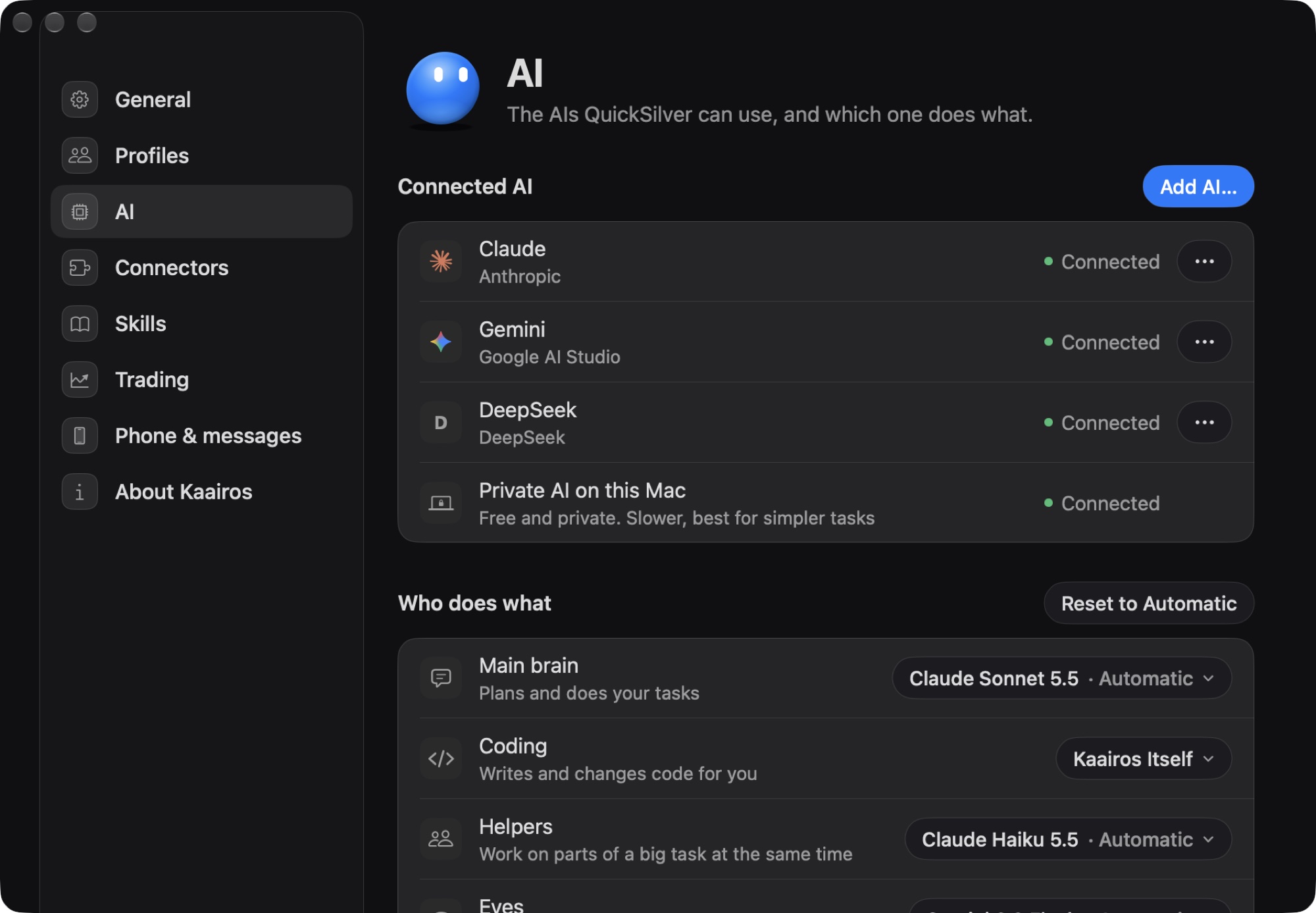
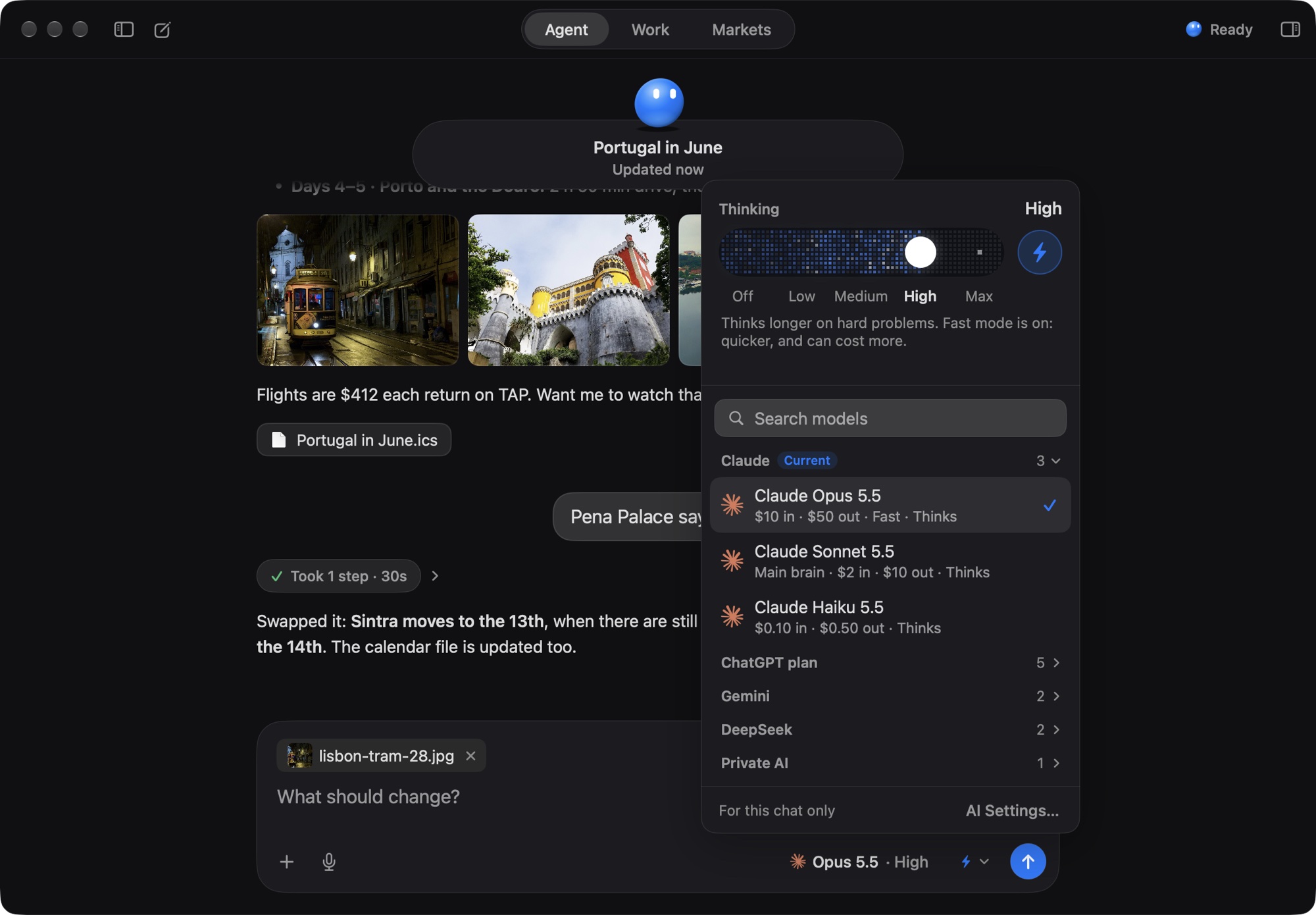
| Using several models | Automatic roles: main brain, routines, helpers, quick chores, eyes, and the private AI as backup. You can also switch per chat | Split chats run models side by side; you assign models per chat and per background function |
What it can do
| Kaairos | Msty (Studio and Go) | |
|---|---|---|
| Chat | Yes | Yes, with split chats, personas and crew conversations |
| Search the web | Yes, and its own browser for sites that need one | Studio: Real-Time Data from a search engine (Google and Brave for everyone; more providers on Aurum) |
| Your documents | Works on files you share and in its Kaairos folder | Knowledge Stacks: retrieval over files, folders, notes and YouTube links, with a local embedding model (Studio Desktop) |
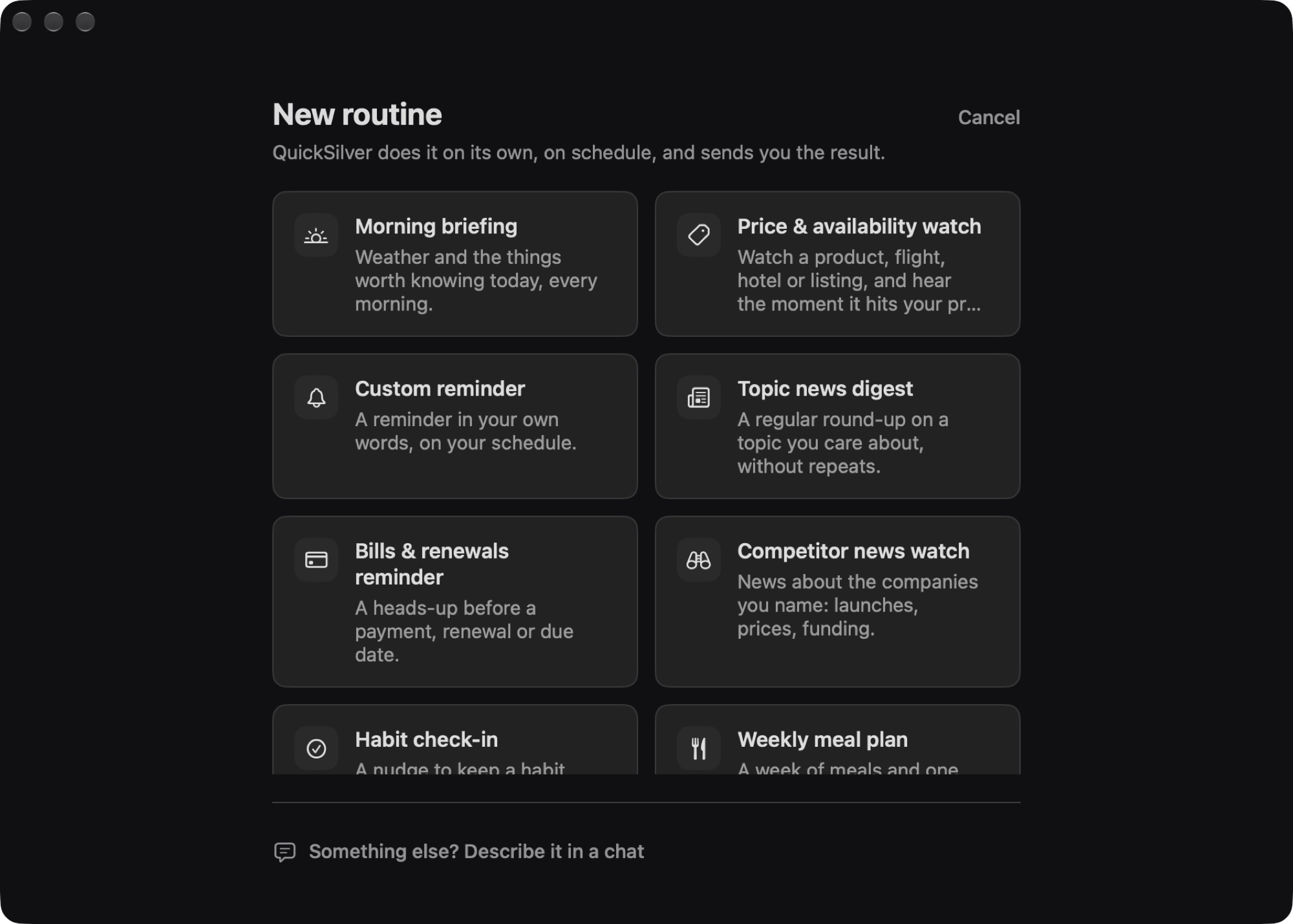
| Schedules and routines | Yes: plain words or a gallery of 13 ready-made routines, with on/off switches | Not in Studio. Msty Go has scheduled tasks (once or cron): prompts, reminders, watchers, playbook runs |
| Phone | Telegram and WhatsApp, linked by scanning a code. A Kaairos phone app is coming soon | Studio: Studio Web in a browser (Aurum). Msty Go: Telegram, WhatsApp and Discord channels; its Android app is invite-only |
| Voice | Dictation, and voice notes from your phone transcribed on the Mac | Not covered in the docs we read |
| Pictures and video | Finds real photos and videos with no key, draws charts; generates with an image service or Higgsfield account | Media Studio generates images and shapes video concepts with the models you connect |
| Connected apps (MCP) | An approved catalog: Notion, Linear, Asana, Dropbox, Stripe and others, each signing in on its own page | Toolbox: add any MCP server, local (STDIO) or remote (HTTP). Go also connects MCP servers |
| Skills, prompts, personas | Skills it learns, Nous Research's catalog, profiles with their own model and personality | Prompt, Persona, Skill and Media Studios; many persona features |
Safety
| Kaairos | Msty (Studio and Go) | |
|---|---|---|
| Approvals | Three levels; the default asks before deleting, buying or sending | Studio Agent Mode: review the plan and approve steps. Go: approvals for sensitive actions in Mission Control |
| Limits on reach | A hard-line blocklist, protected files and secret redaction stay on at every level | Go: Allowed Folders (read/write or read-only), Blocked Patterns, Network Guard presets and sender groups |
| Undo | Checkpoints snapshot files it changes | Studio Agent Mode: review diffs and commit from the workspace |
Privacy
| Kaairos | Msty (Studio and Go) | |
|---|---|---|
| Where chats are kept | On your Mac (~/.kaairos and the Kaairos folder) | On your device; Studio Web keeps data in browser storage |
| Telemetry | None: no analytics in the app; the engine's shared metrics are off | None: Msty says Studio, Go and Nexus send no usage or crash telemetry |
Platforms and requirements
| Kaairos | Msty (Studio and Go) | |
|---|---|---|
| Platforms | Mac with Apple silicon (M1 or later), macOS 15 or later | Studio: macOS 11+ (Apple silicon and Intel), Windows 10/11 (x64 and ARM64), Linux. Go: macOS (Apple silicon), Windows x64, Linux |
| Disk | About 30 GB free (the app plus its own AI) | Depends on the models you download |
Licence, price, updates, support
| Kaairos | Msty (Studio and Go) | |
|---|---|---|
| Price | $29 at launch, then $80, once, for 3 Macs | Studio: Free; Aurum $149 per user per year; Aurum Lifetime $349 per user. Go: free beta. Teams and enterprise on request |
| Updates | Every 1.x update included | Aurum Lifetime includes Aurum features “today and tomorrow” |
| Refunds | 14 days, full refund | Not covered in the pages we read |
| Source code | Closed (the Hermes engine inside is MIT open source) | Closed; we found no public source for Studio or Go |
| Support | Email: support@stuvio.co | Docs, changelog; priority support on enterprise plans |
What each is really for
Msty: a workspace for people who like their models
Msty Studio is built around the conversation and the model. You pick from three local engines, browse and install models from Ollama and Hugging Face, connect online providers, then put several models in one split chat to compare tone, depth and accuracy. Knowledge Stacks ground answers in your own files and notes, and the Prompt, Persona and Skill Studios let you shape reusable assistants. It runs on almost anything: Apple silicon and Intel Macs, Windows on x64 and ARM, and Linux.
That makes it a strong fit for people who enjoy choosing models, writers and researchers who work from a pile of documents, and teams that want SSO, roles and audit logs on enterprise plans. Its free plan is generous, and its privacy stance is clear: no product telemetry, and chats stay on your device unless you send them to an online model.
Msty Go is Msty's answer to agents. It's a separate app in beta (version 1.1.0 beta 5 on 3 November 2026) built around explicit folders, reviewable work and model choice, with scheduled tasks, playbooks, a memory bank and channels for Telegram, WhatsApp and Discord. It assumes you'll define agents, allowed folders, network policy and channel presets yourself.
Kaairos: an agent for people who want the result
Kaairos makes the choices for you. It picks one private AI that fits your Mac, downloads it and sets everything up behind one button. There is no model browser, no prompt studio and no knowledge base to build. You say what you want (“every weekday at 8, send me a briefing on Telegram”) and it searches, opens pages, writes files and keeps doing it on a schedule, asking before anything risky.
If you connect Claude, ChatGPT or Gemini, Kaairos routes work for you: conversations go to the online AI, routines stay on the private AI on your Mac, and the private AI answers if the online one fails. It's for people who will never open a settings file, and it's Mac only.
The same job in both
Job 1: a weekday briefing on your phone
The goal: every weekday at 8, the weather and the news you care about, sent to your phone.
In Msty Studio there are no schedules, so you'd open a chat each morning with Real-Time Data switched on (the globe icon) and ask. In Msty Go, from its docs:
- Set up a model provider (local through Ollama, MLX or llama.cpp, or an online provider).
- Connect a channel: for Telegram or WhatsApp, connect the account or session (WhatsApp uses a QR code), create a channel preset and set its sender policy.
- Open Tasks from the sidebar and create a Prompt task with a Cron schedule.
- Set the destination to your channel preset. Msty suggests checking in-app delivery first, then switching to the channel once the format is right.
- Run the task once by hand to test it.
In Kaairos:
- On the home screen, scan the Telegram or WhatsApp code with your phone.
- Open Work › New routine and pick Morning briefing, or just ask in a chat.
- Choose where the result goes (your Telegram chat). The routine appears in the Work tab with an on/off switch.
Every weekday at 8, send me the weather in Lisbon and the top three news stories on climate tech. Send it to Telegram.
Done. Your briefing runs Monday to Friday at 8:00 AM on the private AI on this Mac and arrives in Telegram. You can pause it from the Work tab.
Job 2: compare three models on the same question
This is Msty's home ground. In Msty Studio, open a split chat, add the models you want (local and online), and ask once: each answers side by side, so you can compare tone, depth and accuracy.
In Kaairos there's no split view. You can switch the model per chat from the model picker and ask again, but comparing models isn't what it's built for. If this is your main job, Msty is the better tool.
Privacy, side by side
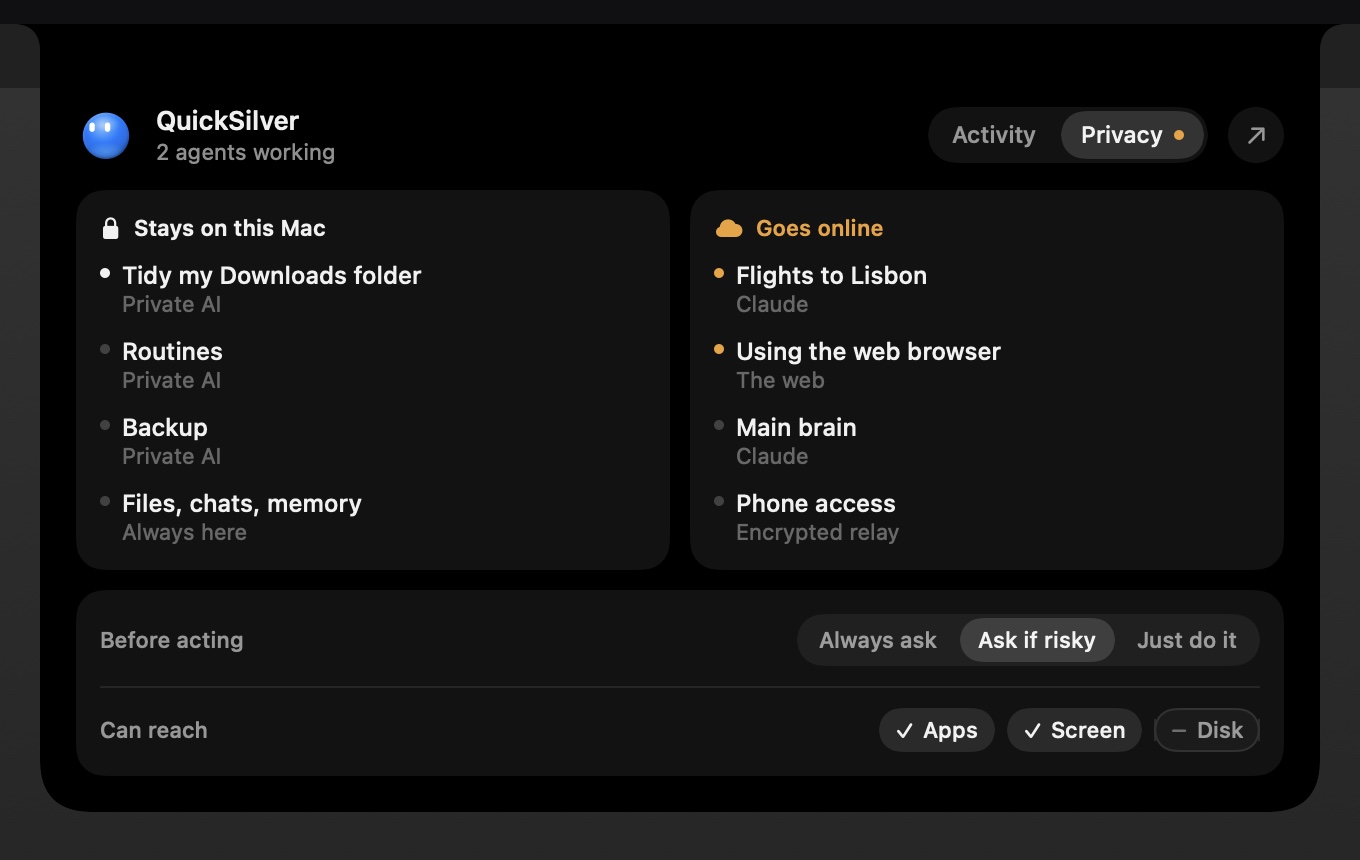
Both keep your chats on your computer and send no product telemetry. The difference is mostly in what each sends out when it does things for you.
| What | Kaairos | Msty (Studio and Go) |
|---|---|---|
| Chats with the local model | Stay on the Mac | Stay on your device |
| Chats with an online model | Go to the AI company you connected | Go to the provider you connected |
| Routines and scheduled tasks | On the private AI by default, so they stay on the Mac (except the web pages they read) | Go: run on whichever model you assign |
| Web searches | Go out to the web | Go to the search provider you choose (Google, Brave, or others such as a SearXNG instance you host) |
| Phone messages | Through Telegram or WhatsApp | Go: through Telegram, WhatsApp or Discord. Studio Web: browser on your device, connecting to your Desktop if you set that up |
| Connected apps | To the service you connected (Notion, Linear and so on) | To the MCP servers you add |
| Product telemetry | None | None, per Msty's privacy policy |
| Licence and account | A licence check with Polar (Stuvio's merchant of record); 30 days offline grace | Licence keys and active devices for paid plans; payments through Lemon Squeezy and Stripe |
| Downloads | The private AI once, then app updates | The models you choose, from Ollama's registry or Hugging Face |
Hardware and cost
Memory
Kaairos needs 32 GB of memory or more to run its own AI: the smallest model in its catalog is about 16.5 GB, and agents need room for long context. On an 8, 16 or 24 GB Mac, setup says so and asks you to connect an online AI, after which it works on any Apple silicon Mac. Msty doesn't publish a minimum: it checks your hardware and recommends a model, from Light to Powerful, so you can run smaller local models on smaller machines. For plain chat on a 16 GB Mac, Msty gives you more local options. See how much memory local AI needs.
Year one, with the arithmetic
| Setup | Kaairos | Msty |
|---|---|---|
| Local models only | $29 once = $29 | Studio Free + Go beta = $0 |
| Paid features | None to buy; every feature is in the $29 | Aurum: $149 × 1 year = $149, or Aurum Lifetime $349 once |
| Plus an online AI | $29 + what you use, billed by that company (or your existing ChatGPT plan) | $0 or $149 + the same provider bills |
| Three computers, one person | $29 covers 3 Macs | Priced per user, not per device, on the pages we read |
If you connect the same online AI to either app, you pay that company the same rates. Kaairos tries to keep that bill down by running routines on the private AI and sending chores to inexpensive models, and the Work tab shows your AI cost over 30 days.
Using them together
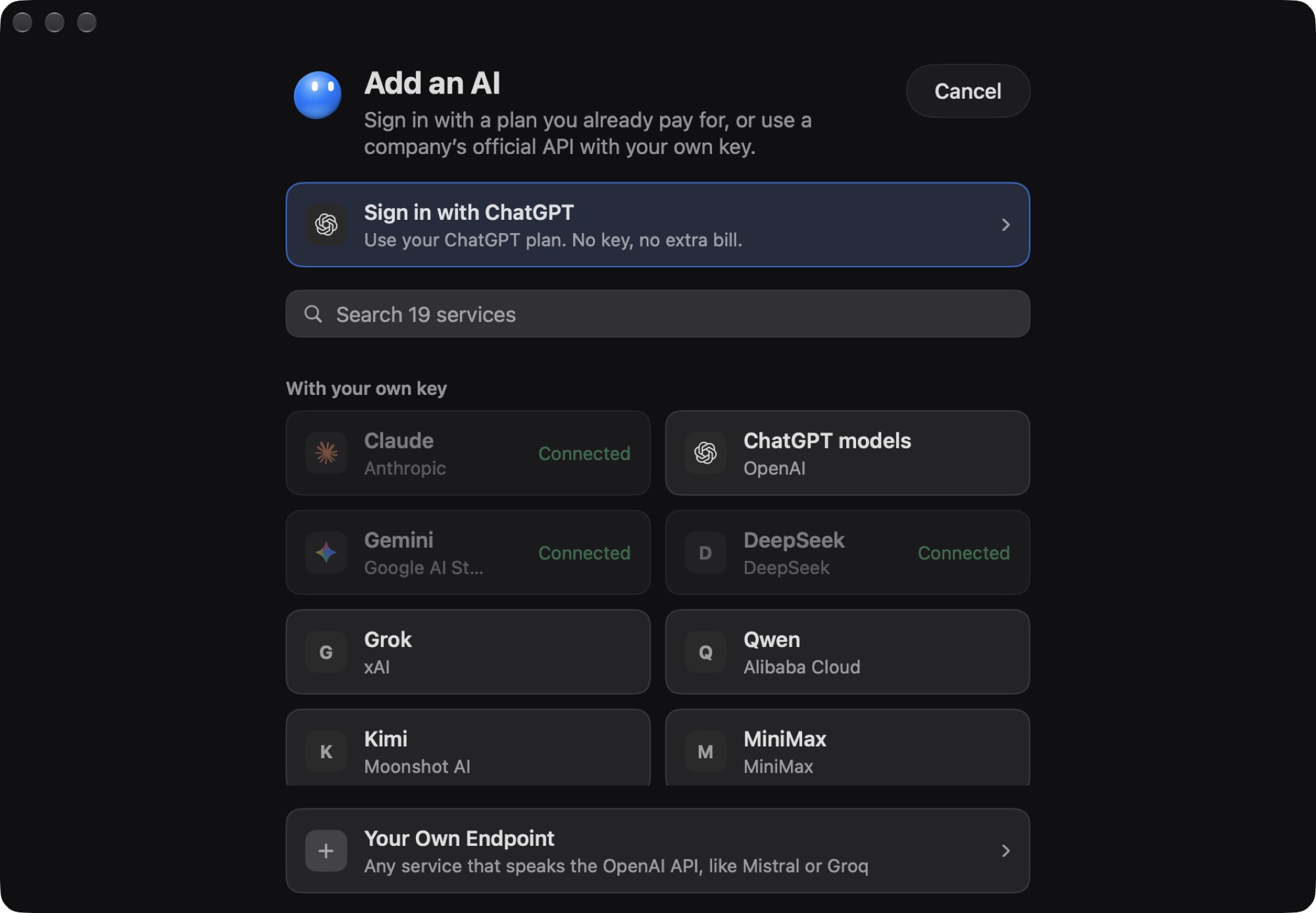
You can keep Msty for chatting and comparing models and use Kaairos for tasks and routines. Msty's docs describe its Local AI service as Ollama's API on port 11964 by default, “including OpenAI-compatible endpoints”. Kaairos can use any OpenAI-compatible server as an AI: Settings › AI › Add AI… › Your Own Endpoint, with a name, the address (for example http://localhost:11964/v1), an optional key and the model name, then Test Connection. We haven't tested this pairing ourselves, so treat it as possible rather than supported.
Keep in mind that a model you run this way uses the same memory as Kaairos's own private AI would, and agents work best with capable models and long context.
When to choose Msty instead
- You want to try many local models, from Ollama's registry or Hugging Face, and pick the engine (MLX, llama.cpp or Ollama) yourself.
- You compare models often: split chats are the fastest way to see several answers side by side.
- You work from documents: Knowledge Stacks give you retrieval over files, folders, notes and YouTube links with a local embedding model.
- Your Mac has 8 to 24 GB of memory and you want local AI anyway: Msty will recommend a smaller model that fits.
- You use Windows, Linux or an Intel Mac, or want the same app on several kinds of computer.
- You want to add any MCP server, not only an approved catalog.
- You want a free app: Studio's free plan and Go's beta cost nothing.
- You need team features: SSO, roles, audit logs and shared resources on Msty's enterprise plans.
- You want agents with strict folder and network policies you define yourself: that's Msty Go's design.
Switching between them
What carries over: your online AI accounts. A Claude, OpenAI, Gemini or OpenRouter key works in both, and in Kaairos you can also sign in with ChatGPT to use your plan. Your files stay where they are; share them with Kaairos or put them in its Kaairos folder.
What doesn't: Msty's chats, personas, prompts and Knowledge Stacks stay in Msty; Kaairos doesn't import them. Models you downloaded in Msty aren't reused by Kaairos's own private AI, which downloads its own (about 24 GB), though you can point Kaairos at Msty's local server as described above. Msty Go tasks need to be recreated as Kaairos routines, which usually means one sentence each.
You don't have to choose: the two can sit side by side on one Mac. Just watch memory if both load large local models at once. Kaairos unloads its private AI after 15 idle minutes.
Sources
- Msty pricing: Studio Free, Aurum $149 per user per year, Aurum Lifetime $349, Go free beta, enterprise plans.
- Msty Studio: engines (MLX, llama.cpp, Ollama), split chats, Knowledge Stacks, crews, Agent Mode, Media Studio, platforms.
- Msty Studio docs: local models: featured catalog, model search, import, MLX recommendation.
- Msty Studio docs: quick start: first-run steps, hardware-based recommendation, Studio Web on Aurum.
- Msty Studio docs: Agent Mode: Codex, Claude Code and Gemini CLI, plans, diffs, approvals.
- Msty Studio docs: Toolbox: MCP over STDIO and HTTP.
- Msty Studio docs: Real-Time Data: search providers and which are Aurum perks.
- Msty Studio docs: Knowledge Stacks: sources and local embeddings, Desktop only.
- Msty Studio docs: Remote Connections: Local AI on port 11964 through Ollama's API, including OpenAI-compatible endpoints.
- Msty Go, Go docs overview, channels, tasks, security, model providers and changelog (1.1.0 beta 5, 3 November 2026).
- Msty privacy policy and privacy FAQ: no product telemetry, local session data, licence data.
- Ollama: OpenAI compatibility: the
/v1OpenAI-compatible API. - Kaairos facts come from the app's own code and documentation; see Kaairos facts.
Fair questions
Is Msty free?
Msty Studio has a free plan, for individual use, that includes local and online model chat, Knowledge Stacks, personas and Agent Mode, some of them marked “Limited”. Aurum costs $149 per user per year or $349 once for lifetime, and adds Studio Web and other power features. Msty Go is free while it's in beta.
Is Msty private?
Msty's privacy policy says Studio, Go and Nexus send no usage or crash telemetry and that session data stays on your device. Chats with local models stay local; chats with an online provider go to that provider, and web searches go to the search engine you pick. The same is true of Kaairos: local by default, online only for what you connect.
Is Msty open source?
No public source code for Msty Studio or Msty Go turned up in our research, and Msty doesn't describe them as open source. Kaairos isn't open source either, though the engine inside it, Hermes Agent, is MIT-licensed. If you need fully open-source software, Jan is the usual pick.
Msty vs LM Studio: which is better on a Mac?
Both are free to start and both can run MLX models on Apple silicon. Msty leans toward a workspace (split chats, personas, Knowledge Stacks, online providers in the same place), while LM Studio leans toward running and serving models. Neither runs routines or reaches you on your phone; see Kaairos vs LM Studio.
What's a good Msty alternative that does tasks for you?
If you want an agent rather than a chat workspace, the options are Msty's own Msty Go (beta, cross-platform, you configure agents and channels), open-source agents such as OpenClaw or Hermes Agent, and Kaairos, which is Hermes Agent already set up as a Mac app with its own private AI. See our overview of private AI apps for Mac.
Does Kaairos let me choose which local model to run?
Not from a list. Kaairos picks one open-weight model that fits your Mac's memory and runs it for you. If you want a specific model, run it in another app that serves an OpenAI-compatible API and add it in Kaairos as Your Own Endpoint.
Can Msty run on a schedule or message my phone?
Msty Studio doesn't have schedules; Studio Web lets you use it from a browser on an Aurum plan. Msty Go, the separate beta app, has scheduled tasks and channels for Telegram, WhatsApp and Discord. Kaairos has routines and Telegram and WhatsApp built in, set up by scanning a code.
Do I need 32 GB of memory for Kaairos?
Only to run its own private AI. With an online AI connected (for example by signing in with ChatGPT), Kaairos works on any Apple silicon Mac with macOS 15 or later. Msty can run smaller local models on Macs with less memory.
Can I use Msty and Kaairos on the same Mac?
Yes. They keep their data in separate places. If both load large local models at the same time, they'll compete for memory, so on a 32 GB Mac it's best to use one local model at a time.
Download and go
Your AI agent, already set up.
One button to set up. Its own private AI, free. Claude, ChatGPT or Gemini when you want more.
A Mac with Apple silicon (M1 or later), macOS 15 Sequoia or later. 14-day refund.