
Compare
Kaairos vs the ChatGPT and Claude apps
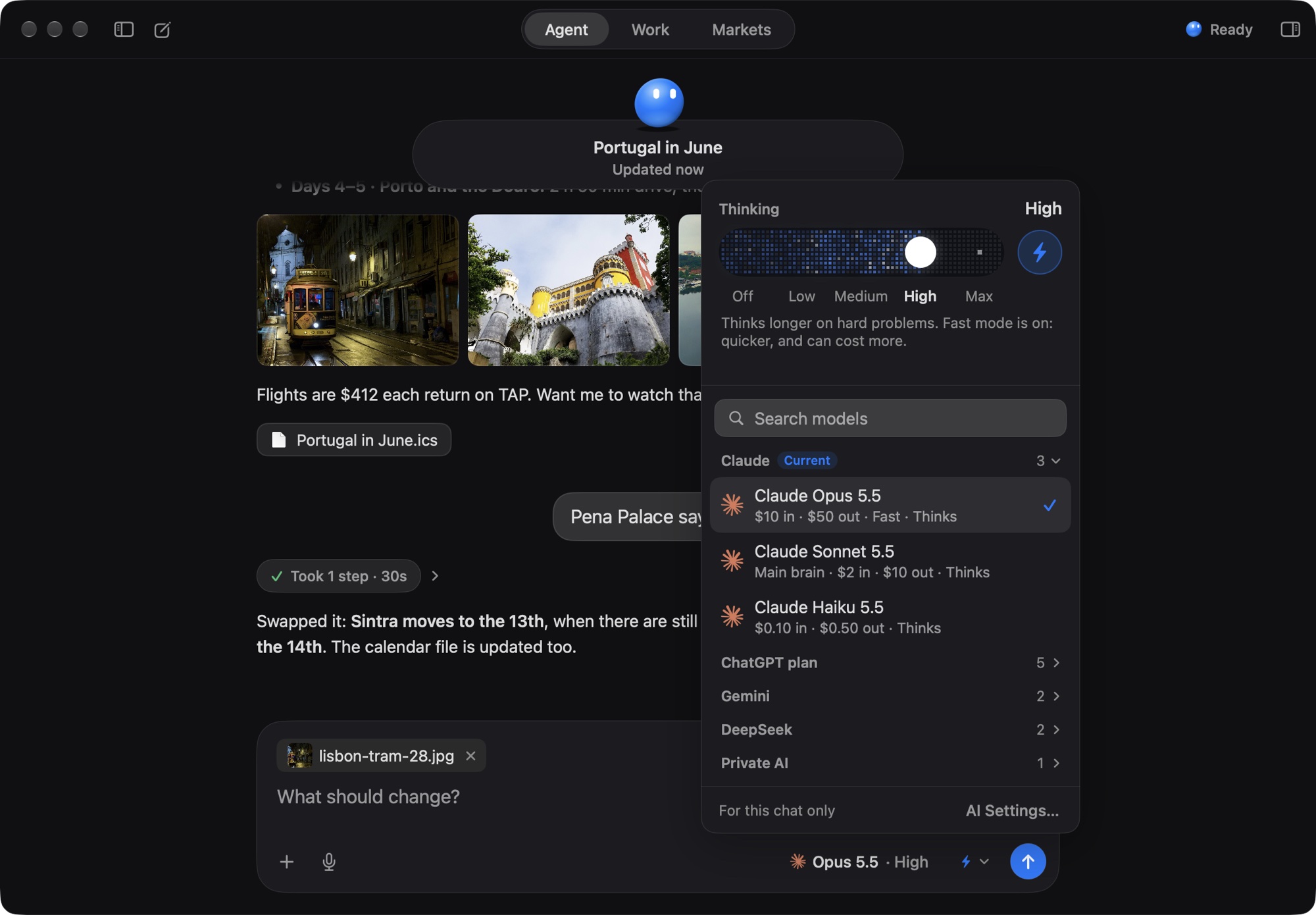
You don't have to choose: Kaairos can use your ChatGPT plan or a Claude key. The real differences are where the AI runs, what happens with no account at all, and what keeps working on your own Mac.
The short answer
Use the ChatGPT or Claude app if you want the strongest models with the least effort, on any computer and your phone, and you're comfortable with everything running in the company's cloud. Choose Kaairos if you want an agent on your Mac that works with no account, keeps routines and files on the Mac, and can still use your ChatGPT plan or a Claude key for harder work.
At a glance
OpenAI and Anthropic ship new features almost monthly, so this table reflects what their own pages said on 16 November 2026. Both desktop apps now include an agent that works on longer tasks (ChatGPT Work and Claude Cowork), not only chat.
What it is and who it's for
| Kaairos | ChatGPT app | Claude app | |
|---|---|---|---|
| What it is | An AI agent app for the Mac with its own private AI, made by Stuvio, built on the open-source Hermes Agent | OpenAI's desktop app: Chat, ChatGPT Work (an agent) and Codex in one app | Anthropic's desktop app: Chat, Claude Cowork (an agent) and Claude Code in one app |
| Who it's for | People who want a private agent on their own Mac that's already set up | Anyone with a ChatGPT account, from Free to Enterprise | Anyone with a Claude account; Cowork needs a paid plan |
| Where the AI runs | On your Mac by default; on an online AI only if you connect one | OpenAI's cloud | Anthropic's cloud |
Setup
| Kaairos | ChatGPT app | Claude app | |
|---|---|---|---|
| Account needed | No (on a Mac with 32 GB of memory or more) | Yes, an OpenAI account | Yes, an Anthropic account |
| First launch | One button, Set it up: picks and downloads its private AI (about 24 GB) and sets itself up | Sign in and start | Sign in and start |
| Terminal or config files | No | No | No |
| API key needed | No. Optional: Sign in with ChatGPT, or a key for Claude and 18 other services | No | No |
Models
| Kaairos | ChatGPT app | Claude app | |
|---|---|---|---|
| Runs a model on your Mac | Yes: an open-weight model chosen for your Mac's memory, run by llama.cpp | No | No |
| Works offline | Yes, for anything that doesn't need the web | No | No |
| Online models | Your ChatGPT plan, Claude (with an API key), Gemini, DeepSeek, Grok, OpenRouter and others, or any OpenAI-compatible endpoint | OpenAI's models only | Anthropic's models only |
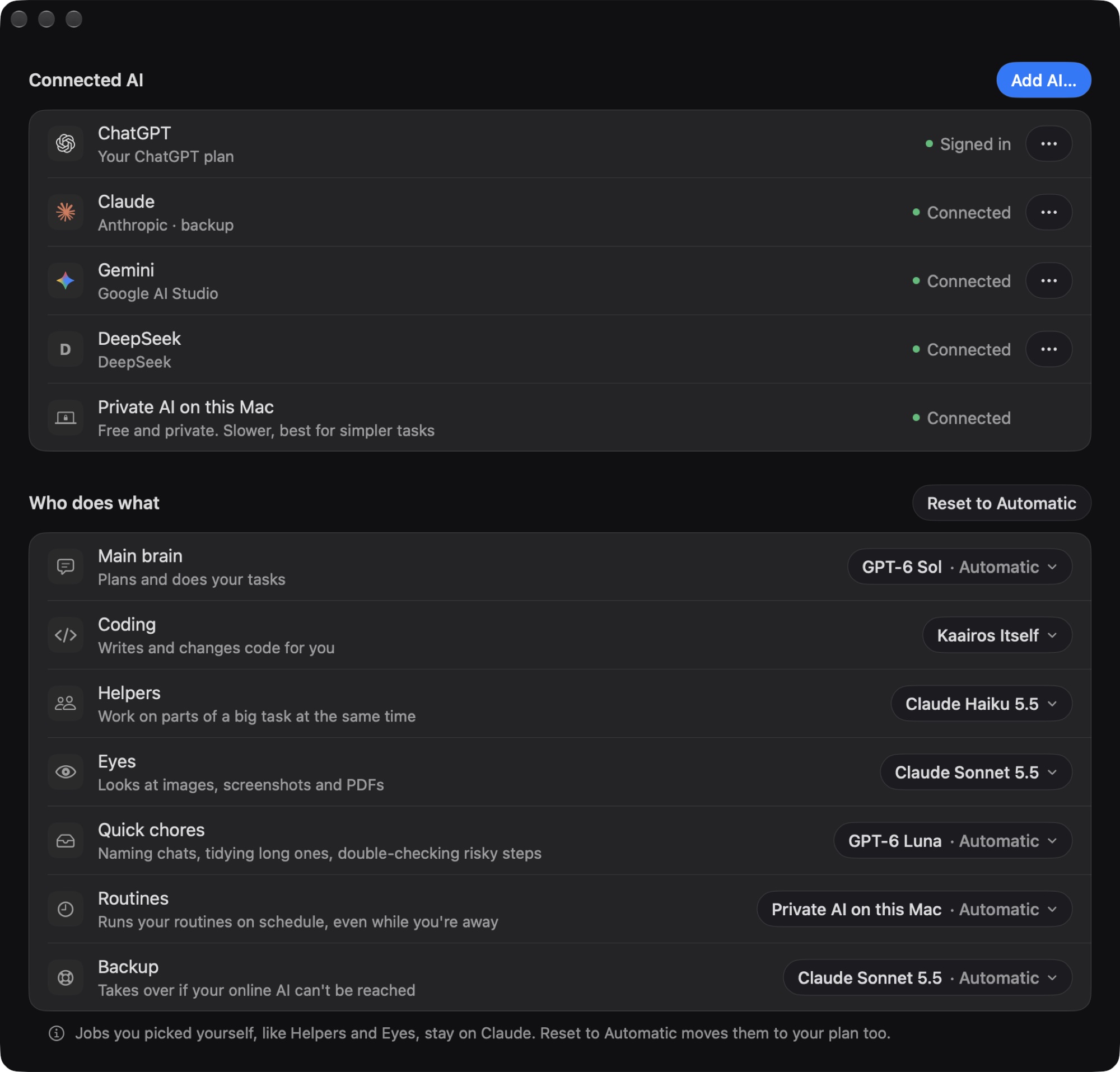
| Mixes models | Yes: main brain online, routines on the private AI, quick chores on fast models, the private AI as backup | No | No |
| Per-chat model choice | Yes, with a thinking slider | Yes, within OpenAI's models | Yes, within Anthropic's models |
What it can do
| Kaairos | ChatGPT app | Claude app | |
|---|---|---|---|
| Chat, research, writing | Yes | Yes | Yes |
| Use a web browser for you | Yes, with its own browser | Yes: a built-in browser in the desktop app for agent work | Yes, through Claude in Chrome (paid plans) |
| Files on your computer | Yes, in its Kaairos folder and files you share | Yes, on desktop, through ChatGPT Work | Yes, folders you connect, through Cowork |
| Scheduled tasks | Yes: a gallery of 13 routines, or plain words | Yes, on paid plans (listed on Go, Plus and Pro) | Yes, in Cowork (paid plans) |
| Runs while your computer sleeps | No: the Mac must be on and awake | Not stated on the pages we read | Yes: Anthropic says scheduled tasks run remotely |
| From your phone | Telegram and WhatsApp chats to your own Mac | OpenAI's own phone apps | Anthropic's own phone apps |
| Connected apps | MCP connectors from an approved catalog (Notion, Linear, Asana, Dropbox, Stripe and more) | Draws on email, files and what's on screen (per its download page) | Connectors, plus desktop extensions (local MCP servers) |
| Pictures and video | Finds real photos and videos with no key; makes them with an image service or Higgsfield | Image creation built in | Not listed on the pages we read |
Safety
| Kaairos | ChatGPT app | Claude app | |
|---|---|---|---|
| Asks before acting | Three levels: Always ask first, Ask before anything risky (default), Just get it done | ChatGPT Work “checks in when judgment or approval matters”; Plan mode for approving a plan first | Cowork has Manual, Auto and Skip modes |
| Deleting files | Asks first at the default level; changed files are snapshotted so they can be undone | Not documented on the pages we read | Asks for explicit permission before permanently deleting a file |
Privacy
| Kaairos | ChatGPT app | Claude app | |
|---|---|---|---|
| Your chats are processed | On your Mac, unless you send them to an online AI you connect | By OpenAI | By Anthropic |
| Used to train models | Not by Stuvio. If you connect an AI through its API, that company's API terms apply | Unless you turn off “Improve the model for everyone” | Only if the “Model Improvement” setting is on, a chat is flagged for safety review, or you opt in |
| Analytics | None in the app; the engine's usage metrics are switched off | OpenAI's privacy policy applies | Anthropic's privacy policy applies |
Platforms, price and support
| Kaairos | ChatGPT app | Claude app | |
|---|---|---|---|
| Mac requirements | Apple silicon, macOS 15 or later; 32 GB of memory for its own AI | macOS 14 or later, Apple silicon or Intel (OpenAI help centre) | macOS 13 or later (Anthropic's install guide) |
| Other platforms | None (a Kaairos phone app is coming soon) | Windows, web and mobile | Windows, Linux (beta), web, mobile |
| Price | $29 at launch, then $80, once, 3 Macs, every 1.x update | Free; Plus $20 a month; Go and Pro tiers | Free; Pro $20 a month, or $200 a year; Max $100; Ultra $200 a month |
| Open source | No (its engine, Hermes Agent, is MIT-licensed) | No | No |
| Support | Email, support@stuvio.co | OpenAI help centre | Anthropic help centre |
What each is really for
The ChatGPT and Claude apps: the frontier models, wherever you are
These apps exist to give you the newest models from the two leading AI labs, with as little friction as possible. Sign in and you get the same conversations on your Mac, the web and your phone. In 2026 both grew into agents: ChatGPT Work can use local files, apps and a built-in browser from the desktop app and schedule recurring tasks, and Claude Cowork plans and carries out multi-step work, reads and writes folders you connect, and runs scheduled tasks in the cloud.
They fit people who want the best answers on any device, who are happy for their work to live in an AI company's cloud, and who are already paying for a plan. For hard reasoning, long documents and coding, the top online models are clearly ahead of any model that fits in a Mac's memory today.
Kaairos: an agent that lives on your Mac
Kaairos starts from the other end. Its own AI runs on your Mac, so it works with no account, no subscription and no internet for anything that doesn't need the web. It's an agent first: it runs routines, keeps files in its own folder, watches prices and pages, and reports to you on Telegram or WhatsApp.
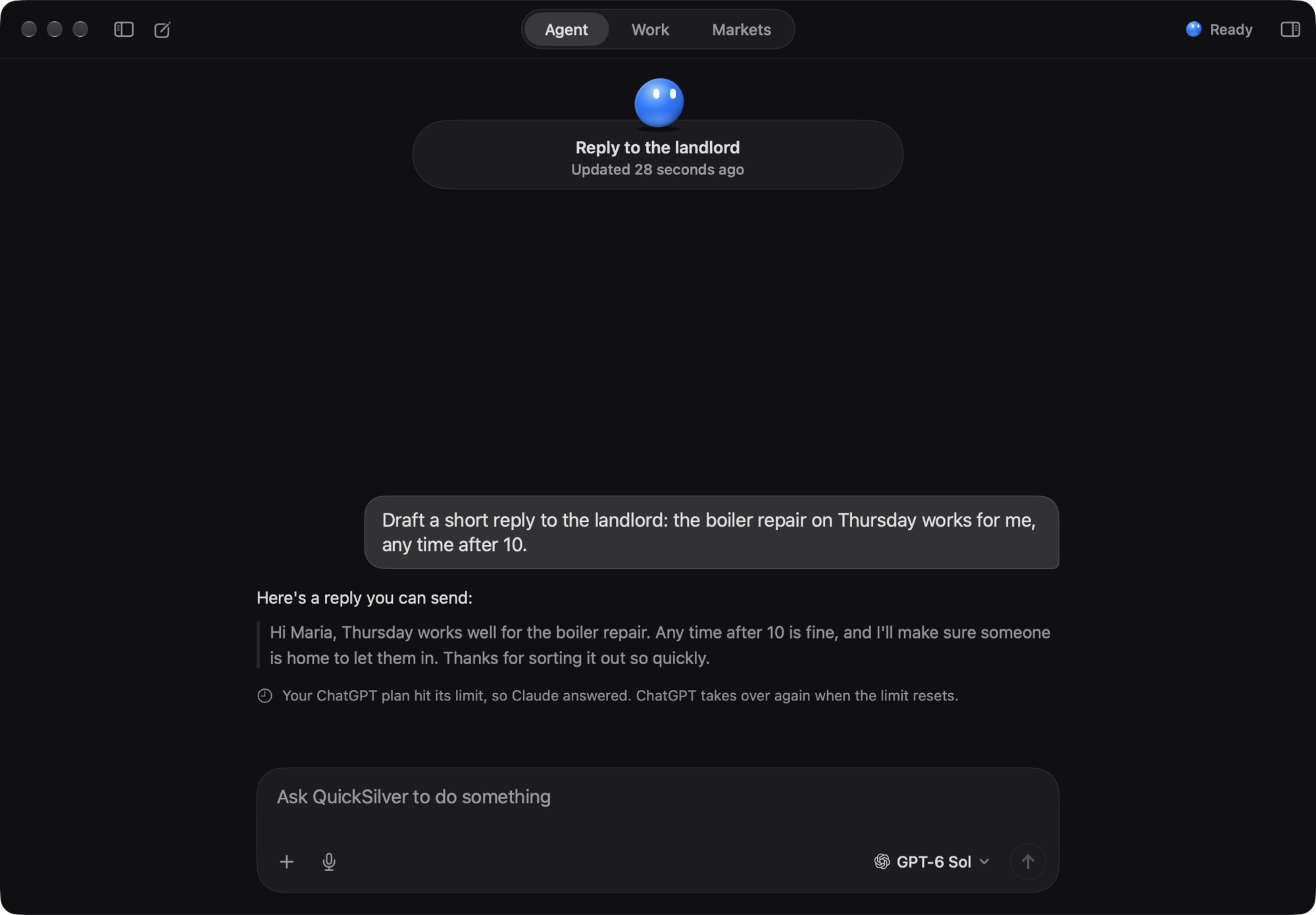
It isn't trying to replace the best online models. When you connect one, Kaairos gives it your conversations, keeps routines on the private AI where what they read stays on the Mac, and falls back to the private AI if the online one fails. It fits people who want privacy by default, one price instead of another subscription, and a choice of AI companies rather than one.
The same job in both
Every weekday at 8, a briefing on my phone
In ChatGPT (paid plans list scheduled tasks):
- Open ChatGPT on the Mac, the web or your phone.
- Ask for it in a chat, for example “Every weekday at 8 am, give me the weather in Lisbon and the three news stories I should know”.
- ChatGPT schedules it as a task. You read the results in ChatGPT, including on its phone app.
In Claude (Cowork, paid plans):
- Open the Claude desktop app and switch to Cowork.
- Click Scheduled in the sidebar, then New task, and describe the briefing. Claude may ask a few questions, then proposes a name, schedule and instructions to confirm.
- It runs remotely on schedule, even with your computer asleep. You check runs under Scheduled on any device.
In Kaairos:
- Link Telegram once: scan the code on the home screen with your phone.
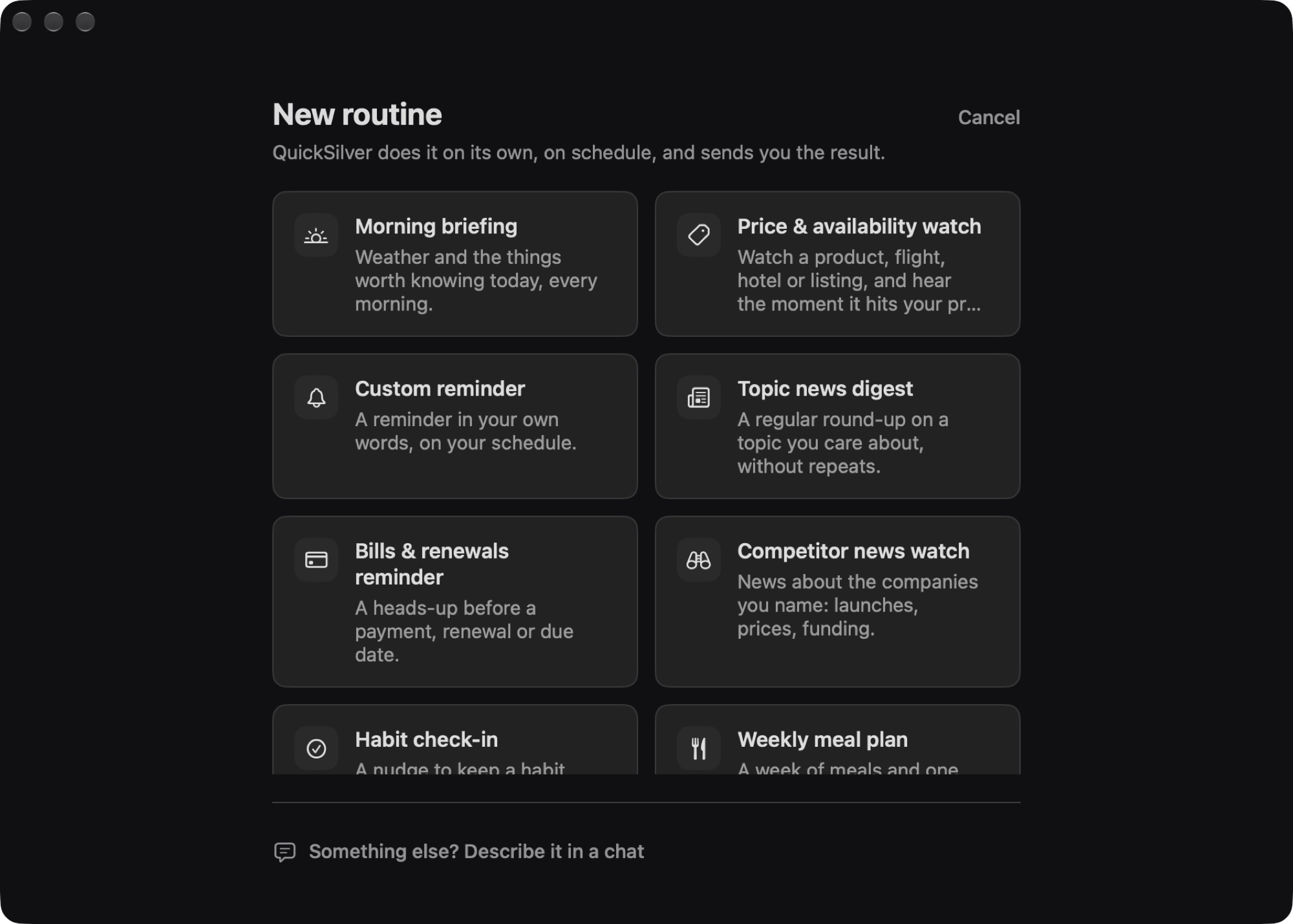
- Open Work › New routine › Morning briefing, or just ask in words.
- Choose where results go (your Telegram chat). The routine runs on the private AI, so it costs nothing per run.
Every weekday at 8, send me the weather in Lisbon and the three stories I should know. Send it to Telegram.
Done. Weekday briefing runs Monday to Friday at 8:00 on the private AI on this Mac, and arrives in your Telegram chat. You can switch it off in Work › Routines.
Good morning. Lisbon: 19°, sunny, light wind. Three stories worth knowing, each with its source…
The honest difference: Claude runs scheduled tasks remotely, so they happen even when your laptop is closed (OpenAI's pages we read don't say either way for ChatGPT). Kaairos runs on your Mac, so the Mac has to be on and awake (turn on Keep working when closed so it runs with the app closed). In return, the briefing is processed on your Mac, uses no plan allowance, and reaches you in the chat app you already use.
Privacy, side by side
What leaves your computer, and who receives it:
| Kaairos (private AI only) | Kaairos (with an online AI) | ChatGPT or Claude app | |
|---|---|---|---|
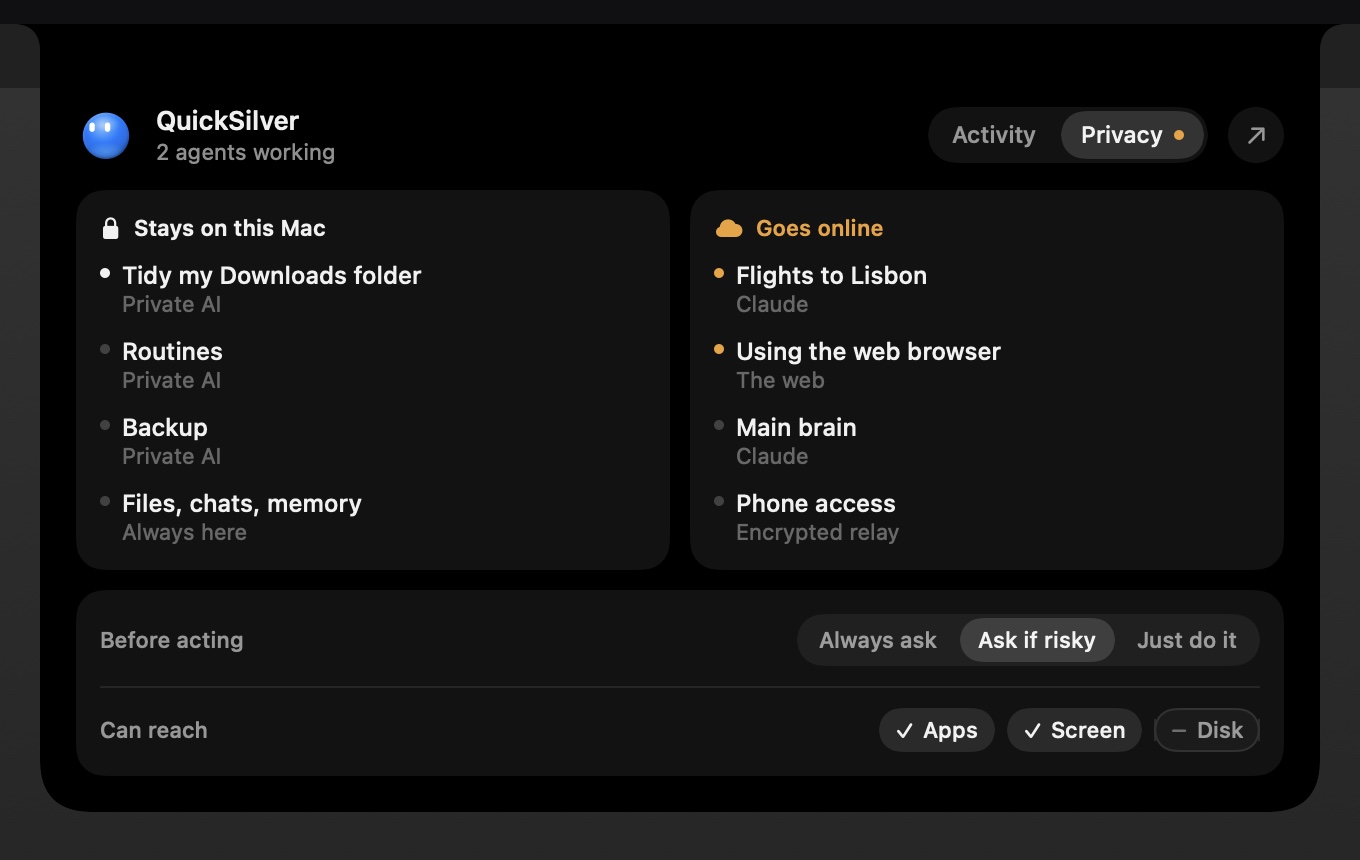
| Your messages | Stay on the Mac | Conversations go to the AI you connected; routines stay on the Mac | Go to OpenAI or Anthropic |
| Files the agent reads | Stay on the Mac | Only what a conversation sends to the online AI | Whatever you upload or connect goes to the company |
| Chat history | On the Mac, in ~/.kaairos | On the Mac | On the company's servers, in your account |
| Web searches and pages | Go to the web | Go to the web | Go to the web, via the company |
| Phone messages | Through Telegram or WhatsApp | Through Telegram or WhatsApp | Through the company's own phone app |
| Training | No | Depends on that company's API terms | Controlled by a setting: ChatGPT's “Improve the model for everyone”, Claude's “Model Improvement” |
| Other traffic | The model download, app updates, licence checks (Polar) | The same | The app's own traffic |
Both companies give you real controls: ChatGPT's Temporary Chats aren't used to improve its models, and Claude's incognito chats are never used for improvement. The difference is structural. With the apps, your conversation always goes to the company. With Kaairos's private AI, it never leaves the Mac.
Hardware and cost
The ChatGPT and Claude apps need almost nothing from your Mac, because the AI runs in the cloud. Kaairos's own AI needs 32 GB of memory or more; the smallest model in its catalog is about 16.5 GB and none fits 8, 16 or 24 GB Macs. On those Macs, Kaairos works once you connect an online AI.
What you'd pay in year one (US prices, before tax):
| Setup | Year one | The arithmetic |
|---|---|---|
| Kaairos, private AI only | $29 | $29 once + $0 |
| ChatGPT Plus | $240 | 12 × $20 |
| Claude Pro, billed yearly | $200 | $200 billed up front (or 12 × $20 = $240 monthly) |
| Kaairos + your ChatGPT Plus plan | $269 | $29 + 12 × $20; the $240 is the plan you may already have |
| Kaairos + a Claude API key, light use | about $185 | $29 + 12 × $13, where $13 a month assumes 5 million input and 0.3 million output tokens on Claude Sonnet 5.5 ($2 and $10 per million): 5 × $2 + 0.3 × $10 |
The API line is an example, not a promise: agent tasks that read many web pages use far more tokens than a short chat. Kaairos shows the real figure in the Work tab as AI cost over 30 days, and routines on the private AI add nothing. The free tiers of ChatGPT and Claude cost $0 but have tighter limits and fewer agent features.
Using them together
Most people who try Kaairos already pay for ChatGPT or Claude. You can keep doing so:
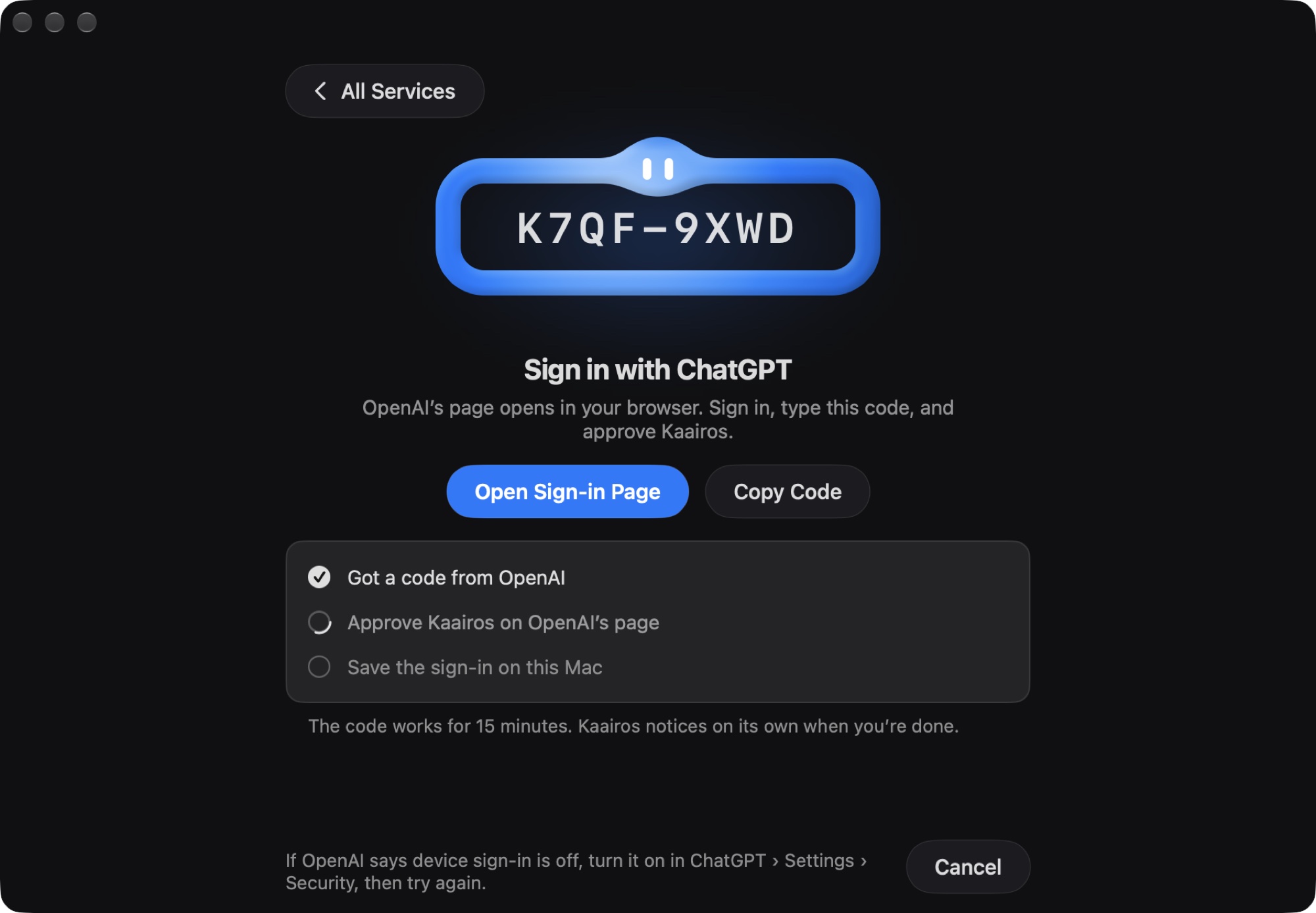
- ChatGPT: in Kaairos, open Settings › AI › Add AI… and choose Sign in with ChatGPT. You type a short code on OpenAI's own page; Kaairos never sees your password. Your conversations then use your plan, with no API key and no extra bill.
- Claude: Claude connects with an Anthropic API key, billed by Anthropic for what you use. A Claude Pro or Max subscription can't be used in Kaairos.
- Both: connect both and Kaairos assigns roles: one as the main brain, the other as backup, and the private AI for routines.
You can also keep the ChatGPT or Claude app for quick questions on the go and use Kaairos for the things that should stay on your Mac.
When to choose the ChatGPT or Claude app instead
- You want scheduled work to run while your computer is asleep or off. Claude's scheduled tasks run remotely; Kaairos needs the Mac awake.
- You work across Windows, the web and your phone, not only a Mac.
- Your Mac has less than 32 GB of memory and you don't want to manage an API key: a ChatGPT or Claude plan is the simplest route.
- You mostly need the strongest reasoning, long documents or coding, and you're happy with the cloud.
- You want their newest features first: ChatGPT Work, Claude Cowork, Claude Code and the latest models arrive in their own apps before anywhere else.
- You'd rather pay nothing up front: both have free tiers.
Switching between them
- Carries over: your ChatGPT plan (sign in from Kaairos) and your way of asking. The same prompts work.
- Doesn't carry over: chat history, memories, custom GPTs, Projects and Claude's connected folders. Kaairos starts its own memory and learns your preferences as you use it.
- Scheduled tasks: recreate them as routines in Kaairos, from the gallery or in plain words.
- Connected apps: Kaairos has its own connector catalog; sign in to Notion, Linear and others again from Settings › Skills.
- Claude subscription: doesn't carry over; use an Anthropic API key instead.
Sources
- Claude pricing: plans and prices (Free, Pro $20 a month or $200 a year, Max $100, Ultra $200).
- Claude API pricing: Claude Sonnet 5.5 at $2 input and $10 output per million tokens.
- Download Claude: desktop platforms, Cowork, Claude in Chrome, desktop extensions, quick entry.
- Get started with Claude Cowork: plans, local files, Manual/Auto/Skip modes, deletion permission.
- Schedule recurring tasks in Claude Cowork: tasks run remotely; Scheduled › New task (read via search excerpts).
- Install Claude Desktop: macOS 13 or later; desktop extensions as local MCP servers.
- Is my data used for model training?: the Model Improvement setting and incognito chats.
- ChatGPT plans and ChatGPT Plus: scheduled tasks on Go, Plus and Pro; ChatGPT Work access. The pages didn't show prices to our checker.
- ChatGPT Work: desktop on all plans, local files, apps and browser, scheduled tasks, check-ins and Plan mode.
- Download ChatGPT for desktop: ChatGPT Work and Codex in the desktop app.
- What is ChatGPT Plus? ($20 a month), ChatGPT macOS app requirements (macOS 14 or later) and Data controls FAQ: OpenAI's help centre blocks automated readers, so these were read through search-engine excerpts of the pages.
Fair questions
Can I use my ChatGPT Plus subscription in Kaairos?
Yes. Open Settings › AI › Add AI… and choose Sign in with ChatGPT; you type a short code on OpenAI's page. Your conversations then use your plan with no API key. Routines stay on the private AI, and if your plan hits its limit, another connected AI or the private AI answers.
Can I use my Claude Pro or Max subscription in Kaairos?
No. Kaairos connects to Claude with an Anthropic API key, billed by Anthropic for what you use. Kaairos also refuses to borrow a Claude Code login it finds on the Mac, because AI companies' terms forbid that for apps like this.
Is the ChatGPT or Claude desktop app private?
They're as private as the company's cloud: every conversation goes to OpenAI or Anthropic. Both let you limit training, with ChatGPT's “Improve the model for everyone” setting and Temporary Chats, and Claude's “Model Improvement” setting and incognito chats. Kaairos's private AI processes your chats on your Mac, so they don't go to any AI company.
Can ChatGPT or Claude work offline on a Mac?
No. Both apps need the internet, because the models run in the cloud. Kaairos's own AI works offline for anything that doesn't need the web, such as drafting, summarising files or sorting notes.
Do I still need ChatGPT or Claude if I have Kaairos?
Not to use Kaairos: on a Mac with 32 GB of memory or more it works with no account. Many people connect one anyway for harder questions, since the top online models reason better than any model that fits in a Mac's memory.
Can the ChatGPT and Claude apps run tasks on a schedule?
Yes. ChatGPT lists scheduled tasks on its paid plans, and Claude Cowork has scheduled tasks on paid plans that run remotely, even when your computer is asleep. Kaairos runs routines on your Mac, which must be on and awake, and can deliver results to Telegram or WhatsApp.
Which is cheaper over a year?
In US prices: Kaairos alone is $29 once at launch. ChatGPT Plus is 12 × $20 = $240 a year and Claude Pro is $200 a year billed up front. If you combine Kaairos with a plan you already pay for, you add $29.
Does Kaairos work on my 16 GB MacBook Air?
Yes, once you connect an online AI: sign in with ChatGPT or add a key. Its own private AI needs 32 GB of memory or more, so on a 16 GB Mac setup says so and asks for an AI account.
Download and go
Your AI agent, already set up.
One button to set up. Its own private AI, free. Claude, ChatGPT or Gemini when you want more.
A Mac with Apple silicon (M1 or later), macOS 15 Sequoia or later. 14-day refund.