
Alternatives
Private AI apps for Mac, compared
There are three kinds of AI app worth knowing about on a Mac: model runners, which let you run models and chat with them; agents, which do tasks for you; and the cloud apps from the AI companies. Here's who each one is for, with what we checked and where. We make Kaairos, so read our take with that in mind.
The short answer
For a private agent that does tasks with no setup, on a Mac with 32 GB of memory or more, pick Kaairos. To explore and serve local models, LM Studio. For developers, Ollama. For a free, open-source chat app that runs on smaller Macs, Jan. For a free, open-source agent platform you configure yourself, Osaurus or OpenClaw.
Model runners, agents and cloud apps
Most confusion about “private AI” comes from mixing up three different kinds of product. Knowing which kind you want narrows the list to two or three apps.
Model runners
A model runner downloads AI models and runs them on your computer. You chat with them, give them documents, or connect other software to them through a local API. LM Studio, Ollama, Jan and GPT4All are in this group, and Msty Studio is a richer chat workspace built on the same idea. They're the right tool if the model is the point: trying new ones, comparing them, or building something on top. They don't do errands on their own. A model answers; it doesn't search on a schedule or message you when a price drops.
Agents
An agent uses a model to do things: search and read the web, work with files, run on a schedule, reach you on your phone, and ask before anything risky. OpenClaw, Hermes Agent (and its official Hermes Desktop app), Osaurus, Msty Go and Kaairos are agents. An agent can be private too, if the model it uses runs on your Mac. Some agents are toolkits you assemble; others arrive set up.
Cloud apps
The ChatGPT and Claude apps run the strongest models, but in the company's cloud: what you type goes to OpenAI or Anthropic. Both now have agent features too. They aren't private in the on-your-Mac sense, but they matter here because many people want to keep using them. Kaairos can use ChatGPT (with Sign in with ChatGPT) and Claude (with an Anthropic API key) for conversations, while keeping routines on its private AI.
At a glance
What each is, who it's for, and what it costs
| App | Kind | Best for | Price | Licence |
|---|---|---|---|---|
| Kaairos | Agent, set up for you | People who want a private agent on their Mac with no setup, routines and phone access | $29 once at launch (3 Macs, every 1.x update) | Proprietary app; built on Hermes Agent (MIT) |
| OpenClaw | Agent, gateway-based | Power users who want the biggest open-source agent ecosystem, many chat channels and any OS | Free; you pay for hosted models | MIT |
| Hermes Desktop | Agent (official Hermes Agent app) | Hermes users who want every control, developer tools and the newest engine | Free; optional paid Nous Portal | MIT |
| Osaurus | Agent platform, local and cloud | Builders who want a free, open-source native app with MLX, a local API, MCP and many channels | Free; Osaurus Cloud credits and team Workspaces paid | MIT |
| Msty | Chat workspace (Studio); agent app in beta (Go) | Heavy chat across many local and online models, side-by-side comparisons and knowledge stacks | Studio free; Aurum $149 per user per year or $349 lifetime; Go free in beta | Closed source |
| LM Studio | Model runner (plus the Bionic agent app) | Exploring, comparing and serving local models; offline document chat | Free for home and work; Bionic+ $20 a month, Pro $100 a month for cloud models | Proprietary, free licence |
| Ollama | Model runtime with CLI, API and chat app | Developers and apps that need local models | Free locally; cloud plans from $20 a month | MIT |
| Jan | Model runner and chat app | A free, open-source chat app with a local API, on almost any Mac | Free | Apache 2.0 |
| GPT4All | Model runner and chat app | Simple offline chat, including with your own documents (LocalDocs) | Free | MIT |
| ChatGPT and Claude apps | Cloud chat apps with agent features | The strongest models, on every device, if cloud processing is fine | Free tiers; Plus and Pro from $20 a month | Proprietary |
Local models, schedules, phone and platforms
| App | Local models | Memory for local AI | Runs on a schedule | From your phone | Platforms |
|---|---|---|---|---|---|
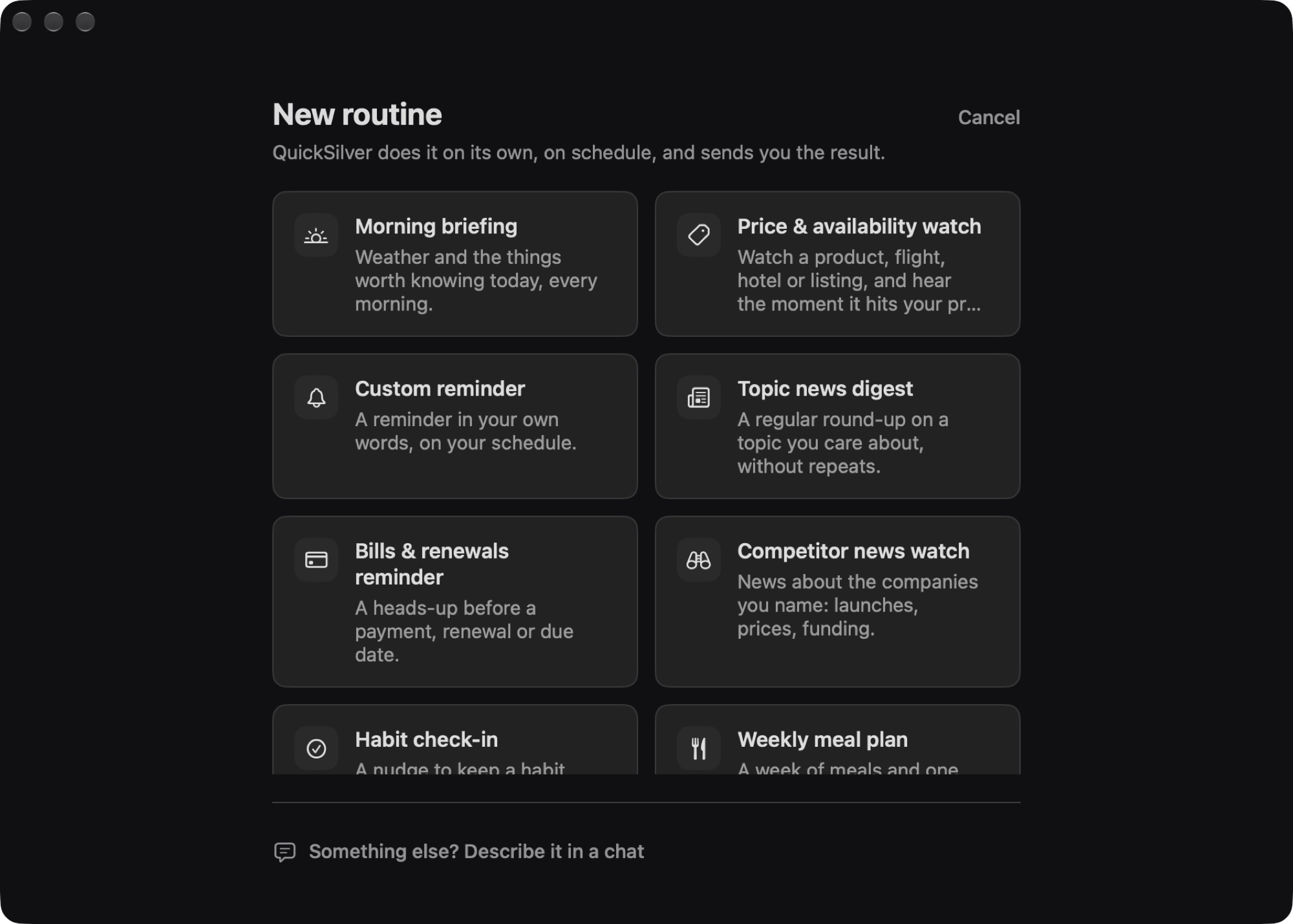
| Kaairos | Its own private AI, chosen and downloaded for you (llama.cpp) | 32 GB or more; any Apple silicon Mac with an AI account | Yes: plain words or a gallery of 13 routines, also with the app closed | Telegram and WhatsApp, by scanning a code | Mac (Apple silicon, macOS 15+) |
| OpenClaw | Through a local runtime you set up, such as Ollama | Depends on the runtime and model you choose | Yes (cron jobs in the Gateway) | 20+ chat channels through its Gateway | macOS (app needs 26.2+), Windows, Linux |
| Hermes Desktop | Built-in Local Models page (llama.cpp), you pick the model | Depends on the model; smaller ones run on smaller Macs | Yes (cron jobs, run by the gateway) | Telegram (Create with QR) and other gateway channels | macOS (Apple silicon), Windows, Linux |
| Osaurus | MLX models and Apple's on-device model | Its own small model is offered on every Mac | Yes, while Osaurus is open | WhatsApp, Telegram, Slack, Discord, iMessage, email; iPhone app in beta | Mac (macOS 15.5+), Windows 11 |
| Msty | Many local models you manage | Not published | Msty Go (beta) has scheduled tasks | Msty Go: Telegram, WhatsApp, Discord | Mac, Windows, Linux |
| LM Studio | Any GGUF or MLX model you search for and download | 16 GB recommended | Not described in its docs | LM Link and the Locally app for iPhone and iPad | macOS 14+ (Apple silicon), Windows, Linux |
| Ollama | Its model library, from the CLI or app | Depends on the model | No (add an agent) | No | macOS 14+, Windows, Linux |
| Jan | Models from Hugging Face or your own files | 8 GB or more | Not in its desktop docs | Not confirmed | macOS 13.6+ (Apple silicon), Windows, Linux |
| GPT4All | Open models you download in the app | Not stated on its home page | No | No | macOS 12.6+, Windows, Linux |
| ChatGPT and Claude apps | None: the models run in the cloud | Not applicable | Yes, scheduled tasks on paid plans | Their own mobile apps | Mac, Windows, web, iPhone, Android |
Each linked comparison has the details behind these cells, with sources. Products in this category change monthly: LM Studio launched an agent app in July 2026 and Msty added one in beta, so check the dates on each page.
How to choose, in four questions
- Do you want answers or results? If answers (chat, drafts, questions about a document), a model runner or a cloud app is enough. If results (things done, on a schedule, while you're away), you want an agent.
- Will you ever open a terminal? If not, rule out anything whose setup starts with a command or a config file. Kaairos, LM Studio, Jan, Msty and GPT4All are download-and-click apps. OpenClaw, Hermes and Ollama's agent routes expect you to be comfortable with a command line and with choosing models and providers.
- How much memory does your Mac have? A model has to fit in memory with room to spare. Chat apps can run small models on 8 or 16 GB. An agent needs a stronger model with a long context, and Kaairos's own private AI needs 32 GB or more; on smaller Macs you connect an AI account instead. See how much memory local AI needs.
- Mac only, or everywhere? OpenClaw, Hermes Desktop, LM Studio, Ollama, Jan, Msty and GPT4All also run on Windows and Linux, and Osaurus on Windows 11. Kaairos is Mac only, by design.
Which one, for which person
“I want it to do things for me, and I don't want to set anything up”
This is what Kaairos is for. Press Set it up, and it picks a private AI that fits your Mac, downloads it and gets ready, with no questions, terminal or API key. Then you ask in plain words, pick a routine from the gallery, or scan a code to reach it from Telegram or WhatsApp. It asks before anything risky, by default before deleting, buying or sending. The catch: its own AI needs a Mac with 32 GB of memory or more, and it's a paid app ($29 once at launch).
“I want to try local models and see what they can do”
LM Studio is the friendliest way to search, download, compare and chat with local models on a Mac, and it can serve them to other apps. Jan does much of the same, is open source and runs on smaller Macs. GPT4All is a simpler option with LocalDocs for chatting with your files. All three are free.
“I'm a developer, or I'm building something”
Ollama is the standard local model runtime, with a CLI and an API that many apps and agents use. Osaurus is a native Mac platform with MLX models, a local API in several formats and MCP in both directions. Both are free and MIT-licensed.
“I want the biggest, most flexible open-source agent”
OpenClaw has the largest ecosystem, runs on any OS and connects to many chat channels. Hermes Desktop is Nous Research's own app for Hermes Agent, with developer tools such as git review and a terminal. Both are free. Both expect you to choose models and providers and to understand their security settings; OpenClaw's own docs, for example, say its sandbox is off by default.
“I chat a lot, across many models”
Msty Studio is a deep chat workspace for local and online models, with split chats for comparing answers and knowledge stacks for your documents. Its agent app, Msty Go, is in beta.
“I just want the best model, and the cloud is fine”
Use the ChatGPT or Claude app. If you later want something that runs on your Mac and keeps going on a schedule, Kaairos can use your ChatGPT plan or a Claude API key, so you don't have to give up the models you like.
What “private” really means in each
“Private” is used loosely in this category. A useful test is: when I ask something, which company receives the words?
- A model runner with a local model (LM Studio, Ollama, Jan, GPT4All, Msty with a local model): nobody. The model runs on your Mac. Model downloads and update checks still go online, and some apps collect usage analytics; check each one's privacy page (our comparisons quote them).
- An agent with a local model (Kaairos with its private AI, Osaurus, Hermes or OpenClaw with a local runtime): the AI company receives nothing. But an agent uses the web on purpose, so web searches and the pages it opens go to those sites, and messages you send through Telegram or WhatsApp pass through those services.
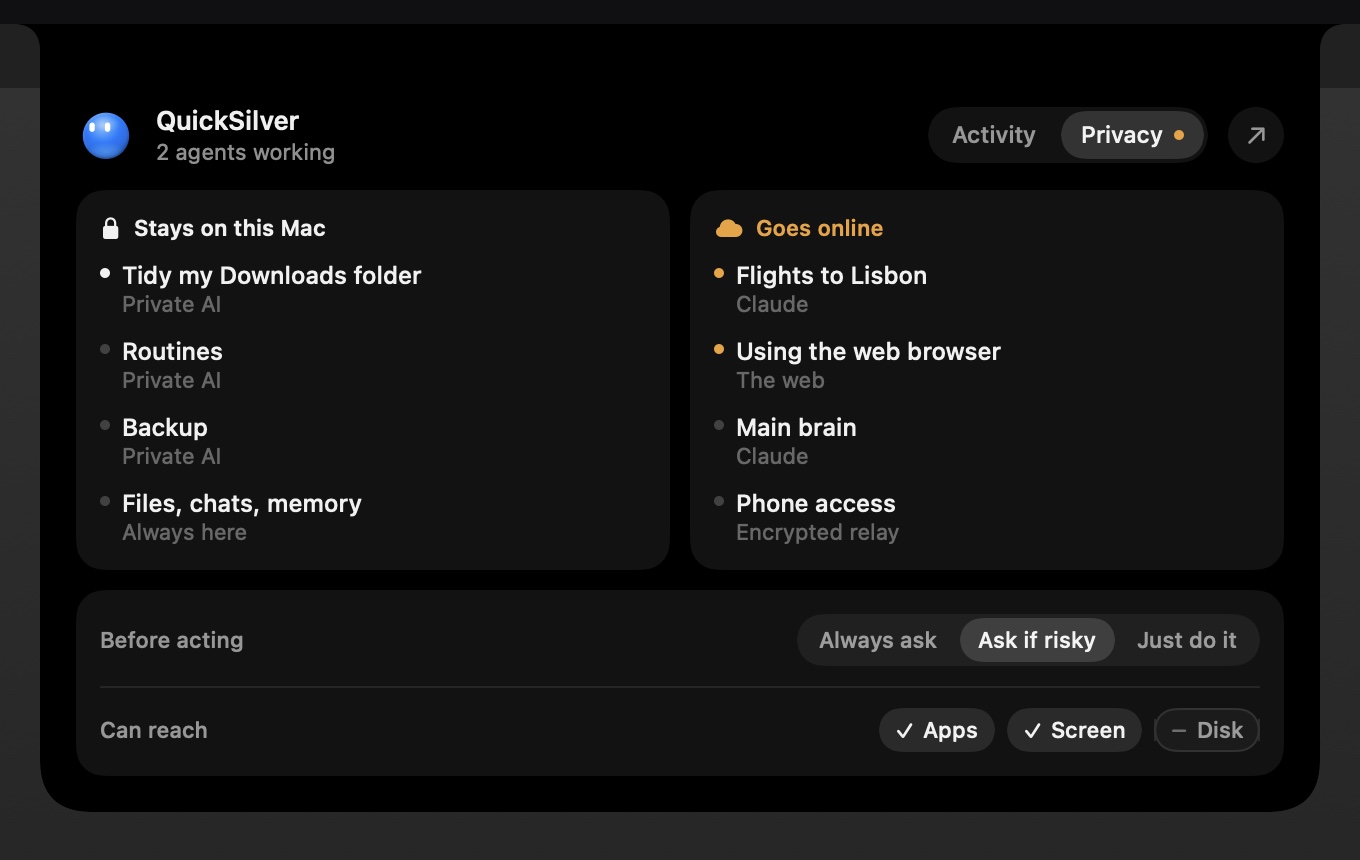
- An agent or app with an online model: the AI company you chose receives what you send it, under its own terms. In Kaairos, that applies only to the jobs you give the online AI: by default routines stay on the private AI, and the notch or menu bar panel shows what goes where.
- A cloud app: everything you type goes to the company. Both offer settings that limit training on your chats, which is different from your chats staying on your computer.
Kaairos keeps its data on the Mac, in ~/.kaairos and its Kaairos folder, has no analytics in the app, and keeps the engine's shared-metrics telemetry off. Stuvio has no server in the path of your conversations. The full list of what leaves the Mac is on the privacy and security page.
Memory and Mac requirements
Memory is the deciding constraint for local AI on a Mac, because Apple silicon shares one pool of memory between the system, your apps and the model.
| Your Mac's memory | What works well | Kaairos |
|---|---|---|
| 8 GB | Small chat models in Jan, LM Studio or Osaurus; online AI for anything demanding | Works with an AI account (ChatGPT plan or a key); no private AI |
| 16 GB | Small and mid-size chat models; LM Studio recommends 16 GB | Works with an AI account; no private AI |
| 24 GB | Mid-size models; still tight for an agent's long context | Works with an AI account; no private AI |
| 32 GB or more | Larger models with a long context, which agents need | Its own private AI, chosen for your Mac, plus any AI account you add |
Kaairos is strict here on purpose. The smallest model in its curated catalog is about 16.5 GB, and it runs with at least a 64,000-token context, because an agent reads web pages, files and its own tool results. On a 16 or 24 GB Mac that wouldn't leave room for your other apps, so setup says so plainly and asks for an AI account instead. Model runners let you pick a smaller model, which is better for chat but weaker at multi-step tasks.
Using more than one
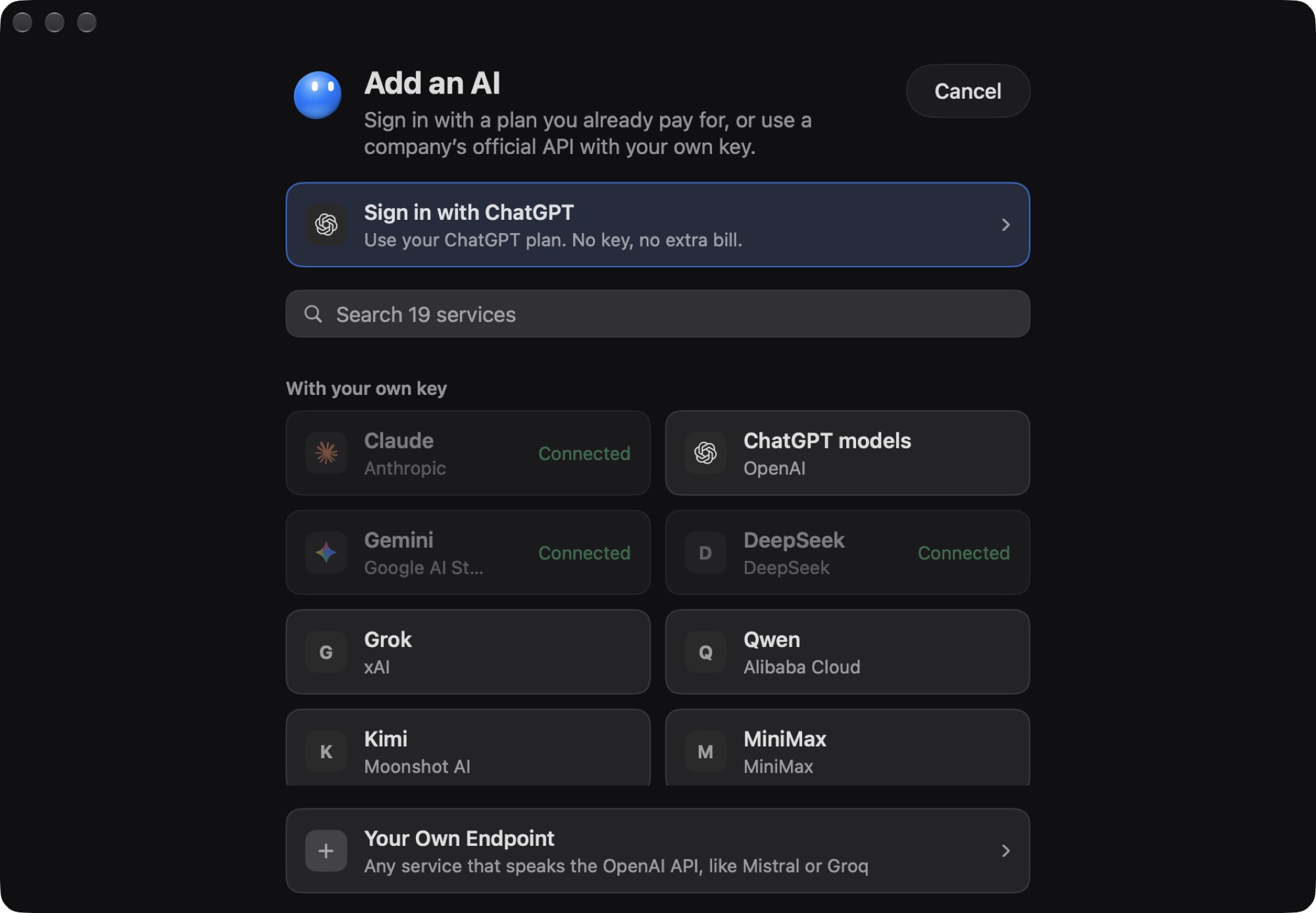
These apps aren't exclusive. LM Studio, Ollama, Jan and Osaurus can serve a model through an OpenAI-compatible local server, and Kaairos can use any such server as an AI: Settings › AI › Add AI… › Your Own Endpoint, with a name, the server's address, an optional key and the model name, and a Test Connection button. That way you can keep the model runner you like and use Kaairos for routines and the phone. Each comparison page has the exact address for that app.
Sources
Every comparison linked above has its own sources section with the primary pages we read. For the apps without their own page:
- GPT4All (Nomic): local desktop chat, LocalDocs, macOS, Windows and Linux installers.
- GPT4All on GitHub: MIT licence; the macOS build requires Monterey 12.6 or newer.
- Kaairos facts: our facts page, checked against the app's source code.
Fair questions
What's the best private AI app for Mac?
It depends on what you want it to do. For a private agent that does tasks with no setup, Kaairos (on a Mac with 32 GB or more). For exploring local models, LM Studio. For developers, Ollama. For a free, open-source chat app that runs on smaller Macs, Jan.
Do private AI apps work offline?
The AI itself can: a local model needs no internet once it's downloaded. Anything that uses the web, such as searching or checking a price, needs a connection, and so do messaging apps like Telegram and WhatsApp.
Is local AI as good as ChatGPT or Claude?
Not at the top end. The best cloud models are stronger, especially at long, complicated tasks. Good local models handle everyday work well, such as summaries, drafts, briefings and sorting, and they're free and private. Kaairos uses both: the online AI you connect for conversations, the private AI for routines and as a backup.
How much RAM do I need to run AI locally on a Mac?
Small chat models run on 8 to 16 GB. Agents need a stronger model with a long context, and Kaairos's own private AI needs 32 GB or more. See our memory guide for the details.
What's the difference between LM Studio, Ollama and Jan?
All three run local models. LM Studio is a polished app for finding, comparing and serving models; Ollama is a runtime with a CLI and API that other software builds on; Jan is an open-source chat app with a local API. None of them runs routines or reaches you on your phone by itself.
Is there a private AI agent for Mac that doesn't need a terminal?
Yes. Kaairos sets itself up with one button and needs no terminal, config file or API key. Osaurus is also a native app you install by download; it gives you more to configure, and it's free and open source.
Which of these are open source?
OpenClaw, Hermes Desktop, Osaurus, Ollama and GPT4All are MIT-licensed, and Jan is Apache 2.0. LM Studio and Msty are proprietary. Kaairos's own code is proprietary, and its engine, Hermes Agent, is MIT.
Can I use my ChatGPT subscription with a private AI app?
In Kaairos, yes: Sign in with ChatGPT uses your plan, with no API key. Conversations go to your plan, while routines stay on the private AI. Claude works with an Anthropic API key, not a Claude subscription.
Download and go
Your AI agent, already set up.
One button to set up. Its own private AI, free. Claude, ChatGPT or Gemini when you want more.
A Mac with Apple silicon (M1 or later), macOS 15 Sequoia or later. 14-day refund.