
Use case · Remind
Bills paid and renewals caught: reminders that don't give up
A normal reminder fires once and gets swiped away, and the bill is still unpaid. QuickSilver keeps at it: it reminds you on your phone in plain words, on any schedule, and keeps nudging on Telegram or WhatsApp until you reply done. Bills, renewals, habits and chores included.
What it looks like
Remind me to pay the electricity bill at 6 tonight, and keep pinging me every 15 minutes until I say done.
Will do. First reminder at 6:00 PM, then every 15 minutes until you tell me it's paid.
Time to pay the electricity bill.
Still on the list: the electricity bill. Reply done once it's paid.
done
Great, I've stopped the reminders.
Because a person-like assistant writes them, reminders can carry a little context (“the bill is due Thursday”) and vary their wording, so the fifth one doesn't look like the first.
Every kind of reminder, and how to ask
| Kind | Say this | Or use the gallery |
|---|---|---|
| One-off, in a while | “Remind me in 40 minutes to take the bread out.” | — |
| One-off, at a time | “Remind me tomorrow at 9 to call the dentist.” | — |
| Every day or weekday | “Every weekday at 1 PM, remind me to take a proper lunch break.” | Custom reminder |
| Monthly | “On the 1st of every month at 10, remind me to send the rent.” | — |
| Before something renews | “On 25 March, remind me to cancel the streaming trial before it charges me.” | Bills & renewals reminder |
| A habit, with a check-in | “Every evening at 8, ask me if I read for 20 minutes today.” | Habit check-in |
| Through the workday | “Every hour from 9 to 5 on weekdays, remind me to stand up and drink water.” | Hydration & movement nudge |
| Until you say done | “…and keep pinging me every 15 minutes until I say done.” | — |
Set it up, step by step
- Link your phone once: on the home screen, under Talk from your phone, choose Show Code next to Telegram or WhatsApp and scan it.
- Ask in any chat, on the Mac or from your phone. Say what, when, how often, and where (“on Telegram”).
- QuickSilver confirms the time of the first reminder. The reminder appears in Work › Routines, where you can switch it off, run it now or delete it.
From the gallery
In the Work tab, choose + next to Routines. Custom reminder asks: Remind me to…, What time?, Repeat on (Every day, Weekdays or Weekends) and Send the result to. Bills & renewals reminder asks What's due? and words the message as a heads-up you can act on (“review or cancel before it renews”). Habit check-in asks Which habit? and asks you each time whether you did it. Hydration & movement nudge runs on weekdays: choose How often? (every 1, 2 or 3 hours), a Start hour and an End hour.
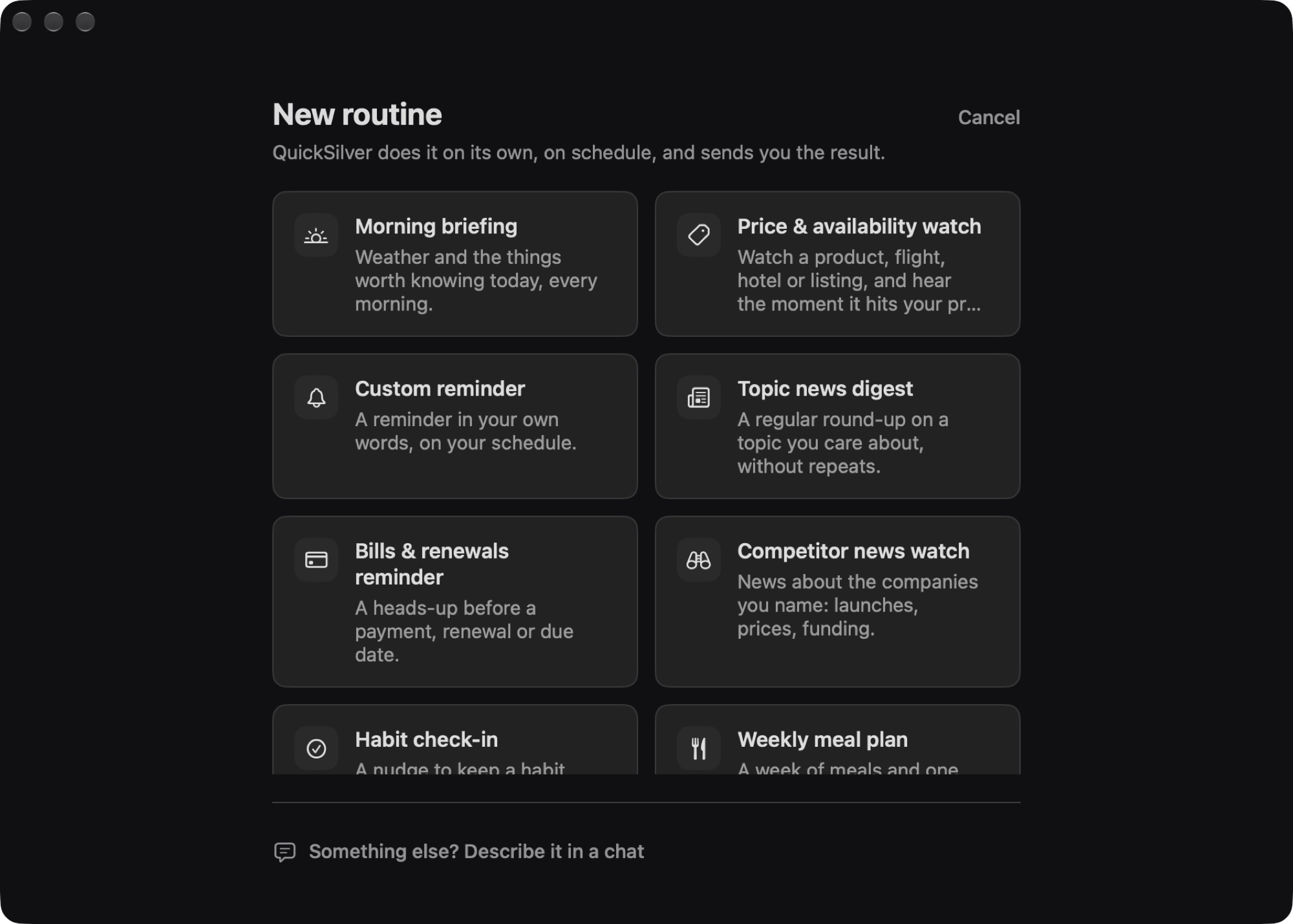
The reminder routines in the gallery, field by field
| Gallery tile | What it asks | Defaults | What the message does |
|---|---|---|---|
| Custom reminder | Remind me to…, What time?, Repeat on, Send the result to | 2:00 PM, every day | Reminds you in your words |
| Bills & renewals reminder | What's due?, What time?, Repeat on, Send the result to | 10:00 AM, every day | An actionable heads-up: review or cancel before it renews |
| Habit check-in | Which habit?, What time?, Repeat on, Send the result to | 8:00 PM, every day | Asks whether you did it, warmly, with a line of encouragement |
| Hydration & movement nudge | How often?, Start hour, End hour, Send the result to | Every hour, 9 AM to 5 PM, weekdays | A one-line nudge to drink water, stand up and stretch, worded differently each time |
| Gratitude & reflection prompt | What time?, Repeat on, Send the result to | 9:30 PM, every day | Invites you to note one thing that went well |
Evening check-in: did you get your 20 minutes of reading in today? Even five pages counts.
yes, finished the chapter
Nice, a whole chapter. Same time tomorrow.
How “until I say done” works
There's no special alarm behind it. QuickSilver creates a repeating routine (every 15 minutes, say) when you ask, and when you reply “done” in the same chat, it switches that routine off. That has two consequences worth knowing:
- Reply in the chat where the reminder arrived. Each reminder is added to that chat's history, so a plain “done” right after one is understood. If several reminders are running, name it: “done with the electricity bill”.
- Check it the first time. Glance at Work › Routines after your first “done” to see it's switched off. If something keeps going, say “stop all reminders about the bill”, or use the switch.
For something daily that should nag until done, like medication, the simplest reliable setup is a daily reminder at the time, plus “if I haven't said done by 9:30, remind me again”. Ask for that in words and QuickSilver tells you what it set up.
Variations
Renewals
“My car insurance renews on 3 April. Remind me two weeks before to compare quotes, and again three days before.”
Plants
“Remind me to water the plants every Sunday at 10, and every Wednesday too from June to August.”
A shared chore
“Every second Thursday at 7 PM, remind me to put the recycling out.”
A habit you're building
“Every evening at 9, ask me whether I went for a run today. Keep it short and don't nag.”
A deadline
“My tax return is due 31 January. Remind me on the 1st of each month until then, and every day in the last week.”
Gentle wind-down
The gallery's Gratitude & reflection prompt sends a short evening prompt to note what went well.
Which AI sends them, and what leaves your Mac
Routines run on the private AI on your Mac whenever it has one (Macs with 32 GB of memory or more), even if you've connected Claude, ChatGPT or Gemini for conversations. On a Mac without it, they run on your account's fast, inexpensive model, such as Claude Haiku 5.5. You can move them in Settings › AI › Who does what › Routines.
| Step | Where it happens | What leaves your Mac |
|---|---|---|
| Keeping the schedule | Kaairos's engine, on your Mac | Nothing |
| Writing each reminder | The private AI on your Mac, or your account's fast model | Nothing with the private AI; with an account, the reminder text goes to that company |
| Delivery | Telegram, WhatsApp or Kaairos | The reminder passes through Telegram's or WhatsApp's servers if you chose them |
What it costs
Each reminder is a short AI run. Assumption: one call of about 10,000 input tokens (the instructions) and 100 output tokens. On Claude Haiku 5.5 that's 10,000 × $0.10/M + 100 × $0.50/M ≈ $0.001 a reminder: a daily reminder costs about 3 cents a month, and a 15-minute nag for two hours about a cent. On the private AI it's free. Prices from Anthropic's price list.
What it isn't
- It isn't an alarm clock. It arrives as a Telegram or WhatsApp message with that app's notification sound. It won't ring through Do Not Disturb or Focus unless you've allowed that app.
- It isn't Apple's Reminders app. Reminders from QuickSilver don't appear in the Reminders app or on your Apple Watch's Reminders list.
- It depends on your Mac. A Mac that's shut or asleep sends the reminder when it wakes, not on time. For anything critical, keep your usual alarm too.
- It isn't a medical device. A helpful nudge for medication, never the only safeguard.
Kaairos works on your Mac, so routines run while your Mac is on and awake. Turn on Keep working when closed (in the Work tab or the menu bar panel) and they carry on after you quit the window. If the Mac was asleep at the time, the routine runs once when it wakes, rather than replaying every check it missed.
Troubleshooting
| Problem | Fix |
|---|---|
| The reminder came late | The Mac was asleep. Keep it plugged in, set it not to sleep, and turn on Keep working when closed. |
| It keeps going after “done” | Say “stop the [name] reminders”, or switch the routine off in Work › Routines. |
| Wrong time | Routine times are local time on your Mac. If you changed time zone, check the next run time in Work › Routines, and ask QuickSilver to move it if needed. |
| No notification on the phone | Check Telegram's or WhatsApp's notification settings and Focus modes on your phone. |
Fair questions
Is this a medical reminder system?
No. It's a helpful nudge, not a medical device. Don't rely on it alone for anything critical; keep your usual alarms for those.
Do reminders appear in Apple's Reminders app?
No. QuickSilver sends them as messages to Telegram, WhatsApp or Kaairos.
Can it remind me in 20 minutes?
Yes. “Remind me in 20 minutes to…” makes a one-off reminder that runs once and is done.
How do I see all my reminders?
They're routines, so they're listed in Work › Routines with on/off switches, and in the menu bar panel. Or ask “what reminders do I have?”.
Can it remind someone else?
No. Reminders go to your own Telegram bot, your own WhatsApp chat or Kaairos.
What does a reminder cost?
On the private AI, nothing. On Claude Haiku 5.5, by our estimate about a tenth of a cent each.
Download and go
Your AI agent, already set up.
One button to set up. Its own private AI, free. Claude, ChatGPT or Gemini when you want more.
A Mac with Apple silicon (M1 or later), macOS 15 Sequoia or later. 14-day refund.