
Features · Visual replies
Answers you can see
Plan a trip and you get photos of each stop. Ask how your spending splits and you get the chart. Ask how to descale a coffee machine and the video is right there in the reply.
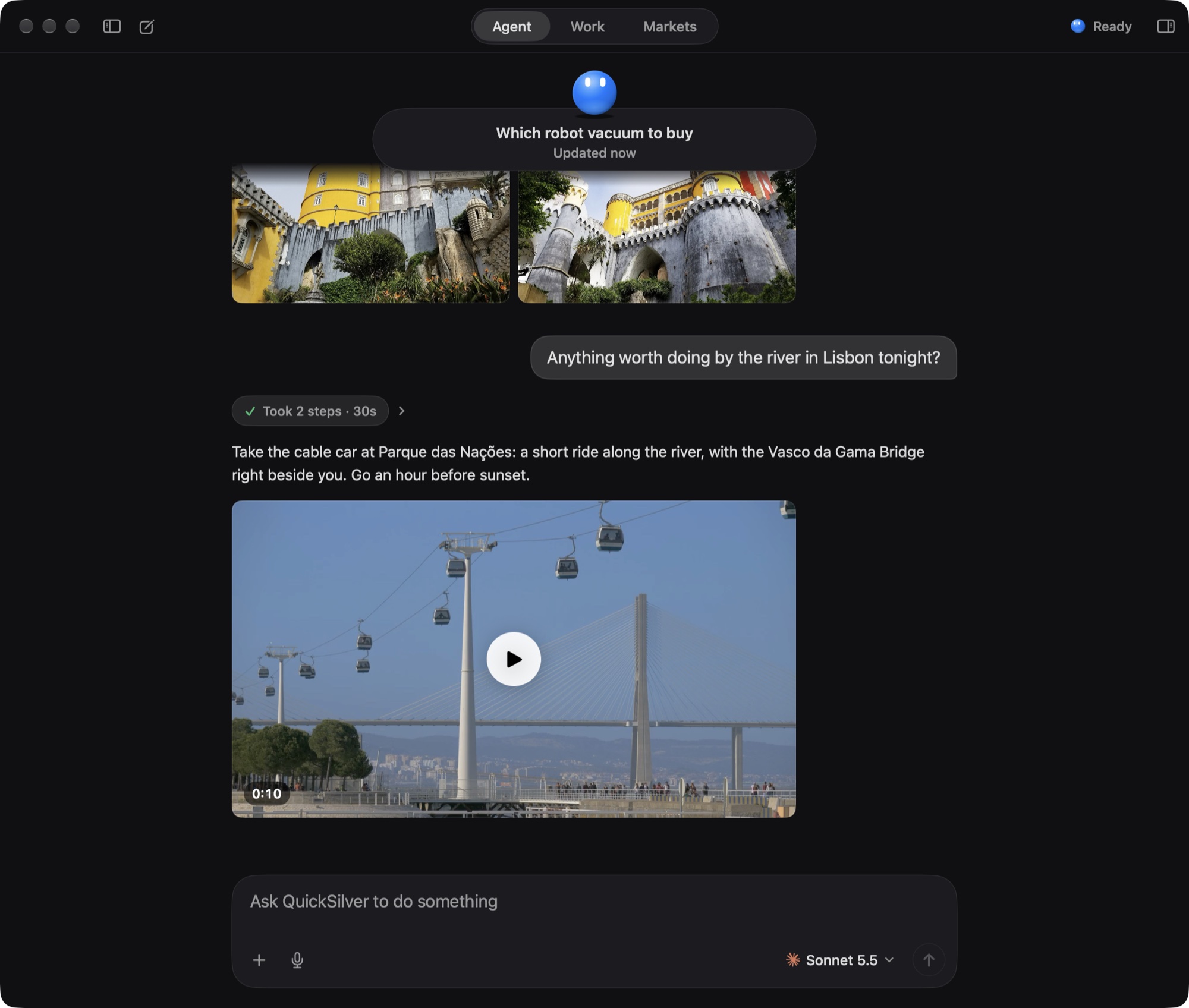
An example
We have one free day near Lisbon. Sintra or Cascais?
Sintra, if you like palaces and hills; Cascais, if you'd rather walk by the sea. Here's Pena Palace from the gardens, the Moorish Castle walls, and a short video of the train ride out. The day's walking plan is below.
In the app, the photos sit in a row as one gallery, the video plays in the conversation, and the text reads around them. You don't have to ask for pictures: Kaairos tells its agent to show things when a picture or video would help (a place, a hotel, a dish, a product, how something looks, numbers worth a chart) and to keep it purposeful, because a few good ones beat many.
What can appear in a reply
| What | How it shows | Where it comes from |
|---|---|---|
| Photos from the web | Each with a caption; several in a row become one gallery. Click one to open it. | Kaairos's image search |
| Videos from the web | YouTube and Vimeo finds show as a card with the thumbnail that opens the video; a direct video address plays in the chat. | Kaairos's video search |
| Charts | A picture in the chat, saved in your Kaairos folder. | Drawn on your Mac with Python's matplotlib |
| Pictures and videos on your Mac | Shown in the chat; videos play with the Mac's own player. | Files QuickSilver made or found |
| Other files | A card with the file's icon, name and folder; click it to open the file. | Documents, PDFs and spreadsheets it made |
Replies also render Markdown: headings, lists, tables, links and code. While a reply is still arriving, a half-written picture line is held back rather than flashing up as text.
Finding pictures needs no account
Kaairos adds two tools to its engine, image search and video search. They use DuckDuckGo through the open-source ddgs library that the engine already uses for keyless web search, so there's no account or key. Image search returns up to 8 pictures per search and checks each one before handing it back: the address must actually answer with an image, and when a full-size picture refuses, its thumbnail is used. So a reply doesn't show broken pictures. Video search returns up to 6 videos.
Kaairos also tells the agent never to make up an image address, and to show only pictures it found or made.
Searching for pictures is a web search: the search words go to DuckDuckGo, and the pictures load from the sites that host them, as they would in a browser.
Charts, drawn on your Mac
When numbers are worth a picture (a price over the week, your monthly costs by category, two options compared), QuickSilver writes a few lines of Python with matplotlib, runs them on your Mac and saves the chart as a PNG in your Kaairos folder. The chart shows in the reply, and the file stays in the folder for you to use elsewhere. It also appears in the Work tab under Made for you.
Make a bar chart of my monthly costs and show it to me: rent 1200, food 450, transport 120, fun 200.
Files on your Mac, in the reply
What QuickSilver makes on your Mac shows in the reply too. Kaairos tells the agent your Kaairos folder's exact path, so it saves there and refers to files by their full path rather than guessing. A picture or video file shows in the chat; a video plays with the Mac's own player. Anything else, such as a PDF itinerary, a spreadsheet or a Word document, shows as a card with the file's icon, its name and the folder it's in. Click the card to open the file in its usual app.
Every one of those files is also in the Work tab under Made for you, newest first, and in your Kaairos folder in Finder.
Making new pictures and videos
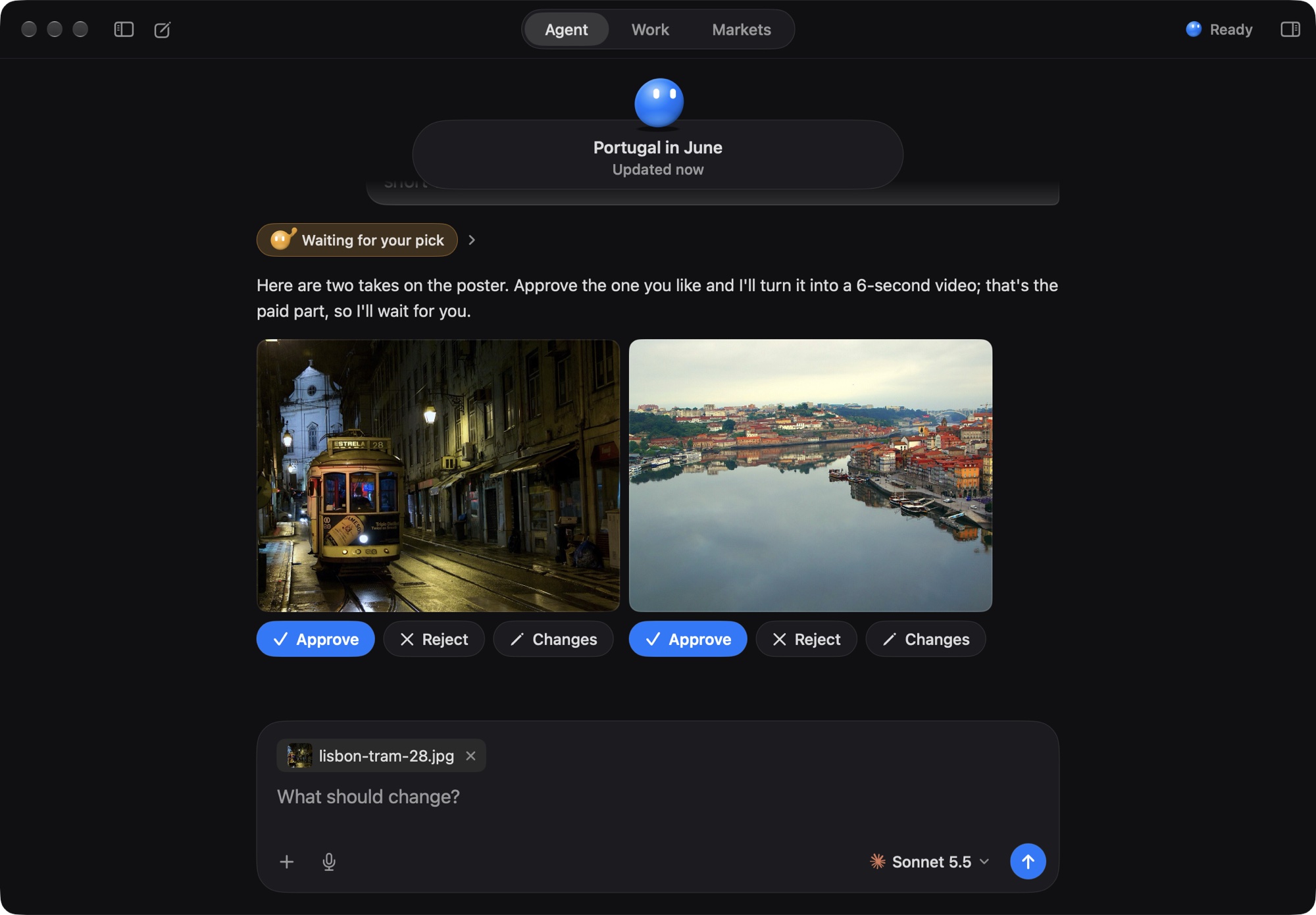
Finding pictures is free. Making new ones takes a generation service. Kaairos's built-in route is Higgsfield: connect it in Settings › Connectors and QuickSilver can make a poster, a product shot or a short video, with your own Higgsfield credits. It checks the cost first and asks before any job over your limit.
Everything it generates comes back with three buttons, and QuickSilver stops and waits for your pick:
- Approve (“Keep it: a copy goes into your Kaairos folder, and QuickSilver carries on”). The copy goes into the Approved folder inside your Kaairos folder, and the reply notes “Approved · saved to Kaairos › Approved”.
- Reject (“QuickSilver makes another one”): it makes a different take straight away.
- Changes (“Put it in the message box and say what to change”): the picture goes into your message, and you type what to change.
Until you approve, it doesn't do more paid work with a picture, such as turning a poster into a video.
Privacy
- Image and video searches send the search words to DuckDuckGo; pictures load from the sites that host them.
- Charts are drawn on your Mac. The numbers you give go to whichever AI is doing the task (the private AI keeps them on the Mac).
- Generated pictures and videos are made by Higgsfield: your prompt and any picture you use as a starting point go to Higgsfield.
- Approved files are saved only on your Mac, in your Kaairos folder.
The notch's Privacy page marks these as they happen: “The search goes to the web”, “Opens pages on the web”, “Made by an online service”.
Limits
- Image search returns at most 8 pictures per search and video search at most 6 videos.
- Web videos from sites like YouTube open from their card rather than playing inside the chat.
- Photos found on the web belong to whoever published them. They're fine to look at; check the source before you reuse one.
- Making new pictures and videos needs a Higgsfield account with credits.
Fair questions
Does it generate images for free?
It finds real photos and videos for free. Making new ones uses Higgsfield, with credits from your own Higgsfield account.
Where do the photos come from?
From the web, through a keyless image search (DuckDuckGo). Click a photo to open it.
Can I turn pictures off?
Ask in the chat (“just text, please”) and QuickSilver will answer in words. There's no switch in Settings.
Where are charts saved?
In your Kaairos folder (Settings › General › Kaairos saves your work in). They also show in the Work tab under Made for you.
What does Approve do with a picture?
It saves a copy in the Approved folder inside your Kaairos folder and tells QuickSilver to carry on with the next step.
Why didn't a reply include any pictures?
QuickSilver adds them when they help, not every time. Ask for them (“show me photos of each hotel”) and it will search.
Download and go
Your AI agent, already set up.
One button to set up. Its own private AI, free. Claude, ChatGPT or Gemini when you want more.
A Mac with Apple silicon (M1 or later), macOS 15 Sequoia or later. 14-day refund.