
Compare
Kaairos vs Claude Cowork
Both hand real work to an AI agent instead of a chat box. Claude Cowork is Anthropic's agent mode inside the Claude app, running on Anthropic's servers with Claude's models. Kaairos is a Mac app that runs the agent on your own Mac, with its own private AI, and can bring Claude in when a job needs it.
The short answer
Choose Claude Cowork if you pay for Claude, want Claude's strongest models on every step, and are happy for work to run on Anthropic's servers, including schedules that run with your computer off. Choose Kaairos if you want the agent and your files on your Mac, a private AI with no account or subscription, free routines, and Telegram or WhatsApp access. Kaairos can still use Claude with your own key.
Side by side
What it is
| Kaairos | Claude Cowork | |
|---|---|---|
| Product | A Mac app: an AI agent that's already set up, built on Hermes Agent by Nous Research | Anthropic's agent mode in the Claude app: “Claude Code's agentic capabilities” for knowledge work, with no terminal |
| Made by | Stuvio | Anthropic |
| Setup | Download, open, click Set it up. No terminal, no config files, no API key needed | Install Claude Desktop, sign in to a paid plan, pick Cowork in the message box |
Models
| Kaairos | Claude Cowork | |
|---|---|---|
| AI that runs on your Mac | Yes: downloads its own open-weight AI (about 24 GB) and runs it on the Mac with llama.cpp. Needs 32 GB of memory | None mentioned in Anthropic's docs: Claude runs in Anthropic's cloud |
| Online AI | Optional: Sign in with ChatGPT (your ChatGPT plan), or your own key for Claude, OpenAI, Gemini, OpenRouter and 15 more services, or any OpenAI-compatible endpoint | Claude models only |
| Works offline | The private AI does; anything that needs the web doesn't | No |
Abilities
| Kaairos | Claude Cowork | |
|---|---|---|
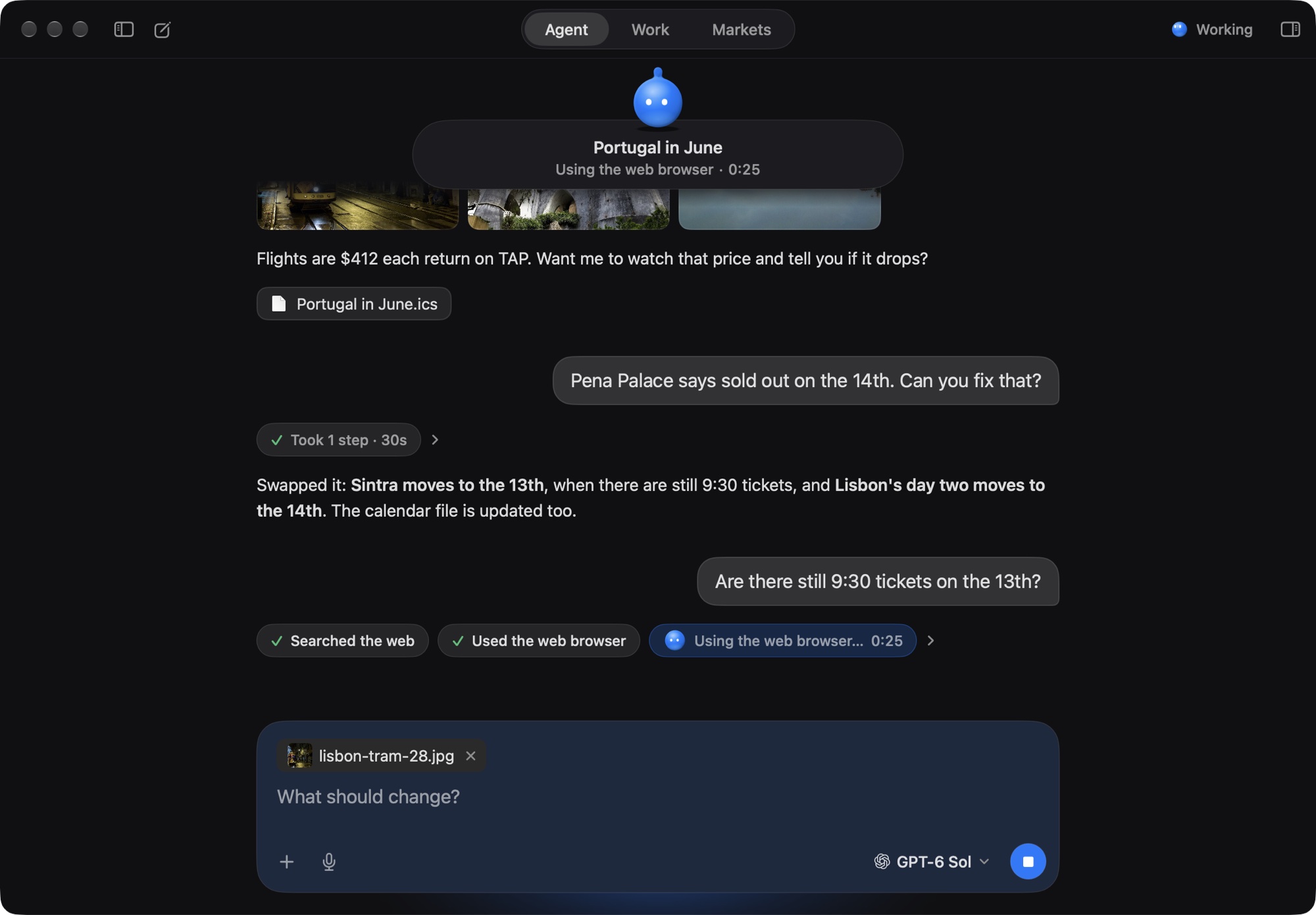
| Web and browser | Yes: searches the web and uses a real browser, shown live in the chat | Yes: a built-in browser in the desktop app, or your Chrome with Claude in Chrome |
| Your files | Yes, on the Mac; deletes and other risky steps wait for your OK; changed files are snapshotted so they can be undone | Reads and writes local files in folders you connect; asks before permanently deleting |
| Apps on your computer | Can use apps on the Mac (macOS asks you to allow Screen and Accessibility access), plus connected apps through MCP | Computer use, with permission asked per app |
| Schedules | Yes: routines from a gallery or in plain words; run on the private AI by default; the Mac must be on and awake | Yes: /schedule or Scheduled in the sidebar; runs in the cloud, so no device needs to be on |
| Phone | Telegram and WhatsApp, linked by scanning a QR code; voice notes transcribed on the Mac | Claude mobile app; Dispatch (send a task from your phone to your desktop) is a limited beta not open to new users |
| Connectors and plugins | Yes: connectors from an approved catalog (Notion, Linear, Asana, Dropbox, Stripe and others); reads freely, changes need approval | Connectors and plugins (skills, connectors, sub-agents); plugins with local MCP servers are desktop-only |
| Pictures and video | Keyless photo and video search shown in replies; image and video generation through Higgsfield or an image service on your account | Not covered in the Cowork docs we checked |
Safety
| Kaairos | Claude Cowork | |
|---|---|---|
| Approvals | Three levels: Always ask, Ask before anything risky (default), Just get it done | Manual, Auto (checks each action; the default on Pro, Max, Ultra and Team) and Skip |
| Undo | File snapshots before changes | Not covered in the docs we checked |
Privacy
| Kaairos | Claude Cowork | |
|---|---|---|
| Where the work runs | On your Mac | “In an isolated, temporary environment on Anthropic's servers” |
| What leaves your computer | Chats you give an online AI you connect, web searches and pages it visits, Telegram/WhatsApp messages, the model download, updates and licence checks | The task, and files you open through the desktop app, which are processed on Anthropic's servers |
| Training | Kaairos has no servers in the conversation path and trains on nothing | Your choice in Claude's settings; if you allow it, data is kept for 5 years |
Platforms and price
| Kaairos | Claude Cowork | |
|---|---|---|
| Platforms | Mac with Apple silicon (M1 or later), macOS 15 or later. No Windows, Linux or phone app yet | Claude Desktop for macOS 13 or later, Windows, Linux (beta); also web and mobile |
| Price | $29 at launch, then $80, once, for 3 Macs and every 1.x update; 14-day refund. Online AI, if you add it, is paid to that company | Paid Claude plans: Pro $20 a month ($17 billed yearly), Max $100, Ultra $200, Team from $25 a seat |
| Licence | Commercial app; the engine inside is MIT | Proprietary service |
What each is really for
Claude Cowork: Claude's best models, doing work in the cloud
Cowork takes the agent loop Anthropic built for Claude Code and points it at everyday work: reading a folder of documents, filling a spreadsheet, researching in a browser, drafting a report. Its strength is the model. Every step runs on Claude, which is among the most capable models available, and the work runs in Anthropic's cloud, so a scheduled task can run at 6 a.m. while your laptop is shut. You can start a task on one device and steer it from another.
The trade is that the work happens on someone else's computer. Anthropic's own safety guide says Cowork tasks run on its servers, that files you open through the desktop app are processed there, and it advises against using the browser for sensitive information. That's a clear, honest description, and for many people it's fine. For others it's the reason to look elsewhere.
Kaairos: an agent that lives on your Mac
Kaairos installs a complete agent, Hermes Agent by Nous Research, inside a Mac app, and gives it its own AI that runs on the Mac. With no account at all it can research, keep a morning briefing, watch a page for a price, nudge you about a bill, tidy a folder and answer you on Telegram or WhatsApp. Nothing you ask goes to an AI company unless you connect one.
When a job needs more reasoning than a local model has, you can add an online AI in Settings → AI, including Claude with your own Anthropic key, and Kaairos routes the hard conversations there while routines keep running on the private AI. The cost is that it's Mac-only, it needs 32 GB of memory for the private AI, and scheduled work runs only while the Mac is on and awake.
The same task in both: a weekly flight-price check
A task both can do: check the fare for a trip every Monday and say whether it dropped.
In Claude Cowork
- Open the Claude desktop app and choose Cowork in the message box.
- Ask it to check fares from London to Lisbon for the dates you want and summarise the cheapest options.
- Watch it work in its built-in browser (or in your Chrome, if you use Claude in Chrome).
- Type
/schedule(or use Scheduled in the sidebar) to repeat it every Monday. It runs in the cloud, so your computer can be off. - Read the result in the Claude app on your Mac or phone.
In Kaairos
- Open Kaairos and ask in plain words, or pick Price and availability watch in New routine.
- QuickSilver, the agent, searches and opens the airline pages in a real browser; you see each step live in the chat.
- It confirms the schedule in words you can read back, and the routine appears on the Work tab with an on/off switch.
- Each Monday it runs on the private AI on your Mac, at no cost, while the Mac is on and awake.
- If you linked Telegram or WhatsApp, the routine's result reaches you there.
Every Monday at 8, check return flights London to Lisbon, 12 to 19 June, and tell me if the cheapest drops below £120.
Done. I'll check every Monday at 8:00 and message you on Telegram with the cheapest fare and a link. If one is under £120, I'll put that first. The first check runs now so you have a starting price.
Starting price: £134 return, TAP, direct, 07:05 out. I'll compare against this next Monday.
The difference is where it runs. Cowork's schedule doesn't need your computer; Kaairos's does. Kaairos's run doesn't need an AI company; Cowork's does.
Privacy, side by side
| Kaairos (private AI only) | Kaairos with Claude connected | Claude Cowork | |
|---|---|---|---|
| Your request | Stays on the Mac | Sent to Anthropic for the chats routed to Claude | Sent to Anthropic |
| Files it reads | Stay on the Mac | Excerpts the agent reads go to Anthropic in those chats | Processed on Anthropic's servers |
| Routines | On the Mac | Still on the private AI by default | Run in Anthropic's cloud |
| Web pages it visits | Fetched from your Mac | Fetched from your Mac | Fetched from Anthropic's environment, or your Chrome |
| Who can train on it | No one | Anthropic's API terms apply to API keys | Your choice in Claude's settings |
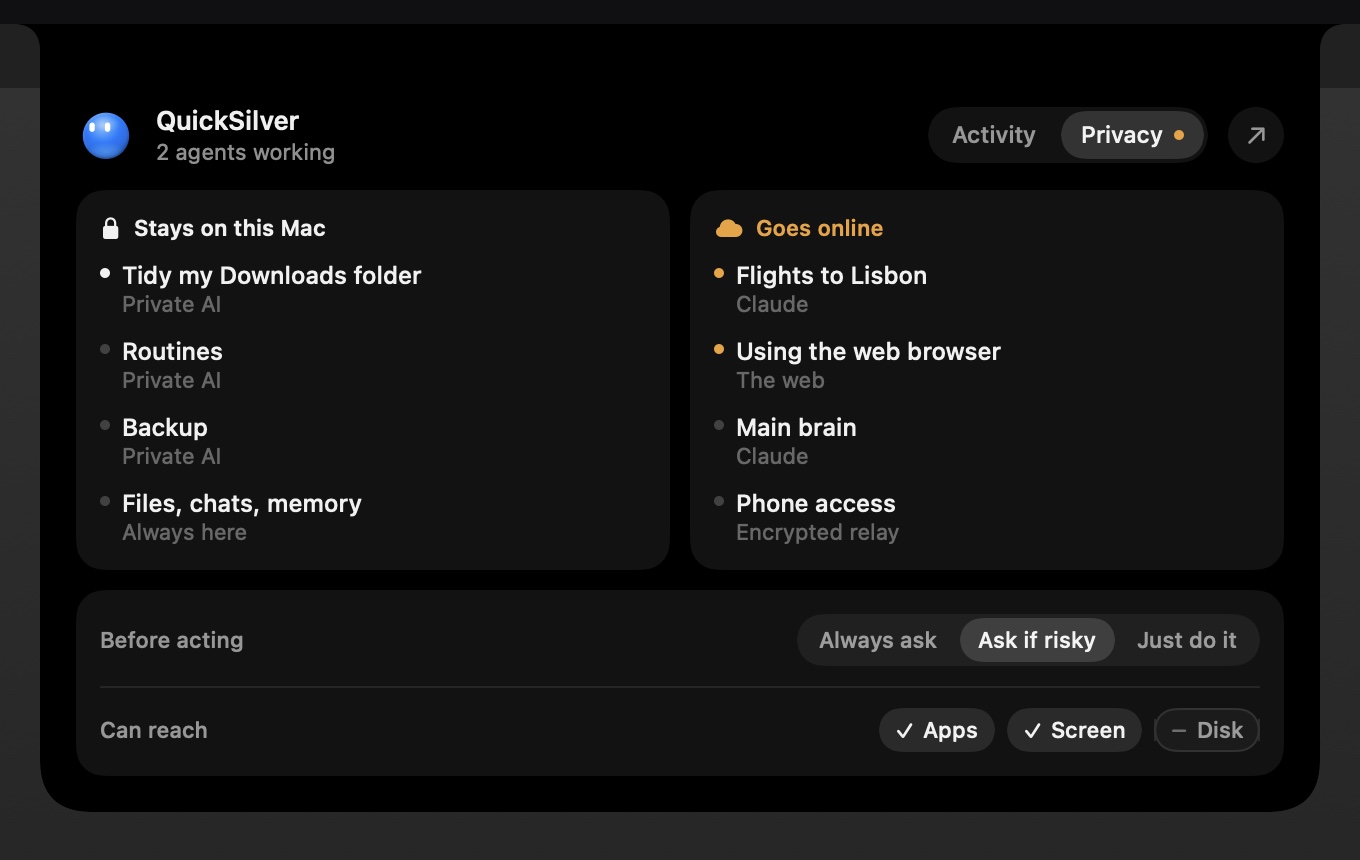
Kaairos shows this live. On Macs with a camera notch, the notch's Privacy page lists what is staying on the Mac and what is going online right now, and which AI each chat is on. Elsewhere, the same information is in the menu bar panel.
What it costs in the first year
- Kaairos, private AI only: $29 once. Year one: $29. Routines and chats on the private AI cost nothing more. It needs a Mac with 32 GB of memory.
- Kaairos with your own Claude key: $29 plus what you use on Anthropic's API, which depends entirely on how much you ask. Routines stay on the private AI, so they add nothing. Kaairos shows 30 days of AI cost on the Work tab.
- Claude Cowork on Pro: $20 × 12 = $240, or $17 × 12 = $204 billed yearly (Anthropic shows $200 a year). Usage limits apply to the plan.
- Claude Cowork on Max: $100 × 12 = $1,200. On Ultra: $200 × 12 = $2,400.
One honest caveat: Kaairos can't use a Claude Pro or Max subscription. It connects to Claude with an Anthropic API key, which is billed separately by use. The only subscription it can use is a ChatGPT plan, through Sign in with ChatGPT.
Using them together
They fit side by side. A sensible split: keep Cowork for heavy, one-off document work where you want Claude on every step and don't mind the cloud, and let Kaairos handle the standing jobs that should stay on your Mac, such as a morning briefing, price watches, reminders that nag until done, and anything involving files you'd rather not upload. If you have an Anthropic key, you can put Claude in Kaairos's Main brain slot and keep routines on the private AI.
When to choose Claude Cowork instead
- You want every step done by Claude's strongest models, not a local model.
- You need scheduled tasks to run while your computer is off or asleep.
- You use Windows or Linux, or move between computers, the web and your phone.
- You already pay for Claude Pro, Max or a Team plan; Cowork comes with it.
- Your Mac has less than 32 GB of memory and you'd be connecting a cloud AI to Kaairos anyway.
- Your organisation already manages Claude with admin controls.
Sources
Fair questions
Is there a Claude Cowork alternative that runs locally on a Mac?
Kaairos runs the whole agent on your Mac with its own private AI, so it works with no account and nothing you ask goes to an AI company. Open-source agents such as Hermes Agent and OpenClaw can also run locally if you set them up with a local model.
Does Claude Cowork run on my computer or in the cloud?
Anthropic's help centre says Cowork tasks run in an isolated, temporary environment on its servers, and that files opened through the desktop app are processed there. The desktop app gives it access to folders you connect, a browser and computer use.
Do I need a paid plan for Claude Cowork?
Yes. Anthropic lists it on paid plans: Pro, Max, Ultra, Team and Enterprise. Pro is $20 a month, or $17 a month billed yearly.
Can Kaairos use my Claude Pro subscription?
No. Kaairos connects to Claude with an Anthropic API key, billed by use. The only AI subscription it can use is a ChatGPT plan, through Sign in with ChatGPT.
Can Claude Cowork run tasks on a schedule?
Yes, with /schedule or Scheduled in the sidebar, and they run in the cloud, so your computer doesn't need to be on. Kaairos's routines run on your Mac, which must be on and awake, and use the private AI at no cost.
Which is more capable?
On hard reasoning, Claude's cloud models are stronger than any model that fits on a Mac. Kaairos closes most of that gap by letting you connect Claude or another online AI for the hard conversations while routines stay private.
Can I reach either from my phone?
Cowork tasks can be started and steered from the Claude mobile app, and Dispatch to your desktop is a limited beta. Kaairos answers in Telegram or WhatsApp once you scan a code; a Kaairos phone app is coming soon.
Does Kaairos work on Windows?
No. Kaairos is a Mac app for Apple silicon on macOS 15 or later.
Download and go
Your AI agent, already set up.
One button to set up. Its own private AI, free. Claude, ChatGPT or Gemini when you want more.
A Mac with Apple silicon (M1 or later), macOS 15 Sequoia or later. 14-day refund.