
Guide
Does ChatGPT train on your data?
On personal plans, yes by default, and the same goes for Gemini; Claude asks you to choose. Here is exactly where each setting is, how long each company keeps your chats, what opting out doesn't cover, and how to keep sensitive work away from AI companies altogether.
The short answer
Yes: on ChatGPT's personal plans (Free, Plus and Pro), OpenAI may use your conversations to train its models unless you turn off “Improve the model for everyone” in Settings › Data Controls. Google does the same for Gemini while “Keep Activity” is on. Anthropic asks Claude Free, Pro and Max users to choose, and keeps chats for five years if you allow training. Business plans and API use are not used for training by default at any of the three. Opting out stops future training on your chats; it doesn't stop the company receiving, storing for a period, or safety-reviewing what you send.
ChatGPT, Claude and Gemini compared
| ChatGPT (Free, Plus, Pro) | Claude (Free, Pro, Max) | Gemini (personal Google account) | |
|---|---|---|---|
| Used for training by default? | Yes, unless you opt out | Only if you allow it (you're asked to choose) | Yes while Keep Activity is on |
| Where to turn it off | Settings › Data Controls › Improve the model for everyone | Settings › Privacy (claude.ai/settings/data-privacy-controls) | Gemini Apps activity › turn off Keep Activity |
| Retention if you opt out | Chats stay in your history until you delete them; deleted and temporary chats are removed within 30 days, per OpenAI | 30 days | 72 hours with your account |
| Retention if you allow training | Not stated as a fixed period | Up to five years | Until you delete it, under your activity settings |
| Private mode | Temporary Chat: not in history, not used for training, deleted within 30 days | Not covered in the announcement we cite | Temporary chats: not used for training |
| Human review | Possible for safety | Possible for safety | A subset of chats is reviewed; reviewed chats kept up to three years, disconnected from your account |
| Business plans and API | Not trained on by default | Not covered by the consumer change (Claude for Work, API) | Workspace and API terms differ from personal accounts |
How to stop ChatGPT training on your chats
- On the web, click your profile picture, then Settings.
- Open Data Controls.
- Turn off Improve the model for everyone.
- On the phone app it's in the same place: your profile, then Data Controls.
The setting follows your account, not the device. Your history stays; only future training stops. OpenAI says the same setting also applies to Codex tasks on a personal ChatGPT plan. For a one-off sensitive question, use Temporary Chat: it isn't saved to your history, doesn't update memory and isn't used for training while it remains temporary.
Memory is a separate setting. Turning off training doesn't turn off ChatGPT's memory of you, and turning off memory doesn't stop training. Check both.
How to check Claude's setting
Anthropic changed its consumer terms in 2025 so that Free, Pro and Max users choose whether new chats and coding sessions can train future models. If you allow it, retention extends to five years; if you don't, the 30-day period stays. You can change your choice at any time under Settings › Privacy (claude.ai/settings/data-privacy-controls). Deleting a conversation means it won't be used for future training. The change doesn't apply to Claude for Work, the Anthropic API, or Claude through Amazon Bedrock or Google Cloud's Vertex AI.
How to turn off Gemini's Keep Activity
In the Gemini app, open Activity (Gemini Apps activity) and turn off Keep Activity. Google says that with it off, future chats won't be used to train its AI models unless you send feedback, and they're kept with your account for 72 hours to respond to you and keep the service safe. Google also says a subset of chats is reviewed by people, that reviewed chats are kept for up to three years, disconnected from your account, and advises: “don't enter data that's confidential or that you wouldn't want a reviewer to see” while the setting is on.
What opting out doesn't do
- It doesn't stop the company receiving your words. The model runs on their servers, so every message is sent there and processed.
- It doesn't erase the past. It applies to future chats. Delete old conversations you'd rather weren't kept.
- It doesn't stop retention for safety or legal reasons. Each company keeps some data for abuse monitoring, and legal holds can override normal deletion.
- It doesn't cover what you share elsewhere. Shared chat links, files uploaded to connected apps and feedback (thumbs up or down) can have their own rules.
- It doesn't cover other people's tools. An AI feature inside another app follows that app's terms and the AI company it uses.
What not to paste into any online AI
Whatever the settings, treat an online AI like an email to a company you don't work for. Keep these out unless your organisation has a business agreement that covers them:
- Passwords, API keys, recovery codes and one-time codes.
- Full card numbers, bank details, tax and identity numbers.
- Health records and other people's personal information.
- Client documents under a confidentiality agreement, unreleased financials, legal strategy.
How to use AI without sending it to an AI company
The only way to be certain an AI company doesn't receive your words is to run the model yourself. On a Mac with enough memory, an open-weight model runs entirely on your machine: nothing you type to it leaves the Mac. Our guides cover which model fits your Mac and how much memory you need.
| Option | Who receives your words | Good for |
|---|---|---|
| Consumer chat app with training on | The AI company, which may train on them | Nothing sensitive |
| Consumer app with training off, or Temporary Chat | The AI company, kept for a limited period | Everyday questions |
| Business plan or API | The AI company, under business terms (not trained on by default) | Work data your company has approved |
| A local model on your own Mac | No one | Private notes, documents, routines that read your files |
| Hybrid: local for private jobs, online for hard ones | The AI company, only for the jobs you give it | Most people: see what hybrid AI is |
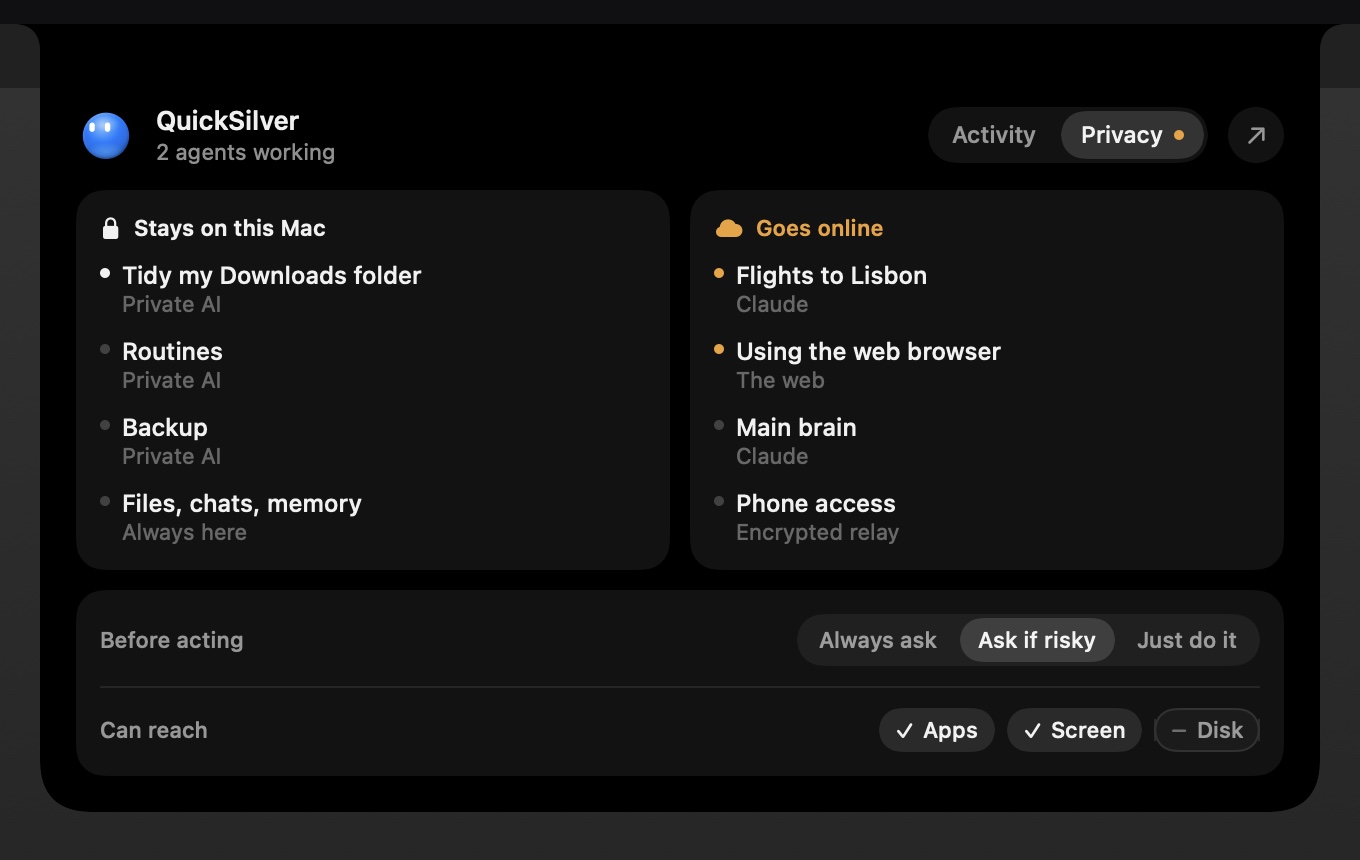
In Kaairos, for example, everything runs on the private AI on your Mac until you connect an online account. Once you do, you can see which jobs go to it: routines stay on the private AI by default, and the notch's Privacy page lists what stays on this Mac and what goes online. If you connect ChatGPT with Sign in with ChatGPT, your ChatGPT account's own data controls apply to what's sent; if you connect with an API key, that company's API terms apply.
History, memory and training are three different settings
People often turn off one and assume they've turned off all three. They're separate:
| Setting | What it controls | Turning it off means |
|---|---|---|
| Chat history | Whether past conversations are saved for you to see | You lose the list of old chats (or use a temporary chat for one conversation) |
| Memory | Whether the assistant remembers facts about you across chats | It stops personalising answers from past conversations |
| Model training | Whether the company may use your chats to improve future models | Your future chats aren't used for training; history and memory are unaffected |
Check all your AI settings in five minutes
- ChatGPT: Settings › Data Controls › turn off Improve the model for everyone. Then Settings › Personalization to review Memory.
- Claude: Settings › Privacy › check the model-training choice.
- Gemini: Gemini Apps activity › turn off Keep Activity, if you don't want chats used for training.
- Delete what you regret. Go through old conversations and delete any that contain sensitive details.
- Check apps with AI built in. Writing tools, email clients and note apps often send text to an AI company; their privacy pages say which.
- Use a temporary or private chat for the next sensitive question, or a local model.
Using AI at work
If your employer pays for ChatGPT Business or Enterprise, Claude for Work, or uses the companies' APIs, those plans aren't used for training by default and come with business agreements. That's different from staff using personal accounts for work, where the personal defaults above apply and company data ends up under consumer terms. If you're unsure which you're on, ask your IT team before pasting client or company information.
Which kind of AI for which kind of data
| Your data | Reasonable choice | Why |
|---|---|---|
| Public information: news, product research, travel ideas | Any assistant | Nothing to protect |
| Your own writing, plans, ideas | Online assistant with training off, or a local model | Limits reuse of your words |
| Personal admin: bills, letters, health questions in general terms | Temporary chat, or a local model | Keeps it out of history and training |
| Other people's personal data, client files, contracts | A business plan your organisation approved, or a local model | Business terms or no third party at all |
| Passwords, card numbers, identity documents | No AI | No assistant needs them to help you |
A local model is the one option that fits every row except the last, because nothing you type to it leaves your computer. The trade-off is capability: the best online models are still stronger on the hardest tasks, which is why many people use both.
Sources
- OpenAI Help Center: Data Controls FAQ
- OpenAI Help Center: How your data is used to improve model performance
- OpenAI: Business data privacy, security, and compliance (“We don't train our models on your organization's data by default”)
- Anthropic: Updates to our consumer terms
- Google: Gemini Apps Privacy Hub
OpenAI's help pages blocked our automated reader on 16 November 2026, so the OpenAI rows are based on the text of those pages as shown in search results that day. Read them directly before relying on the detail.
Fair questions
Does ChatGPT use my conversations to train its models?
On Free, Plus and Pro, yes by default. Turn off “Improve the model for everyone” in Settings › Data Controls to stop future training.
Does ChatGPT Plus train on my data?
The paid personal plans follow the same default as Free: training is on until you switch it off. Business and Enterprise plans are not trained on by default.
Are ChatGPT Temporary Chats private?
They aren't saved to your history, don't update memory and aren't used for training while temporary. OpenAI still receives them and deletes them within 30 days.
Does Claude train on my chats?
Only if you allow it. Free, Pro and Max users choose in Settings › Privacy; allowing it extends retention to five years.
Does Gemini train on my chats?
Yes while Keep Activity is on. With it off, Google says future chats aren't used for training (unless you send feedback) and are kept for 72 hours.
Does the OpenAI API train on my data?
OpenAI says it doesn't train on API inputs or outputs by default.
If I opt out, are my chats deleted?
No. Opting out stops training on future chats. Delete conversations separately, and expect a retention period for safety.
What's the most private way to use AI?
Run an open-weight model on your own computer. Nothing you type to it is sent anywhere.
Is ChatGPT safe for confidential information?
On personal plans, treat it as sending the information to OpenAI: even with training off, it's received, stored for a period and may be reviewed for safety. For confidential work, use a business plan your organisation approved, or a model running on your own computer.
Does deleting a chat remove it from OpenAI's systems?
OpenAI says deleted chats are removed from its systems within 30 days, unless it has to keep them for safety or legal reasons. Deleting also removes them from your history straight away.
Do these settings sync across my devices?
Yes for ChatGPT and Claude: the training choice belongs to your account, not the device. Gemini's Keep Activity is a Google Account setting, so it applies wherever you're signed in.
Download and go
Your AI agent, already set up.
One button to set up. Its own private AI, free. Claude, ChatGPT or Gemini when you want more.
A Mac with Apple silicon (M1 or later), macOS 15 Sequoia or later. 14-day refund.