
Privacy and security
Private by design, careful by default
Kaairos is built so the safe choice is the default one: your AI on your Mac, your data on your Mac, and your OK before anything risky. Here's exactly how, including what it doesn't protect against.
The short answer
Kaairos keeps your conversations, memory, files and settings on your Mac, and its own AI runs there too. Stuvio, which makes Kaairos, runs no server that receives your chats, and the app has no analytics or tracking. Data leaves your Mac only when a feature needs it, and then it goes directly to the service involved: an online AI you connect, a website it visits, Telegram or WhatsApp. By default QuickSilver, the agent, asks before anything risky, keeps snapshots of files it changes, and can't wipe your disk whatever you choose. Reading saved passwords or changing what starts at login always needs your OK unless you choose to let it work without asking.
Where your data lives
| What | Where |
|---|---|
| Conversations, memory, skills, routines, engine settings | ~/.kaairos/home, on your Mac |
| Keys and sign-ins for AI accounts and connected apps | ~/.kaairos/home (the engine's .env and token stores) |
| Kaairos's own state (name, carefulness, folder) | ~/.kaairos/app |
| Logs | ~/.kaairos/logs; open them from Settings › About Kaairos › Show Logs |
| The private AI's model | ~/.kaairos/home/models |
| Files it makes and files you give it | Your Kaairos folder (~/Kaairos) |
| Your licence key; phone-access secrets | The macOS Keychain, service app.kaairos, readable only on this Mac after it's been unlocked (phone access also keeps a private copy, readable only by you, for its background helper) |
Nothing here is copied to Stuvio. Your own backups, such as Time Machine, treat these folders like any other files in your home folder.
What leaves your Mac, feature by feature
| Feature | What leaves the Mac | To whom |
|---|---|---|
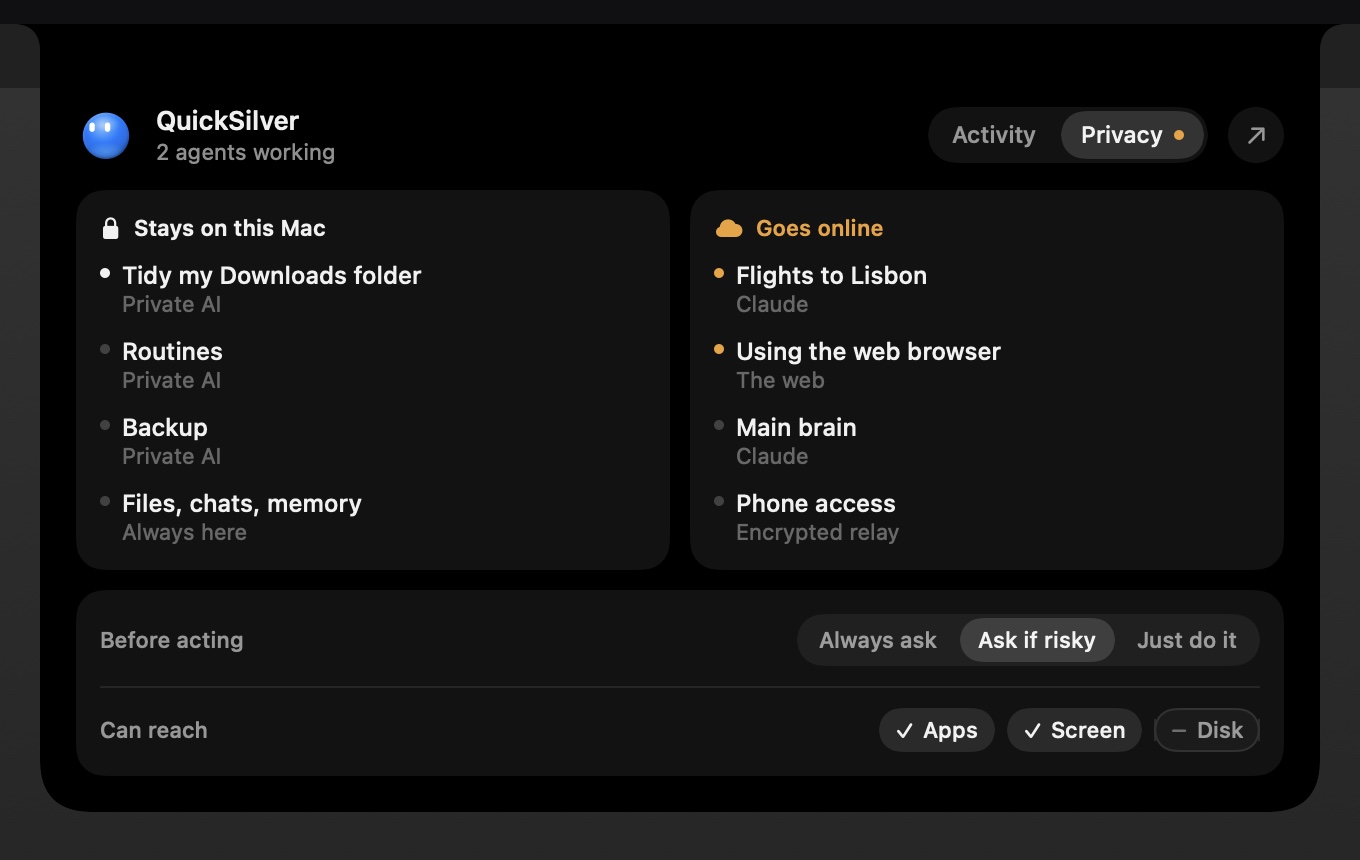
| Chatting with the private AI | Nothing | No one |
| Files, memory, reminders on the private AI | Nothing | No one |
| Chatting with an online AI you connect | Your messages, files you share in that chat, and tool results | That AI company (for example Anthropic, OpenAI, Google), under your account |
| Sign in with ChatGPT | The sign-in happens on OpenAI's page; then the jobs routed to your plan | OpenAI |
| Web search and browsing | Search terms; ordinary page requests | Several search engines at once through the open-source ddgs library (such as DuckDuckGo, Bing, Brave and Google), or Exa, Parallel or Firecrawl; and the sites visited |
| Photos and videos in replies | Search terms; image requests | DuckDuckGo, through the open-source ddgs library, and the sites hosting them |
| Making pictures or videos | Your prompt and any picture you give it | The service you connect, such as Higgsfield or OpenAI |
| Connected apps | What QuickSilver reads or, with your OK, writes there | That app, such as Notion or Linear |
| Telegram | Your messages with your bot; for quick setup, a pairing request | Telegram. Quick setup uses a helper hosted by Nous Research, which creates your bot and can see its token |
| Messages in your chat with yourself | WhatsApp (Meta), through an unofficial linked-device bridge | |
| Dictation in the app | Nothing when your Mac supports on-device recognition for your language; otherwise audio | Apple's speech recognition, only if on-device isn't available |
| Voice notes from your phone | Nothing more: they're transcribed on the Mac | No one |
| Setup (downloading the private AI) | Your IP address and which files | Hugging Face, or Stuvio's mirror on Cloudflare R2 for files it holds |
| Licence activation and checks | Your licence key and a name for this Mac | Polar, our payment provider |
| App updates | Your IP address, app version and macOS version | Stuvio's update server |
| Lists of online models, only while an online AI is connected | Your IP address and the engine's version | Nous Research, OpenRouter, GitHub and models.dev |
| Spoken replies | Nothing: speech is made on the Mac | No one |
How careful QuickSilver is
In Settings › General (or at the notch, under Before acting) you choose one of three levels. Each maps to one of Hermes Agent's approval modes:
| Level | Engine mode | What happens |
|---|---|---|
| Always ask first | manual | Asks before every command that could delete, overwrite, install or change settings; edits files in your folders freely |
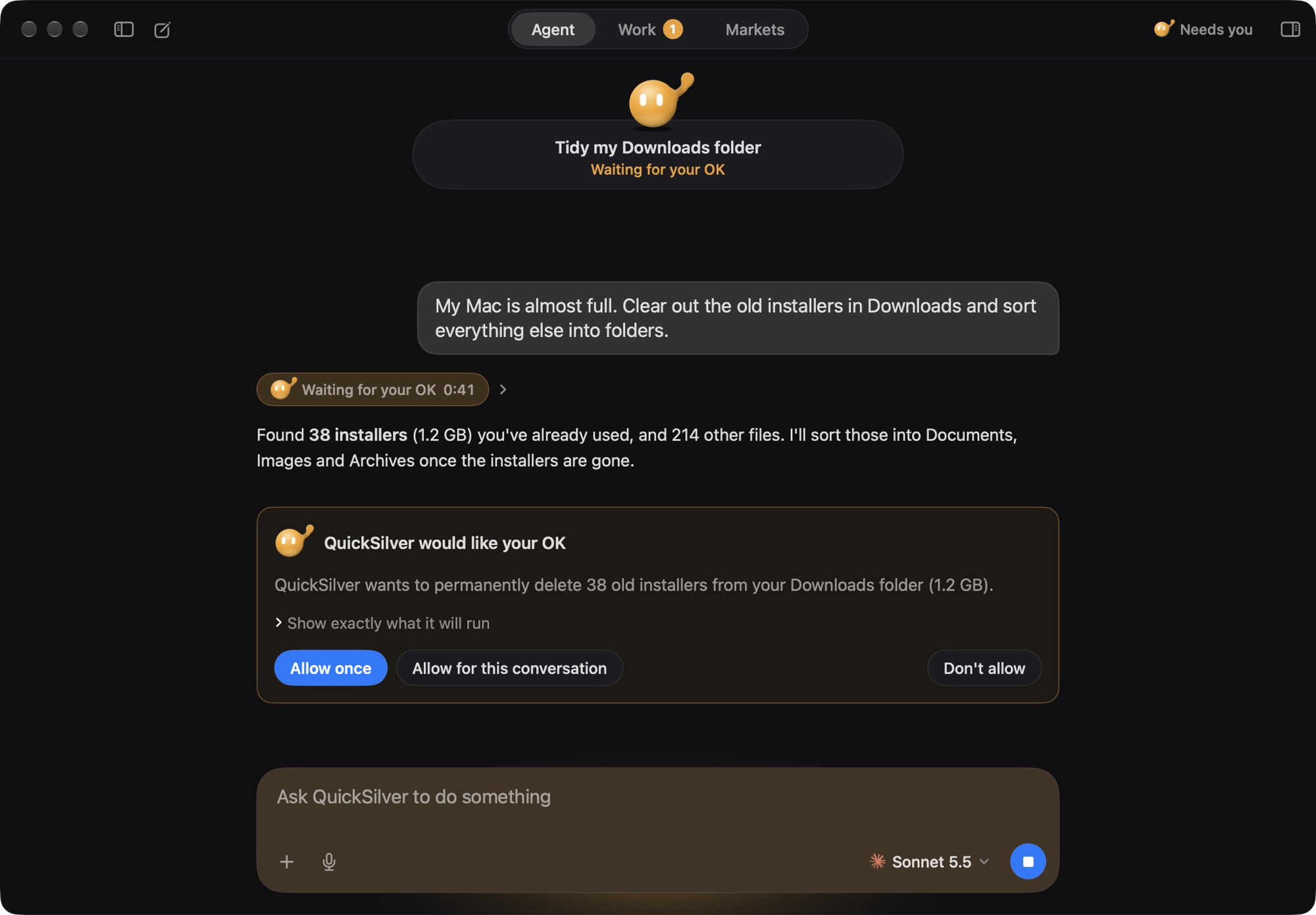
| Ask before anything risky (recommended, the default) | smart | Asks before deleting, moving or sending anything; a safety check clears the rest. A fast AI model judges each command: low-risk ones go ahead, dangerous ones are refused, uncertain ones ask you |
| Just get it done | off | Never stops to ask; it still can't wipe your disk |
An approval says what it wants to do in a sentence, with Allow once, Allow for this conversation or Don't allow, and a way to see exactly what it will run. It appears in the chat, in Work › Needs you, in the menu bar and at the notch, with a notification.
What it never does, at any level
- Disk-destroying commands (such as erasing the root of the disk or formatting a drive) are refused by the engine's hard blocklist, with no override.
- Protected files (SSH keys, cloud credentials, the engine's own key stores, your login items and Kaairos's own settings and engine) can't be written by its file tools.
- Passwords: reading saved passwords from the Keychain or the engine's sign-in tokens needs your OK.
- Secrets are kept out of sight: the engine removes the common key and token variables from what its commands see, and masks keys in error messages.
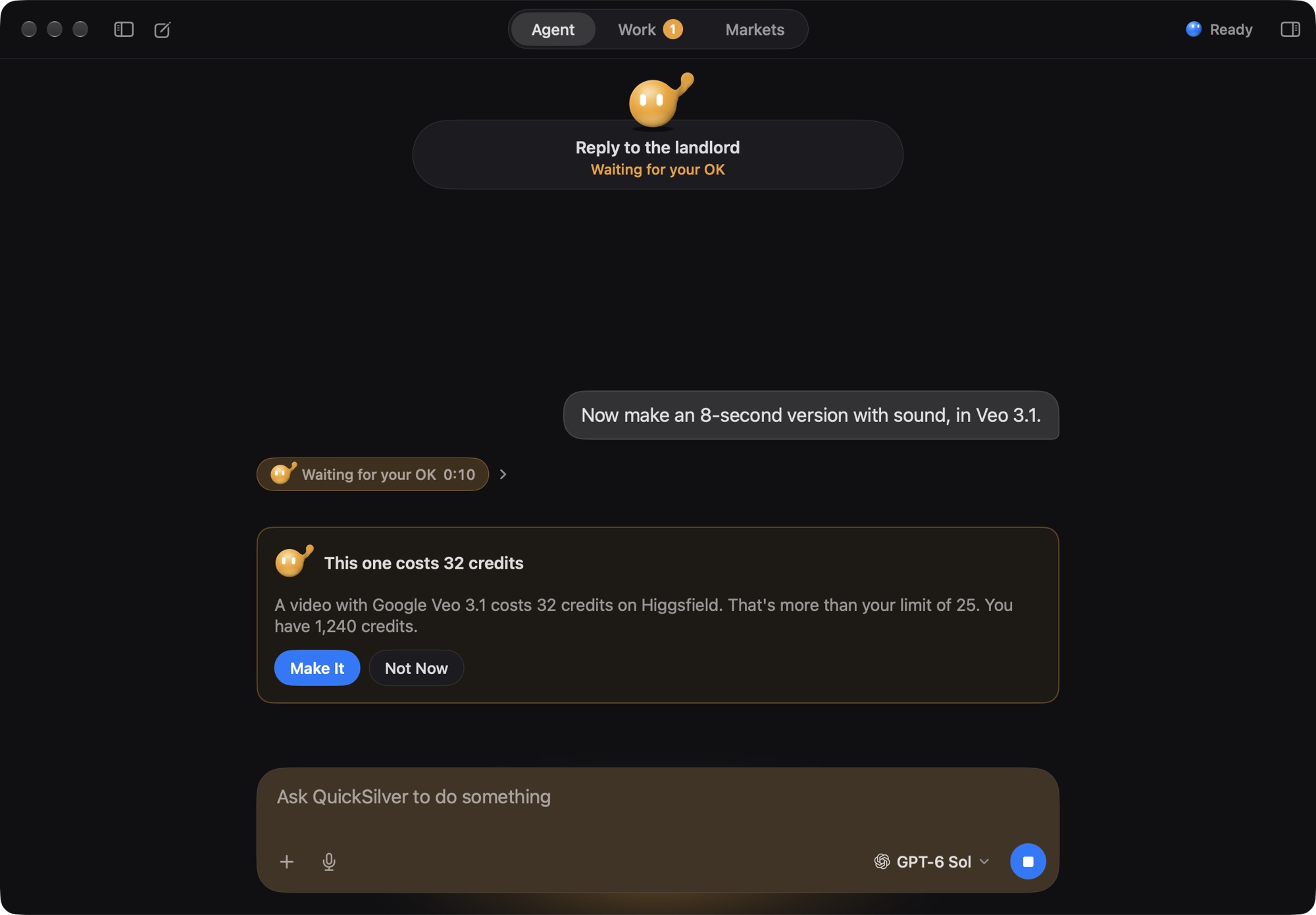
- Spending on Higgsfield above the credit limit you set (25 by default) waits for your OK.
What macOS lets it reach
Kaairos asks macOS for a permission only when a feature needs it. Three powerful permissions it never asks for on its own: the agent gets them only if you allow them yourself in System Settings › Privacy & Security, and the notch shows whether each is on.
| Permission | Asked for? | Used for |
|---|---|---|
| Microphone | Yes, the first time you hold the microphone button | Talking instead of typing |
| Speech recognition | Yes, with the microphone | Turning what you say into text, on this Mac where supported |
| Automation (Apple Events) | Yes, the first time it works with another app | Working with other apps on your Mac when you ask |
| Notifications | Yes | Telling you when it's ready, needs you or finished |
| Accessibility (shown as Apps) | Never by itself | If you allow it: clicking and typing in other apps |
| Screen Recording (Screen) | Never by itself | If you allow it: looking at your screen when a task needs it |
| Full Disk Access (Disk) | Never by itself | If you allow it: opening protected folders such as Mail and Messages. Without it, it keeps out of them |
Undo, and stop
Kaairos turns on the engine's checkpoints: before QuickSilver changes a file, the engine keeps a snapshot, so changes can be undone (how). Snapshots aren't a backup, so keep Time Machine on. Every running task has a Stop button: in the chat (⌘.), in the Work tab, in the menu bar and at the notch.
Keys, sign-ins and the Keychain
- AI keys and connected-app sign-ins are checked with the service when you add them, then stored by the engine in
~/.kaairos/home, the same way Hermes Agent stores them. Removing an AI in Settings deletes its key there. - Your licence key and, if you turn on phone access, its password and secret are stored in the macOS Keychain, available only on this Mac after it's been unlocked once since starting up. They don't sync to other devices.
- Borrowed logins are refused. Hermes can pick up a Claude Code or Codex login it finds on your Mac; Kaairos switches that off on every start, so the engine only uses accounts you connected in Kaairos.
- Sign in with ChatGPT happens on OpenAI's own page; Kaairos never sees your OpenAI password.
- Connected apps sign in on each app's own page.
How the app is built
- The engine talks only to the app, over your Mac's loopback address, with a token that changes every launch. It's never exposed to your network.
- The private AI's server listens only on
127.0.0.1, with its own key. - The engine stays out of your system: its own folder, no shell-profile edits, not on your Terminal's path, and it doesn't update itself.
- No telemetry: there are no analytics in the app, and the engine's own usage reporting is switched off on first launch.
- Messaging is locked to you: Telegram and WhatsApp only answer people you've approved.
- Signed and notarized by Apple. The engine inside the app stays exactly as signed; Kaairos runs a copy in
~/.kaairos/engine.
Updates
App updates come through Sparkle. Kaairos checks once a day and installs an update when you quit, or right away from Settings › About Kaairos › Check for Updates…. Each update must carry Kaairos's own EdDSA signature and the same Apple Developer ID signature as the app, or Sparkle refuses it. The engine is updated only with the app: Kaairos switches off the engine's own update check, so it can't change underneath you.
Phone access through the relay (coming soon)
The Kaairos phone app isn't available yet. When it is, it will reach your Mac through a small relay run by Stuvio. The design keeps the relay blind: the encrypted connection ends on your Mac, with a certificate made on your Mac, and the phone trusts only that certificate (its fingerprint is in the pairing QR code). The relay sees names, timing and sizes, not chats, files or commands, and can't pose as your Mac. Pairing codes work once, for two minutes, and Sign out all phones changes the secret. The Privacy Policy will add the relay before it ships.
Threat model, honestly
| Risk | What protects you | What doesn't |
|---|---|---|
| An AI company reading your requests | The private AI keeps them on your Mac | Anything you route to an online AI goes to that company |
| The agent doing something you didn't want | Approvals, the hard blocklist, protected files, checkpoints, Stop | Under “Just get it done” it acts without asking. The engine runs as your user account, not in a sandbox; its own docs say the blocklist reduces accidental damage but doesn't contain a hostile agent |
| A web page or document trying to steer the agent (prompt injection) | Approvals before risky steps; connected apps are read-only until you OK a change | No AI is immune. Be careful with “Just get it done” on tasks that read untrusted pages |
| Someone else messaging your agent | Messaging only answers approved people | Anyone who controls your Telegram or WhatsApp account |
| Someone with access to your Mac | macOS login, FileVault, the Keychain | Files in ~/.kaairos are readable by anyone logged in as you |
| A tampered update | EdDSA and Developer ID signatures, checked by Sparkle | — |
| Stuvio being breached | Stuvio holds no chats or files | Order details held by Polar and Stuvio (see the Privacy Policy) |
Reporting a security issue
If you find a vulnerability in the Kaairos app, its update feed, Stuvio's relay or this website, email support@stuvio.co with “Security” in the subject. Please include steps to reproduce. We'll acknowledge within 3 working days, keep you updated, and credit you if you'd like once it's fixed. We won't take legal action against good-faith research that avoids harm to people's data and doesn't degrade our services. Our security.txt has the same details.
Out of scope: the third-party AI services you connect, Telegram and WhatsApp themselves, and issues in Hermes Agent that should go to Nous Research (we'll help route them).
Fair questions
Does Stuvio see my conversations?
No. Your conversations stay on your Mac, or go directly from your Mac to an AI company you connected. Stuvio doesn't run a server in between.
Is there telemetry?
No analytics or tracking in the app, and the engine's usage reporting is switched off. Updates, licence checks and the model download do contact servers; see the Privacy Policy.
Can QuickSilver delete my files?
Only with your OK under the default setting, and changed files are snapshotted so they can be undone. Under any setting, it never wipes your disk.
Where are my API keys stored?
In the engine's folder on your Mac (~/.kaairos/home), as Hermes Agent stores them. Your licence key is in the macOS Keychain.
Can it see my screen or control other apps?
Only if you allow Screen Recording or Accessibility for it in System Settings. Kaairos never asks for those by itself.
Can Kaairos read my email?
Not today: Mail and calendar aren't connected in Kaairos yet (Inbox is coming soon), and it keeps out of the Mail folder unless you give it Full Disk Access yourself.
What happens to my data if I delete Kaairos?
It stays on your Mac until you delete ~/.kaairos and your Kaairos folder. Turn off Keep working when closed first. See the uninstall guide.
Is the WhatsApp link safe?
It works as a linked device through an unofficial bridge, which WhatsApp may restrict. Kaairos tells you so and recommends Telegram.
Download and go
Your AI agent, already set up.
One button to set up. Its own private AI, free. Claude, ChatGPT or Gemini when you want more.
A Mac with Apple silicon (M1 or later), macOS 15 Sequoia or later. 14-day refund.