
Help
Use Kaairos from WhatsApp
Talk to QuickSilver in the WhatsApp chat with yourself. It links like WhatsApp on a computer, which comes with a risk you should know first.
In short
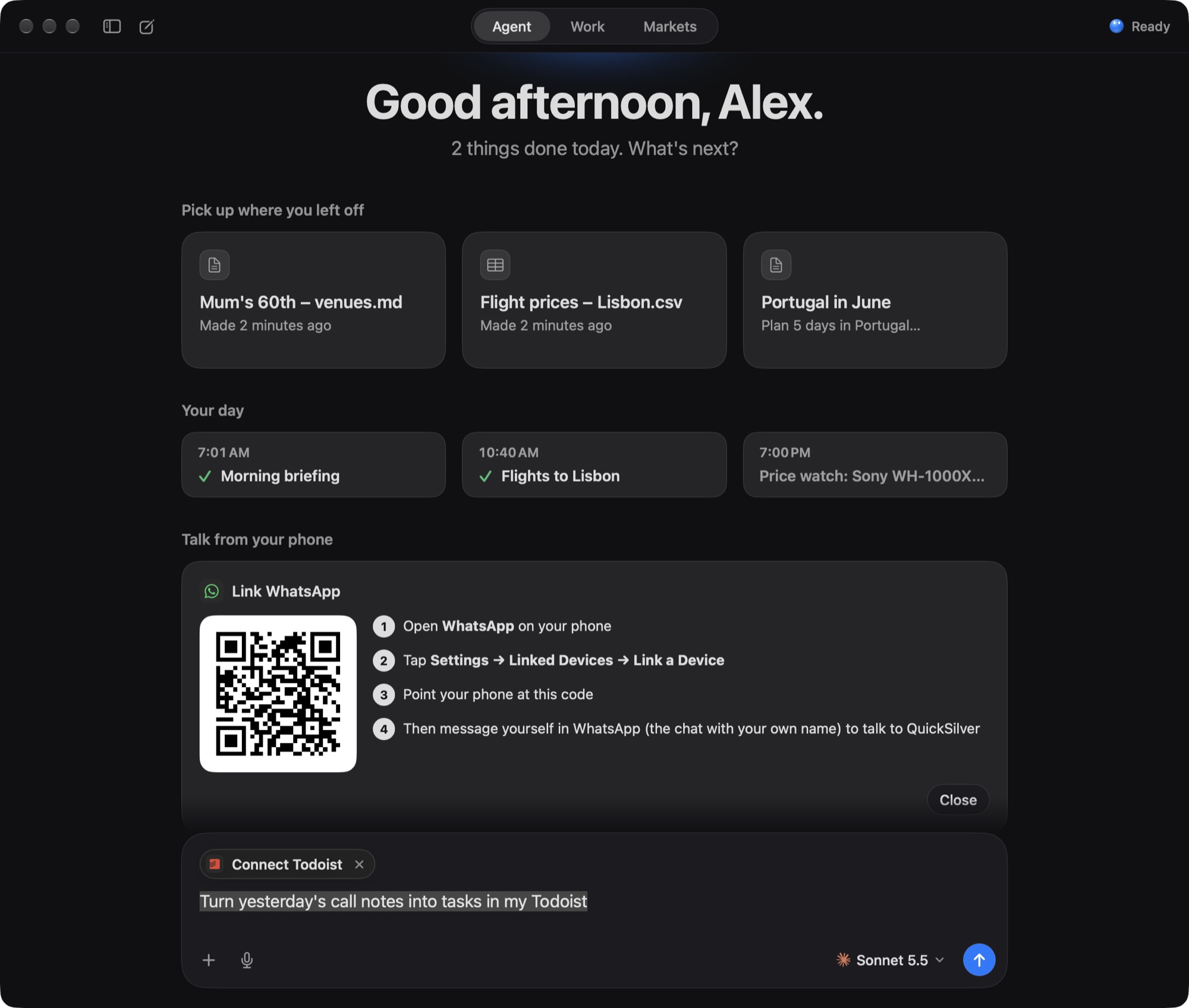
On the home screen, under Talk from your phone, press Show Code next to WhatsApp. On your phone, open WhatsApp and tap Settings → Linked Devices → Link a Device, then point the phone at the code. Then message yourself (the chat with your own name) and QuickSilver answers there. No second phone number is needed.
Before you link: the risk
WhatsApp doesn't officially support assistants. Linking works like WhatsApp on a computer, but WhatsApp could limit the number. Telegram is the safer choice.
Kaairos links to WhatsApp the way WhatsApp Web does, through an unofficial bridge built into its engine. WhatsApp's rules don't cover assistants on personal accounts, and it may restrict accounts that use unofficial bridges. If your WhatsApp number matters to you, use Telegram instead.
Before you start
- WhatsApp on your phone, with a free Linked Devices slot.
- Kaairos set up and running, with the internet.
- For answers when you're away: your Mac on and awake, and Kaairos open or Keep working when closed on.
Link it
- On the home screen, under Talk from your phone, press Show Code next to WhatsApp. (Or Settings › Phone & messages › Connect next to WhatsApp; setup also offers this step.)
- The card Link WhatsApp shows a QR code.
- Open WhatsApp on your phone.
- Tap Settings → Linked Devices → Link a Device.
- Point your phone at the code. On the Mac, the code turns into a tick and the card says WhatsApp is linked.
- Message yourself in WhatsApp (the chat with your own name) to talk to QuickSilver.
Using it
- Write in the chat with yourself. QuickSilver reads only that chat, so your other conversations aren't touched.
- Voice notes are transcribed on your Mac, and the transcript is echoed back.
- Routines can send results here: choose WhatsApp under Send the result to.
- Approval requests arrive in the chat; reply to approve or deny.
- Tasks you send show in the Work tab with WhatsApp's logo.
Statuses you might see
| Status | Where | Meaning |
|---|---|---|
| Scan a code to link | Home screen card | Not linked yet; press Show Code |
| Not set up / Off | Settings › Phone & messages | Not linked, or switched off; press Connect |
| Connecting… / Starting up… | Both | Kaairos is bringing the link up |
| Connected | Both | Messages in the chat with yourself get answers |
| A problem message | Both, and Work › Needs you as “WhatsApp isn't connected” | The link dropped; press Fix and scan again |
Once both WhatsApp and Telegram are linked, the home screen's Talk from your phone cards go away; their status stays in Settings › Phone & messages.
Unlink
In Kaairos, open Settings › Phone & messages, press ⋯ on the WhatsApp row and choose Disconnect WhatsApp…. Kaairos stops answering on WhatsApp and deletes its link from this Mac. Then, on your phone, open WhatsApp › Settings › Linked Devices, tap the Kaairos device and log it out, so it no longer shows there. You can link again any time with Connect.
Common problems
- “That code expired. Let's make a new one.” WhatsApp codes last 10 minutes. Press Try Again.
- “WhatsApp didn't link. Let's try again.” Press Try Again and scan the new code.
- No answer in the chat with yourself. Check the Mac is on and awake with Kaairos open or Keep working when closed on, and that Kaairos is still listed in Linked Devices on your phone.
- “WhatsApp isn't connected” in Work › Needs you. WhatsApp logged the device out (this happens if the phone is offline for a long time, or you removed it). Press Fix and scan again.
What leaves your Mac
Your messages go through WhatsApp's servers, end-to-end encrypted as usual, to your Mac, which acts as a linked device and does the work. The link's session is stored in Kaairos's data folder on your Mac. Voice notes are transcribed on the Mac.
Fair questions
Do I need a second number?
No. You talk to QuickSilver in the chat with yourself, on your own number.
Can my contacts talk to QuickSilver?
No. Kaairos links in self-chat mode: it answers you in the chat with yourself, not other people.
Does my Mac need to stay on?
Yes. Your Mac does the work, so it must be on and awake, with Kaairos open or Keep working when closed on. WhatsApp holds messages until the Mac is back.
Does it use one of my linked device slots?
Yes. Kaairos appears in Linked Devices like WhatsApp on a computer, and counts toward WhatsApp's limit of linked devices.
Is WhatsApp riskier than Telegram?
Yes. WhatsApp doesn't support assistants on personal accounts and may limit numbers that use unofficial bridges. Telegram supports bots officially.
Download and go
Your AI agent, already set up.
One button to set up. Its own private AI, free. Claude, ChatGPT or Gemini when you want more.
A Mac with Apple silicon (M1 or later), macOS 15 Sequoia or later. 14-day refund.