
Guide
A private AI agent for your Mac
A chatbot answers. An agent does: it uses tools, keeps working on a schedule, remembers what you like and comes back with results. A private agent does that with an AI that runs on your own Mac. Here's what that looks like, what it needs and how to choose one.
The short answer
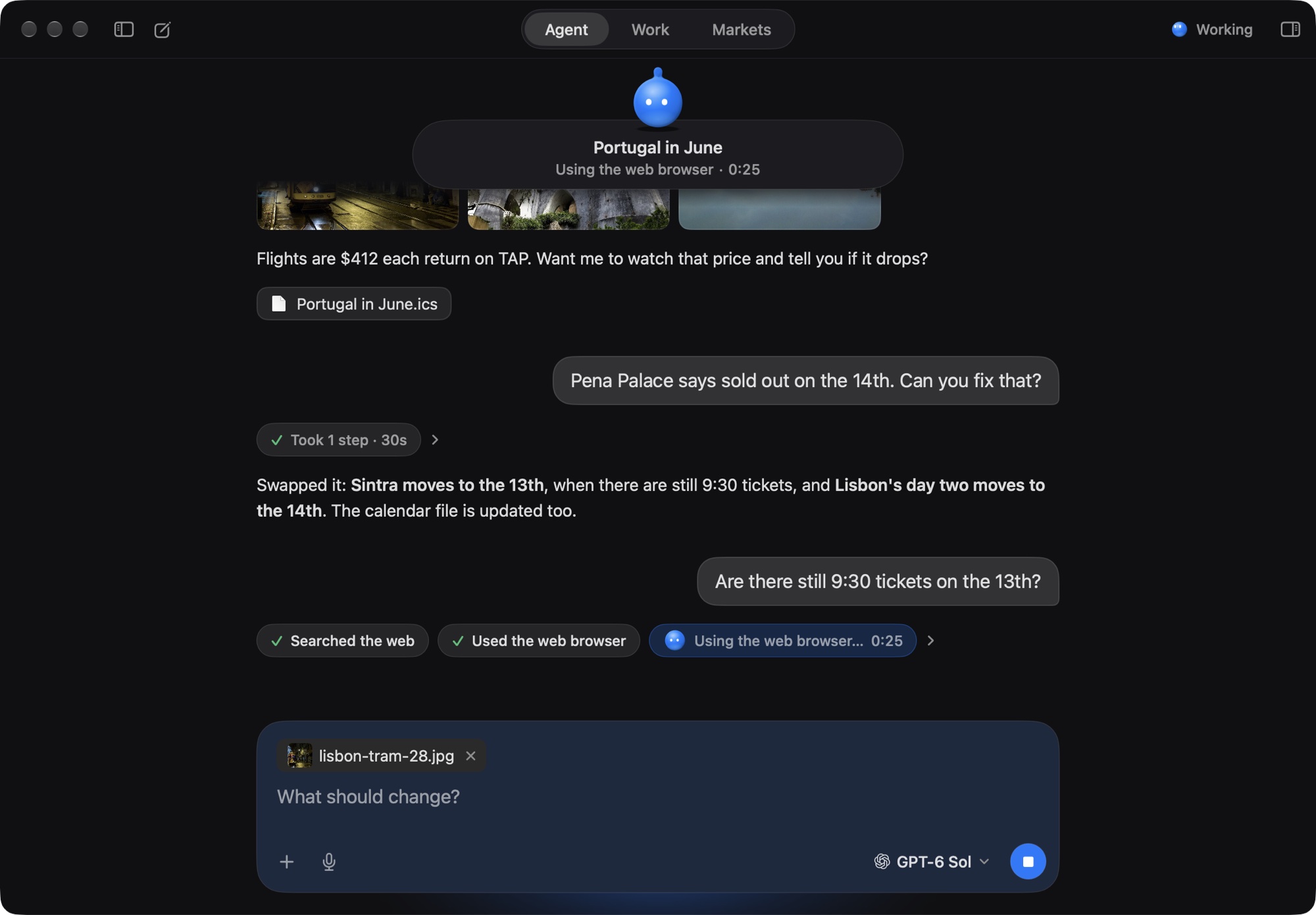
A personal AI agent is software that uses an AI model to carry out tasks for you, not just answer questions: it searches the web, opens pages, makes and sorts files, runs on a schedule and messages you the results. A private AI agent runs that model on your own computer, so what you ask isn't sent to an AI company. On a Mac, Kaairos is a private AI agent that's already set up: it's built on the open-source Hermes Agent, downloads its own AI to run on Apple silicon, and needs no account or terminal. It needs 32 gb of memory or more to run its own ai for the private AI; on smaller Macs you connect an online AI instead.
What makes something an agent
An AI agent has four parts. Take any one away and you're back to a chatbot:
- A model that can plan and decide: the AI itself.
- Tools it can use: a web browser, files, code, connected apps, messaging.
- A loop: it acts, looks at the result, and decides the next step until the job is done or it needs you.
- Persistence: memory of what you like, skills it reuses, and schedules, so it keeps working when you're not typing.
| Chatbot | Agent | |
|---|---|---|
| You ask “find me a hotel in Alfama under $180” | Suggests what to search for | Searches, opens the sites, compares, and comes back with three options and links |
| You ask “tell me when it's cheaper” | Can't: it only acts when you type | Checks on a schedule and messages you once, when it happens |
| You're away from your desk | Nothing happens | Routines run; you can message it from your phone |
| It needs to do something risky | Not applicable | Asks first, and says what and why |
| Next week | Starts from scratch | Remembers what you like, and how it did it last time |
What makes an agent private
Two questions decide how private an agent is: where the model runs, and where your things are kept.
| Kind | Where the model runs | Where your data is kept | Examples |
|---|---|---|---|
| Cloud agent | The company's servers | The company's servers | Agents inside ChatGPT or Claude |
| Local agent with an online model | A company you choose | Your computer | Hermes Agent or OpenClaw with an API key |
| Private agent | Your computer | Your computer | Kaairos with its private AI; Hermes Agent with a local model you set up |
| Model runner | Your computer | Your computer | LM Studio, Ollama, Jan: private, but chat rather than an agent |
Even a private agent reaches the internet when a task needs it: a web search goes to a search provider, a Telegram message goes through Telegram. What stays private is the thinking, and everything it keeps. In Kaairos, the notch's Privacy page lists, task by task, what stays on this Mac and what goes online (privacy and security).
Things people hand off
A morning briefing
Weather, five things worth knowing, your reminders, on your phone at 7.
Watch and alert
Seats, tables, prices, listings: it checks and tells you once.
Plan a trip
Day by day, within your budget and limits, with photos and a calendar file.
Research before deciding
Owner complaints, a chart, a pick and its sources.
Reminders that nudge
It keeps pinging until you reply done.
Voice note to document
Talk on a walk; get a proposal back as a file.
One task, step by step
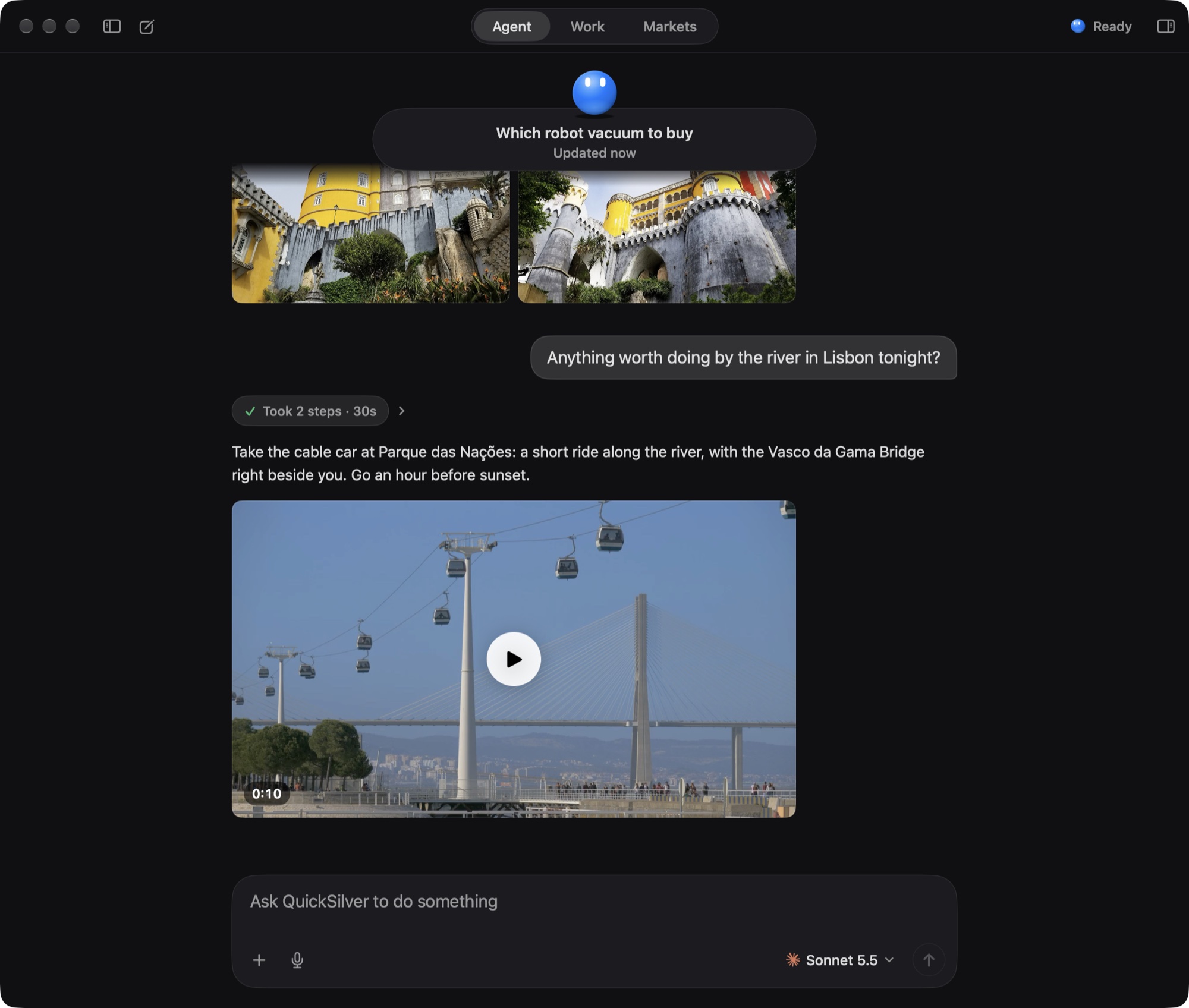
An illustration of what happens when you ask Kaairos to “find flights to Lisbon in March under $600 and tell me the best two”. The exact steps depend on the task and the AI doing it:
- Planning the steps. The agent breaks the job down: which dates, which sites, what “best” means for you (it checks its memory for preferences such as aisle seats or no red-eyes).
- Searching the web. It looks for routes and fares.
- Using the web browser. Some booking sites need clicks and forms, so it opens its own browser. You see the page it's on, live, and can press Stop at any time.
- Comparing. It reads the results and drops what doesn't fit.
- Replying with two options, prices and links, and a note of anything it couldn't check.
- Offering a routine: “Want me to check every morning and tell you if either drops?” Say yes and it becomes a scheduled job.
If a step would spend money or send something on your behalf, it stops and asks first.
What an agent can use
The engine inside Kaairos, Hermes Agent, has more than 40 tools. These are the ones you'll see most, with the plain words Kaairos shows while it uses them:
| Engine tool | What you see | What it's for |
|---|---|---|
web_search, web_extract | Searching the web · Reading a web page | Finding and reading pages |
browser_* | Using the web browser | Its own Chromium-based browser, for sites that need clicks, forms or logins |
read_file, search_files, write_file, patch | Reading a file · Looking through files · Saving a file · Editing a file | Your Kaairos folder freely; elsewhere as your carefulness setting allows |
terminal, execute_code | Running a command · Running some code | Converting files, doing sums, sorting things out |
vision_analyze | Looking at an image | Screenshots, photos and PDFs you share |
image_generate, video_generate | Making an image · Making a video | Needs an account with an image or video service |
image_search, video_search | Shown as photos and videos in the reply | Kaairos's own engine plugin, built on the open-source ddgs library; no key needed |
text_to_speech | Recording audio | Spoken versions of a reply |
memory, session_search | Remembering this · Looking through past conversations | What you like, and what you talked about before |
skills_list, skill_view, skill_manage | Checking its skills · Following a known recipe · Learning a new skill | Skills are written instructions it reuses and improves |
cronjob_manage | Setting up a schedule | Routines from plain words |
delegate_task | Handing part of this to a helper | Subagents for parallel work |
todo_list, clarify | Planning the steps · Asking you something | Breaking down a job; asking when something is unclear |
computer_use | Using your Mac | Clicking and typing in other apps, only if you've allowed it in System Settings |
mcp_* | The connected app's name | Notion, Linear, Dropbox and other apps you connect |
It can also work in apps you connect, such as Notion, Linear, Asana or Dropbox, by signing in on each app's own page (skills and connectors), and make pictures and videos with a Higgsfield account, asking first above a credit limit you set.
Agents and your files
A Mac agent's biggest advantage over a chat app in a browser is that it works where your things are. In Kaairos:
- It has a folder of its own,
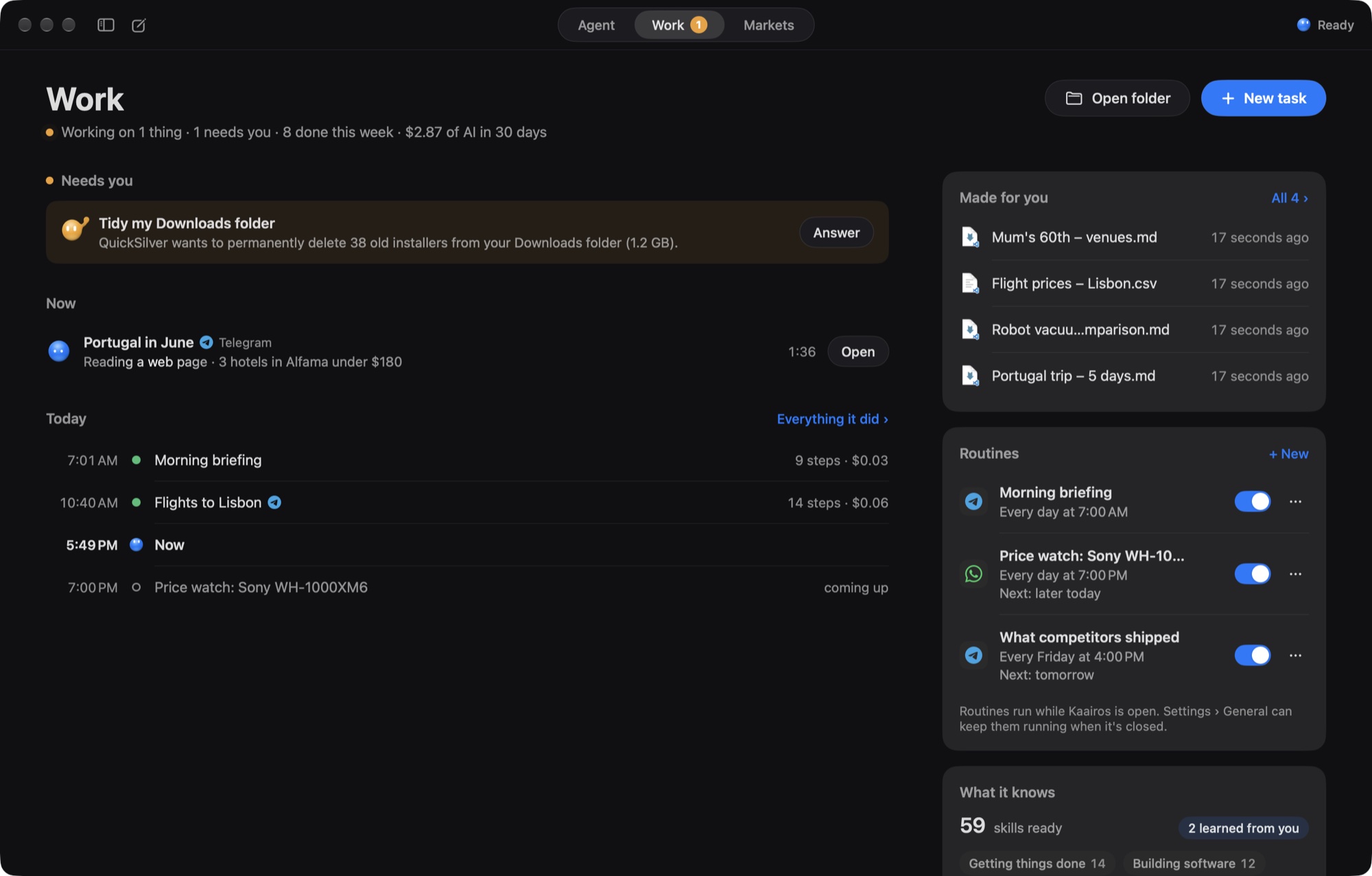
~/Kaairos. Everything it makes goes there and shows in Work › Made for you, with previews. - You can hand it files: drop a PDF, a spreadsheet or a photo into the chat. Files from temporary places are copied into
Kaairos/Sharedfirst, so nothing gets lost. - It can tidy, convert and sort files elsewhere on your Mac, asking first under the default setting, and keeps a snapshot of anything it changes so you can undo.
- It stays out of protected places such as Mail and Messages unless you've given it Full Disk Access yourself.
Routines: work that happens without you
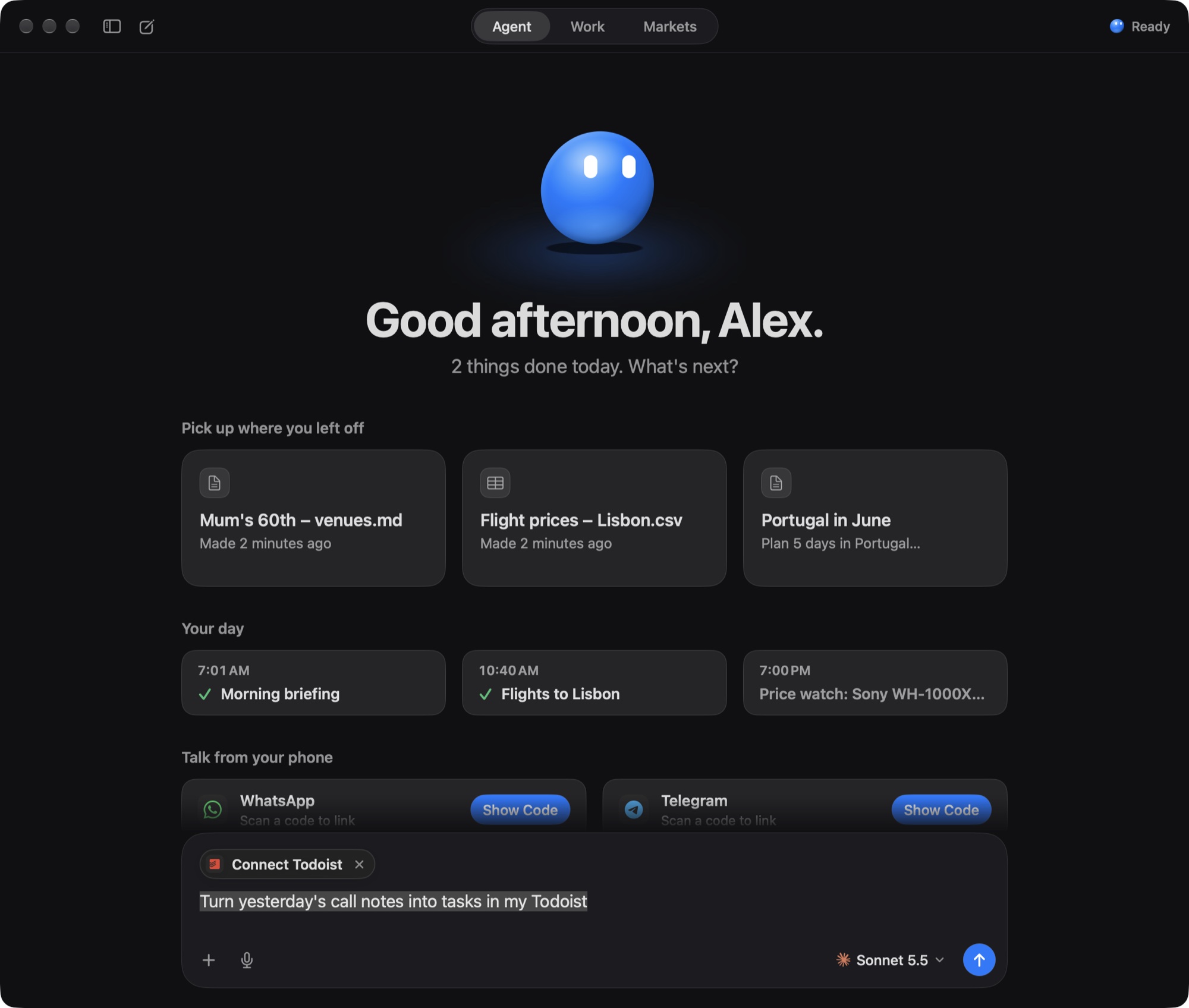
The biggest difference between an agent and a chatbot is that an agent keeps going. Ask in plain words (“every Friday at 5, list bills due next week”) or start from the gallery: morning briefing, price and availability watch, custom reminder, topic news digest, bills and renewals, competitor news watch, habit check-in, weekly meal plan. Results come to Kaairos, or to Telegram or WhatsApp.
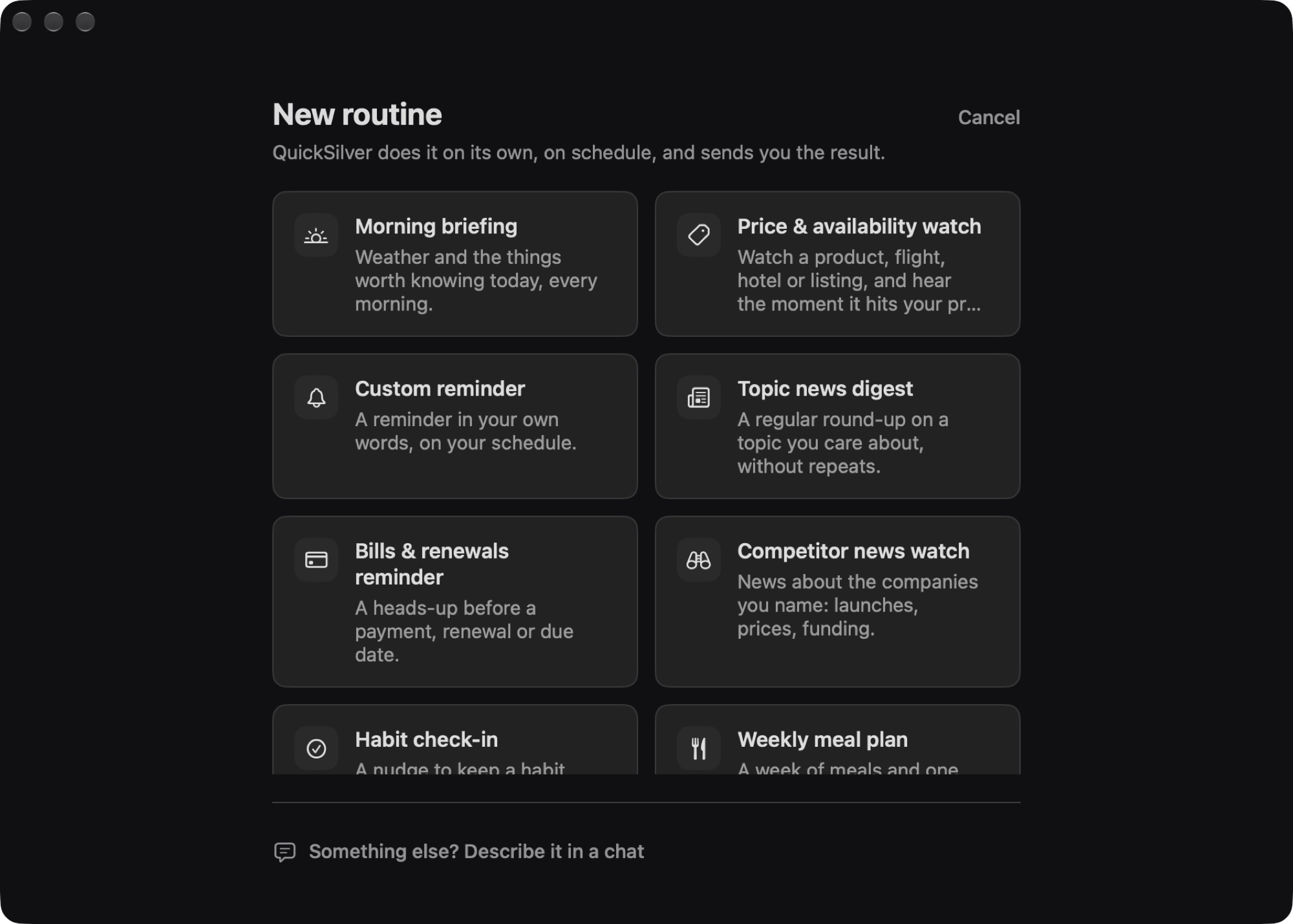
Routines run on the private AI by default, so they're free however often they run. With Keep working when Kaairos is closed on, they run after you quit, as long as your Mac is awake (routines).
From your phone
Link Telegram or WhatsApp by scanning a code in Kaairos, and message QuickSilver like a person: ask from the train, get the briefing at 7, send a voice note and get a document back. Only you can talk to it; people you haven't approved get no reply. A dedicated Kaairos phone app is coming soon. More in phone access.
Which AI does the thinking
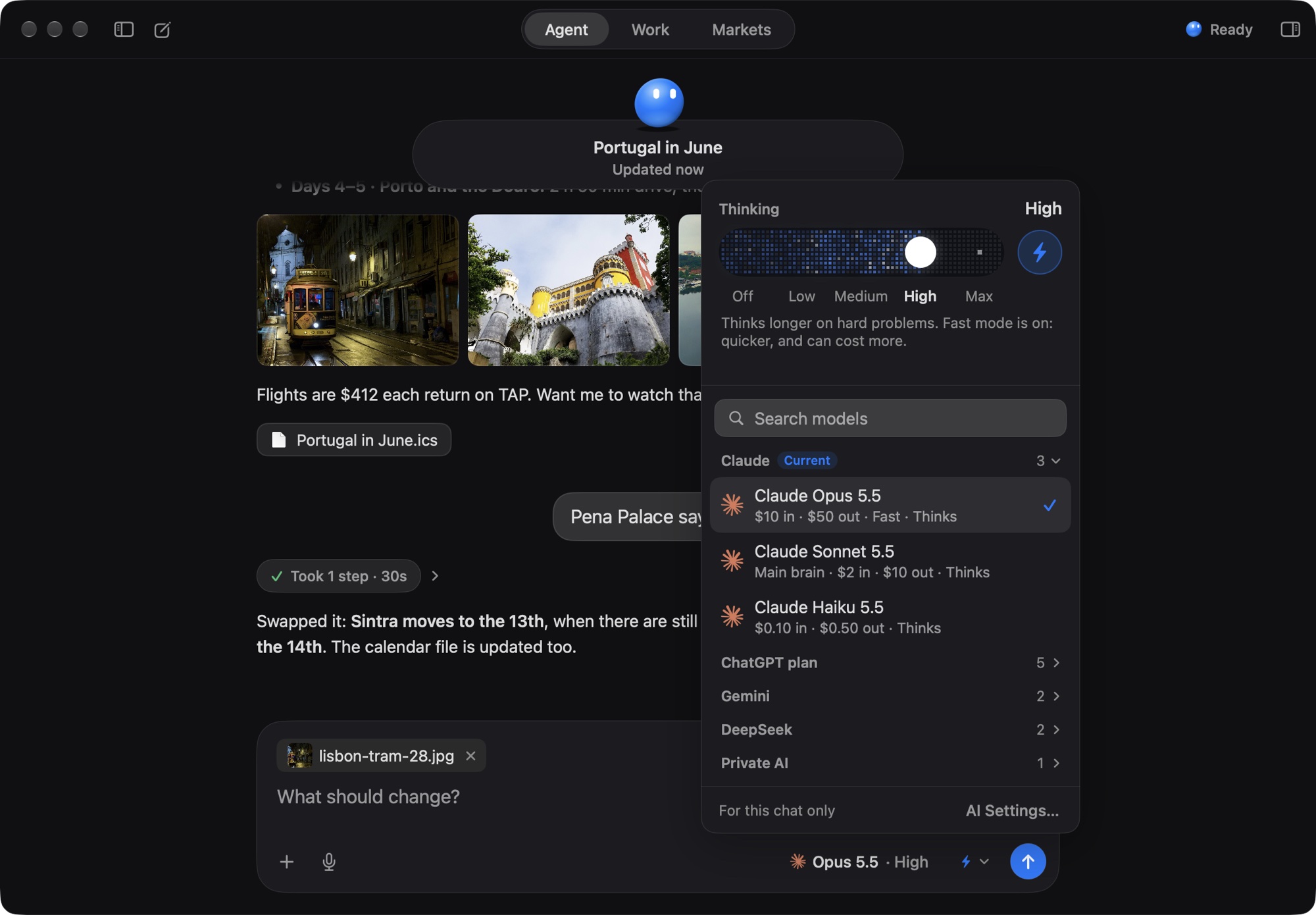
An agent is only as good as the model behind it. Agents need a model that's good at following instructions and calling tools, and that can hold a long context: Hermes requires at least 64,000 tokens.
- Private AI on your Mac: free, offline, and nothing leaves the Mac. Needs 32 GB of memory or more. Good for everyday work and routines (private AI).
- An online AI you connect: Claude, ChatGPT (with your plan, no key), Gemini, OpenRouter and others. Faster and stronger on long, hard tasks. You pay that company directly.
- Both (hybrid): your best online AI does conversations, the private AI runs routines and stands in if the online AI fails (hybrid intelligence).
Keeping an agent safe
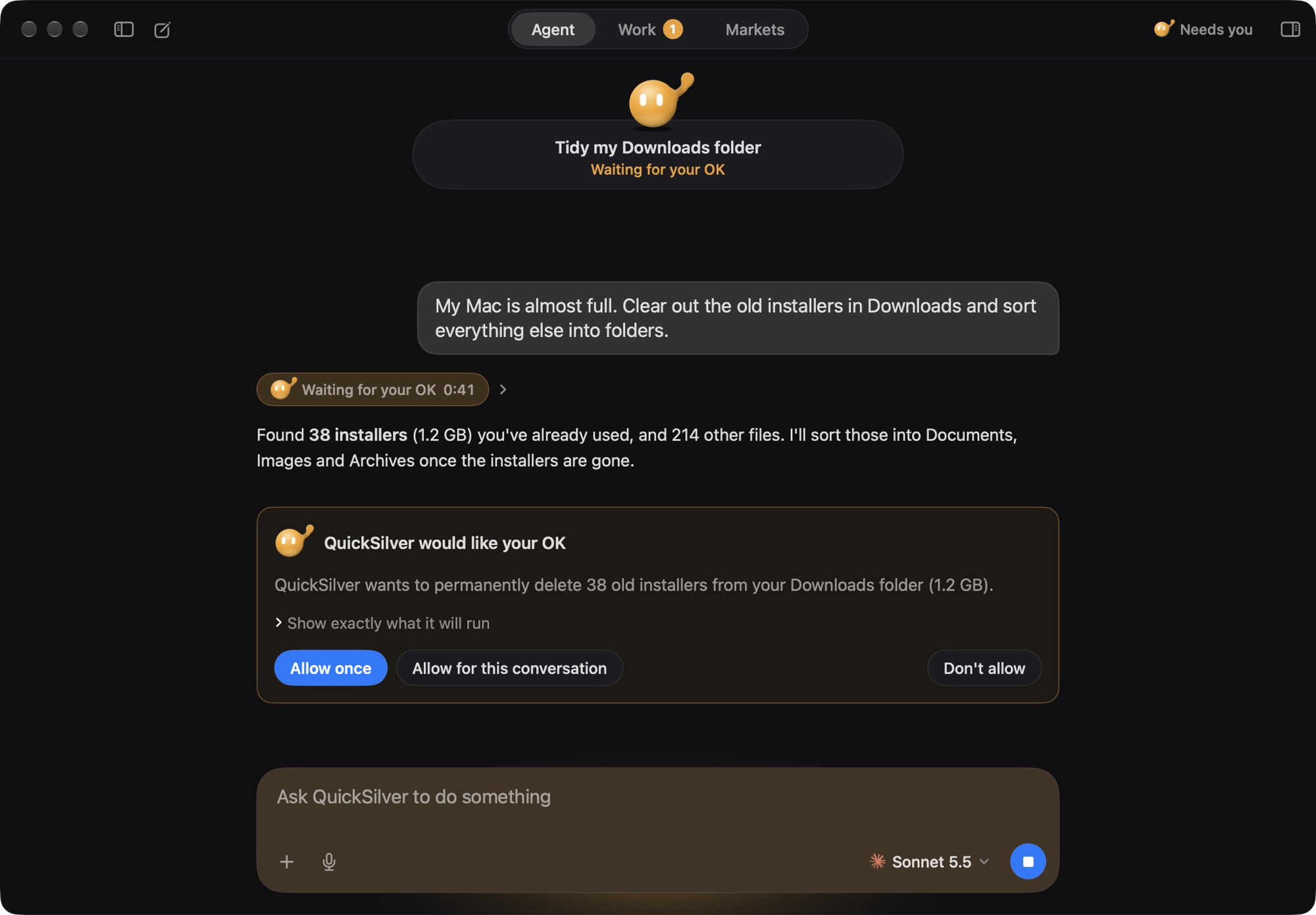
An agent that can act needs limits. In Kaairos you choose how careful it is in Settings › General:
| Setting | What happens |
|---|---|
| Always ask first | Asks before every command that could delete, overwrite, install or change settings; edits files in your folders freely |
| Ask before anything risky (recommended) | Asks before deleting, moving or sending anything; a safety check clears the rest |
| Just get it done | Never stops to ask; it still can't wipe your disk |
Whatever you pick, it can't wipe your disk: the engine's hard blocklist stays on, and its file tools can't overwrite your keys, your login items or Kaairos's own settings. It keeps a snapshot of files it changes so you can undo, and every task has a Stop button. It can only click and type in other apps, see your screen or open protected folders such as Mail if you allow those in System Settings; Kaairos never asks for them on its own. More in privacy and security.
What an agent can't do (yet)
- It can be wrong. Check facts, prices and anything that matters before you act on it.
- Some sites block automated browsers, or need a login it doesn't have.
- It needs your Mac awake to run routines. A sleeping Mac runs nothing.
- Private AI is slower than the best online models on long tasks, and needs 32 GB of memory.
- Mail and calendar routines aren't in Kaairos's gallery yet; they wait until Kaairos can connect those accounts itself.
What you need
| Requirement | |
|---|---|
| Mac | A Mac with Apple silicon (M1 or later) |
| macOS | macOS 15 Sequoia or later |
| Memory | 32 GB of memory or more to run its own AI. Any Apple silicon Mac, once you connect an AI account |
| Disk | About 30 GB of free space (the app plus its own AI); about 105 GB on Macs with 96 GB of memory or more |
| Internet | Needed for setup, licence activation and anything that uses the web |
What it costs
Kaairos is $29 at launch, then $80, once, for up to 3 Macs and every 1.x update, with a 14-day refund for any reason. The private AI is free to use. An online AI, if you connect one, is billed by that company to your own account (or uses your ChatGPT plan), and the Work tab shows the cost over 30 days. Open-source agents such as Hermes Agent and OpenClaw are free, and you pay for the models you use. See pricing and costs and usage.
How to choose an AI agent for your Mac
- Do you want answers or results? If results, things done on a schedule while you're away, you want an agent, not a chat app.
- Should it be private? If you'd rather your requests didn't go to an AI company, you need a model that runs on your Mac, and a Mac with enough memory.
- Will you open a terminal? If not, choose an app that's set up for you.
- Do you need it on your phone? Check for Telegram or WhatsApp, and whether it keeps running with the window closed.
- How careful should it be? Look for approvals before risky steps, undo, and a Stop button.
| Option | Kind | Best for | Price |
|---|---|---|---|
| Kaairos | Private agent, set up | People who want a private agent working today, without a terminal | $29 once |
| Hermes Agent (install yourself) | Agent | Developers who want every setting | Free, open source; pay your model provider |
| Hermes Desktop | Agent | Hermes users who want every control and developer tools | Free, open source |
| OpenClaw | Agent | Power users who want the biggest open-source agent ecosystem | Free, open source |
| ChatGPT and Claude apps | Cloud assistants | Chat with the strongest models | Free tiers; subscriptions |
| LM Studio, Ollama | Model runners | Running local models; chat and developers | Free |
Fair questions
What is an AI agent?
Software that uses an AI model to carry out tasks: it uses tools such as a browser and files, works step by step until the job is done, and can run on a schedule. A chatbot only answers when you type.
What is a private AI agent?
An agent whose AI model runs on your own computer, so what you ask isn't sent to an AI company. Kaairos is one for the Mac.
Is there an AI agent that runs locally on a Mac?
Yes. Kaairos runs its own AI on Apple silicon Macs with 32 GB of memory or more, with no account. You can also install Hermes Agent or OpenClaw yourself and connect a local model.
Is an AI agent safe on my Mac?
With sensible limits, yes. Kaairos asks before risky actions by default, snapshots changed files, never touches passwords or wipes your disk, and can't control other apps or see your screen unless you allow it in System Settings.
Does an AI agent need the internet?
Only for tasks that use the web or online services. Kaairos's own AI runs on your Mac, so chat, files and reminders work offline.
Can an AI agent work while my Mac is asleep?
No. Routines need your Mac awake. With Keep working when Kaairos is closed on, they run after you close the app.
Can I use an AI agent from my phone?
Yes. Link Telegram or WhatsApp to Kaairos by scanning a code, then message it from anywhere.
How much does a personal AI agent cost?
Kaairos is $29 at launch, then $80, once, and its private AI is free to use. Open-source agents are free, and you pay for the AI models you use.
Do I need an API key?
Not for Kaairos: it brings its own AI. You can add Claude, Gemini or others with a key, or sign in with ChatGPT to use your plan.
Can ChatGPT do this?
ChatGPT can run some tasks in its own cloud. A Mac agent such as Kaairos works with your files, runs routines on your Mac, can keep everything private with a local AI, and can use ChatGPT as its brain if you sign in.
Download and go
Your AI agent, already set up.
One button to set up. Its own private AI, free. Claude, ChatGPT or Gemini when you want more.
A Mac with Apple silicon (M1 or later), macOS 15 Sequoia or later. 14-day refund.