
Compare
Kaairos vs Osaurus
These two are close cousins: native Mac apps that mix AI on your Mac with online AI, and agents that act rather than only chat. Osaurus is a free, open-source harness with a very wide feature set. Kaairos is a smaller, paid app that arrives set up with a large private AI and keeps working when its window is closed.
The short answer
Choose Osaurus if you want a free, MIT-licensed agent app with MLX models, Apple's on-device model, a local API on port 1337, MCP in both directions, many chat channels, an iPhone app in beta and a Mac with less than 32 GB of memory. Choose Kaairos if you have a 32 GB Mac and want a large private AI chosen for you, routines that run with the app closed, automatic hybrid routing and no analytics, for $29 once.
At a glance
What it is and who it's for
| Kaairos | Osaurus | |
|---|---|---|
| What it is | A finished AI agent app for the Mac by Stuvio, built on the open-source Hermes Agent by Nous Research | By Osaurus, Inc.: “the open-source agent harness for macOS” (its GitHub README): local and cloud models, agents, workflows, automations, MCP and a local API server |
| Built for | People who want results without choosing models or wiring tools | Everyday users and developers: its site says you don't need to understand runtimes or terminals, and offers APIs, MCP and endpoints when you want them |
| Scope | Deliberately narrow: chat, routines, phone, connectors, files | Very broad: workflows, automations with many triggers, computer use, a code sandbox, Apple app tools, channels, team workspaces |
Setup
| Kaairos | Osaurus | |
|---|---|---|
| Install | Download the app; one button, Set it up | Drag the app into Applications, or brew install --cask osaurus |
| First run | No questions: it picks the private AI that fits your Mac's memory, downloads it (about 24 GB, resumable) and notifies you | Pick one of three: keep it private (downloads Raptor 0.7, about 3.7 GB), start on Osaurus Cloud, or use an AI account you already have |
| Terminal needed | No | No (its quick start has no terminal steps) |
| Account or API key needed | No (a licence key for the paid app) | No for local use; an Osaurus ID key is created on the Mac during setup |
Models
| Kaairos | Osaurus | |
|---|---|---|
| Local runtime | llama.cpp, through Hermes Agent's own local-model manager | MLX on Apple silicon; Apple Foundation Models on macOS 26 with Apple Intelligence |
| Choosing a local model | Chosen for you from Hermes' curated catalog; no in-app model browser | A Local Models catalog, any MLX model by Hugging Face address, and reuse of models already downloaded for LM Studio or Hugging Face |
| Default local model | A large open-weight model (about 24 GB download) with at least 64K context | Raptor 0.7, Osaurus's own 4B agent model (about 3.7 GB) |
| Memory for the local AI | 32 GB or more | Raptor 0.7 runs on small Macs (the site says from 8 GB for Raptor 0.6); larger catalog models need more |
| Online AI | Sign in with ChatGPT, 19 services by key (Claude, OpenAI, Gemini, DeepSeek, Grok, OpenRouter and more) and Your Own Endpoint for any OpenAI-compatible API | Sign in with ChatGPT, Grok or OpenRouter; Claude Code; keys for OpenAI, Anthropic, Gemini, Mistral, DeepSeek and others; Ollama, LM Studio; Osaurus Cloud credits; any OpenAI, Anthropic or Open Responses endpoint |
| Which AI does which job | Automatic: main brain on your best online AI, routines on the private AI, chores on fast models, the private AI as backup | You pick per chat, per agent or per automation; memory carries over when you switch |
What it can do
| Kaairos | Osaurus | |
|---|---|---|
| Web search and browsing | Yes, with its own browser for sites that need one | Yes; keyless built-in search, optional paid search services; browser use off by default |
| Files | Its Kaairos folder and files you share | A Working Folder per agent |
| Schedules | Routines in plain words or from a 13-template gallery | Automations: schedules, folder changes, webhooks, RSS and more, running workflows or agents |
| Runs with the app closed | Yes, with Keep working when closed (Mac on and awake) | No: automations “only run while Osaurus is open”; missed runs catch up when you reopen |
| Phone | Telegram (a bot made by scanning a code) and WhatsApp | WhatsApp, Telegram, Slack, Discord, iMessage and email as agent channels; an iPhone app in TestFlight beta |
| Voice | Dictation, and voice notes transcribed on the Mac | On-device transcription, wake word, dictation hotkey, text-to-speech |
| Pictures and video | Finds photos and video without a key; charts; generation with an image service or Higgsfield | Image and video generation through paid cloud services |
| Connected apps (MCP) | Approved catalog: Notion, Linear, Asana, Dropbox, Stripe and more | MCP client with one-tap sign-in, and an MCP server for other apps; plugins and Claude plugins |
| Controls other Mac apps | Yes, once you allow Accessibility and Screen Recording in macOS: it can look at the screen and click and type in other apps when a task needs it; no native Calendar or Mail tools | Yes, experimental computer use, off until you turn it on per agent; native tools for Calendar, Mail, Notes and more |
| Local API for other apps | No | Yes: OpenAI, Anthropic and Ollama-compatible on 127.0.0.1:1337 |
Safety
| Kaairos | Osaurus | |
|---|---|---|
| Approvals | Three levels; the default asks before deleting, buying or sending | Agents ask before sending, changing or deleting; computer use has five autonomy presets, Balanced by default |
| Undo | Checkpoints snapshot every file it changes | Changes in a Working Folder can be reviewed and undone |
| Hard limits | Hermes' blocklist, protected files and secret redaction stay on at every level | Sensitive apps (Terminal, System Settings, Keychain Access, password managers) always need approval in computer use; code runs in a Linux VM sandbox on macOS 26 |
Privacy
| Kaairos | Osaurus | |
|---|---|---|
| Analytics | None | Anonymous usage analytics (Aptabase) with a pre-checked consent box on the first screen |
| Crash reports | None | Sentry crash and hang reports, on from first launch; can be turned off |
| Keys | AI keys saved by the engine in Kaairos's own folder; the licence in the Keychain | Keys in the macOS Keychain, Touch ID to view |
| Encryption at rest | No extra option (FileVault covers the disk) | Optional SQLCipher encryption; plaintext SQLite by default |
Platforms, licence, price and support
| Kaairos | Osaurus | |
|---|---|---|
| Mac requirements | Apple silicon, macOS 15 or later, about 30 GB free | Apple silicon, macOS 15.5 or later; Apple Foundation Models and the sandbox need macOS 26 |
| Other platforms | None | Windows 11 (Microsoft Store); iPhone in TestFlight beta |
| Licence | Proprietary app; the Hermes Agent engine is MIT | MIT, open source |
| Price | $29 at launch, then $80, once, 3 Macs, every 1.x update, 14-day refund | Free app, local models and updates (new releases every few days in November 2026); Osaurus Cloud credits and team Workspaces are paid (no prices published) |
| Support | Email, support@stuvio.co | GitHub, plus bug reporting and support threads in the app's Help |
What each is really for
Osaurus: own the whole stack, for free
Osaurus's pitch is ownership: “Stop renting your AI. Start owning it.” Agents, memory, tools and permissions live on your computer, and models are swappable: “The models change. Everything else stays yours.” It is local first, not local only, so you can move between its own Raptor model, Apple's on-device model, MLX models from Hugging Face and cloud providers without losing an agent's memory.
It is also a platform. Beyond chat it has a workflow builder, automations triggered by schedules, folders, webhooks and feeds, a local API that speaks three dialects, MCP in both directions, plugins, a Linux sandbox for code, experimental computer use, team Workspaces and remote access through its relay. If you like to build, tinker, connect other software, or you have a Mac with 8 or 16 GB of memory, Osaurus gives you far more than Kaairos does, at no cost.
Kaairos: an agent that's already set up
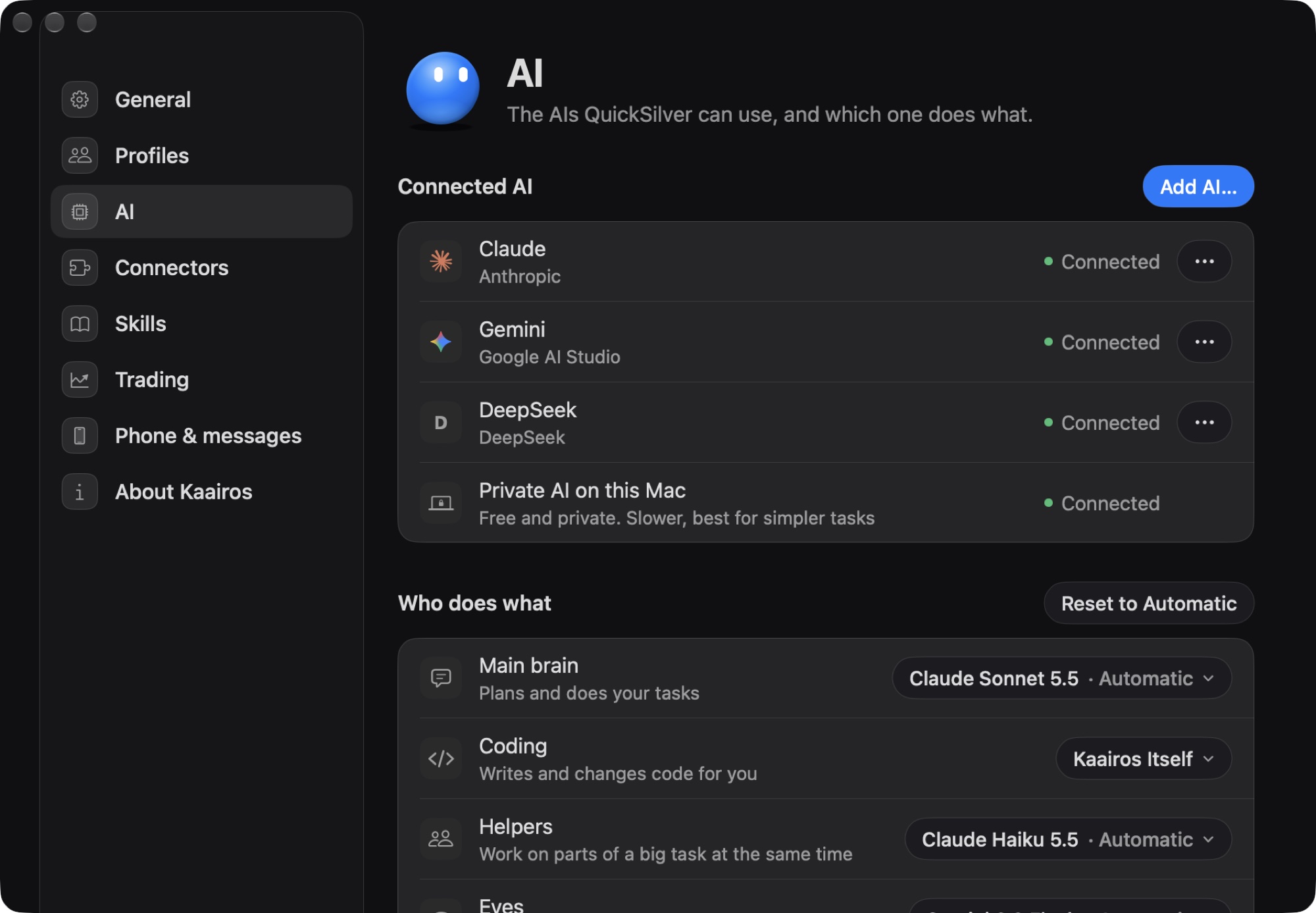
Kaairos makes the choices for you. The first launch has one button; it picks a large open-weight model sized to your Mac's memory, downloads it, and is ready. Each job goes to a sensible AI without you choosing: if you connect Claude or ChatGPT, conversations use it, routines stay on the private AI, and the private AI answers when the online one can't.
It is narrower by design. There is no workflow editor, no code sandbox and no API server. In return it does a few everyday jobs well: briefings, price watches, reminders and research, delivered to Telegram or WhatsApp, even with the window closed. It fits people who will never look for a setting called “Core Model” and want the agent to keep going in the background.
The same job in both
Task: every weekday at 8, send me a short briefing (weather and the news I care about) on Telegram.
In Osaurus
- Create a Telegram bot (Telegram's BotFather gives you a token), then in Osaurus open the agent's channels and paste the token in the Connect step. Osaurus stores it in its Vault.
- Allow the agent to post without being asked: set its posting mode to Without asking (or Asks first) and make sure the bot may post in your chat.
- Open Settings › Automations › Add Automation. Under When, choose a schedule (Daily, or a cron pattern for weekdays at 8:00).
- Under Do, choose Run Agent, pick the agent, and write the instructions for each run. Save, then press Run Now to test.
- Keep Osaurus open: automations only run while the app is open. If the Mac was asleep or the app closed at 8, the run catches up when you next open it.
In Kaairos
- Link Telegram once: the home screen shows a code; scan it and Kaairos makes your personal bot. No token to copy.
- Ask in plain words, from the app or from Telegram, or pick Morning briefing in the routines gallery and fill in what you care about.
- Turn on Keep working when closed in the menu bar panel if you want it to run with the app quit. The Mac must be on and awake.
Every weekday at 8, send me the weather in Lisbon and the top three stories on European rail and AI regulation. Keep it short. Send it here on Telegram.
Done. Weekday briefing runs Monday to Friday at 8:00 on the private AI on your Mac, and the result comes to this chat. You'll see it in the Work tab, where you can pause it any time.
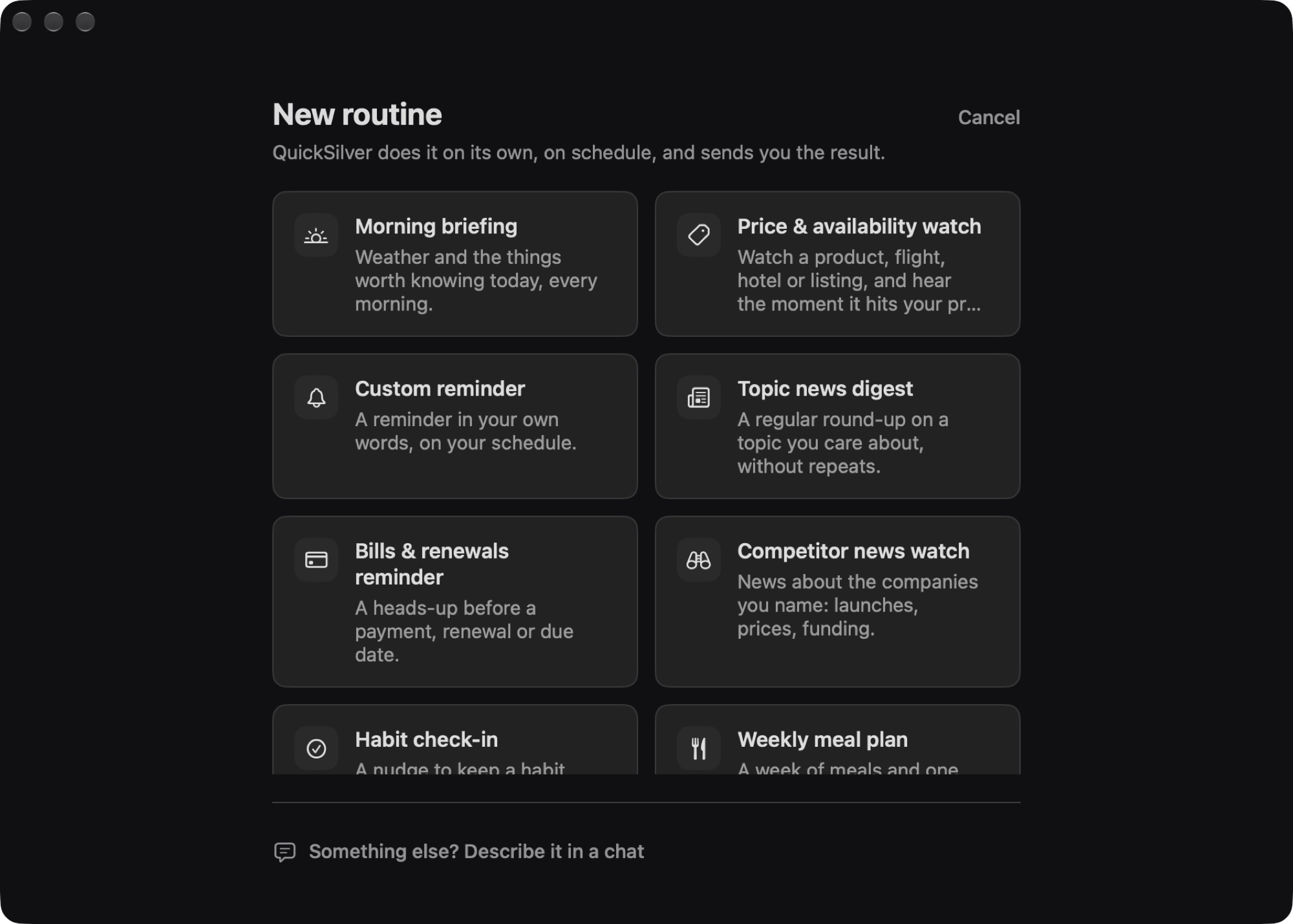
Where Osaurus is ahead here: it can trigger on far more than a clock (a new file in a folder, a webhook from Stripe or GitHub, an RSS item), and it can post to Slack, Discord, iMessage or email as well. Where Kaairos is ahead: the Telegram link is one scan, and the routine keeps firing with the app closed.
Privacy, side by side
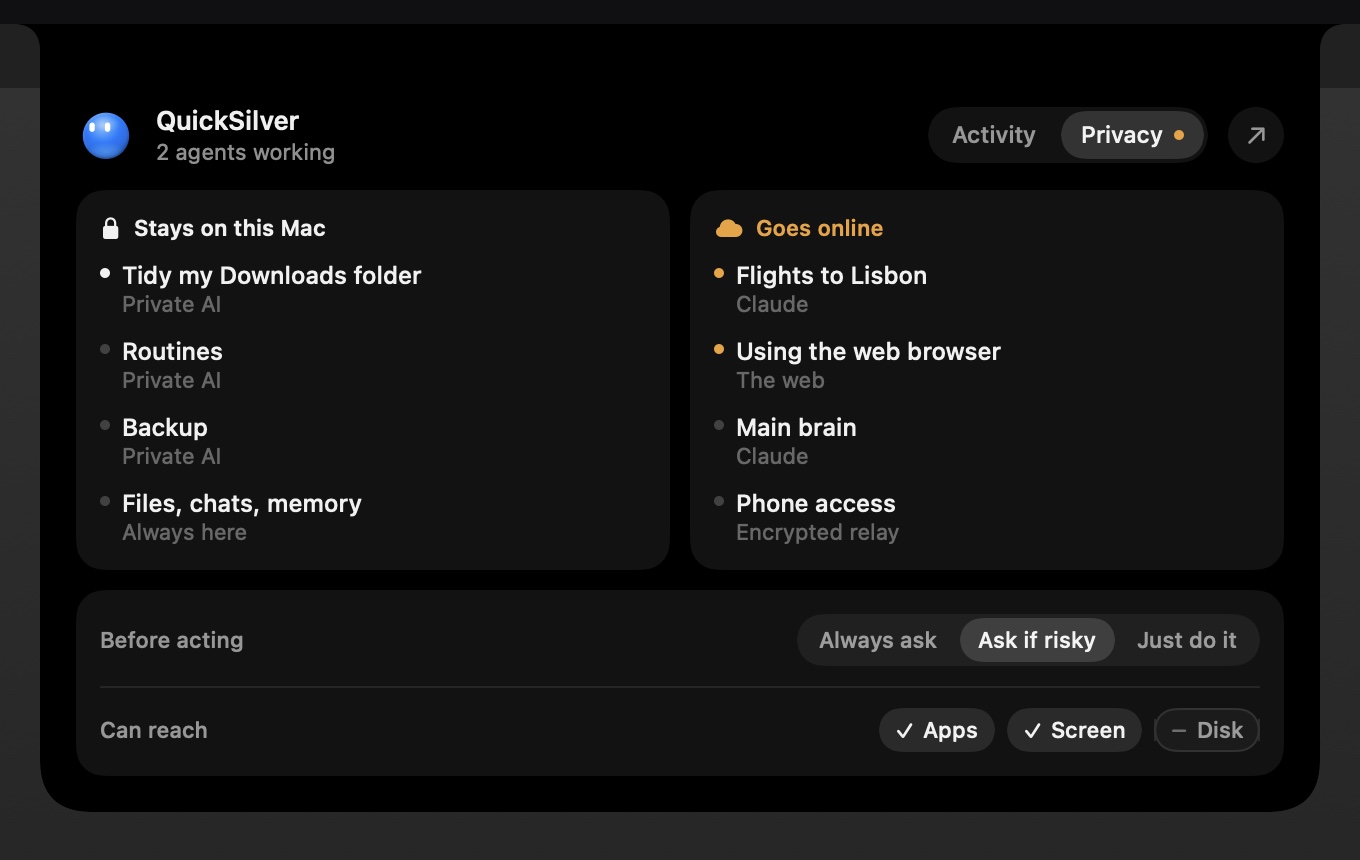
Both keep chats, memory and settings on the Mac, and both send things out only when a job needs the internet. The differences are in the details.
| What | Kaairos | Osaurus |
|---|---|---|
| A chat on the local model | Stays on the Mac | Stays on the Mac |
| A chat on an online AI | Goes to the company you connected | Goes to that provider, including history, memory, document excerpts and tool results it needs |
| Scheduled jobs | On the private AI by default, even when an online AI is connected | On whichever model the automation or agent uses |
| Memory | Stored on the Mac | Nothing leaves if the Core Model is local (the default on macOS 26); a cloud Core Model receives the chats it learns from |
| Web searches and pages | Go to the web | Go to the built-in search (Brave, Bing, DuckDuckGo) or a search service you add |
| Phone | Telegram or WhatsApp messages pass through those services | Same for channels; the iPhone app syncs end-to-end encrypted; Remote Access passes through Osaurus's relay, which can read traffic from non-Osaurus apps |
| Personal details to cloud AI | Sent as written | An optional Privacy Filter can swap names, emails and secrets for placeholders (experimental; “it can miss things”) |
| Usage analytics | None | Anonymous, aggregated, never chats or files; consent box pre-checked |
| Crash reports | None | On by default (Sentry), without personal information |
| Other network traffic | Model download, app updates, licence checks (Polar) | Model downloads, updates, Osaurus ID features you use |
Osaurus has the stronger privacy tooling: Keychain-stored keys, optional database encryption, a Privacy Filter and an Insights view of what was sent. Kaairos has the quieter default: no analytics or crash reporting at all, and scheduled work pinned to the Mac.
Hardware and cost
Memory
This is the biggest practical difference. Kaairos's private AI needs 32 GB of memory or more: the smallest model in its catalog is about 16.5 GB, and nothing fits 8, 16 or 24 GB Macs. On those Macs Kaairos works once you connect an online AI.
Osaurus scales down. Its Raptor 0.7 agent model is about 3.7 GB, and setup offers it on every Mac. Its docs give a rule of thumb: about 0.6 GB of memory per billion parameters at 4-bit and 1.2 GB at 8-bit, with mixture-of-experts models nearer their active size. Its larger catalog models run from about 23 to 33 GB, and its Allosaurus model is sized for a 48 GB Mac. A small model is quicker to download and leaves memory for other apps; a large one tends to handle long multi-step agent work better. Try both on your own tasks.
Year one
- Kaairos, private AI only: $29 app + $0 for the AI = $29 (US price).
- Osaurus, local models only: $0 app + $0 for the AI = $0.
- With an online AI: add the same provider bill to either. Both can sign in with a ChatGPT plan or use API keys, billed by the provider for what you use. Kaairos's Work tab shows your AI cost over 30 days. Osaurus Cloud credits are an extra option whose prices aren't published.
On price alone, Osaurus wins. The $29 buys the set-up experience, the larger default model and background running, not features Osaurus lacks.
Using them together
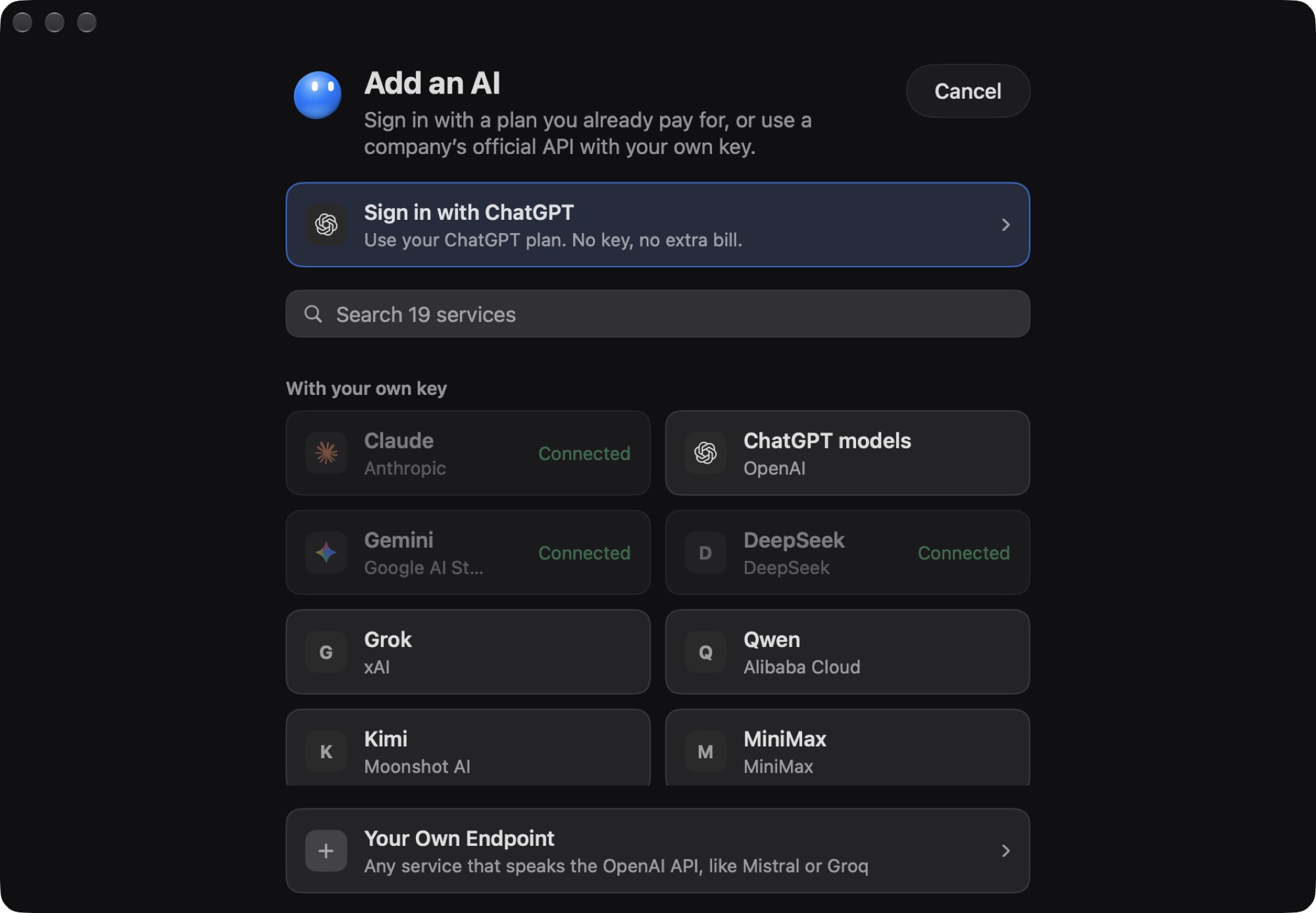
Osaurus's local server speaks the OpenAI API at http://127.0.0.1:1337, and calls from the same Mac need no key. Kaairos can use any OpenAI-compatible service as an AI, so you can point Kaairos at a model Osaurus serves:
- In Osaurus, load the model you want to share (its server lists models at
/v1/models). - In Kaairos, open Settings › AI › Add AI… › Your Own Endpoint.
- Name: Osaurus. Address:
http://127.0.0.1:1337/v1. API key: leave empty. Model: the model's name as Osaurus lists it. - Press Test Connection, then Add. Kaairos can now use it like any other AI.
This is useful on a Mac with less than 32 GB, where Kaairos can't run its own private AI but Osaurus can serve a smaller MLX model. Two caveats: running both apps' models at once doubles the memory used, and a small model may struggle with Kaairos's longer agent tasks. We haven't benchmarked this pairing, so treat it as something to try.
When to choose Osaurus instead
- Your Mac has 8, 16 or 24 GB of memory and you want a local model anyway.
- You want it free and open source (MIT), with releases every few days and code you can read.
- You want MLX models, Apple's on-device model, or to choose and swap models yourself.
- You want a local API (OpenAI, Anthropic and Ollama formats) or an MCP server for your own code and tools.
- You want automations triggered by folders, webhooks or feeds, or a visual workflow builder.
- You want Slack, Discord, iMessage or email channels, an iPhone app, or Windows as well as Mac.
- You want native tools for Calendar, Mail and Notes, per-agent computer-use presets, or code run in a sandbox.
- You work in a team and want shared Workspaces.
Switching between them
There is no importer either way, and the two don't share folders: Osaurus keeps its data in ~/.osaurus and models in ~/MLXModels; Kaairos keeps everything in ~/.kaairos and its Kaairos folder. Both can be installed side by side.
- Models: don't carry over. Osaurus uses MLX models; Kaairos's private AI runs on llama.cpp and is downloaded during setup. You can still use an Osaurus model from Kaairos through Your Own Endpoint.
- Online AI accounts: easy. Sign in with ChatGPT again, or paste the same API keys in Settings › AI.
- Schedules: recreate them. Most Osaurus schedules become one plain-words request in Kaairos; folder, webhook and feed triggers have no Kaairos equivalent.
- Telegram: Kaairos makes its own personal bot from a code, so you don't reuse an Osaurus bot token. WhatsApp links as a new linked device.
- Memory and chats: stay in the app that made them. Paste anything important into a chat in the new app.
- Connectors: sign in again from Kaairos's approved catalog; custom MCP servers and Osaurus plugins don't carry over.
Sources
- Osaurus home page: platforms, free and paid parts, Raptor and Allosaurus models, offline use.
- Why Osaurus: design philosophy, Mac requirements, admitted limits.
- Osaurus on GitHub (README): MIT licence, macOS 15.5+, MLX, port 1337 API, MCP, providers, telemetry defaults.
- Osaurus releases: versions 1.0.3 to 1.0.5.
- Osaurus docs: Quick Start: first-run choices.
- Osaurus docs: Models: local catalog, memory rule of thumb, providers.
- Osaurus docs: Automations: triggers, runs only while open.
- Osaurus docs: Agent Channels: chat apps, Telegram token, WhatsApp bridge, proactive posting.
- Osaurus docs: Privacy & Trust: what leaves the Mac, Aptabase and Sentry, encryption, Privacy Filter.
- Osaurus docs: Computer Use, API, Devices & Sync, Remote Access, Web Search.
- Secondary: TechCrunch, Osaurus brings both local and cloud AI models to your Mac (May 2026).
- Kaairos facts come from the app itself; see Kaairos facts and privacy and security.
Fair questions
Is Osaurus free?
Yes. The Mac app, its local models, agents and updates are free, with no account and no caps on local use, and the code is MIT-licensed on GitHub. Osaurus Cloud credits and team Workspaces are paid, and cloud providers bill you for their own models. Kaairos costs $29 once at launch, then $80.
Is Osaurus an Ollama or LM Studio alternative?
Partly. Like them it runs local models (MLX on Apple silicon) and serves them to other apps, with OpenAI, Anthropic and Ollama-compatible endpoints on port 1337. Unlike them it is mainly an agent app, with memory, tools, workflows and automations. Kaairos is an agent too, but it has no API server for other apps.
How much memory do I need?
Osaurus's Raptor 0.7 model is about 3.7 GB and setup offers it on every Apple silicon Mac; bigger catalog models need 23 GB or more. Kaairos's private AI needs 32 GB of memory or more. On smaller Macs, Kaairos works with an online AI such as ChatGPT or Claude.
Does Osaurus work offline?
Its local models do, for chat and your local files. Web browsing, cloud models and connected services need the internet. The same is true of Kaairos: its private AI works offline, while anything that uses the web needs a connection.
Does Osaurus collect data?
Its docs say anonymous, aggregated usage analytics (Aptabase) wait for your consent, with a pre-checked box on the first screen, and crash and hang reports (Sentry) are on from first launch. Both can be turned off in Settings › Privacy & Security, and source builds send nothing. Kaairos has no analytics or crash reporting.
Can Osaurus or Kaairos run tasks when the app is closed?
Osaurus automations only run while the app is open; missed runs catch up when you reopen it. Kaairos runs routines with the app closed if you turn on Keep working when closed. In both cases the Mac has to be on and awake.
Can I reach them from my phone?
Osaurus connects agents to WhatsApp, Telegram, Slack, Discord, iMessage and email, and has an iPhone app in TestFlight beta. Kaairos works through Telegram and WhatsApp, linked by scanning a code; its own phone app is coming soon. Both WhatsApp links use an unofficial linked-device connection, which WhatsApp can sign out.
Can Kaairos use a model running in Osaurus?
Yes, in principle. Add it in Kaairos under Settings › AI › Add AI… › Your Own Endpoint with the address http://127.0.0.1:1337/v1 and the model's name, then press Test Connection. Running both apps' models at once uses more memory.
Does Osaurus run on Windows?
Its website lists a native Windows 11 app for x64 and ARM64 PCs in the Microsoft Store, with NVIDIA CUDA and Vulkan acceleration; some features differ from the Mac. Kaairos is Mac only, on Apple silicon.
Which is easier for someone who isn't technical?
Both install without a terminal. Osaurus asks you to choose a path at first launch and has many more settings to explore. Kaairos asks nothing, picks the AI for you and keeps its settings few, which is the reason it exists.
Download and go
Your AI agent, already set up.
One button to set up. Its own private AI, free. Claude, ChatGPT or Gemini when you want more.
A Mac with Apple silicon (M1 or later), macOS 15 Sequoia or later. 14-day refund.