
Compare
The best AI agents for Mac in 2026
An AI agent doesn't just answer: it takes a job, works through the steps, and comes back with a result, often on a schedule. Here are the agents worth considering on a Mac in November 2026, what each is best at, and how to choose.
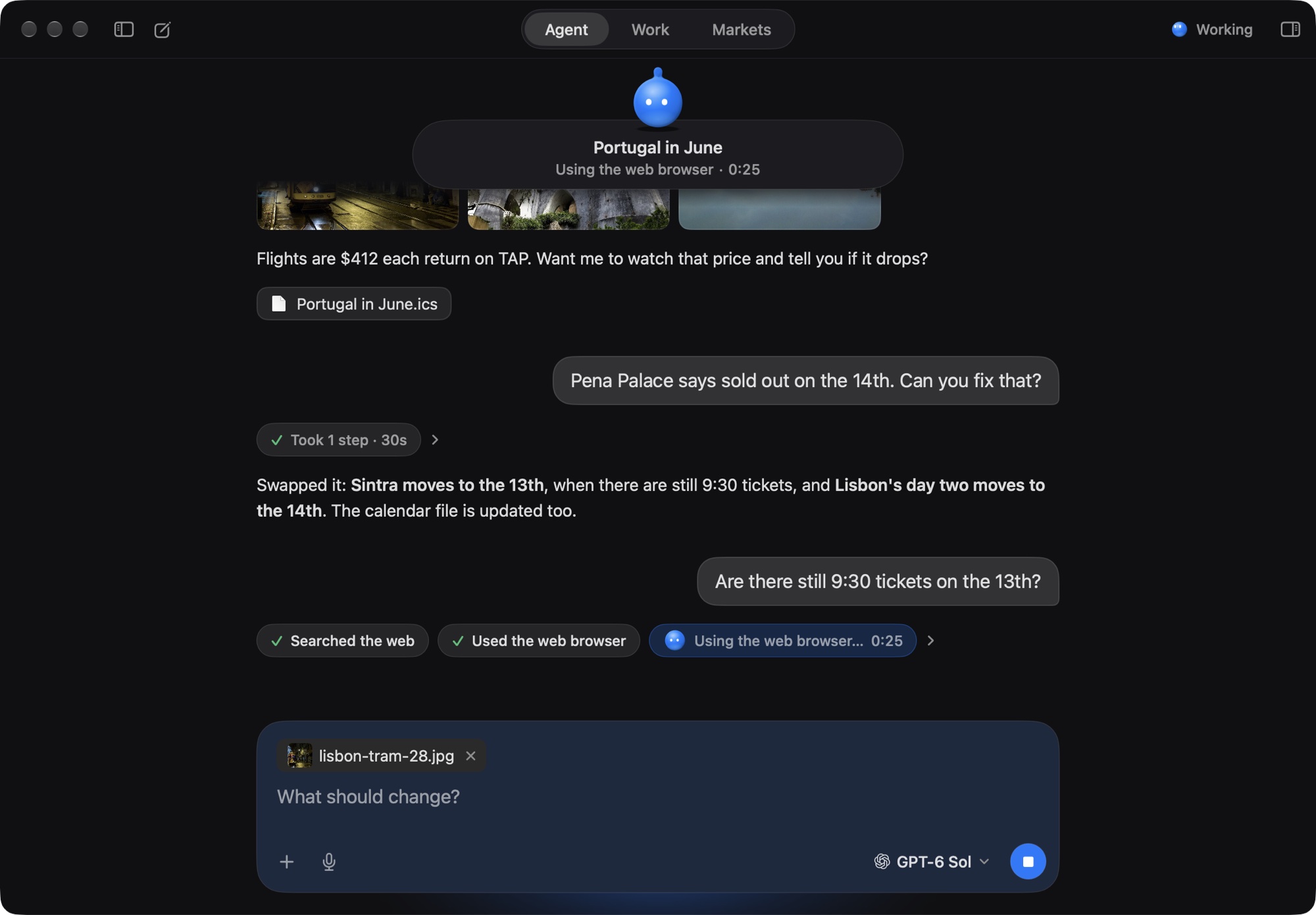
The short answer
For a private agent that's set up for you, Kaairos. For Claude's models on documents, with schedules that run while your Mac is off, Claude Cowork. For ChatGPT subscribers, ChatGPT Work. For long autonomous projects, Manus Studio. For open source with the most chat channels, OpenClaw; open source that learns skills, Hermes Agent. For documents plus agents, free, AnythingLLM. For keyboard-first AI, Raycast.
We make Kaairos, so we have a stake in this list. We've tried to be fair: every fact about another product comes from its own site or docs (linked in Sources), we say where others are better, and we haven't ranked anything on benchmarks we didn't run.
How we judged them
- Does it act? Browsing, files, apps or connected services, not only chat.
- Does it keep going? Scheduled jobs, and whether the Mac has to be on.
- Where does it think? On the Mac, in the vendor's cloud, or your choice.
- How much setup? From one button to a command line and config files.
- How does it keep you safe? Approvals, sandboxing, undo.
- What does it cost in year one? Subscription, credits, or a one-time price, and the hardware it needs.
At a glance
| Agent | Best for | Where it thinks | Schedules | Setup | Price |
|---|---|---|---|---|---|
| Kaairos | A private agent on your Mac, set up for you, with phone access | On the Mac (private AI) or an online AI you connect | Yes; Mac on and awake | One button | $29 once |
| Claude Cowork | Document and research work on Claude's models | Anthropic's cloud | Yes; runs with your computer off | Claude app, paid plan | From $20 a month (Pro) |
| ChatGPT Work | ChatGPT subscribers who want tasks done locally or in the cloud | OpenAI's cloud; Local mode uses your files and apps | Yes, on paid plans | ChatGPT app | Limited on Free and Go; see chatgpt.com/pricing |
| Manus Studio | Long, open-ended tasks with hands on your Mac | Manus cloud; commands run on your Mac | Yes (2 on Free, 20 on Pro) | App and account | Free credits; Pro from $20 a month |
| OpenClaw | Open source, 33 chat channels, every platform | Your choice of provider or local model | Yes, plus watchers and webhooks | Command line and gateway | Free (MIT) |
| Hermes Agent / Desktop | Open source that learns skills; careful approvals | Your choice of provider or local model | Yes, built-in cron | Installer or Hermes Desktop | Free (MIT) |
| AnythingLLM | Chatting with documents, plus agents, free | Your choice; built-in local engine | Yes, Scheduled Tasks | App, then choose models | Desktop free (MIT) |
| Raycast AI | AI one keystroke away, AI commands, MCP | Online models, or Ollama | Yes, Automations (Pro) | App, paid plan for AI | From $10 a month |
| Osaurus | Builders who want an open-source native Mac harness | Local MLX and Apple models, or cloud | Not its focus | App, technical | Free (MIT) |
The five most-asked-about, in detail
Models
| Kaairos | Claude Cowork | Manus Studio | OpenClaw | AnythingLLM | |
|---|---|---|---|---|---|
| AI that runs on the Mac | Built in, set up for you (32 GB) | No | No | Ollama or LM Studio, set up by you | Built-in engine; you pick models |
| Online AI | Optional: ChatGPT plan or 19 services by key | Claude only | Manus's own | Many providers | Many providers |
| Works with no account | Yes, on 32 GB | No | No | Yes, with a local model | Yes, with a local model |
Abilities
| Kaairos | Claude Cowork | Manus Studio | OpenClaw | AnythingLLM | |
|---|---|---|---|---|---|
| Web browsing | Yes, shown live | Yes | Yes | Yes | Yes, skill |
| Files on the Mac | Yes | Yes, connected folders | Yes, chosen folders | Yes | Yes, skill |
| Uses Mac apps | Yes, with permission | Computer use, per app | Computer use, per app | Not covered | Not covered |
| Schedules | Routines, Mac awake | Cloud, Mac can be off | Automations | Scheduler, watchers, webhooks | Scheduled Tasks |
| Phone | Telegram, WhatsApp | Claude app; Dispatch beta | Manus app (remote control) | 33 channels and mobile apps | Android app |
| MCP / connectors | Approved catalog | Connectors and plugins | Connectors | Skills; ClawHub | MCP servers, Agent Flows |
Safety and privacy
| Kaairos | Claude Cowork | Manus Studio | OpenClaw | AnythingLLM | |
|---|---|---|---|---|---|
| Default approvals | Ask before anything risky | Auto (on Pro, Max, Ultra, Team) | Approve for me | Allowlists; sandbox opt-in | Not covered |
| Undo | File snapshots | Not covered | Not covered | Not covered | Not covered |
| Where your request goes | Nowhere, on the private AI | Anthropic | Manus cloud | Your chosen provider | Your chosen provider |
Platforms and price
| Kaairos | Claude Cowork | Manus Studio | OpenClaw | AnythingLLM | |
|---|---|---|---|---|---|
| Platforms | Mac | Mac, Windows, Linux (beta), web, phone | Mac (Apple silicon), Windows | Mac, Windows, Linux, iOS, Android | Mac, Windows, Linux, server |
| Year one | $29 | $204 to $2,400 | $0 to $480 | $0 plus models | $0 plus models |
Each one, briefly
Kaairos: best for a private agent that's ready to go
A Mac app built on Hermes Agent by Nous Research. Click Set it up and it downloads a private AI sized for your Mac, then researches, keeps routines, watches prices, sets reminders that nudge until done, and answers on Telegram or WhatsApp. Connect Claude, ChatGPT (including Sign in with ChatGPT) or Gemini for harder work. Not for you if: you're on Windows, your Mac has less than 32 GB and you don't want an AI account, or you need jobs to run while the Mac is off.
Claude Cowork: best for Claude's models on real documents
Anthropic's agent mode in the Claude app. Tasks run in an isolated environment on Anthropic's servers, with your connected folders, a browser and computer use from the desktop app. Scheduled tasks run in the cloud. Not for you if: you want work to stay on your Mac, or you don't want a subscription.
ChatGPT Work: best if you already pay for ChatGPT
OpenAI's way to delegate multi-step work in ChatGPT. The desktop app has a Local mode that can use your files, apps and browser, and a Cloud mode that runs in a container. Scheduled tasks are part of it on paid plans. We couldn't read current prices from OpenAI's pricing page, so check chatgpt.com/pricing. Not for you if: you want a private model on your Mac.
Manus Studio: best for long autonomous projects
Manus plans in its cloud and runs commands on your Mac, with a cloud sandbox to fall back on and a phone app to watch live. Paid in credits. Not for you if: you want the agent's thinking on your own Mac, or predictable costs for many small daily jobs.
OpenClaw: best for open source on every channel
The largest open-source personal agent: a gateway to 33 chat channels, apps for every platform, a public skills registry and a scheduler with watchers and webhooks. Not for you if: you don't want to run a command line, or you want strict safety defaults without configuring a sandbox.
Hermes Agent and Hermes Desktop: best open source that learns
Nous Research's agent writes reusable skills from completed work, curates memory, and has careful approval defaults. Hermes Desktop puts it in a window on Mac and Windows. Kaairos is built on it. Not for you if: you want a private model chosen and set up for you.
AnythingLLM: best free workspace for documents plus agents
Workspaces for chatting with documents, an @agent with built-in skills, MCP, Agent Flows and Scheduled Tasks. Free and open source on desktop. Not for you if: you want fewer choices, or to reach it from an iPhone.
Raycast AI: best AI at the keyboard
Quick AI, AI Commands on selected text, AI Extensions, MCP and scheduled Automations, in a launcher many Mac users already live in. Not for you if: you want long, multi-step jobs handed off, or no subscription.
Osaurus: best for builders on a native Mac harness
An open-source native macOS harness with MLX and Apple's on-device models, cloud providers and MCP in both directions. Not for you if: you want routines and phone access out of the box.
One job, every agent: a briefing on your phone at 7
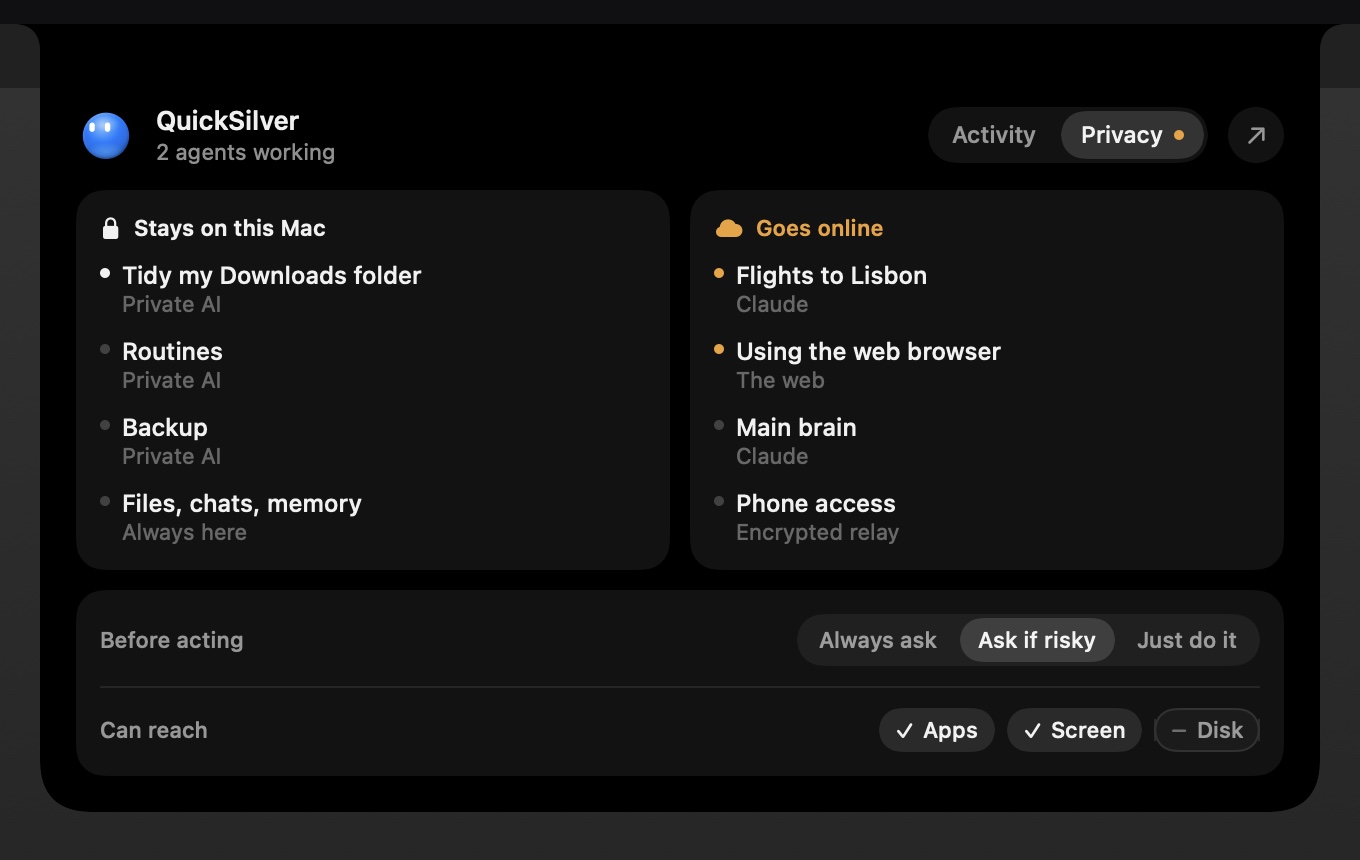
A useful test of any agent: every weekday at 7, a short briefing on your phone with the weather and three headlines on a topic you follow. From each product's docs:
- Claude Cowork:
/schedulea task; it runs in the cloud and you read it in the Claude app. - ChatGPT Work: a scheduled task; you read it in ChatGPT.
- Manus Studio: an Automation; read it in Manus.
- OpenClaw and Hermes Agent: a cron job delivered to Telegram, WhatsApp or another channel you've set up.
- AnythingLLM: a Scheduled Task; read it in the app.
- Raycast: an Automation on Pro; read it in Raycast with the Mac awake.
- Kaairos: a Morning briefing routine on the private AI, delivered to Telegram or WhatsApp.
Every weekday at 7, send me Lisbon weather and the top 3 stories on renewable energy.
Set: weekdays at 7:00 on WhatsApp, the weather and three stories with a line each and a link. It runs on the private AI on your Mac, so it costs nothing.
Privacy: where each one thinks
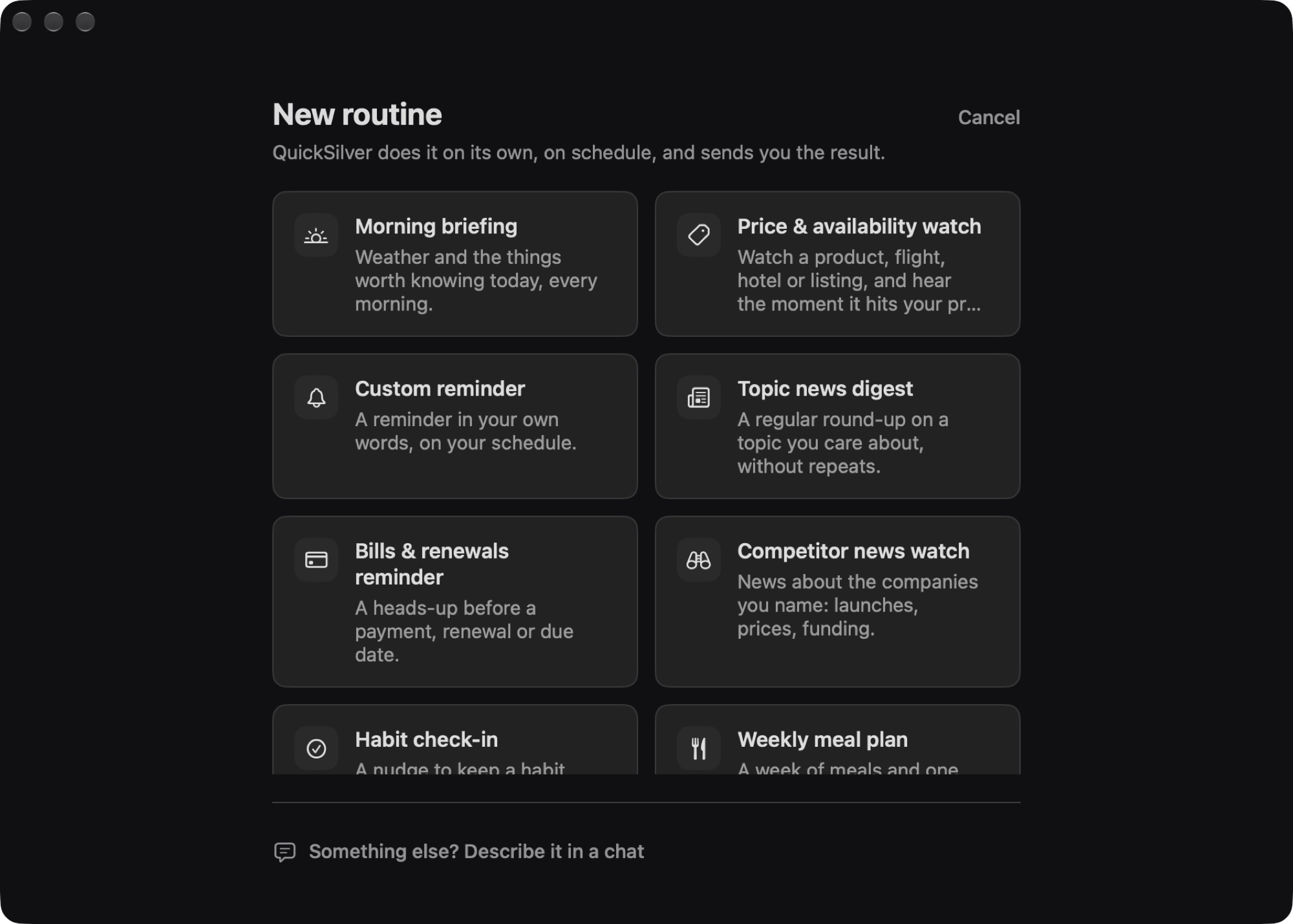
For an agent, privacy turns on one question: where does the model that reads your files and pages run?
- In the vendor's cloud: Claude Cowork, Manus Studio, ChatGPT Work and Raycast's hosted models. Each publishes how it handles data; read it before you point the agent at sensitive files.
- Your choice: OpenClaw, Hermes Agent, AnythingLLM and Osaurus can use a local model you set up, or a provider.
- On the Mac by default: Kaairos runs its own private AI and keeps routines on it even after you connect an online AI, and shows live which chats go online.
What they cost in the first year
- Kaairos: $29 once (32 GB Mac for the private AI).
- Claude Cowork: Pro $17 × 12 = $204 billed yearly, or $20 × 12 = $240; Max $1,200; Ultra $2,400.
- Manus Studio: $0 on Free credits; Pro $20 × 12 = $240 or $40 × 12 = $480 before yearly discount.
- Raycast AI: Pro $96 billed yearly or $10 × 12 = $120; Plus $192; Max $480.
- OpenClaw, Hermes Agent, AnythingLLM Desktop, Osaurus: $0 for the software, plus any online model you use.
- ChatGPT Work: included in ChatGPT plans; check OpenAI's pricing page.
Combining them
Many people end up with two: a cloud agent for heavy one-off projects (Cowork, ChatGPT Work or Manus) and an agent on the Mac for standing jobs that should be private and cost nothing per run (Kaairos, or an open-source agent you maintain). Kaairos can also use your ChatGPT plan through Sign in with ChatGPT, or Claude with an API key, for the hard conversations.
If you only remember one thing
- Want it private and ready today on a 32 GB Mac: Kaairos.
- Want the strongest models and cloud schedules and already pay for one: Claude Cowork or ChatGPT Work.
- Want free and open, and enjoy setting things up: OpenClaw or Hermes Agent.
- Mostly ask questions about documents: AnythingLLM.
- Want AI at your fingertips more than an agent: Raycast or Apple Intelligence.
Sources
- Claude Cowork: get started and use safely; Claude pricing
- ChatGPT Work: get started; ChatGPT pricing
- Manus Studio; Manus pricing help
- OpenClaw on GitHub; OpenClaw channels
- Hermes Agent on GitHub; Hermes Agent site
- AnythingLLM on GitHub; AnythingLLM pricing
- Raycast pricing; Raycast Automations
- TechCrunch on Osaurus (May 2026)
Fair questions
What is the best AI agent for Mac?
It depends on what you value. For a private agent set up for you, Kaairos. For Claude's models with cloud schedules, Claude Cowork. For open source, OpenClaw or Hermes Agent. For documents, AnythingLLM.
Which AI agents for Mac work offline?
Those that can use a local model: Kaairos (its private AI is built in), and OpenClaw, Hermes Agent, AnythingLLM and Osaurus with a local model you set up. Anything that uses the web still needs the internet.
Is there a free AI agent for Mac?
Yes: OpenClaw, Hermes Agent and Hermes Desktop, AnythingLLM Desktop and Osaurus are free and open source. Manus has a free credit allowance.
Which Mac AI agent can run tasks while my Mac is off?
Cloud agents: Claude Cowork's scheduled tasks run in the cloud, and Manus can fall back to a cloud sandbox. Agents on the Mac, including Kaairos, need it on and awake.
Do I need 32 GB of memory for an AI agent on a Mac?
Only to run a capable model locally. With an online AI account, any Apple silicon Mac works for Kaairos, and cloud agents run on any supported Mac.
What's the difference between an AI agent and a chatbot?
A chatbot answers. An agent takes a goal, works through steps like searching, browsing and saving files, and can keep doing it on a schedule.
Which AI agent can I use from WhatsApp?
Kaairos (by scanning a code), OpenClaw and Hermes Agent (through their gateways) all reach you on WhatsApp.
Are these rankings sponsored?
No. We make Kaairos and say so. Nothing here is paid placement, and we point to others where they're the better choice.
Download and go
Your AI agent, already set up.
One button to set up. Its own private AI, free. Claude, ChatGPT or Gemini when you want more.
A Mac with Apple silicon (M1 or later), macOS 15 Sequoia or later. 14-day refund.