
Use case · Watch and alert
Never miss the price drop or the open seat
A price drop, two seats together, a table on a Friday, a refundable room. Tell QuickSilver exactly what you're waiting for. It checks on the schedule you choose, stays quiet until it happens, then messages you once, with the link.
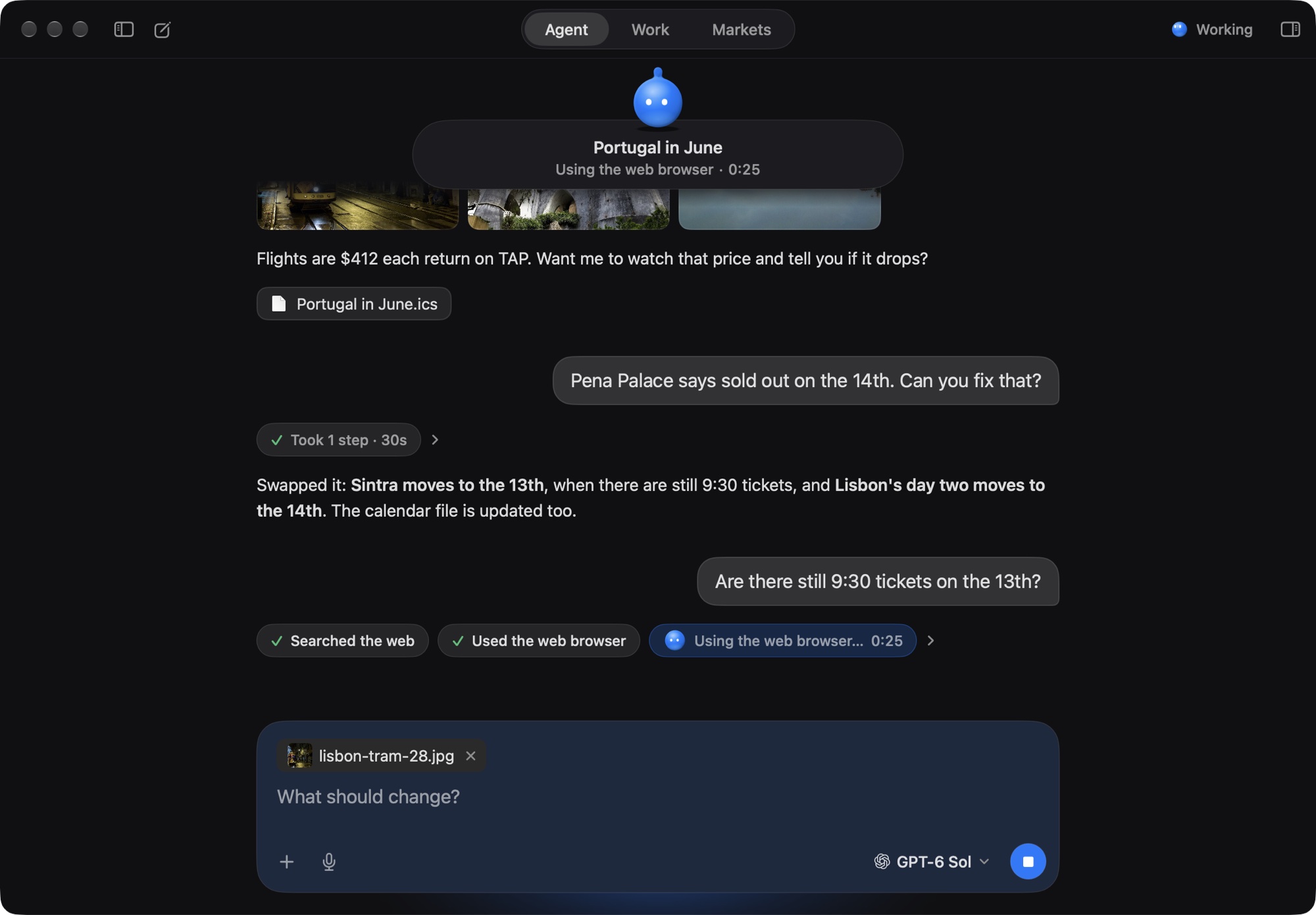
What the alert looks like
Nothing, most of the time. A watch that finds no change stays silent: no “still watching” messages. When your condition is met, one message with everything you need to decide: the exact item, the all-in price and currency, availability and terms, your target, when it checked, and the link.
Watch the Sony WH-1000XM6 in black at Best Buy and Amazon. Tell me when the all-in price, with tax and shipping to 94110, drops below $330. Check every 6 hours.
Watching. Right now it's $379 at both. I checked one live page from each before setting this up, so I know I'm reading the right model and colour. I'll only message you when it's under $330.
Price drop: Sony WH-1000XM6, black, at Best Buy: $319.99 + $0 shipping + $27.20 estimated tax = $347.19 all in. That's under your $330 before tax but not after; you said all-in, so this doesn't count yet. Amazon is still $379. I'll keep watching.
It's there: Best Buy, $299.99 all in with free shipping, in stock for delivery Tuesday. Checked 9:00 AM. Link: bestbuy.com/… I can't reserve it; the price may change.
The middle message shows the rule that matters most: it compares like with like. The watch is built on the engine's price-monitor skill, which records whether your target is before or after tax and fees, and never alerts on the wrong size, colour, seller, dates or room type.
What it's good for, and when to use something else
For plain flight fares, free trackers already exist: Google Flights tracks fares, and in August 2026 Google brought that tracking into AI Mode, with an email when the price changes. Many shops and hotel sites have their own alerts. Use those where they work. Kaairos is for the things they don't do:
- Availability, not just price: two seats together for a sold-out show, a table for 4 on the 12th, a size coming back in stock.
- Your own definition of the price: all-in with shipping and tax, refundable rooms only, a specific seller.
- Any page: a small shop, a local listing site, a resale page, a booking page with no alert button.
- Several sites at once: “whichever of these three shops goes under $330 first.”
Set it up, step by step
From the gallery
- In the Work tab, choose + next to Routines, then Price & availability watch.
- What exactly to watch? Paste the product link, or describe it exactly: model, colour, size, seller, dates, number of people.
- Alert me when… Your condition, with the currency: “the all-in price drops below $330”, “two seats together are available”, “a refundable room appears under €180 a night”.
- How often? Every hour, every 3, 6, 12 or 24 hours. Every 6 hours is the default and right for most things.
- Send the result to Kaairos, Telegram or WhatsApp, then Create routine. It appears in Work › Routines as “Watch: …” with an on/off switch.
The first run sets the watch up: it pins down the exact item, fetches one live page to make sure it can read it, and saves a small record of the item, your condition and today's price in Kaairos's folder on your Mac. Every later run compares against that record.
Or in words
Say it in any chat, on the Mac or from your phone. In words you can use any interval, not just the gallery's: “every 30 minutes on Friday mornings”, “every 2 hours until the 15th”.
“Watch [link or exact description]. Tell me when [the all-in price, including shipping to my postcode, is below $X / two seats together are available / it's back in stock in size M]. Check every [6 hours]. Send it to Telegram. Stop after [the 30th].”
How often to check
| Waiting for | Sensible interval | Why |
|---|---|---|
| A price drop on a product | Every 6–12 hours | Shop prices change a few times a day at most |
| A flight or hotel rate | Every 6 hours | Fares move often, but checking more rarely helps |
| Returned tickets or a cancelled table | Every hour, or every 30 minutes in words | These go fast; it's worth the extra checks |
| A listing or a back-in-stock | Every 3 hours | A balance between speed and being a good visitor |
Very frequent checks put more load on your Mac, cost more on an online AI, and make a site more likely to block the visits. The engine's own guidance is to be gentle with rate limits and site terms.
Kaairos works on your Mac, so routines run while your Mac is on and awake. Turn on Keep working when closed (in the Work tab or the menu bar panel) and they carry on after you quit the window. If the Mac was asleep at the time, the routine runs once when it wakes, rather than replaying every check it missed.
Variations
Sold-out seats
“Watch [cinema link] for Saturday's 7:30 IMAX showing. Tell me the moment two seats together open, row F or further back.”
A restaurant table
“Check [booking page] every hour and tell me when a table for 4 frees up at Rada on the 12th between 7 and 9 PM.”
A fare you already found
“Watch TAP's return fare Lisbon–London, 3–10 June, one adult, hand luggage. Alert me under €120 all in.”
A refundable room
“Watch [hotel link] for 14–16 March, two adults. Tell me if a free-cancellation room appears under €180 a night.”
A second-hand find
“Every 3 hours, check [listing site search link] and tell me about any new Brompton under £700 within 20 miles.”
Keep a price history
“…and log every check to a CSV in my Kaairos folder.” Later: “Chart the price from that file.” QuickSilver draws the chart in the reply.
Which AI runs it, and what leaves your Mac
Routines run on the private AI on your Mac whenever it has one (Macs with 32 GB of memory or more), even if you've connected Claude, ChatGPT or Gemini for conversations. On a Mac without it, they run on your account's fast, inexpensive model, such as Claude Haiku 5.5. You can move them in Settings › AI › Who does what › Routines.
| Step | Where it happens | What leaves your Mac |
|---|---|---|
| Fetching the page, with its own browser if the page needs one | Your Mac | A normal visit to that site from your internet connection |
| Reading the price, comparing with your condition | The private AI on your Mac, or your account's fast model | Nothing with the private AI; with an account, the page text it read goes to that AI company |
| The watch record (item, condition, last price) | Kaairos's folder on your Mac | Nothing |
| The alert | Telegram, WhatsApp or Kaairos | The alert passes through Telegram's or WhatsApp's servers if you chose them |
What it costs to run
Watches are where the choice of AI matters most, because they run many times a day. Assumption: one check takes about 4 model calls averaging 12,000 input tokens (48,000 input, 1,000 output per check).
| Runs on | Per check | Every 6 hours (120 a month) | Every hour (720 a month) |
|---|---|---|---|
| Private AI on your Mac | $0 | $0 | $0 |
| Claude Haiku 5.5 ($0.10 / $0.50 per million) | ≈ $0.005 | ≈ $0.64 | ≈ $3.80 |
| Claude Sonnet 5.5 ($2 / $10 per million) | ≈ $0.11 | ≈ $12.70 | ≈ $76 |
That last row is why Kaairos never puts routines on the main conversation model by default.
What it can't do
- It doesn't buy or book. It tells you; you decide. Under the default setting (Ask before anything risky) QuickSilver asks before buying anything, and a watch never does.
- It can't hold stock. By the time you open the link, the seats or the price may be gone. Alerts say so.
- Some sites block automated visits. QuickSilver tries other routes first; if it still can't read the page, the routine shows Last run had a problem and appears in Work › Needs you, instead of failing silently. It never treats a failed check as a price.
- Pages behind a login are hard. It can't sign in to your accounts for a watch. Use a public page.
- Prices can be personalised. A site may show your Mac a different price from your phone.
Troubleshooting
| Problem | Fix |
|---|---|
| It alerted on the wrong variant | Give it the exact product page, or name the variant, seller and size. Say “that's the wrong one, watch [X] instead”. |
| No alert, but the price dropped | Check whether your condition was all-in or before tax, and the currency. Ask “what did the last check see?” |
| “Last run had a problem” | Usually a block or no internet. Try Run now. If a site keeps blocking, watch a different shop or a less frequent interval. |
| Too many messages | Ask it to only alert on a new low, or on drops of at least 5%. |
| You bought it | “Stop the headphones watch.” Or switch it off, or delete it from the ⋯ menu. |
Fair questions
Will it buy things for me?
No. It alerts you with the link. Anything that spends money needs your OK under the default safety setting, and a watch only reads.
How often can it check?
In the gallery: every 1, 3, 6, 12 or 24 hours. In words, any interval, such as every 30 minutes. Very frequent checks cost more on an online AI and may get blocked.
Will it message me every time it checks?
No. When nothing qualifies, it stays silent, and it doesn't repeat an alert for the same offer.
Can it watch Amazon prices?
It can read public product pages, including Amazon's, though large shops sometimes block automated visits. For Amazon, a dedicated price tracker may be more reliable; use Kaairos for all-in prices, other shops and availability.
Can it watch several shops for one product?
Yes. List them, and say whether you want the first one under your target or the cheapest.
Can I see the price history?
Ask it to log each check to a CSV in your Kaairos folder when you set the watch up. Later, ask for a chart and it draws one in the reply.
Does it work while I'm away from my Mac?
Yes, as long as the Mac is on and awake, with Keep working when closed turned on. Alerts reach your phone through Telegram or WhatsApp.
Download and go
Your AI agent, already set up.
One button to set up. Its own private AI, free. Claude, ChatGPT or Gemini when you want more.
A Mac with Apple silicon (M1 or later), macOS 15 Sequoia or later. 14-day refund.