
Features · Claude Code
Give Claude Code an agent on your Mac that can do what it can't.
Claude Code is brilliant in a repository. It doesn't have a brokerage account, routines that keep running after you close the terminal, a memory of you, or a window where you can watch helpers work. Kaairos has all of that. Add Kaairos to Claude Code with one click and Claude Code can use it: no sign-in, no API key for Kaairos, nothing in the cloud. Claude Code starts Kaairos's connector on your Mac, and Kaairos answers it directly.
Two agents, each doing what it's best at
Claude Code works where you write code: it reads your project, edits files, runs your tests and talks you through it in the terminal. Kaairos works where you live: it runs all day on your Mac, keeps your routines going, watches markets, remembers you, reaches your phone and shows its work in a window built for watching. Until now they couldn't talk to each other.
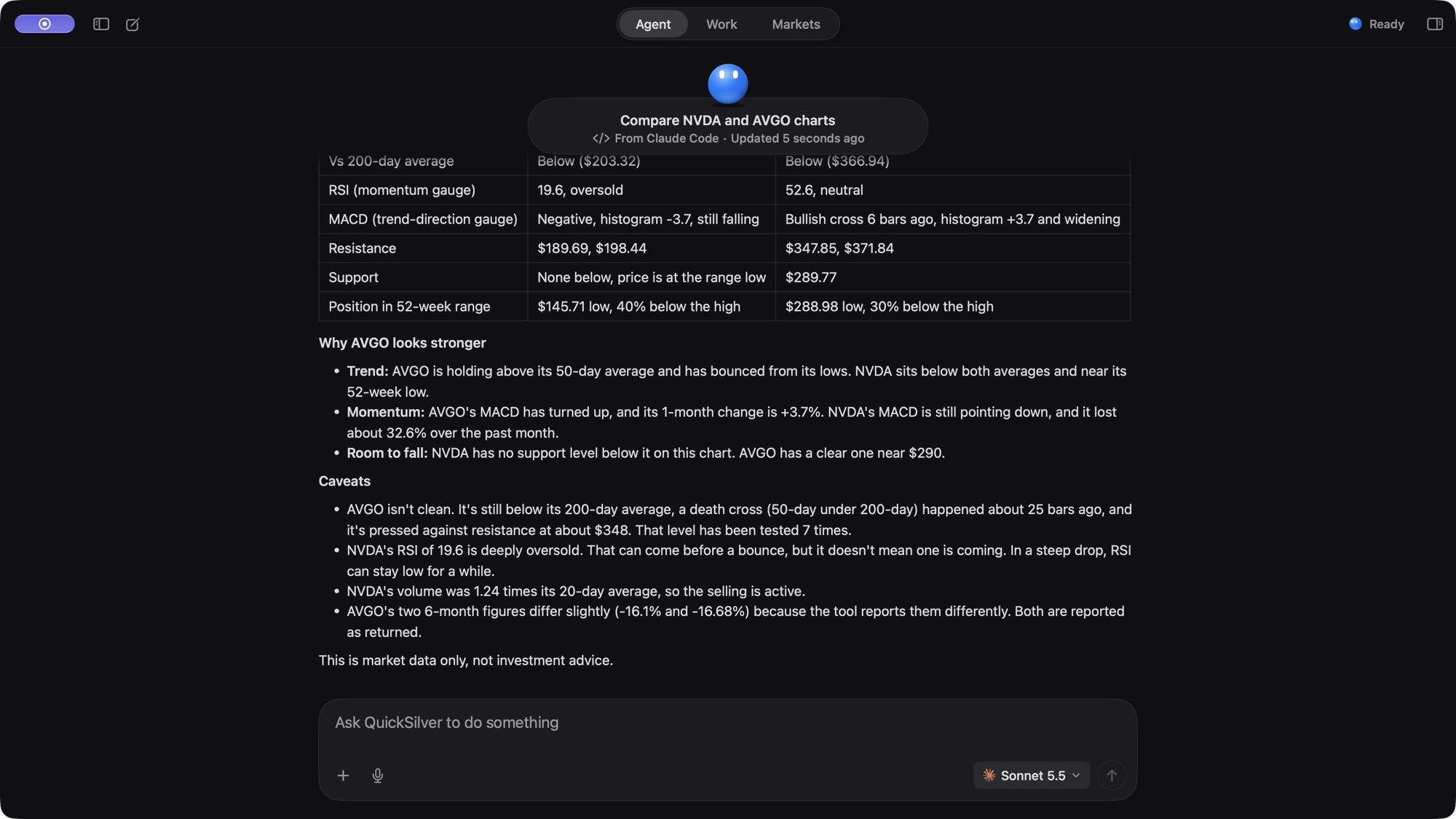
Kaairos now speaks MCP, the Model Context Protocol that Claude Code uses for its tools. Once you add it, Claude Code sees nine Kaairos tools beside its own, and it uses them the way it uses any other: when your request needs them. Ask Claude Code “how does AMD look?” and it gets the answer from Kaairos, with the numbers Kaairos worked out from real market data. Ask it to “have Kaairos research NVDA and AVGO with two helpers” and a chat opens in Kaairos, marked From Claude Code, where the helpers work side by side while Claude Code waits for the result.
Real market data, for code
Charts and technical reads, comparisons, your account, and years of split- and dividend-adjusted price history saved as CSV beside your code, from your own Alpaca account. Claude Code quotes the exact numbers Kaairos computed.
Work you can watch
Hand Kaairos a whole job in plain words. It runs as a chat in the Kaairos window: helpers in parallel, each with its lane, charts drawn under the reply.
Routines and memory
Claude Code can see what Kaairos runs for you on a schedule and what it remembers about you, and can ask Kaairos to set up a new routine.
Your OK stays with you
A trade Claude Code asks for still waits for your approval in Kaairos. Claude Code can't approve it, and your limits are checked in code before anything reaches the broker.
A real run, start to finish
Everything below happened on 20 November 2026, with the Claude Code command line (version 2.1.329) talking to Kaairos on the same Mac, Kaairos's agent on Claude Sonnet 5.5, and a real Alpaca paper account. Each answer is Claude Code's own, word for word. Market prices are from the 19 November close.
1. A chart read, in Claude Code
Use Kaairos to get a technical read of AMD over 6 months with RSI and MACD, and show it to me in Kaairos. In two sentences, tell me the trend and the exact RSI value Kaairos gave.
AMD's 6-month trend is mixed: it's up about 4% over the range, but the price ($489.19) is below its 50-day average and above its 200-day, after a 16% drop over the past week. Kaairos gave an RSI(14) of exactly 45.2 (neutral), and the MACD shows a bullish cross 6 bars ago. The chart is open in the Kaairos Markets tab, and this is market data, not investment advice.
2. A job handed to Kaairos, with helpers
Hand this to Kaairos and wait for it: have two helpers work at the same time, one reading NVDA's 6-month chart and one reading AVGO's, each with RSI and MACD, then say which looks stronger and why. When Kaairos is done, tell me its conclusion in three sentences.
Kaairos ran both helpers at once and finished. It concluded that AVGO looks stronger than NVDA on this chart data. AVGO is down about 16% over six months, sits just above its 50-day average, has a neutral RSI of 52.6, and its MACD made a bullish cross six bars ago. NVDA is down about 33%, sits below both its 50-day and 200-day averages, has a deeply oversold RSI of 19.6, and its MACD is still negative and falling. Kaairos added caveats. AVGO is still below its 200-day average and is pressed against resistance near $348. NVDA's oversold reading could come before a bounce but doesn't guarantee one.
3. A trade, which waits for you
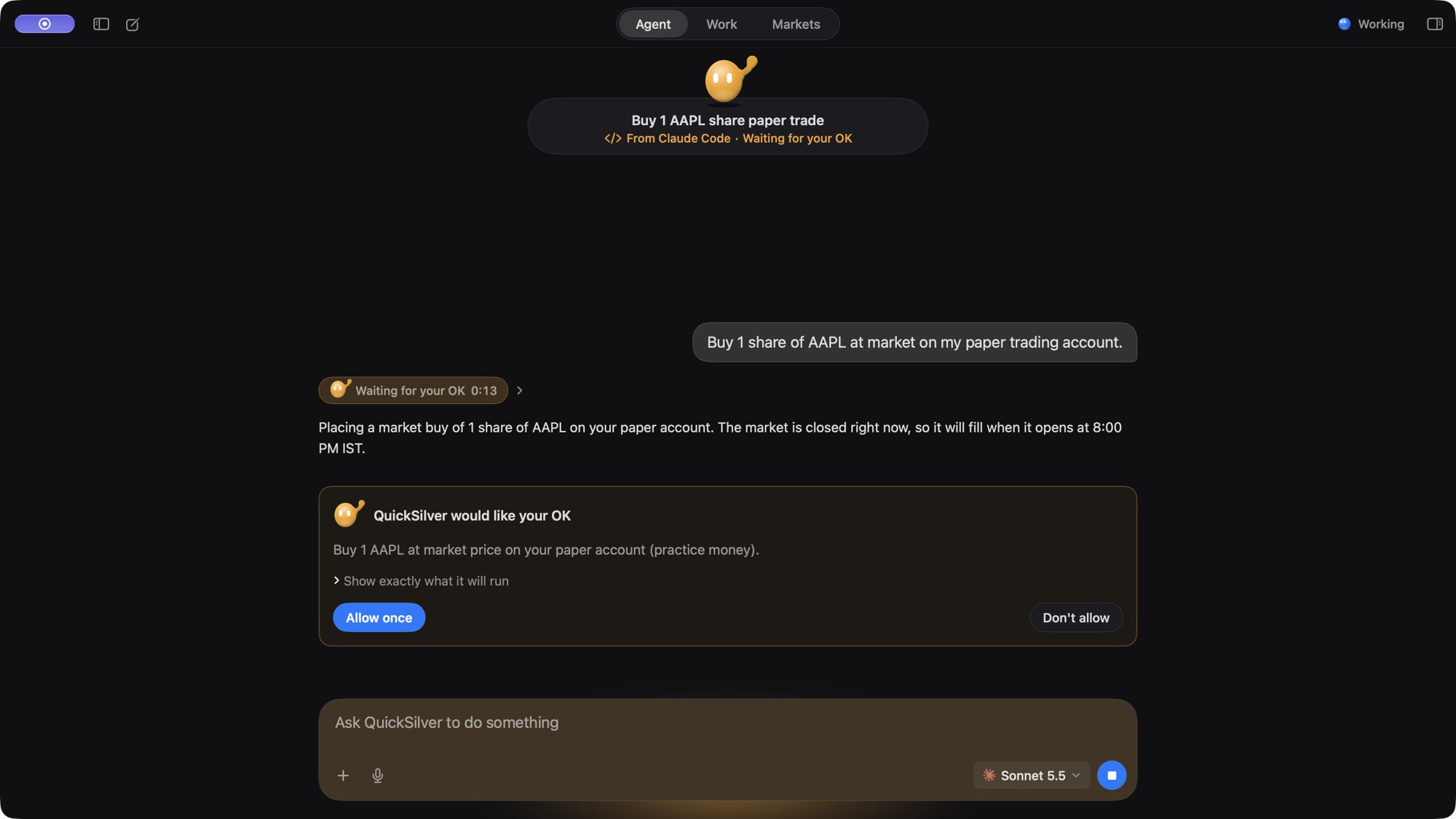
Ask Kaairos to buy 1 share of AAPL at market on my paper account, then tell me what happened.
The order was not placed, so nothing was sent to your paper account. I asked Kaairos to buy 1 share of AAPL at market. Placing an order has to be approved in Kaairos, and that approval wasn't granted. Kaairos says the market is closed until 8:00 PM IST. If the order had gone through, it would have waited and filled then.
What people build with it
The connection matters most when Claude Code writes and runs code. These three are real sessions from 20 November 2026, run by Kaairos's own end-to-end check: the Claude Code command line, Kaairos, and an Alpaca paper account. Each has its own page with the full session, the files it made and how to repeat it.
Ten years of SPY, tested in 36 seconds
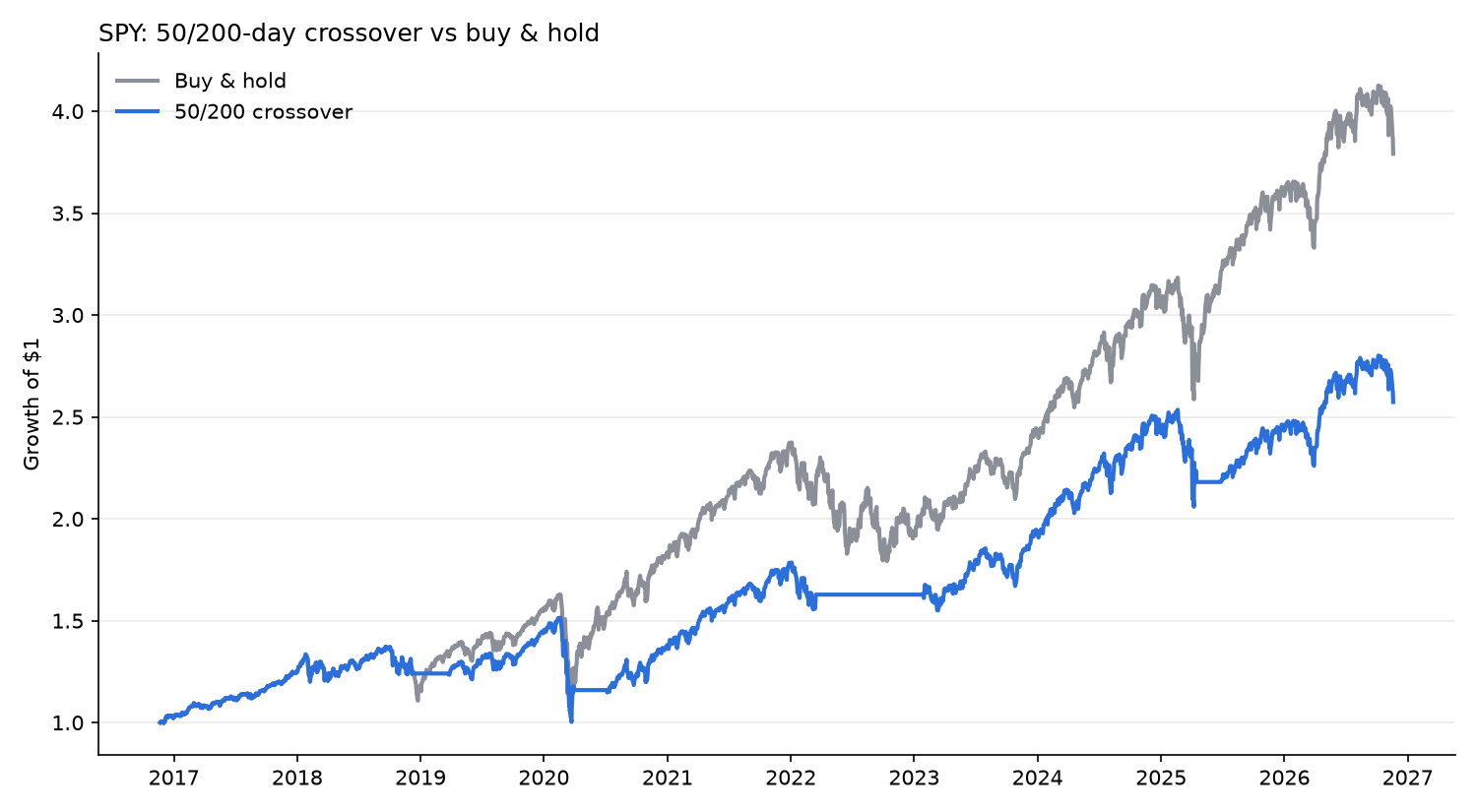
Kaairos saved 2,737 days of adjusted prices as a CSV; Claude Code wrote the backtest, fixed its own bug, ran it and drew the chart. Buy and hold: 14.3% a year. The 50/200 crossover: 9.9%.
ScreenerEight stocks, ranked by your rules
Eight chart reads from Kaairos at once, eight price files, and a screener Claude Code wrote and ran. Its own RSI matched Kaairos's to the decimal.
RoutineFrom one answer to every morning
One request from the terminal, and Kaairos checks SPY, QQQ and NVDA every weekday at 9:45 AM New York time, long after the Claude Code session ends.
What Claude Code can ask Kaairos
Kaairos gives Claude Code nine tools. Six only read, one saves price history as a CSV file for your code, one hands over a job, and one follows a job that's still running.
| Tool | What it does | Changes anything? |
|---|---|---|
kaairos_do | Hands Kaairos a job in plain words: research with helpers, a new routine, a trade. It runs as a chat you can watch; Claude Code gets the reply, the helpers' results and the charts. | Only what you approve in Kaairos |
kaairos_check | Follows a job that's still running, or waiting for your OK. | No |
kaairos_chart | A technical read of one symbol: trend against the 20, 50 and 200-day averages, RSI, MACD, ATR, volume, support and resistance, performance and the 52-week range. It can open the chart in Kaairos's Markets tab. | No |
kaairos_compare | Two to six symbols over a range: performance, worst drop, volatility, and how closely they move together. | No |
kaairos_prices | Price history for code: daily, weekly, monthly or intraday bars, adjusted for splits and dividends, saved as a CSV (time, open, high, low, close, volume) in your project. Intraday requests are capped at 200,000 bars. | Writes the CSV file, nothing else |
kaairos_portfolio_history | How your account's value moved over a week, a month, three or six months, or a year, with the day-by-day series and the worst drawdown. | No |
kaairos_account | Your account as Kaairos sees it: paper or live, value, cash, what you hold, open orders, today's spending against your limits, and market hours in your time zone. | No |
kaairos_routines | What Kaairos runs for you on a schedule, when each runs next, and how the last run went. | No |
kaairos_memory | What Kaairos remembers about you and your work. | No |
Claude Code doesn't get Kaairos's file, terminal or browser tools; it has its own. What it gets is what only Kaairos has.
What people use it for
Building a trading tool
You're writing a strategy or a dashboard in Claude Code. It checks its maths against Kaairos's chart reads of the same symbols, and pulls your real positions to test with.
A second opinion on a stock
Between commits, ask Claude Code how a stock looks. The read comes from real market data, not from the model's memory, and the chart opens in Kaairos for you to look at.
Research that runs in parallel
Have Kaairos send helpers to read several stocks at once while Claude Code keeps working on your code. Claude Code collects the result when it's ready.
Setting something up to keep going
Ask Claude Code to have Kaairos check your watchlist every weekday morning. The routine lives in Kaairos and runs on its schedule, long after the Claude Code session ends.
Context about you
Claude Code can read what Kaairos has learned about you and your work, instead of you explaining it again.
Trades you still decide
Ask from the terminal; approve in the Kaairos window. Nothing is placed without your OK.
How it works, and why there's no cloud
An MCP server for Claude Code is usually a small program on your computer that Claude Code starts and talks to. Kaairos's is exactly that.
- You add Kaairos. This writes one entry,
kaairos, into Claude Code's settings on your Mac, pointing at Kaairos's connector. Nothing else in the settings changes, and a copy of the file as it was is kept beside it. - Claude Code starts the connector when a session begins. It's a short program inside Kaairos, run by Kaairos's own Python, with no extra downloads.
- When Claude Code calls a Kaairos tool, the connector passes the request to the Kaairos app through a private channel on your Mac that only your user account can open.
- Kaairos does the work, using what it already has: its agent, its helpers, your market data connection, its routines and memory. Anything that needs your OK asks you in Kaairos.
- The answer goes back to Claude Code, which carries on with your request.
No one has to sign in to anything, and there's nothing to host or pay for. Claude Code runs on your own Claude plan, as always; Kaairos runs on whichever AI you've given it, including the private AI on your Mac. If Kaairos isn't open, the first request opens it.
What Kaairos hands back to Claude Code becomes part of your Claude Code conversation, which Claude Code sends to Anthropic like everything else in it. So a chart read, your account summary or what Kaairos remembers about you goes to Anthropic once Claude Code asks for it. What Kaairos does without being asked, and anything it keeps to itself, stays on your Mac as before.
Set it up
- In Kaairos, open Settings › Claude Code.
- Next to Claude Code, click Add Kaairos. (Next to Claude desktop app, the same button adds it there too.)
- Start a new Claude Code session. Type
/mcpto see Kaairos listed, then ask for something that needs it, such as “Use Kaairos to chart NVDA”.
If you prefer the terminal, Settings › Claude Code shows the command with your Mac's path in it, ready to copy. It has this form:
claude mcp add --scope user kaairos -- ~/.kaairos/bin/kaairos-mcp
For charts and your account, connect Alpaca first in Settings › Trading. A paper account is free, uses practice money at real prices, and needs only an email address.
Safety: Claude Code asks, you decide
- Approvals stay in Kaairos. An order, a cancel or anything else Kaairos asks about waits for you in the Kaairos window. No tool lets Claude Code answer it.
- Your limits still hold. The per-order and per-day limits you set in Settings › Trading are checked in code after your OK and before anything reaches Alpaca.
- Claude Code's own permissions still apply. Claude Code asks before it calls a tool you haven't allowed, as it does for any MCP server.
- Only your account. The channel between the connector and Kaairos lives in Kaairos's own folder, open to your user account only. Other users on the Mac can't connect.
- Easy to undo. Remove in Settings › Claude Code takes the entry out again.
How it was tested
Kaairos has an end-to-end check that runs the real app and the real Claude Code command line together. It adds Kaairos to Claude Code the way the Settings button does, then has Claude Code ask for a chart, a job with helpers, the routines and memory, and a trade. Each check looks at what Kaairos actually did, not just at what Claude Code said:
- The RSI Claude Code quoted must match the one Kaairos computed, and the chart must be open in Kaairos.
- The job must appear as a chat in Kaairos, with at least two helpers that finished and a chart for each stock.
- The trade must stop at an approval in Kaairos. The check declines it and then confirms the account has no open order.
All ten checks passed in three separate runs on 20 November 2026. Separate tests make sure adding and removing Kaairos changes nothing else in Claude Code's settings, and that a settings file Kaairos can't read is left untouched.
Limits
- Mac only, with Claude Code and Kaairos on the same Mac. Claude Code on another computer, or in the cloud, can't reach it.
- Kaairos has to be set up and running. If it's closed, the first request opens it, which takes a moment.
- A long job can outlast Claude Code's wait. Claude Code then gets a chat id and follows up with kaairos_check, while the job carries on in Kaairos.
- Market tools need an Alpaca account connected in Kaairos. Charts are for US stocks, ETFs and crypto, with full-market prices up to 15 minutes old and the exchange IEX after that.
- Kaairos doesn't sign you in to Claude, and doesn't use your Claude plan for its own work.
Fair questions
Do I need to sign in to anything?
No. You add Kaairos to the Claude Code you already use. Claude Code runs on your own Claude plan or key as usual; Kaairos uses the AI you've given it.
Does it need a server or the cloud?
No. Claude Code starts Kaairos's connector on your Mac, and the connector talks to the Kaairos app on the same Mac. Nothing is hosted.
Can Claude Code place trades without me?
No. Every order and cancel waits for your OK in the Kaairos window, and no tool lets Claude Code give it. Your limits are checked after you approve.
Does it work with the Claude desktop app?
Yes. Settings › Claude Code has a button for the Claude desktop app too; quit and reopen it afterwards.
What does Claude Code get that it doesn't already have?
Real market data and technical reads, years of adjusted price history as CSV files for its code, your brokerage account and its history, Kaairos's helpers that you can watch, its routines and its memory of you. It doesn't get Kaairos's file or terminal tools; it has its own.
Can Claude Code backtest a strategy with it?
Yes. kaairos_prices saves daily, weekly or intraday bars, adjusted for splits and dividends, as a CSV in your project; Claude Code writes and runs the backtest. Alpaca's free market data goes back to 2016.
Which AI does the work Claude Code hands over?
Kaairos's own: whichever AI you've connected in Kaairos, or the private AI on your Mac. Claude Code's plan isn't used for it.
What if Kaairos is closed?
The first request opens it. Kaairos needs to be set up already.
How do I remove it?
Settings › Claude Code › Remove, or claude mcp remove kaairos --scope user in a terminal.
Download and go
Your AI agent, already set up.
One button to set up. Its own private AI, free. Claude, ChatGPT or Gemini when you want more.
A Mac with Apple silicon (M1 or later), macOS 15 Sequoia or later. 14-day refund.