
Guide
What is hybrid AI?
Hybrid AI means using a model on your own device and models in the cloud together, and giving each job to the one that suits it. It's how you get privacy, low cost and top-end capability without choosing just one. Here's how it works, with real costs and real examples.
The answer
Hybrid AI is an AI setup that runs some work on a model on your own device (your phone, your Mac) and sends other work to larger models in the cloud, choosing between them job by job. The on-device model handles what should be private, frequent or offline; the cloud model handles what needs the most capability. A good hybrid setup also falls back to the local model when the cloud can't be reached.
The term has other meanings. Here's which is which:
| “Hybrid AI” can mean | What it is | This guide? |
|---|---|---|
| Device plus cloud | Some AI runs on your device, some in a data centre | Yes |
| Symbolic plus neural | Rule-based AI combined with machine learning; an older research meaning | No |
| Human plus AI | People and AI working together in one workflow | No |
| Hybrid cloud for AI | A company's AI spread across its own servers and public cloud | No |
Why split the work at all?
Because different jobs want different things, and no single model is best at all of them:
| A model on your device | A model in the cloud | |
|---|---|---|
| Privacy | What it reads stays on your device | Your request goes to the provider |
| Cost per use | Free (you've bought the hardware) | Billed per token, or limited by a plan |
| Capability | Good; behind the best on the hardest tasks | The strongest models available |
| Speed | Slower on most personal hardware | Usually faster |
| Offline | Works | Doesn't |
| Availability | Always there | Outages, rate limits, credit running out |
| Hardware | Needs memory: 32 GB for agent work on a Mac | Any device |
A morning briefing that reads your notes runs every day while you're asleep: it should be private and free, and it doesn't matter if it takes a few minutes. A tricky research question wants the sharpest model there is, now. Naming a chat should cost nearly nothing. Putting all three on one model means paying too much, leaking too much, or getting too little.
How a hybrid system decides
The decision is called routing. The common rules, often combined:
| Route by | Example |
|---|---|
| The kind of job | Unattended routines go local; conversations go to the strongest connected model |
| Sensitivity | Anything reading your files or personal notes stays local |
| Size | Short, simple requests local; long, hard ones to the cloud |
| Cost | Frequent jobs on free or very cheap models; rare, hard jobs on expensive ones |
| Availability | If the cloud model fails, is offline or out of credit, the local model answers |
| Your choice | You pick the model for a chat, or move a job to another model |
The best systems tell you when they route. A reply that quietly came from a different model than you expected is a trust problem; a note that says which model answered and why is not.
Hybrid AI in the real world
Apple Intelligence is the best-known example. Requests run on an on-device model when they can; larger ones go to Apple's Private Cloud Compute, servers built on Apple silicon that Apple says don't keep your data and that outside researchers can inspect (Apple's Private Cloud Compute write-up). Apple decides the routing; you don't choose the models.
Qualcomm made the economic case early: its 2023 paper argued AI would have to run partly on devices because answering everything in data centres is too expensive at scale (Qualcomm's 2023 paper “The future of AI is hybrid”).
Kaairos applies the idea to a personal AI agent on a Mac: a private model on the Mac and the online accounts you choose to connect, with the jobs split between them and every split visible and changeable. The rest of this guide uses it as the worked example.
A worked example: how Kaairos splits the jobs
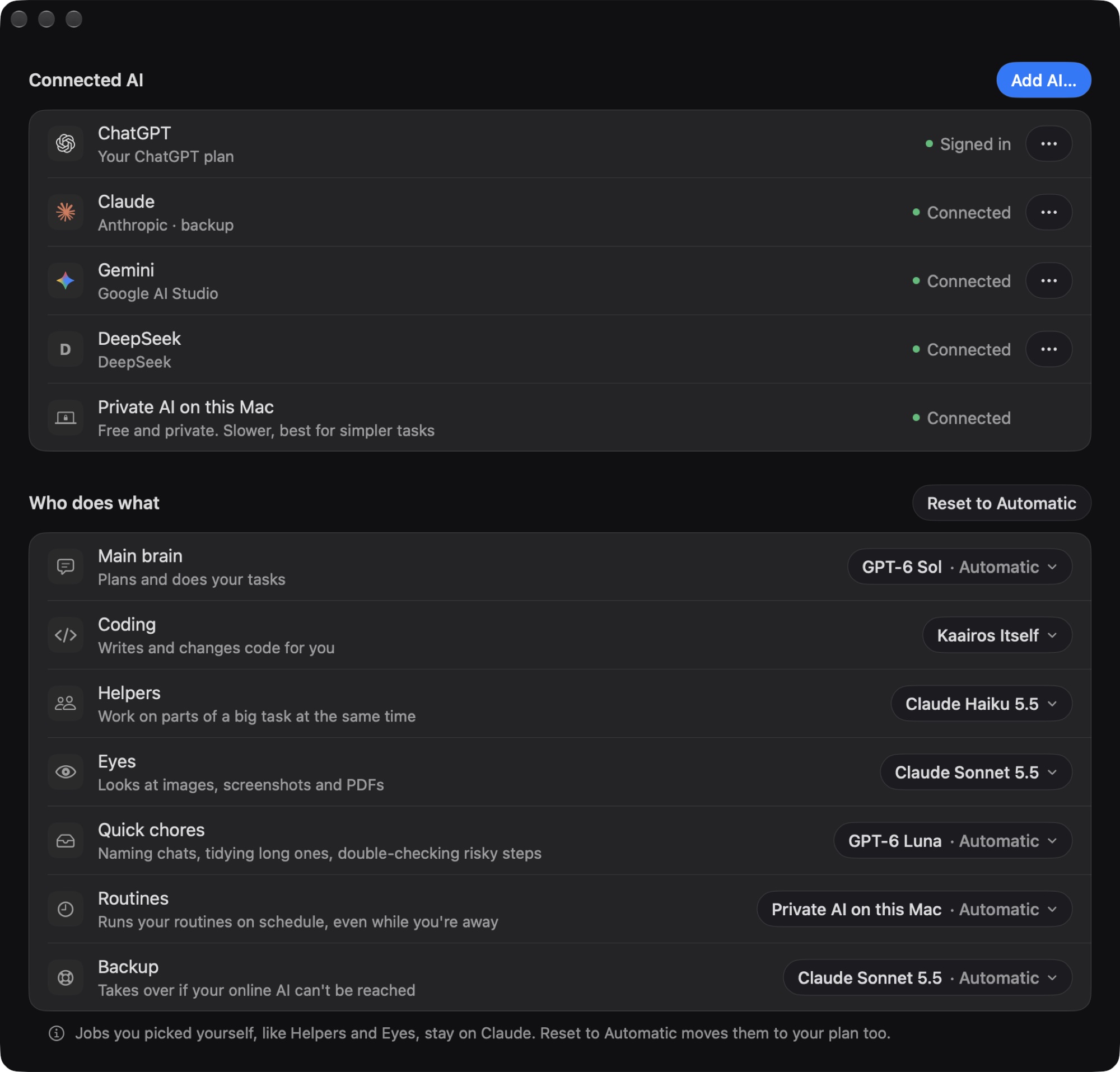
Kaairos gives its agent, QuickSilver, six jobs. Each goes to a model:
| Job | What it does | Goes to |
|---|---|---|
| Main brain | Plans and does your tasks | The strongest AI you've connected; the private AI if none |
| Routines | Runs your routines on schedule, even while you're away | The private AI on your Mac, whenever it has one |
| Helpers | Work on parts of a big task at the same time | A fast, inexpensive model on your account |
| Eyes | Looks at images, screenshots and PDFs | A model that reads images well and cheaply |
| Quick chores | Naming chats, tidying long ones, double-checking risky steps | A fast, inexpensive model |
| Backup | Takes over if your online AI can't be reached | The private AI on your Mac |
What that looks like for four common setups:
| Setup | Main brain | Helpers and chores | Routines | Backup |
|---|---|---|---|---|
| 32 GB Mac, no account | Private AI | Private AI | Private AI | — |
| 32 GB Mac + Claude key | Claude Sonnet 5.5 | Claude Haiku 5.5 | Private AI | Private AI |
| 32 GB Mac, signed in with ChatGPT | Your plan's strongest model | Your plan's small model | Private AI | Private AI |
| 16 GB Mac + Claude key | Claude Sonnet 5.5 | Claude Haiku 5.5 | Claude Haiku 5.5 | — |
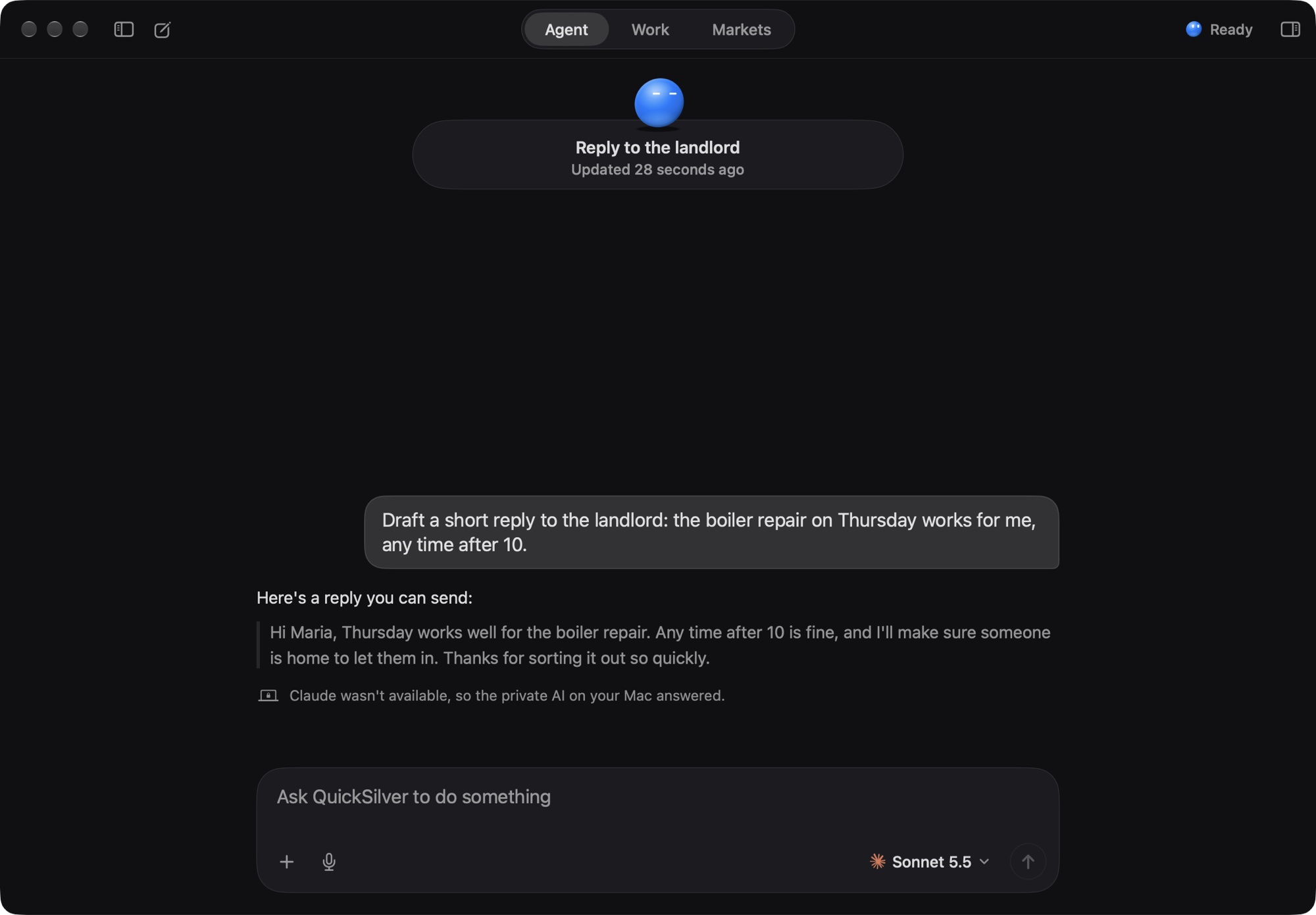
When the routing changes mid-conversation, Kaairos says so in plain words under the reply: “Claude wasn't available, so the private AI on your Mac answered.” Or, on a ChatGPT plan: “Your ChatGPT plan hit its limit, so the private AI on your Mac answered. ChatGPT takes over again when the limit resets.”
What hybrid saves: a week, costed
Take one person's week: a daily briefing, a price watch checked every 6 hours, two research questions and one trip plan. Our assumptions per run: briefing 120,000 input / 3,000 output tokens; watch check 48,000 / 1,000; research 600,000 / 10,000; trip plan 1,000,000 / 15,000. Prices per million tokens from Anthropic's price list: Claude Sonnet 5.5 $2 in / $10 out.
| Everything on Claude Sonnet 5.5 | Hybrid: routines on the Mac | Everything on the Mac | |
|---|---|---|---|
| 7 briefings | $1.89 | $0 | $0 |
| 28 price checks | $2.97 | $0 | $0 |
| 2 research questions | $2.60 | $2.60 | $0 |
| 1 trip plan | $2.15 | $2.15 | $0 |
| Week | $9.61 | $4.75 | $0 |
| What you give up | Privacy for routines | Nothing for routines | Speed and depth on the big tasks |
The routines are the half of the bill that hybrid removes: they're frequent, unattended, and they don't need the strongest model. The research and the trip plan are where paying for the best model is worth it, and they're occasional.
Is hybrid AI private?
As private as the jobs you keep local. Be precise about what that means:
- Local jobs: the model's work stays on your device. If a local job searches the web, the search words still go to a search service.
- Cloud jobs: your request, and whatever the agent read to answer it, go to that AI company under its terms.
- The routing itself should be visible. If you can't see which model handled what, you can't judge your privacy.
In Kaairos, with no account connected, every job is local. With one, routines and the backup stay local and conversations go to the account, which you can change job by job. On a Mac with a camera notch, the notch's Privacy page lists what stays on the Mac and what goes online at that moment.
Setting up hybrid AI in Kaairos
- On a Mac with 32 GB or more, press Set it up on first launch. Kaairos downloads its private AI; at this point every job is local.
- Open Settings › AI and add an online AI: Sign in with ChatGPT to use your ChatGPT plan, or a key for Claude, Gemini, OpenRouter and other services, or your own OpenAI-compatible endpoint.
- Kaairos reassigns the jobs automatically: conversations to the online AI, routines and the backup to the private AI. Check them under Who does what.
- Move any job you like: pick a model next to it. Reset to Automatic puts everything back.
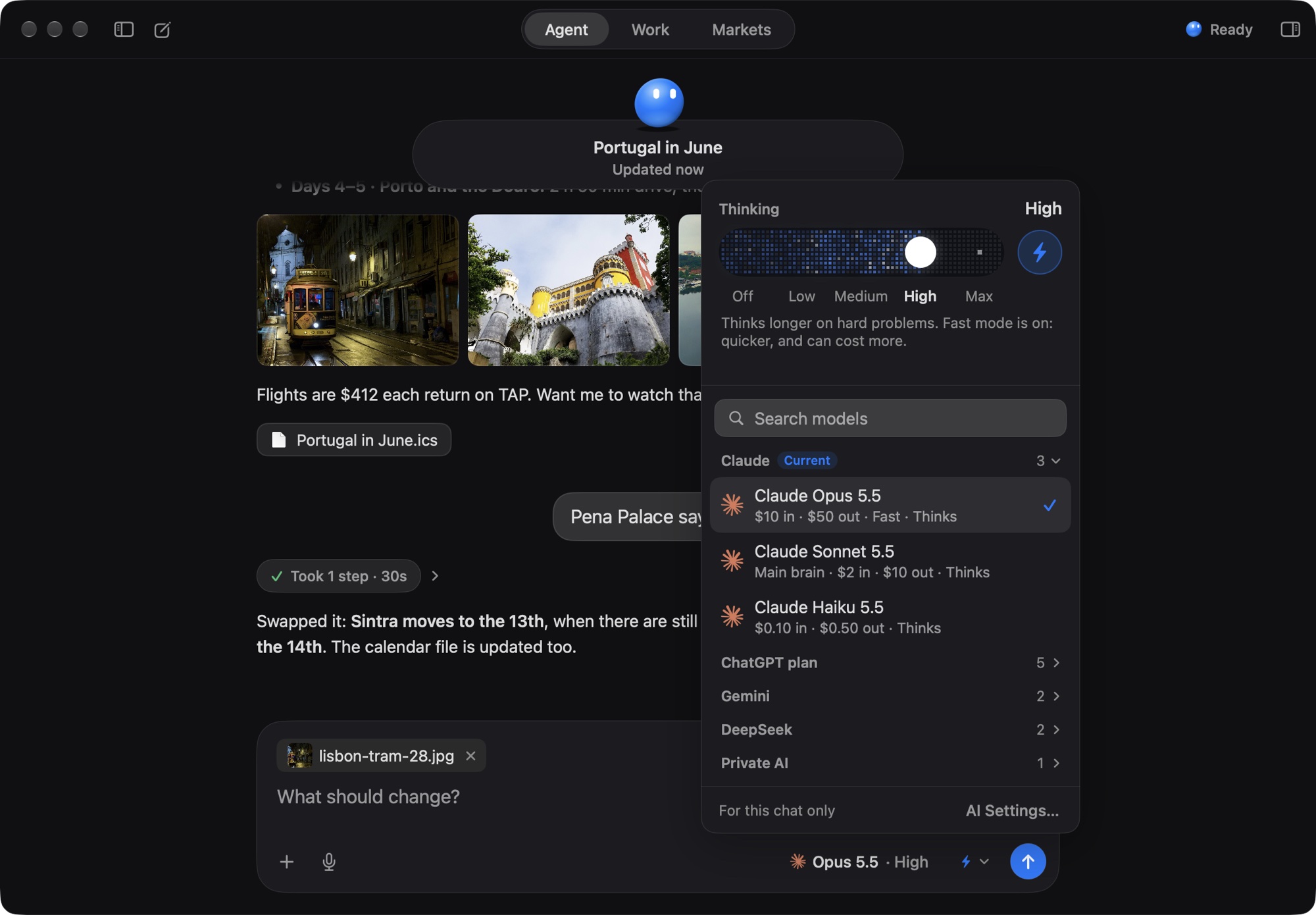
- For a single sensitive conversation, choose Private AI in that chat's model picker.
Common misunderstandings
- “Hybrid means everything goes to the cloud eventually.” Only the jobs routed there. With routines on the device, the unattended work never leaves it.
- “The local model is just a backup.” In a good setup it does real work every day: routines, reminders, digests, watches.
- “Local means offline.” The model can work offline; an agent that searches the web still uses the internet for the searches.
- “Hybrid is only for big companies.” On a 32 GB Mac it's a few settings, and it lowers the bill of anyone paying per token.
- “You need the biggest model for everything.” Most frequent jobs are simple. The strongest model earns its price on hard, occasional tasks.
How to judge a hybrid AI product
- Can you see which model does what? A list of jobs and models, not a vague “we use the best model”.
- Can you change it? Including moving everything local.
- What happens when the cloud fails? A local fallback, or an error?
- Where do unattended jobs run? These read the most and are watched the least.
- What does the local model need? Memory requirements stated honestly; see how much memory local AI needs.
- Who sits in the middle? Do your requests pass through the vendor's servers on the way to the AI company, or go direct?
For the record, Kaairos's answers: a visible job list in Settings › AI › Who does what, changeable per job; the private AI as backup; routines local by default; 32 GB for the private AI; and no Stuvio servers in the conversation path.
Fair questions
What is hybrid AI in simple terms?
Using an AI model on your own device and AI models in the cloud together, and giving each job to the one that suits it: private and frequent jobs on the device, the hardest ones in the cloud.
Is hybrid AI less private than local-only?
Only for the jobs you give an online model. In Kaairos, with no account connected, everything is local; with one, you can see and change which jobs use it.
Is Apple Intelligence hybrid AI?
Yes. It runs requests on an on-device model where it can and sends larger ones to Apple's Private Cloud Compute servers. Apple chooses the routing.
Does hybrid AI cost less?
Usually. Frequent jobs, like routines and small chores, run free on the device, so you pay only for the hard ones. In our worked example, a week's bill halves.
Do I need a powerful computer for hybrid AI?
For the local half, enough memory for a capable model: 32 GB on a Mac for agent work. On a smaller Mac you can still use the cloud half, with cheap fast models for the frequent jobs.
What happens if the internet goes down?
In a hybrid setup with a local fallback, the local model keeps answering. In Kaairos, the private AI takes over and the reply says so.
Can I choose which model answers?
In Kaairos, yes: per job in Settings › AI › Who does what, and per chat with the model picker, including a thinking-effort slider.
Is a cloud AI with a privacy promise the same as local AI?
No. A privacy promise, even a strong one like Apple's Private Cloud Compute, still means your request leaves your device and you rely on how the provider runs its servers. A local model never sends the request anywhere.
Is hybrid AI the same as an AI model router?
A router picks between cloud models, usually on price or speed. Hybrid AI adds a model on your own device to the choice, which brings privacy, offline use and a fallback that doesn't depend on anyone's servers.
Download and go
Your AI agent, already set up.
One button to set up. Its own private AI, free. Claude, ChatGPT or Gemini when you want more.
A Mac with Apple silicon (M1 or later), macOS 15 Sequoia or later. 14-day refund.