
Guide
What is Hermes Agent?
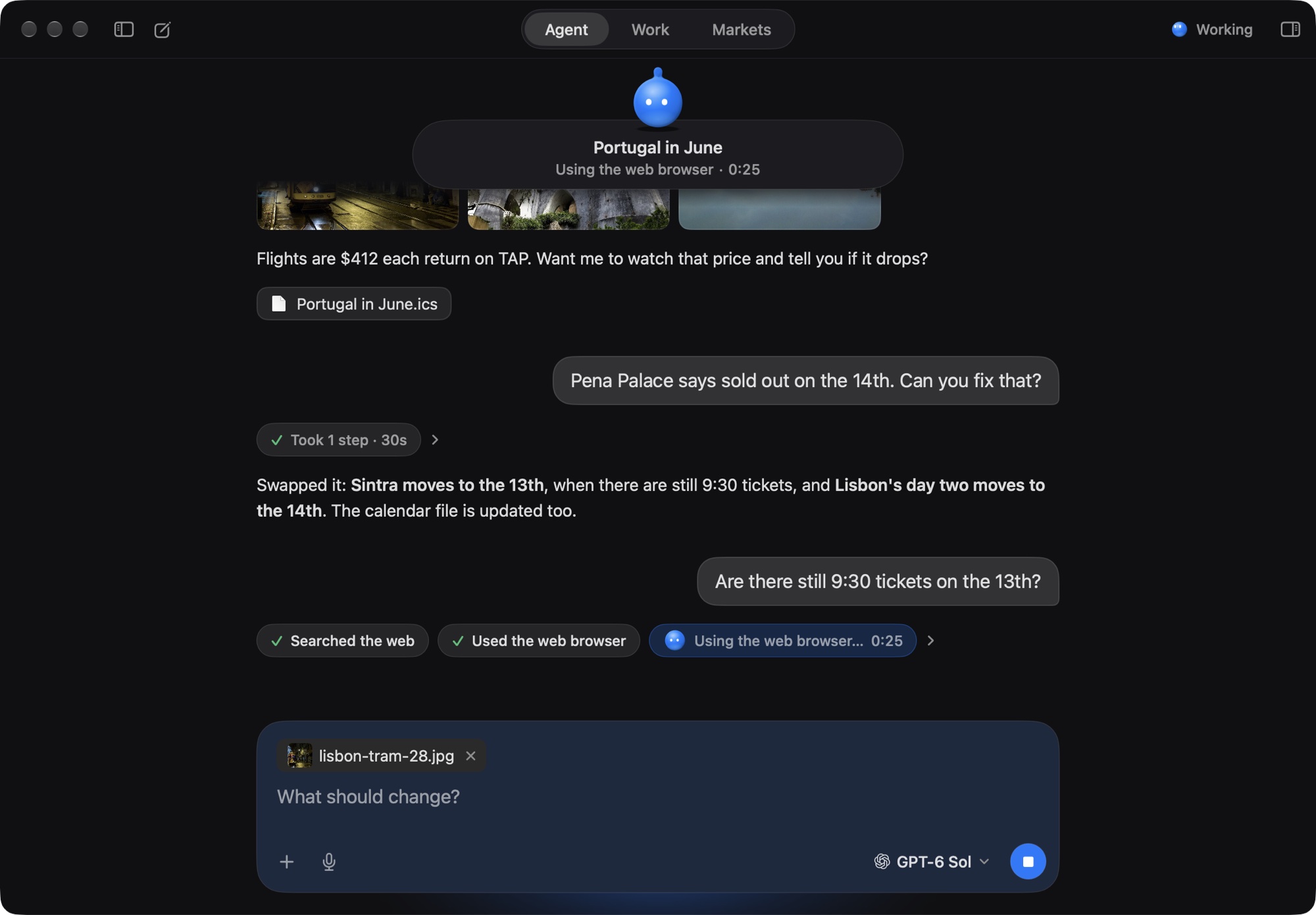
Hermes Agent is a free, open-source AI agent made by Nous Research. It connects a language model to real tools, remembers what it learns, runs jobs on a schedule and answers you in apps like Telegram. Here is what that means in practice, how to run it on a Mac, and what it costs.
The short answer
Hermes Agent is an open-source AI agent from Nous Research, released under the MIT licence. It runs on your own computer or a server, connects to a language model you choose (an online model through an API key, or a model running on your own machine), and uses tools such as web search, a web browser, files and a terminal to carry out tasks rather than only answer questions. It keeps a long-term memory, writes reusable skills from what it does, runs scheduled jobs with its built-in cron, and can be reached through more than 20 messaging platforms, including Telegram, WhatsApp, Slack and Discord.
Nous Research's own documentation calls it “the self-improving AI agent built by Nous Research”. On 16 November 2026 its GitHub repository showed about 264,000 stars, which makes it one of the most widely followed open-source agent projects.
Hermes Agent is not a model
The name causes some confusion. Nous Research also trains language models called Hermes, which are open-weight models you can download. Hermes Agent is different: it's software that drives a model. It isn't tied to Nous's own models. You can point it at Claude, GPT models, Gemini, models on OpenRouter, Nous Portal, or any OpenAI-compatible endpoint, including a model served on your own Mac.
A useful way to picture it: the model is the brain, and the agent is the body and the habits. The agent decides what tools the model may use, keeps track of what happened, asks you before risky steps, and stores what it learned for next time.
What it includes
| Part | What it does | Why it matters |
|---|---|---|
| Tools | More than 60 built-in tools, per the official docs: web search and extraction, a browser it drives itself, file reading and editing, a terminal, code execution, image understanding, image generation, text to speech and more | The model can check a live web page, edit a document or run a command instead of guessing |
| Memory | Agent-curated long-term memory and search across past sessions, stored on the machine it runs on (in ~/.hermes by default) | You don't have to repeat your preferences, names or context |
| Skills | Short instruction files for a kind of task. It ships with bundled skills, can add more from a catalog, and writes new ones from experience | Next time it does the same kind of job the way that worked |
| Scheduling | Built-in cron: jobs run on a schedule and deliver results to any connected platform | Daily briefings, price watches and weekly digests without you asking each time |
| Messaging gateway | Telegram, Discord, Slack, WhatsApp, Signal, Matrix, email, SMS, Microsoft Teams, Google Chat and more (20+ in all) | You can talk to it from your phone |
| Subagents | It can hand parts of a job to isolated helper agents that work in parallel | Long research or multi-part tasks finish sooner |
| Terminal backends | Local, Docker, SSH, Daytona, Modal and Vercel Sandbox | Developers can run risky commands somewhere other than their own machine |
| MCP | Connects to Model Context Protocol servers, the open standard for linking AI to other apps | It can work inside tools like Notion or Linear (see what MCP is) |
What people actually use it for
Because it can act on a schedule and use tools, Hermes Agent is good at jobs that are repetitive, a little fuzzy, and tedious to do by hand. These examples are all backed by skills and job templates that ship inside the engine (we checked the engine's source for each one):
| You ask | What it uses |
|---|---|
| “Tell me when these headphones drop below $350” | The Price & availability watch template and its product-price-monitor skill, which stores the last known price and only alerts once |
| “Every Monday at 9, tell me what my three competitors shipped” | The Competitor news watch template and its competitor-news-monitor skill, which deduplicates events and cites sources |
| “Summarise this YouTube video and list the claims it makes” | The youtube-content skill, which fetches the video's transcript |
| “Turn these meeting notes into decisions, owners and a follow-up email” | The meeting-action-items skill |
| “Read this contract and list every deadline and obligation” | The document-to-action-items and pdf skills |
| “Find recent papers on battery recycling and summarise the three most cited” | The arxiv skill and web search |
| “Every Sunday at 5, plan dinners for the week with one shopping list” | The Weekly meal plan template |
What it does less well: anything that needs your signed-in accounts it hasn't been given, sites that block automated visitors, and tasks where a small mistake is expensive and hard to notice. Those need either a connector, your approval at each step, or a person.
How to install Hermes Agent on a Mac
There are three ways, from most hands-on to least:
| Way | What you do | Good for |
|---|---|---|
| Command line | Run Nous's install script in Terminal, then a setup wizard; choose a model provider and paste an API key | Developers and people who like to configure everything |
| Hermes Desktop | Nous's official desktop app (Apple silicon on Mac). It installs the agent runtime into ~/.hermes and shares its settings with the command-line version; you add a model provider in Settings | People who want Nous's own app with a chat window, terminal and developer tools |
| An app built on it | Download an app that packages Hermes Agent with a model and settings already chosen, such as Kaairos | People who want the result without the setup |
The command-line install, step by step
- Open Terminal and run Nous's installer:
curl -fsSL https://hermes-agent.nousresearch.com/install.sh | bash - Reload your shell so the
hermescommand is found:source ~/.zshrc - Run the setup wizard:
hermes setup. It walks you through the basics. - Choose a model and provider:
hermes model. You'll need an account and API key with that provider (or a local model server). - Start chatting:
hermes(orhermes --tuifor the full-screen interface). - To use it from Telegram or another app, run
hermes gateway setup, then check it withhermes gateway status. - Keep it current with
hermes update.
These commands are from Nous Research's quickstart, read on 16 November 2026. Commands change between versions; if one fails, check the official quickstart.
The command-line route gives you the most control and the most decisions: which model, which approval mode, whether the gateway runs as a background service, how much the agent may do without asking. None of these are hard, but each one is yours to get right.
What it costs
The software is free. What costs money is the model behind it:
| Model choice | What you pay | Trade-off |
|---|---|---|
| Online model with your own API key (Anthropic, OpenAI, Google, OpenRouter…) | Per use, billed by that company | The most capable models; your requests go to that company |
| Nous Portal | Per Nous's own pricing | One account for several models |
| A local model on your own Mac | Nothing per use | Private and free to run, but needs enough memory: see how much memory local AI needs |
Agents use more tokens than chat, because every step sends the conversation, the tool results and the instructions back to the model. A job that reads ten web pages sends all ten pages through the model. That's why routing matters: give frequent, simple jobs (reminders, checks) to an inexpensive or local model, and keep the expensive model for hard work. Our guide to hybrid AI explains the idea.
Running it safely
An agent that can run commands on your computer deserves the same care as any software you install. Hermes Agent has the controls; the defaults you choose decide how they're used.
- Approvals. It can ask before risky actions such as deleting files or running unfamiliar commands. Keep that on until you trust a particular routine.
- Checkpoints. It can snapshot files before changing them, and its
/rollbackcommand restores a checkpoint. - Where commands run. Developers can send terminal commands to Docker or a remote sandbox instead of their own Mac.
- Skills and connectors from others. Treat a third-party skill or MCP server like any other software: read what it does before turning it on.
- Prompt injection. Web pages and emails can contain text written to trick an AI. An agent that reads the web should still ask before sending, buying or deleting.
Which way should you run it?
| If you… | Consider |
|---|---|
| Write code and want full control, other platforms or a server | The command-line install |
| Want Nous's official app with developer tools, and already have an API key | Hermes Desktop (see Kaairos vs Hermes Desktop) |
| Want it on a Mac with a private model included, routines from a gallery and phone access by QR code, without a terminal | Kaairos, which is built on Hermes Agent |
| Mostly want to chat with a local model, not automate anything | A model runner such as LM Studio (see the alternatives) |
A note on Kaairos, since this is its website: Kaairos is a paid Mac app made by Stuvio that builds Hermes Agent in (version 0.23.1 today) and keeps it in its own folder, ~/.kaairos, so it never touches a Hermes you installed yourself. Kaairos isn't affiliated with or endorsed by Nous Research.
How it learns, in practice
“Self-improving” sounds grand; in practice it means two concrete things you can inspect.
Memory is a store of facts the agent decided were worth keeping: that you live in Lisbon, that you prefer metric units, that your manager is called Sarah. Before it answers, it can search that store and its past sessions, so you don't have to repeat yourself. You can ask what it remembers and tell it to forget something.
Skills are short instruction files, one per kind of task. When a job goes well, the agent can write a skill describing how it did it: which sources were useful for your competitor digest, how you like a briefing laid out, which booking site worked for a fare check. Next time a similar request comes in, it loads that skill first. Skills are plain text, so you can read, edit or delete them.
A worked example: the first time you ask for a weekly digest on battery recycling, the agent searches broadly and you tell it two of the sources were useless. It records that. The following week it skips them, and the digest is shorter and closer to what you wanted. Nothing about the model changed; the agent's notes did.
Sources
- Hermes Agent documentation, Nous Research (features, platforms, tools, licence)
- Hermes Agent quickstart (install commands)
- Hermes Desktop documentation
- NousResearch/hermes-agent on GitHub (licence, star count on 16 November 2026)
- The engine's own source (version 0.23.1):
cron/blueprint_catalog.pyfor the routine templates andskills/for the bundled skills named above
Fair questions
Is Hermes Agent free?
Yes. It's open-source software under the MIT licence. You pay only for the model you connect to it, unless you run a local model, which costs nothing per use.
Who makes Hermes Agent?
Nous Research, an AI research lab that also trains the open-weight Hermes language models.
Does Hermes Agent run on a Mac?
Yes. It runs on macOS, Linux, Windows and WSL2. On a Mac you can install it from the command line, use Nous's Hermes Desktop app (Apple silicon), or use an app built on it such as Kaairos.
Which models work with Hermes Agent?
Any it can reach: Anthropic, OpenAI, Google, OpenRouter, Nous Portal, or any OpenAI-compatible endpoint, including a model running locally on your own computer.
Can Hermes Agent run without the internet?
With a local model, yes for anything that doesn't need the web: files, notes, drafting, reminders. Web research and messaging apps need a connection.
Is Hermes Agent safe?
It can run commands and change files, so it's as safe as the settings you choose. Keep approvals on for risky actions, keep checkpoints on, and read third-party skills before enabling them.
What's the difference between Hermes Agent and OpenClaw?
Both are open-source agents with tools, memory and chat-app access. They're separate projects with different code, communities and defaults. See our comparison with OpenClaw.
Do I need to know how to code?
Not to use it, but the command-line setup assumes you're comfortable in Terminal and with API keys. Apps built on it remove those steps.
Download and go
Your AI agent, already set up.
One button to set up. Its own private AI, free. Claude, ChatGPT or Gemini when you want more.
A Mac with Apple silicon (M1 or later), macOS 15 Sequoia or later. 14-day refund.