
Private AI
Private AI that runs on your Mac
Kaairos comes with its own AI and runs it on your Mac. What you ask isn't sent to an AI company. It keeps working without the internet. And it costs nothing to use, however often it runs.
The short answer
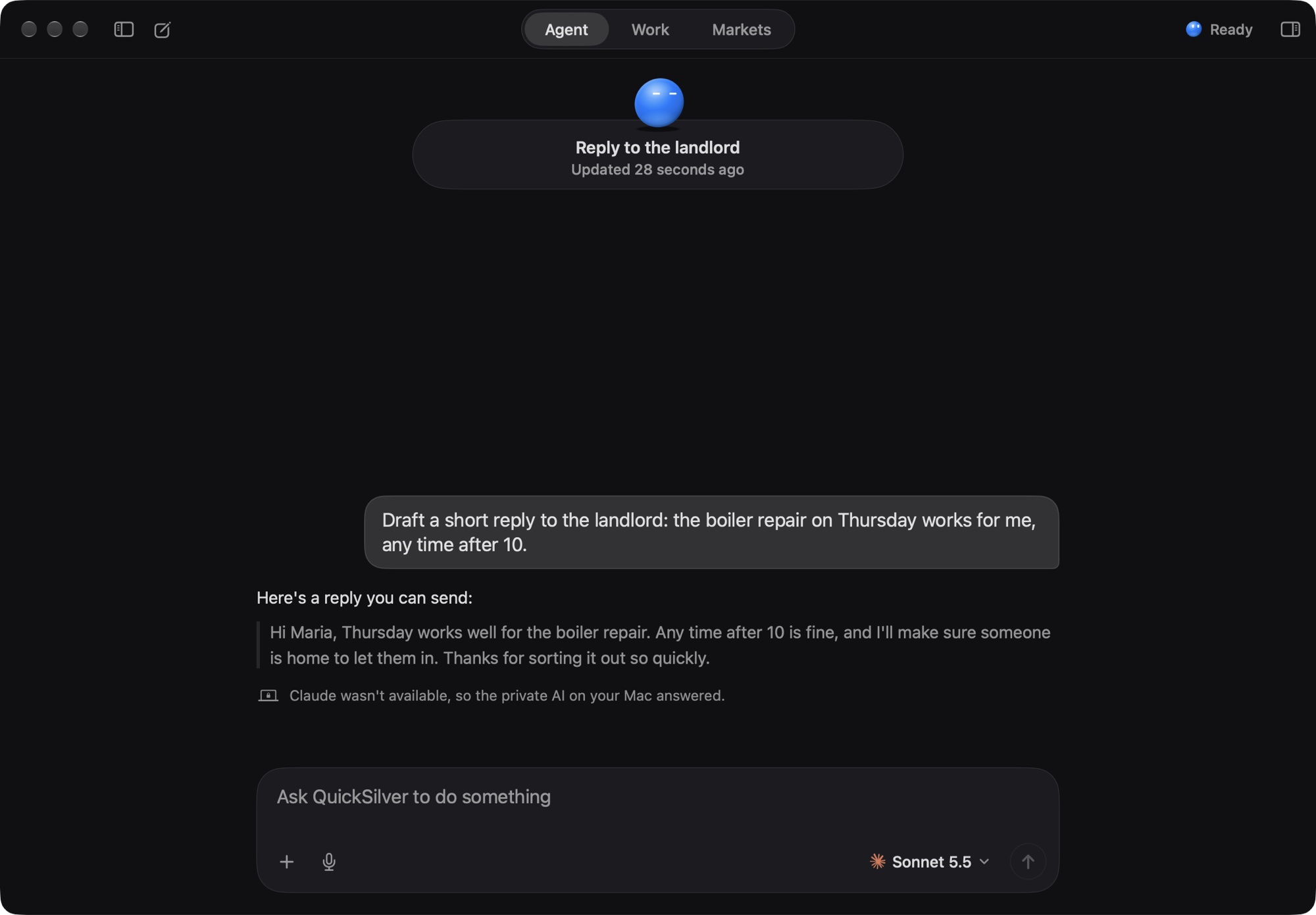
Private AI means the AI model runs on your own computer, so what you ask it is processed there and isn't sent to an AI company. Kaairos is a private AI agent for the Mac: during setup it downloads an open-weight model (about 24 GB (about 99 GB on Macs with 96 GB of memory or more, which get a larger model)) and runs it on your Mac's Apple silicon with llama.cpp, through the open-source Hermes Agent engine. It needs no account and no API key, keeps working offline for anything that doesn't need the web, and has no usage fees. It needs 32 gb of memory or more to run its own ai. On smaller Macs, you connect an online AI instead.
What “private” means here
Many AI products call themselves private and still run in someone's cloud, with a promise about how they treat your data. In Kaairos, private means on your Mac: the model's files are on your disk, it runs on your Mac's chip, and the words you type are processed there. No AI company receives them, so there's nothing for one to keep, read or train on.
| Stays on your Mac? | |
|---|---|
| What you ask the private AI, and what it answers | Yes |
| Your conversations, memory, skills, routines and settings | Yes |
| Files it makes, and files you give it | Yes |
| Voice notes (transcribed on the Mac) | Yes |
Keys and sign-ins for AI accounts and connected apps (in ~/.kaairos), your licence key (in the macOS Keychain) | Yes |
| Web searches, and the pages it visits | No: the search provider and the site see the request, as they would from your browser |
| Messages to and from Telegram or WhatsApp | No: they travel through those services |
| Chats you route to an online AI you connect | No: they go to that company, under your account |
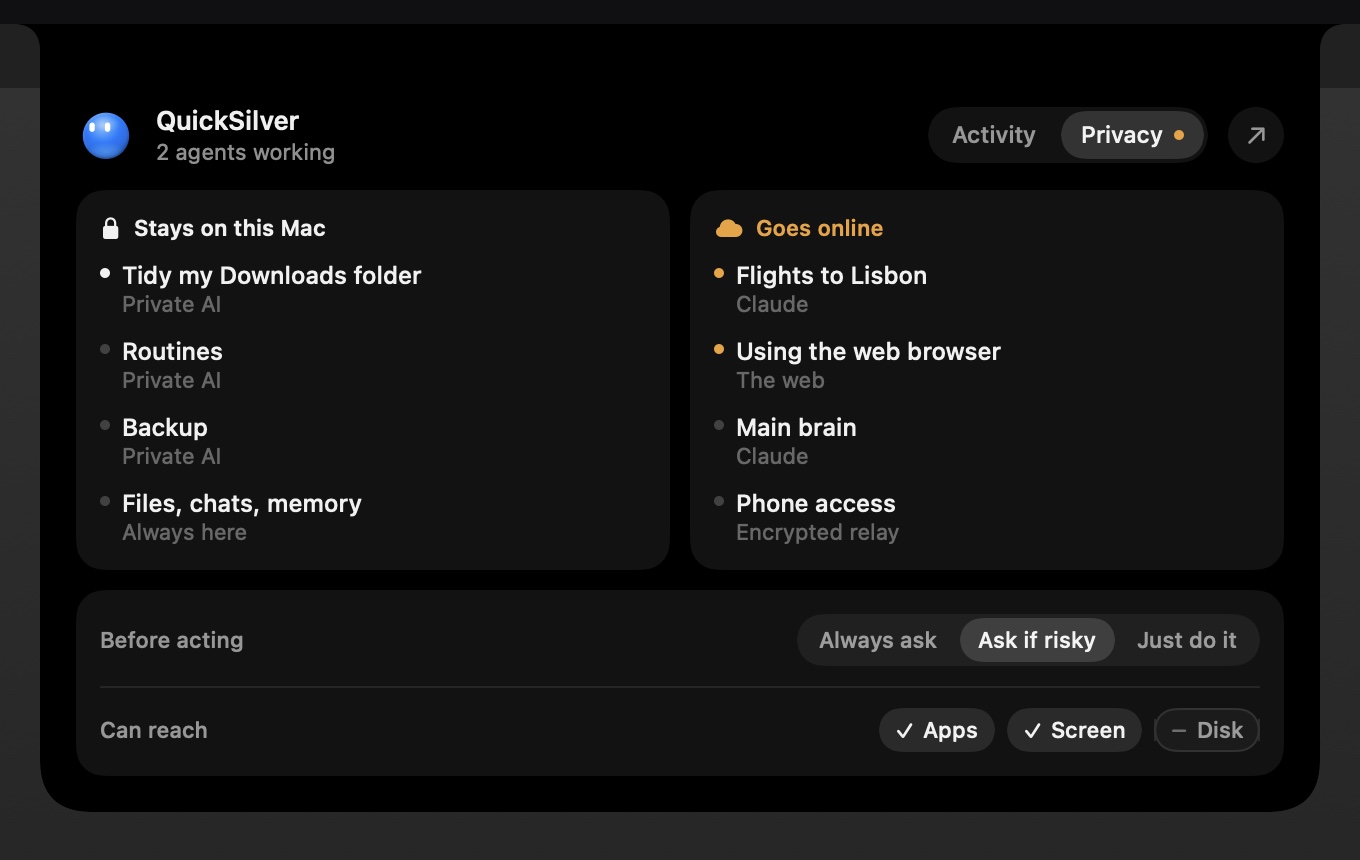
So the private AI keeps the thinking on your Mac. Whether a particular task stays entirely on your Mac depends on what it needs: sorting files, drafting from your notes or summarising a document you gave it can stay local from start to finish; checking a price can't, because the price is on a website.
How it runs
Kaairos doesn't run a separate model app such as Ollama. It uses the local-model manager built into Hermes Agent, the engine inside Kaairos. That manager:
- picks the model from its curated catalog that fits your Mac's memory, and the build (quantization) of it that fits best;
- guarantees at least 64,000 tokens of context, the minimum Hermes requires, because an agent has to keep its instructions, tools and the task's results in view at once;
- installs llama.cpp (with Metal, so it runs on the Mac's GPU) and runs it as a server on
127.0.0.1, reachable only from your Mac; - loads the model when a job needs it and unloads it after 15 idle minutes, so a backup that isn't being used costs no memory.
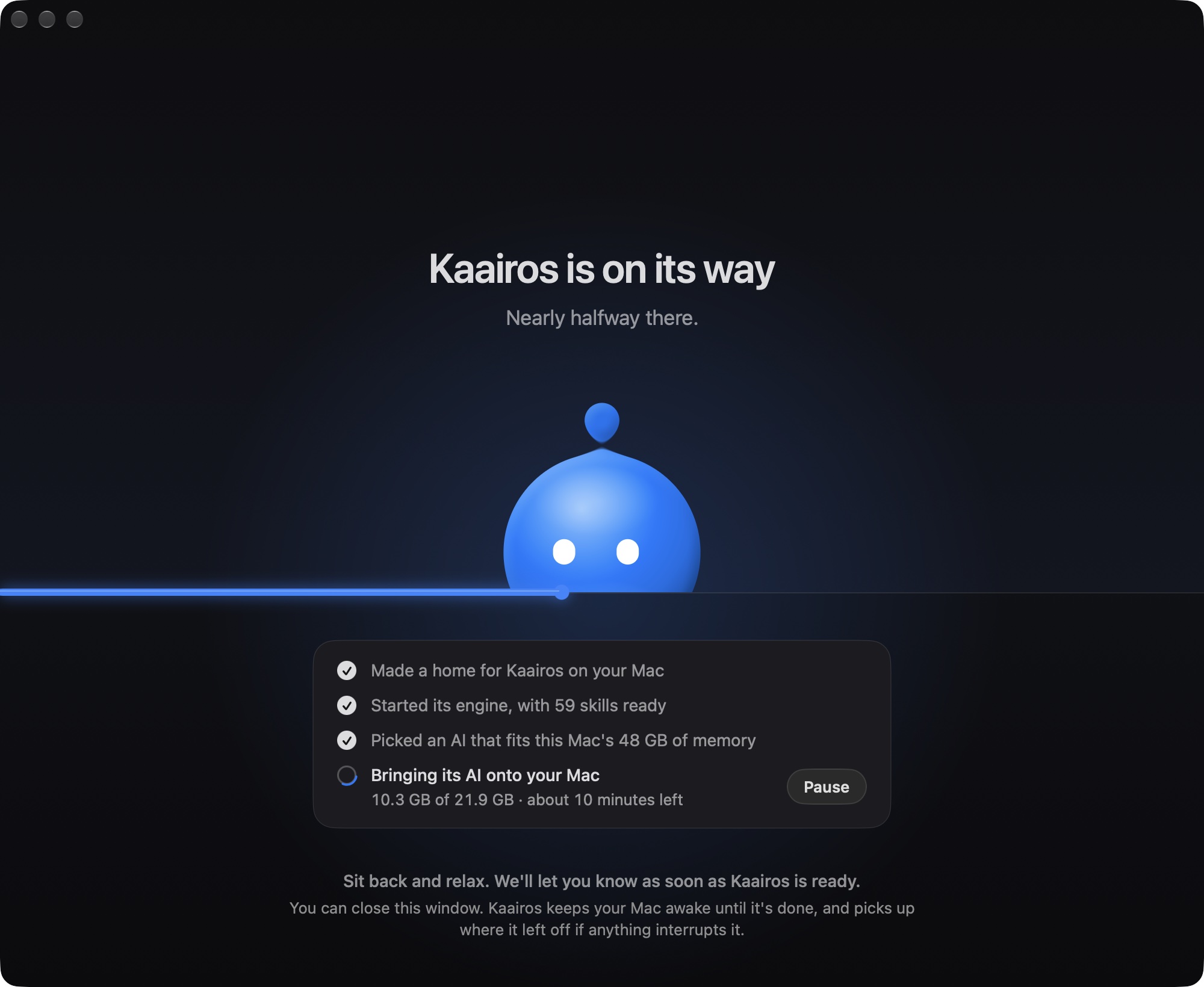
Kaairos runs the manager's quickstart during Set it up: runtime, download, server and default, as one job, with the sunrise as its progress bar.
Which model it uses
Kaairos uses the model the engine recommends for your Mac. In Hermes Agent 0.23.1, the curated catalog lists these open-weight families:
| Model | The catalog's description |
|---|---|
| Qwen3.8 27B | Best all-round agent model; sees images; long context stays fast |
| Qwen3.8 Flash Next | Frontier-scale mixture-of-experts with multi-token prediction; sees images |
| Qwen3.6 35B-A3B | Bigger mixture-of-experts with multi-token prediction; sees images |
| Nemotron 3.5 Bolt | NVIDIA's 74B mixture-of-experts in a 2-bit build; sees images (not recommended by default) |
| DeepSeek V4 Flash | Frontier-class model for machines with 128 GB+ memory |
The smallest of these is about 16.5 GB of weights. Each model is published by its maker under its own licence, which applies to your use of it (open-source page).
What it's good at, and where it's weaker
The private AI handles everyday agent work well: morning briefings, reminders, watching pages for a change, summarising, drafting, sorting files, research that isn't time-critical. If the model chosen for your Mac can see images, it reads screenshots and photos too.
| Good at | Weaker at |
|---|---|
| Routines that run every day, unattended | Long, hard, many-step tasks, where the best online models are faster and more reliable |
| Work on your own files and notes | Very recent events from its own knowledge (it reads the web for those) |
| Anything you'd rather not send to a company | Speed on long replies: it shares your Mac's chip with everything else you're doing |
| Working offline | Tasks that need a lot of context at once on a Mac with just enough memory |
That's why Kaairos is hybrid. When you want more power, connect Claude, ChatGPT or Gemini; the private AI keeps the routines and becomes the backup.
What it needs, and why 32 GB
| Requirement | |
|---|---|
| Mac | A Mac with Apple silicon (M1 or later) |
| macOS | macOS 15 Sequoia or later |
| Memory | 32 GB or more |
| Disk | About 30 GB of free space (the app plus its own AI); about 105 GB on Macs with 96 GB of memory or more |
| Download | about 24 GB (about 99 GB on Macs with 96 GB of memory or more, which get a larger model), once, during setup |
Running a model takes memory for three things at once: the model's weights, its working memory for the conversation (the KV cache, which grows with context), and everything else your Mac is doing, including the agent's own browser. The smallest model in the engine's curated catalog is about 16.5 GB of weights before any context. By the engine's own fit rules, none of its curated models fits an 8, 16 or 24 GB Mac well enough for agent work, so Kaairos doesn't pretend otherwise.
Smaller models do run on 16 GB Macs: Nous Research's own guide to local models on a Mac suggests a 9-billion-parameter model there. Kaairos is evaluating models of that size for agent quality and will only offer one when it's good enough. More in how much memory local AI needs.
On a Mac with less memory, Kaairos still works: connect an AI account or sign in with ChatGPT, and everything else is the same.
Getting it
- Download Kaairos and drag it to Applications.
- Open it and press Set it up.
- Kaairos checks your Mac's memory and picks the model the engine recommends for it, or else the best one that fits.
- It checks your free disk space: the model plus about 5 GB to spare. If there isn't enough, it says how much it needs and how much is free, and keeps anything already downloaded.
- It downloads the model (about 24 GB (about 99 GB on Macs with 96 GB of memory or more, which get a larger model)), including the part that lets it see images. Every file is checked against its published checksum before it's used. Pause or quit at any time; it resumes where it stopped.
- When it's ready, your Mac shows a notification. Ask for something.
Offline
With the private AI, Kaairos keeps working without the internet: chat, your files, reminders, drafting, anything that doesn't need the web. Tasks that need the web wait for it and tell you so. And if you've connected an online AI, the private AI answers when that AI can't be reached, with a line in the reply that says so.
Private plus smart: how it works with online AIs
You don't have to choose between private and powerful. When you connect an online AI, Kaairos gives each job to the AI that suits it:
| Role | With an online AI connected | With none |
|---|---|---|
| Main brain (your conversations) | The best online AI you've connected, for example Claude Sonnet 5.5, GPT-6.1 Sol or Gemini 4 Argon | The private AI |
| Routines (scheduled, often unattended) | The private AI, so it's free and what routines read stays on the Mac | The private AI |
| Helpers (subagents) | A fast, inexpensive online model, for example Claude Haiku 5.5 | The private AI |
| Quick chores (titles, compressing long chats, safety checks) | A fast, inexpensive online model | The private AI |
| Eyes (images and PDFs) | A model that sees well, for example Gemini 3.8 Flash | The private AI, if the model chosen for your Mac sees images |
| Backup | The private AI, when an online AI fails for good (no credit, a revoked key, an outage, no internet) | Not needed |
Routines stay on the private AI by default because they run often and unattended, often read your own things, and would otherwise cost money every time. You can change any assignment in Settings › AI, and pick a model per chat. More in hybrid intelligence and what hybrid AI is.
Why routines run on the private AI
Routines are where private AI earns its keep. A routine runs on a schedule, often while you're away, and often reads your own things: your notes, your files, a list of what you're watching. Kaairos puts routines on the private AI by default, even when you've connected an online AI, for three reasons:
- Cost. A routine that runs every hour would add up on a paid AI. On the private AI it costs nothing.
- Privacy. What a routine reads stays on your Mac. Only the web requests it makes (checking a price, reading the news) go out, as they would from your browser.
- Reliability. It doesn't depend on an AI company being up, your credit lasting, or a key still being valid.
The gallery's ready-made routines, such as a morning briefing, a price and availability watch, a topic news digest, bills and renewals, a habit check-in and a weekly meal plan, all run on it (routines). You can move routines to an online AI in Settings › AI if you'd rather.
Who private AI is for
- People who'd rather not send their questions to an AI company: about health, money, family, or work under a confidentiality agreement.
- People who don't want another subscription or account. Kaairos works on day one with no sign-up.
- People who work offline: on planes and trains, or with unreliable internet.
- People who want an agent that keeps running without a meter: briefings, watches and reminders every day, at no extra cost.
- People who want both: private for routines and personal things, an online AI for the hardest tasks.
It isn't the right fit if your Mac has less than 32 GB of memory (connect an online AI instead), or if every task you have is long and hard and speed matters most (an online AI will be quicker).
Private AI options on a Mac
| Kaairos's private AI | A model runner (LM Studio, Ollama, Jan) | A cloud AI app (ChatGPT, Claude) | |
|---|---|---|---|
| Where the model runs | On your Mac | On your Mac | On the company's servers |
| Does tasks (web, files, schedules, phone) | Yes, it's an agent | Mostly chat; agents can be connected | Some, in their cloud |
| Setup | One button; the model is chosen for you | Choose and download models yourself | Make an account |
| Account needed | No | No | Yes |
| Cost of use | Free after the app | Free | Free tier or subscription |
| Works offline | Yes, except web tasks | Yes | No |
Free, for as long as you use it
There's no meter on the private AI. It runs on hardware you already own, so a routine that runs every hour costs the same as one that runs once a week: nothing. The only costs are your Mac's electricity and some memory while it works. Kaairos itself is $29 once. Online AIs, if you add one, are billed by that company, and the Work tab shows what they cost you over the last 30 days.
Checking it for yourself
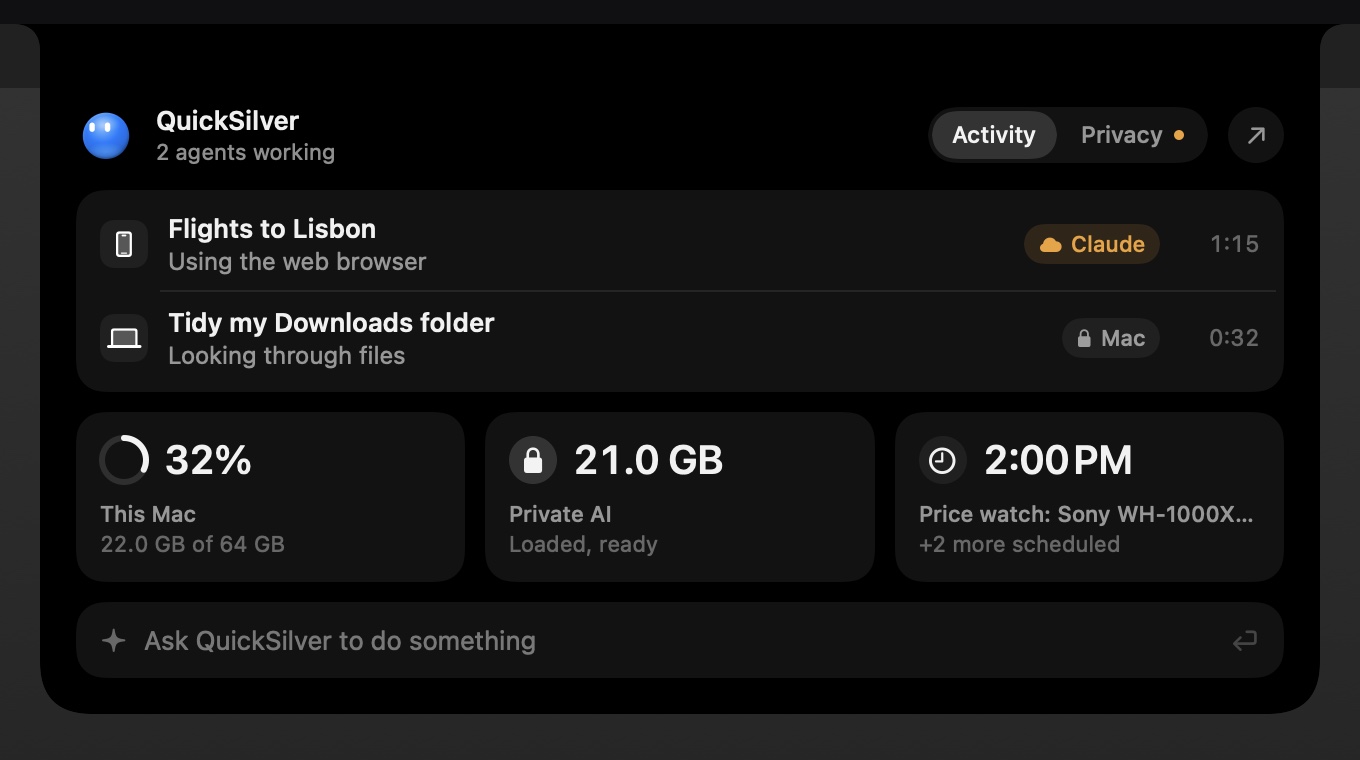
- The notch (on Macs with one): its Privacy page lists what stays on this Mac and what goes online, task by task, and its Activity page shows the private AI's memory use.
- The reply: when a job switched AI, the reply says which one answered.
- Activity Monitor shows the llama.cpp server while the model is loaded, and its memory.
- Turn off Wi-Fi and ask for something that doesn't need the web: it still answers.
Sources
- Hermes Agent on GitHub (Nous Research, MIT)
- Run local LLMs on a Mac, Hermes Agent docs: the 64K context minimum and memory guidance
- Hermes Agent FAQ: local models and data storage
- The model catalog in Hermes Agent 0.23.1 (
hermes_cli/local_runtime/catalog.json), as shipped in Kaairos
Fair questions
What is private AI?
AI that runs on your own device, so what you ask is processed there instead of on a company's servers. Kaairos runs its own AI model on your Mac.
Is my data used to train AI?
Not by Kaairos: Stuvio never receives your conversations. The private AI runs on your Mac, so no AI company receives them either. If you connect an online AI, that company's own policy applies to what you send it.
Which model does Kaairos use?
The one the engine's curated catalog recommends for your Mac's memory. In Hermes Agent 0.23.1 the catalog lists Qwen3.8 27B, Qwen3.8 Flash Next, Qwen3.6 35B-A3B, Nemotron 3.5 Bolt and DeepSeek V4 Flash.
How much memory do I need for private AI on a Mac?
32 GB or more for Kaairos's private AI. The smallest model in the engine's catalog is about 16.5 GB before any context, and an agent needs at least 64,000 tokens of context.
Does it work without the internet?
Yes, for anything that doesn't need the web. Setup itself needs the internet to download the AI.
Can I use only the private AI?
Yes. With no account connected, the private AI does everything.
Is private AI as good as ChatGPT or Claude?
For everyday agent work, it does well. On long, hard tasks the best online models are faster and more reliable, which is why Kaairos lets you connect one and keeps the private AI for routines and as a backup.
Does Kaairos use Ollama or LM Studio?
No. It uses the local-model manager built into Hermes Agent, which runs llama.cpp. You don't need to install anything else.
Does the private AI slow my Mac down?
While it's answering, it uses the Mac's GPU and a lot of memory. It's unloaded after 15 idle minutes, so when it isn't working it uses no memory.
Is the private AI free?
Yes. After the one-time $29 for Kaairos, there are no fees for using it.
Can I choose a different private model?
Not in Kaairos today. It uses the model the engine recommends for your Mac, or the best one that fits. That keeps setup to one button.
Where are the model files stored?
In Kaairos's folder on your Mac, ~/.kaairos/home/models. Deleting ~/.kaairos removes them.
Download and go
Your AI agent, already set up.
One button to set up. Its own private AI, free. Claude, ChatGPT or Gemini when you want more.
A Mac with Apple silicon (M1 or later), macOS 15 Sequoia or later. 14-day refund.