
Features · Trading
Real charts, real research, and nothing is sent until you say OK.
Connect your Alpaca account and QuickSilver works the way a careful trader does. It pulls real price history, reads the indicators, sends helpers to research several stocks at the same time, shows you every chart it read, and proposes orders with their stops and targets. Each order waits for your OK, and your limits are checked in code before anything reaches the broker. It starts on a paper account with practice money.
What people use it for
People who connect an AI agent to a brokerage account mostly don't want a robot that trades by itself. They want the boring parts done: looking up what they hold, doing the arithmetic, typing the order correctly, remembering what's still open. Those are the jobs Kaairos does.
Read the chart
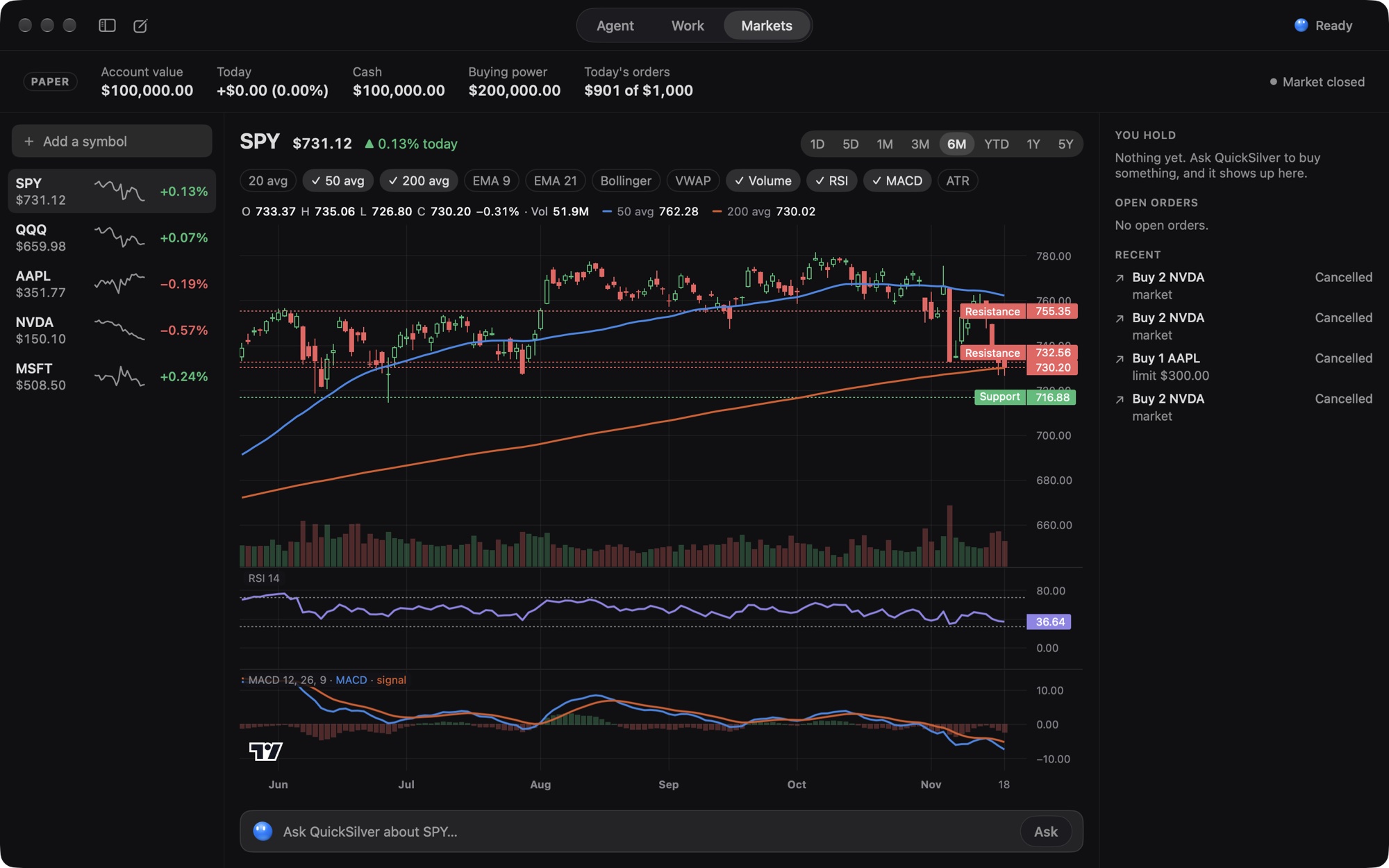
“How does NVDA look?” It pulls six months of real prices and reads the trend, the 50- and 200-day averages, RSI, MACD, volatility, support and resistance, and shows you the chart it read.
Compare and choose
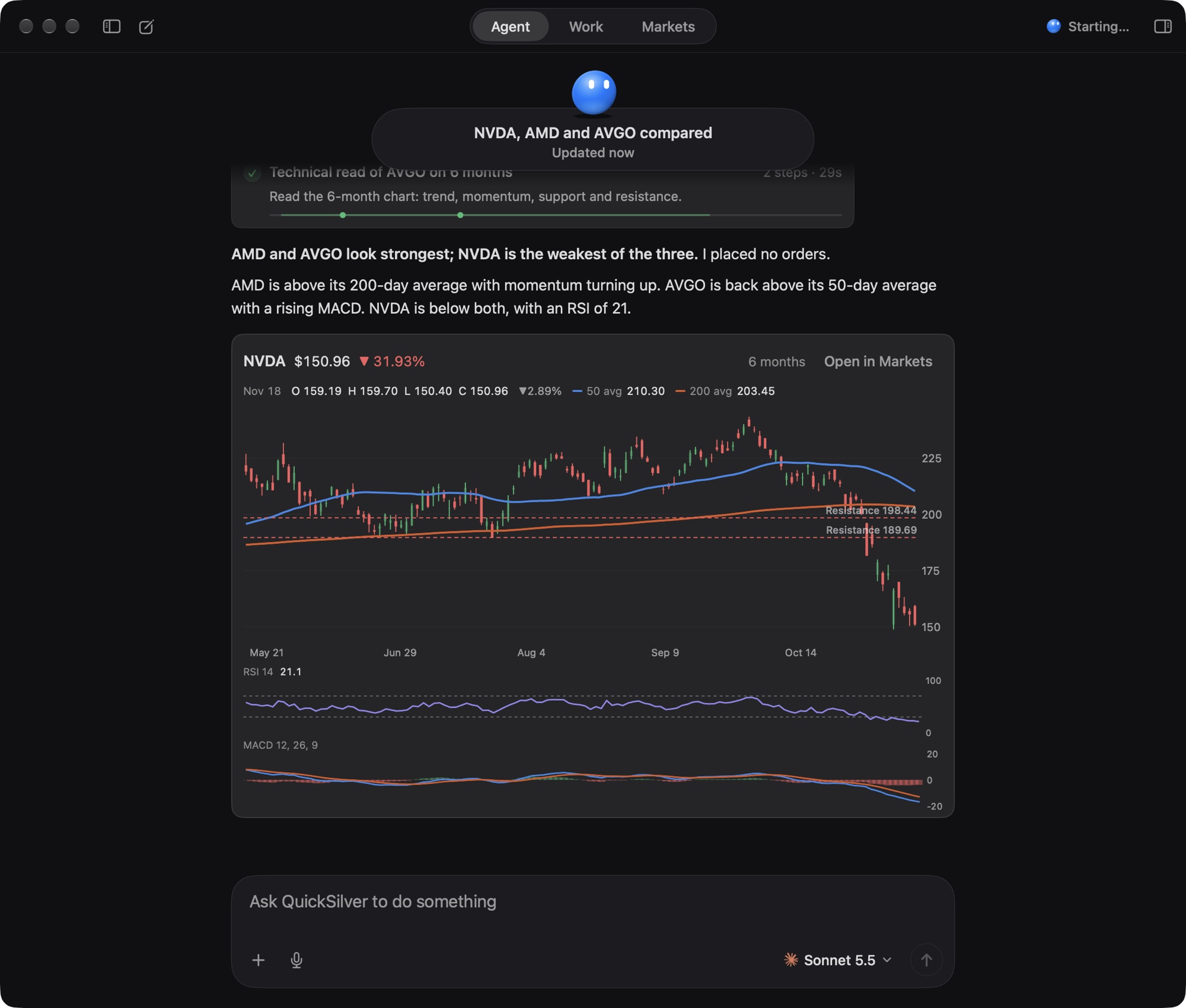
“Which two of NVDA, AMD and AVGO look strongest?” Helpers research each one at the same time, then QuickSilver compares them on one chart, with volatility, drawdown and how closely they move together.
Put cash to work
“Invest $2,000: 50% VTI, 30% VXUS, 20% BND.” It reads your cash, prices each fund and proposes the exact dollar orders, which you approve one by one.
Buy at your price
“Buy 3 AAPL at 3% under the last price, and keep the order open until it fills.” It does the maths and places a limit order that waits.
Check in
“What do I hold, what's it worth and how did today go?” Reading your account never needs an OK.
Tidy open orders
“What's still open? Cancel the TSLA one.” Every cancel asks too.
Protect a position
“Put a trailing stop 8% under my AMD.” Or buy with both exits attached: a bracket order with a take-profit and a stop-loss, where one cancels the other.
Get told, not traded
A routine checks your account or your watchlist on a schedule and messages you. Routines can never place an order.
Charts and the numbers behind them
When QuickSilver looks at a stock, it reads the same thing a trader would: the price history and what the standard indicators say about it. Kaairos fetches the bars from Alpaca, works out every indicator itself, and draws the very chart QuickSilver read under its reply, so what it says and what you see always agree.
| What it reads | What it tells you |
|---|---|
| Candles and volume, from one day to five years | The price path and how much traded. Full-market history from Alpaca, with the last 15 minutes from the IEX exchange. |
| 20, 50 and 200-day averages, EMA 9 and 21 | The trend, and whether the price is above or below it. A recent golden or death cross is called out. |
| RSI (14) | Momentum: over 70 reads overbought, under 30 oversold. |
| MACD (12, 26, 9) | Momentum turning: a recent bullish or bearish cross is called out. |
| Bollinger bands, ATR | How far the price usually swings, as a range and as a percentage. |
| VWAP (intraday) | The day's volume-weighted average price. |
| Support and resistance | Price levels where the stock has turned before, found from its swing highs and lows. |
| 52-week range and performance | Where it sits against its year, and how it did over a week, a month, three months, the year to date and a year. |
Every indicator is computed by Kaairos's own code from the raw prices, and was checked against pandas, the standard data library, on 467 real NVDA daily bars: the 50 and 200-day averages, EMA, Bollinger bands, RSI, ATR and MACD all matched.
Helpers that research at the same time
For a question about several stocks, QuickSilver hands each one to a helper. The helpers work in parallel, each pulling its own chart, and you can watch them: every helper has a lane showing what it's on, the steps it has taken and a timeline, so you can see them overlap. When they finish, QuickSilver puts their findings together.
This is a real run from 19 November 2026, on Claude and a real Alpaca paper account (the reply is shortened; the full one also had a table of each stock's price, trend, RSI, support and resistance):
Research NVDA, AMD and AVGO technically, with three helpers working in parallel, one stock each. Then compare all three over a year and tell me which two look strongest and why. Don't place any orders.
The two strongest are AMD and AVGO. NVDA is the weakest of the three. I placed no orders. - AMD has by far the best year (+137%) and sits above its 200-day average, with momentum just turning up, but its swings are the biggest: about 74% annualised volatility, against 49% for AVGO and 39% for NVDA. - AVGO is back above its 50-day average with a rising MACD, and support is close, at $348. - NVDA is down 19% over the year and below both averages. An RSI of 21 means a bounce is possible, but the trend is still down. The three move together only moderately (correlation 0.48 to 0.59), so holding more than one spreads the risk.
The Markets tab
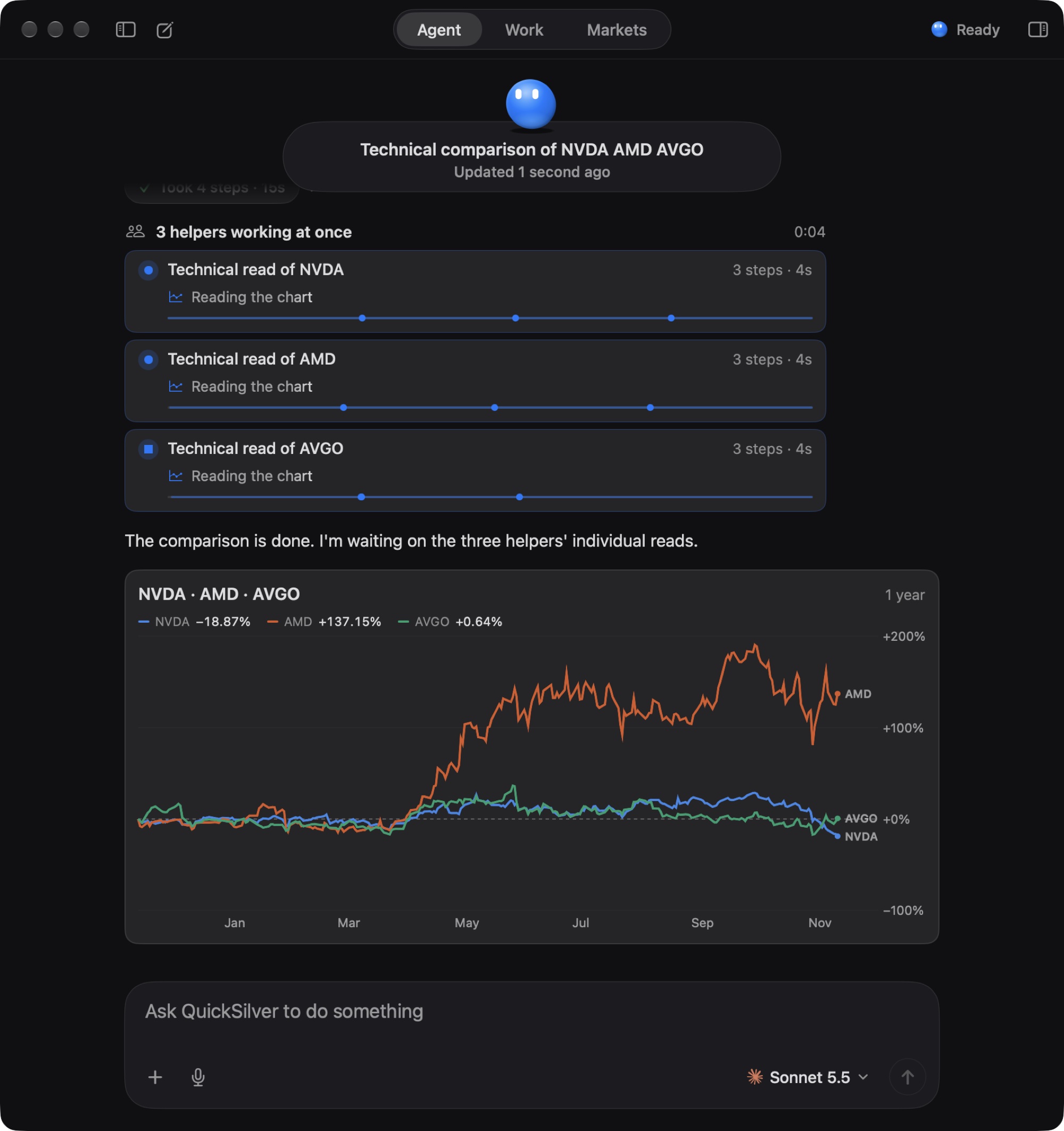
Markets is a tab of its own beside Agent and Work. It shows your account at a glance: its value, today's change, cash, buying power and how much of today's order limit you've used. Beside it are a watchlist with live prices and a month's line for each symbol, and a full interactive chart with every range and indicator you can switch on. On the right are what you hold, with profit and loss, your open orders and your recent ones.
Under the chart is a line for QuickSilver: type “Is this a good entry?” or “Buy 5 with a stop 8% below” and it opens a chat already working on that symbol.
Orders, in plain words
These are from tests on 19 November 2026 on a real Alpaca paper account with real market prices. The market was closed, so the orders would queue for the open.
I have $2,000 of cash I want to put to work: 50% VTI, 30% VXUS, 20% BND, by dollar amount. Work out the exact orders and submit them.
For your paper account ($100,000 cash, market closed, so they'd queue for the open): - VTI: buy $1,000 at market (about 2.78 shares at $359.51) - VXUS: buy $600 at market (about 7.57 shares at $79.24) - BND: buy $400 at market (about 5.64 shares at $70.88) That's $2,000, split 50/30/20, each within your per-order limit and the total within your daily limit.
And a limit order, where the arithmetic is the point:
What's Apple's last price? Then place a limit buy for 3 shares of AAPL at 3% below that.
AAPL last traded at $351.77 (Alpaca market data, IEX). The order: buy 3 AAPL with a limit of $341.22, which is 3% below $351.77, rounded to the cent.
Order types
| Order | What it does | You'd say |
|---|---|---|
| Market | Buys or sells at the going price. | “Buy 2 NVDA.” |
| Limit | Only at your price or better; can stay open until it fills. | “Buy 3 AAPL at 3% under the last price, and keep it open.” |
| Stop | Becomes a market order once the price reaches your stop. | “Sell my AAPL if it drops to $330.” |
| Stop-limit | Becomes a limit order once the price reaches your stop. | “If MSFT breaks $520, buy 2 with a limit of $525.” |
| Trailing stop | A stop that follows the price up and sells if it falls back by your percentage. | “Trailing stop 8% under my AMD.” |
| Bracket | An entry with a take-profit and a stop-loss attached; when one fills, the other is cancelled. | “Buy 2 NVDA at $180, take profit at $200, stop at $170.” |
The approval card spells each one out. A bracket, for example, reads: “Buy 2 NVDA with a limit of $180.00, then sell at $200.00 to take profit or at $170.00 to limit the loss (bracket) on your paper account.” Stops and brackets count against your limits like any other order.
Every order asks, every time
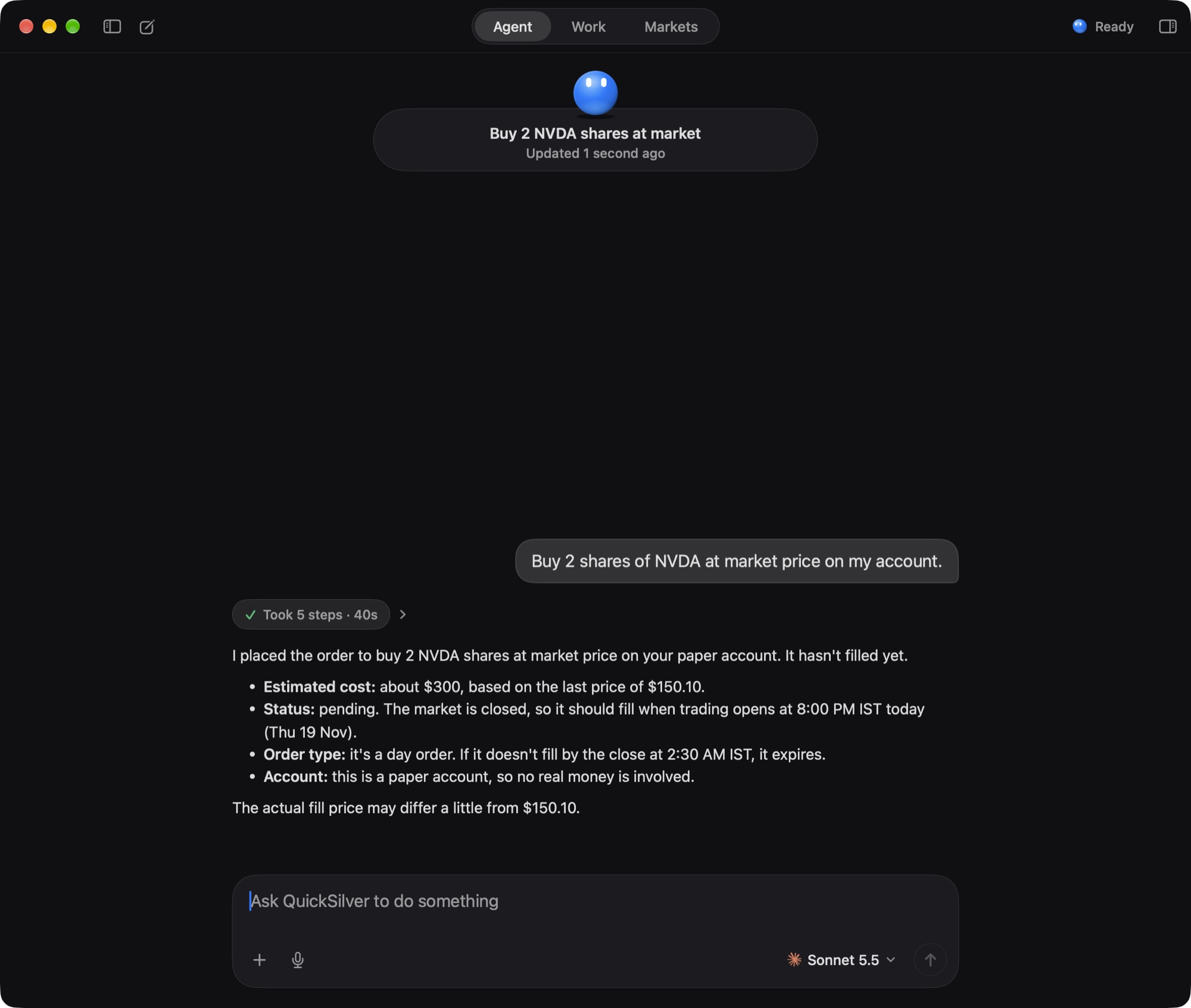
Before an order or a cancel goes anywhere, QuickSilver stops and shows it in one plain sentence: what, how much, at what price, and on which account, paper or live. You press Allow once or Don't allow. If you asked from Telegram or WhatsApp, the question comes to that chat, and you reply to approve or deny.
- It always asks, even when Kaairos is set to “Just get it done” and even if a setting somewhere says the connector is trusted.
- One OK covers one order. Five orders mean five questions; an OK can't be remembered for later.
- Declined means not sent. In the test, a declined order never reached Alpaca: the check reads Alpaca's own order list, not just what the app says.
- Routines can't trade. A routine runs with nobody there to approve, so any order it tries is refused. In the test, a routine told to buy TSLA placed nothing.
Limits that hold even when you say yes
The trading connector checks every order against your limits in code, before it's sent and after you've approved it. An order that breaks a rule is refused with the reason, and QuickSilver tells you what it said.
| Rule | What happens |
|---|---|
| Largest single order (default $500) | A bigger order is refused, even if you approve it. In the test, 3 AAPL at about $1,055 was refused against a $500 limit. |
| Most per day (default $1,000) | Orders Kaairos sent today are added up; one that would go over is refused. |
| No short selling | It won't sell more of something than you hold. |
| Crypto off unless you turn it on | With it off, only US stocks and ETFs. |
| Paper unless you switch to live | Live needs your live keys and a confirmation that says it's real money. |
| No options, margin or leverage tools | It places market, limit, stop, stop-limit, trailing-stop and bracket orders for stocks and ETFs, and market, limit and stop-limit orders for crypto, if allowed. |
Change the limits in Settings › Trading. Setting either one to zero switches trading off. The limits and a log of every order live in a folder on your Mac that the agent's own file tools can't change.
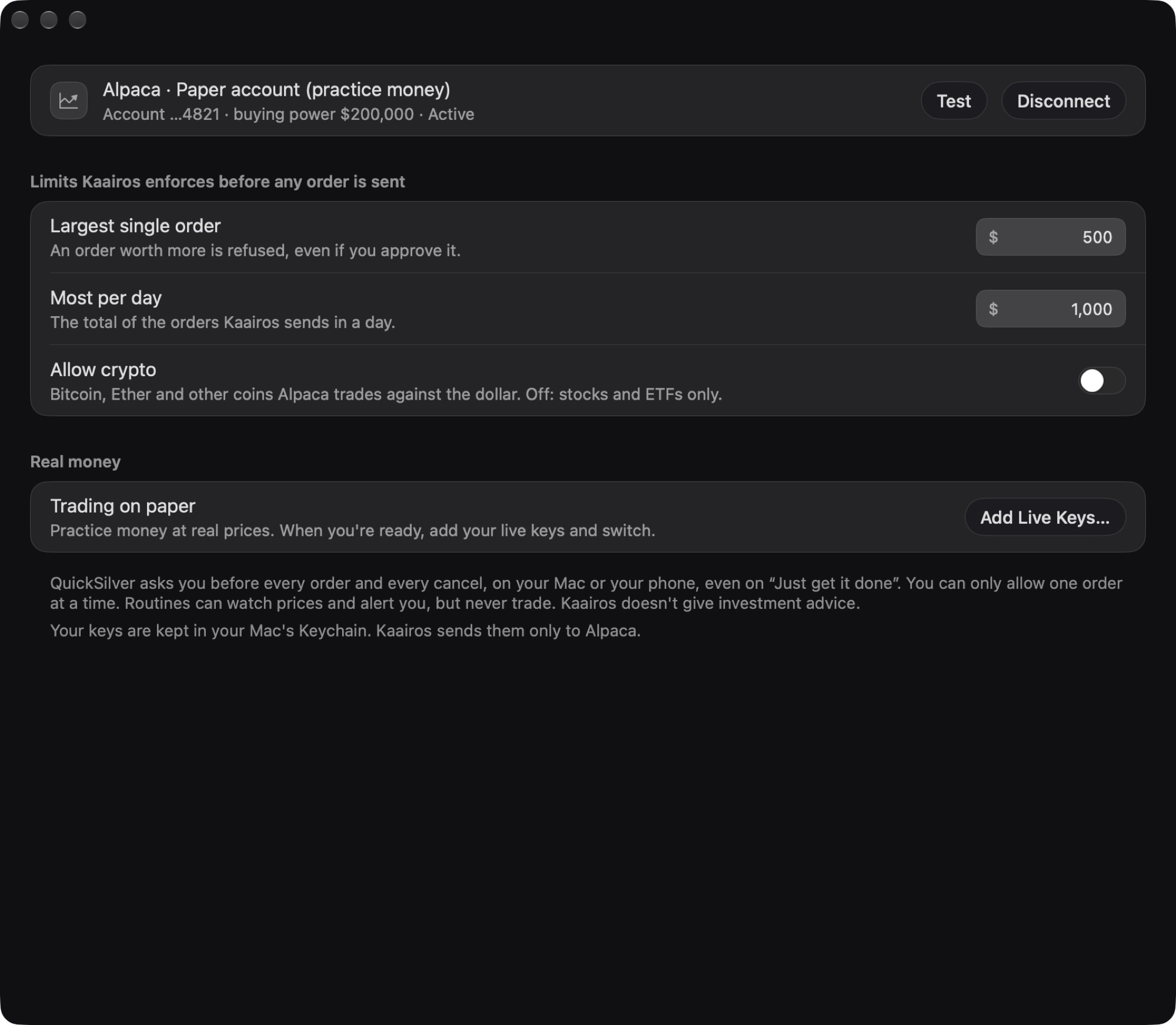
Set it up
- Make a free Alpaca account at alpaca.markets. A paper account, with $100,000 of practice money at real prices, is ready straight away; it needs only an email.
- In the paper dashboard, find API Keys and generate a key. Copy the Key ID and the Secret; Alpaca shows the secret only once.
- In Kaairos, open Settings › Trading, paste both and press Connect. Kaairos tests the keys, shows your account and adds trading to QuickSilver.
- Ask in any chat: “What's in my brokerage account?” Then try an order on paper.
- When you're ready for real money, open a live Alpaca account, choose Add Live Keys… and then Use Live Account…. You can switch back to paper with one click.
Who can use it
Anyone can use a paper account. Live accounts are up to Alpaca: it opens accounts for many people outside the US, depending on country of residence, and says residents of Canada can't open one at present. It doesn't publish a full country list, so if you live outside the US, Alpaca's sign-up tells you whether you're eligible. Live trading is in US stocks and ETFs, plus crypto against the dollar.
Kaairos doesn't give investment advice and isn't a broker. Your account, your money and your orders are with Alpaca, under its terms. Prices move and you can lose money.
Your keys and your data
- Keys are kept in your Mac's Keychain and sent only to Alpaca. They never go to an AI company.
- Your account details (cash, holdings, orders) go to the AI answering that chat, like anything else you ask about. With the private AI on your Mac they stay on your Mac.
- Disconnect in Settings › Trading removes the keys from the Keychain and takes trading off QuickSilver.
What it costs
Trading is part of Kaairos; there's nothing extra to pay Kaairos. Alpaca says its stock trading is commission-free; its crypto fees start at 0.15% for orders that wait (maker) and 0.25% for orders that fill at once (taker). Prices come from Alpaca's free market data (the IEX exchange for stocks on a free plan), so treat them as a close guide and expect the fill price to differ a little.
Limits of the feature
- Alpaca is the only broker for now.
- No options, short selling, margin trades, or trading by a routine.
- Orders that wait (limit orders) are for whole shares if you want them to stay open past today; dollar-amount and fractional orders last the day. Brackets need whole shares.
- Charts use Alpaca's free market data: full-market prices up to 15 minutes ago, then the IEX exchange's own trades, so the last few minutes can differ slightly from other feeds.
- Kaairos reads prices and indicators, not company news or financial statements; for those, QuickSilver searches the web and cites its sources.
- Your Mac has to be on for QuickSilver to place an order; orders already at Alpaca keep working without it.
Fair questions
Can Kaairos trade on its own?
No. Every order and every cancel waits for your OK, one at a time, and routines can't place orders at all.
What if I approve an order that's too big?
It's refused anyway. The trading connector checks your per-order and daily limits after your OK and before anything is sent.
Do I need real money to try it?
No. It starts on an Alpaca paper account: practice money at real prices, free, with just an email.
Which broker does it use?
Alpaca, for US stocks, ETFs and crypto. Kaairos talks to Alpaca's official API with your own keys.
Can I use it from India or elsewhere outside the US?
A paper account works anywhere. For a live account, Alpaca decides by country of residence; it serves many non-US residents but not Canada at present. Its sign-up tells you if you're eligible.
Can I approve orders from my phone?
Yes, for orders you ask for from Telegram or WhatsApp: the question comes to that chat with the order in words, and you reply to approve or deny.
Is this investment advice?
No. QuickSilver does the arithmetic and the typing, and reports what it read with sources. The decision to trade is yours.
Where do the charts and indicators come from?
From Alpaca's market data, with every indicator (averages, RSI, MACD, Bollinger bands, ATR, VWAP) computed by Kaairos on your Mac. The chart you see is the one QuickSilver read.
Can it research several stocks at once?
Yes. QuickSilver hands each stock to a helper; they work at the same time, you can watch each one's lane, and QuickSilver combines what they found.
Does it support stop-losses?
Yes: stop, stop-limit and trailing-stop orders, and brackets that attach a take-profit and a stop-loss to an entry. Each one asks for your OK first.
Download and go
Your AI agent, already set up.
One button to set up. Its own private AI, free. Claude, ChatGPT or Gemini when you want more.
A Mac with Apple silicon (M1 or later), macOS 15 Sequoia or later. 14-day refund.