
Compare
Kaairos vs Apple Intelligence
Apple Intelligence is built into macOS: writing tools, image features, a more capable Siri and on-device models for Shortcuts. Kaairos is an app that adds an AI agent which does whole jobs for you. They overlap less than you'd think, and they work well on the same Mac.
The short answer
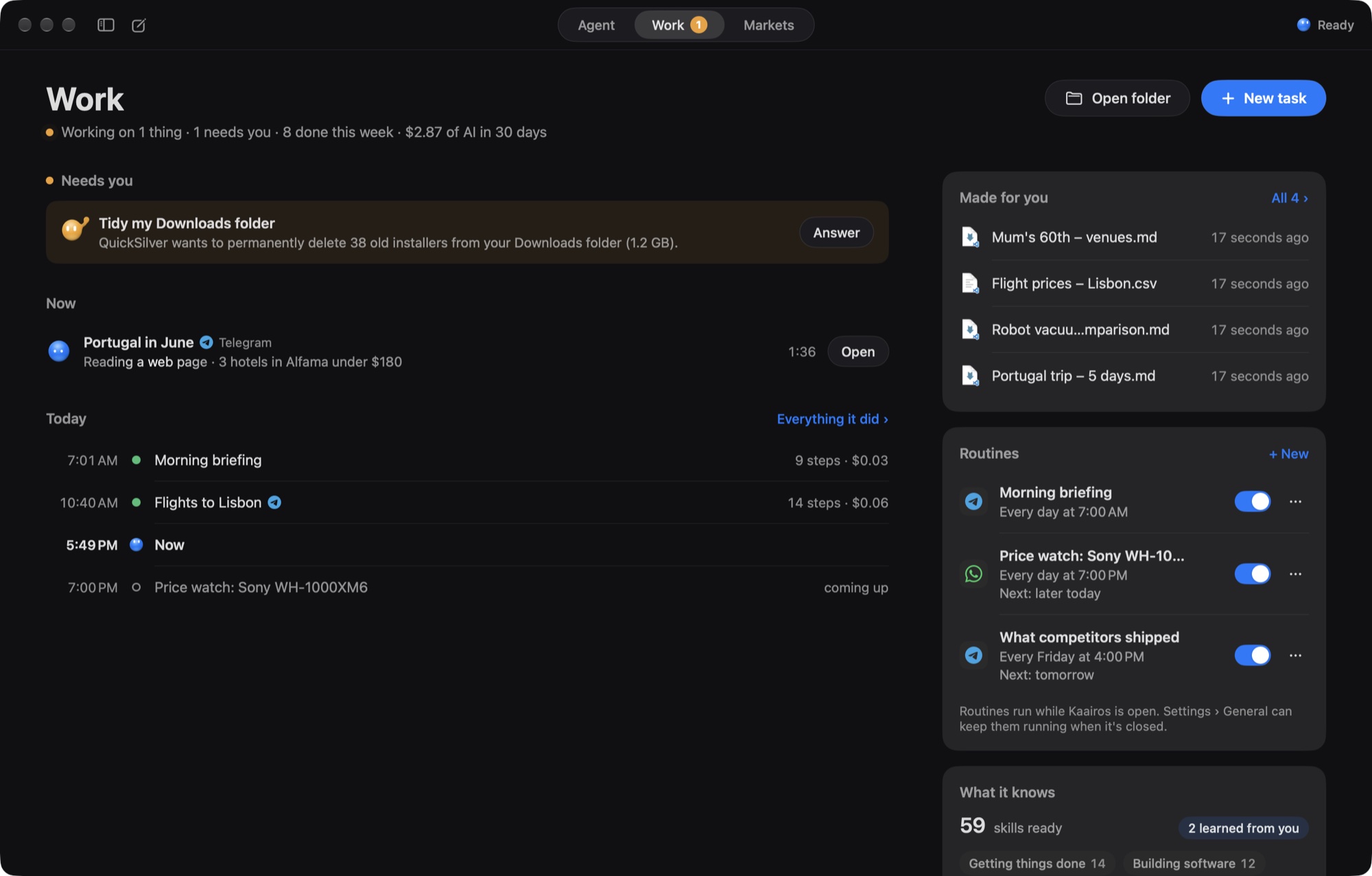
Apple Intelligence is the AI built into your Mac: rewrite text anywhere, summarise notifications, make images, and ask Siri AI about your messages, mail and screen, free within daily limits. Kaairos is an agent you give whole jobs to: research, a morning briefing, a price watch, reminders on your phone. Use Apple Intelligence for help inside your work, Kaairos for work you hand off.
Side by side
What it is
| Kaairos | Apple Intelligence | |
|---|---|---|
| Product | A Mac app: an AI agent that's already set up, built on Hermes Agent by Nous Research | AI features built into macOS, iOS and iPadOS by Apple |
| Setup | Download, open, click Set it up. No terminal, no config files, no API key needed | Turns on automatically on eligible Macs after updating to the 27.0 releases |
| Where you use it | Its own window, the menu bar, the notch, Telegram and WhatsApp | Across the system: Writing Tools in text fields, Siri, Spotlight, Photos, Shortcuts |
Models
| Kaairos | Apple Intelligence | |
|---|---|---|
| On-device AI | Yes: downloads its own open-weight AI (about 24 GB) and runs it on the Mac with llama.cpp. Needs 32 GB of memory | Apple Foundation Models on device; some features need M3 or later with 12 GB |
| Cloud AI | Optional: Sign in with ChatGPT (your ChatGPT plan), or your own key for Claude, OpenAI, Gemini, OpenRouter and 15 more services, or any OpenAI-compatible endpoint | Apple's Private Cloud Compute for larger models; optional ChatGPT extension |
| Choose your model | Yes, per chat | In Shortcuts' Use Model action: On-Device, Cloud, Cloud Pro or Extension Model (ChatGPT) |
Abilities
| Kaairos | Apple Intelligence | |
|---|---|---|
| Writing help in any app | No: you ask in Kaairos | Yes: Writing Tools and Write with Siri |
| Images | Keyless photo and video search shown in replies; image and video generation through Higgsfield or an image service on your account | Image Playground, Genmoji, and Clean Up, Extend and Reframe in Photos |
| Personal context | Memory of what you've told it, and files you share | Siri AI understands context across your messages, mail and photos (beta) |
| Act in apps | Can use apps on the Mac (macOS asks you to allow Screen and Accessibility access), plus connected apps through MCP | Siri AI takes actions in supporting apps (WhatsApp and Audible at launch); App Intents for developers |
| Web research | Yes: searches the web and uses a real browser, shown live in the chat | Siri and Safari features; ChatGPT extension for broader questions |
| Multi-step jobs | Yes: plans, browses, compares, writes, follows up | Single requests; Shortcuts can chain steps you build |
| Schedules | Yes: routines from a gallery or in plain words; run on the private AI by default; the Mac must be on and awake | Shortcuts personal automations can run at a time of day and include Use Model |
| Phone | Telegram and WhatsApp, linked by scanning a QR code; voice notes transcribed on the Mac | Built into iPhone too, as part of iOS |
| Connected apps | Yes: connectors from an approved catalog (Notion, Linear, Asana, Dropbox, Stripe and others); reads freely, changes need approval | App Intents from apps that adopt them |
Safety and privacy
| Kaairos | Apple Intelligence | |
|---|---|---|
| Approvals | Three levels: Always ask, Ask before anything risky (default), Just get it done | macOS permissions and each app's own settings |
| On-device data | Files, chats, memory and routines stay on the Mac; with no AI account, what you ask goes to no AI company | Siri AI's Spotlight index and App Toolbox work entirely on device |
| Cloud data | Chats you give an online AI you connect, web searches and pages it visits, Telegram/WhatsApp messages, the model download, updates and licence checks | Private Cloud Compute: Apple says data is never stored and is used only for your request |
| Third-party AI | Only the services you connect, under their terms | ChatGPT extension is off by default; signed in, OpenAI's own policies apply |
Platforms and price
| Kaairos | Apple Intelligence | |
|---|---|---|
| Requirements | Apple silicon (M1 or later), macOS 15 or later; 32 GB for the private AI | M1 or later (or MacBook Neo); up to 14 GB of storage; supported language and region; not in mainland China |
| Price | $29 at launch, then $80, once, for 3 Macs and every 1.x update; 14-day refund. Online AI, if you add it, is paid to that company | Included with macOS; cloud features have daily limits, and Apple says expanded access will cost a fee in future |
What each is really for
Apple Intelligence: AI inside everything you already do
Apple's approach is to put small, well-integrated AI features where you already are. Select text in any app and rewrite it. Get a summary of a long thread of notifications. Remove a person from a photo. Ask Siri AI, which shipped in beta in September 2026, what someone said about a dinner booking in Messages, or ask it about what's on your screen. Developers can call the same models through the Foundation Models framework, and anyone can use them in Shortcuts with the Use Model action.
Its privacy design is strong. Much runs on the device, and for larger requests Apple's Private Cloud Compute is built so that your data is used only for that request and isn't stored. Its limit is scope: Apple Intelligence helps with a request, then stops. It doesn't go off and do a twenty-step job, keep watch on a web page for a week, or message you on WhatsApp when something changes.
Kaairos: an agent you hand jobs to
Kaairos is built for the handoff. You describe an outcome, and QuickSilver works out the steps: search, open pages in a browser, compare, write, save a file, set a routine, ask you before anything risky. Then it keeps going on a schedule. It runs on its own private AI, an open-weight model sized for your Mac, so routine work costs nothing and stays on the Mac. You can connect Claude, ChatGPT or Gemini for harder thinking.
It doesn't try to be a system feature. It won't rewrite text inside Pages or tidy your photos. That's what Apple Intelligence is for.
The same task in both: a morning briefing
A briefing at 7 every weekday: the weather, three headlines on a topic you follow, and the euro-dollar rate.
With Apple Intelligence and Shortcuts
- Open Shortcuts and create a personal automation with a time of day: 7:00 AM, weekdays.
- Add actions to get the weather, the contents of a news page or feed, and an exchange-rate page.
- Add Use Model (On-Device or Cloud) and ask it to turn those into a short briefing.
- Add an action to show the result as a notification or save it to Notes.
- Test it, and check whether your Mac runs it without asking for confirmation; Apple's documentation doesn't say.
It works, and it's private. It takes some building, and the steps are fixed: if a news site changes, you edit the shortcut.
In Kaairos
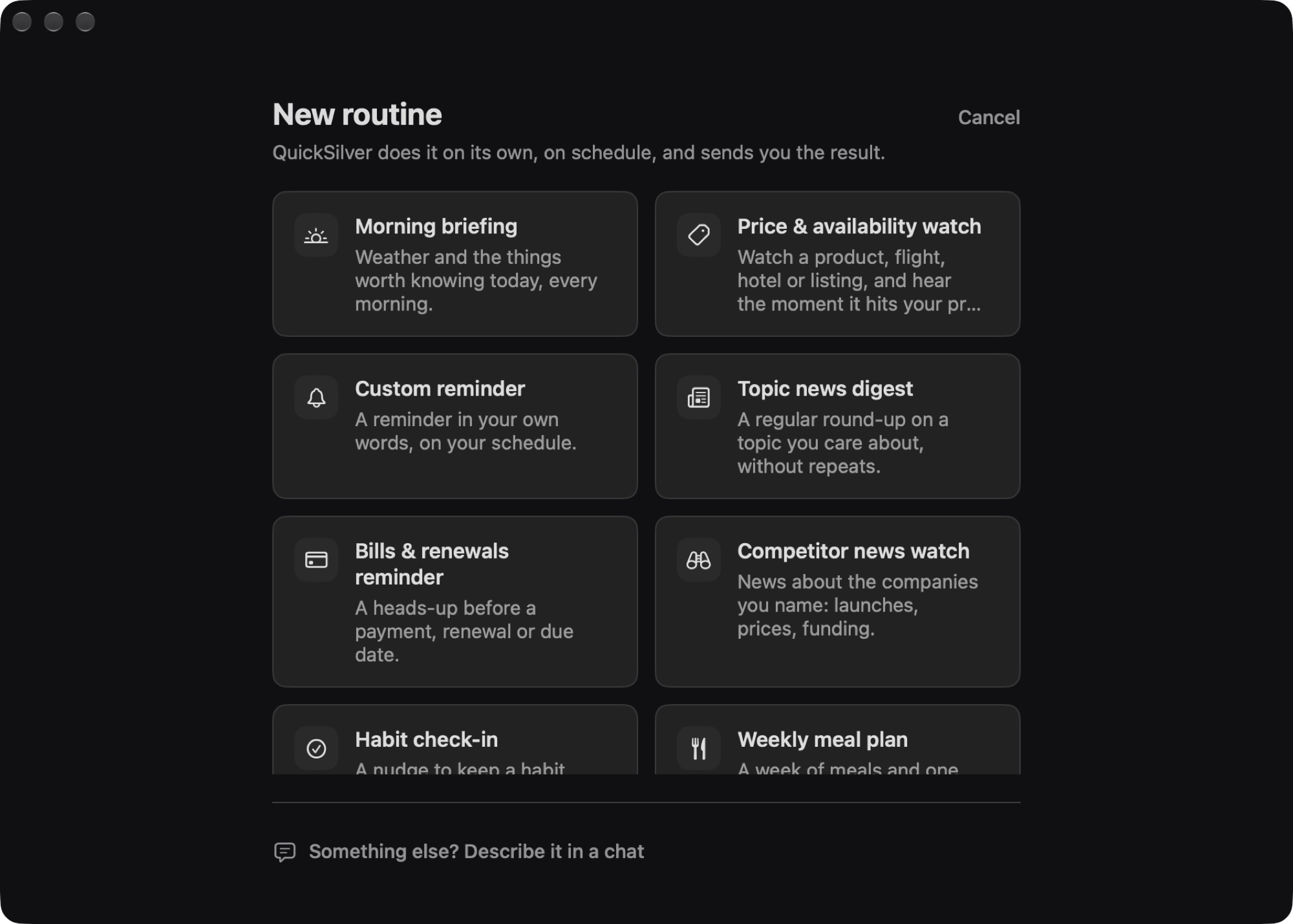
- Open New routine and pick Morning briefing, or just ask for it in your own words.
- Say what to include and when; QuickSilver confirms it in plain language.
- It runs at 7 on the private AI, finds the news itself, and adapts if a source changes.
- If you've linked Telegram or WhatsApp, the briefing arrives on your phone.
Every weekday at 7, send me the weather for Lisbon, the top 3 stories about electric cars and the euro-dollar rate.
Set. Weekdays at 7:00 you'll get it on WhatsApp: Lisbon weather, three electric-car stories with a line each and a link, and the euro-dollar rate with the change since yesterday. It runs on the private AI, so it costs nothing.
Privacy, side by side
Both are serious about privacy, in different ways.
- Apple Intelligence runs what it can on the device and sends larger requests to Private Cloud Compute, which Apple says doesn't store your data or make it accessible to Apple. The ChatGPT extension is opt-in; without an account OpenAI receives the request and limited context and may not store it, but if you sign in to ChatGPT, OpenAI's own policies apply.
- Kaairos with its private AI sends nothing you ask to an AI company: the model runs on the Mac. The web pages it visits are fetched from your Mac, like any browser. If you connect an online AI, the chats routed to it go to that company, and the notch or menu bar shows which ones.
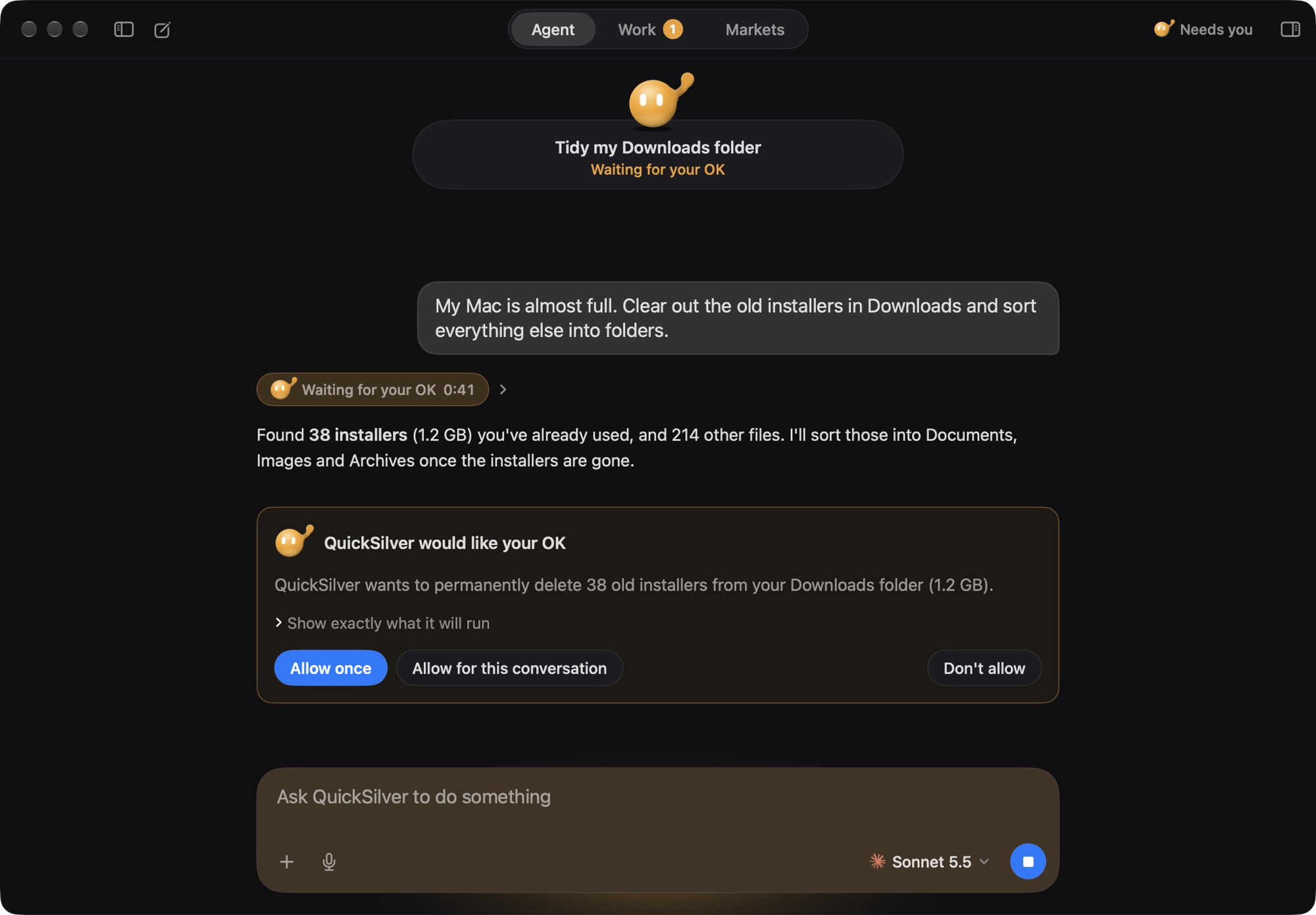
One difference matters for agents: Kaairos reads and acts on the web and your files as part of its job, so it asks before risky steps. The default is Ask before anything risky, and you can choose Always ask for everything.
What it costs in the first year
- Apple Intelligence: included with macOS on an eligible Mac. Apple says cloud features have daily usage limits and that expanded access will be available for a fee in future; no fee is published yet. Year one: $0 today.
- Kaairos: $29 once. Year one: $29, plus any online AI you choose to use.
- Both together: $29. There's nothing to choose between on cost; the question is what you want done.
The real cost difference is hardware. Kaairos's private AI needs 32 GB of memory. On a 16 GB Mac, Kaairos still works once you connect an AI account, while Apple Intelligence runs on any M1 or later.
Using them together
This is the natural setup. Keep Apple Intelligence for writing, photos, notifications and quick Siri questions. Give Kaairos the jobs: the briefing, the price watch on a flight, the reminder to renew insurance that keeps nudging until you've done it, the research before you buy a car. Kaairos doesn't replace Siri, and Siri doesn't keep a routine running for a month.
When Apple Intelligence is all you need
- You mainly want help writing, summarising and editing photos inside the apps you use.
- You'd like a more capable Siri that knows your messages and mail, and no new app.
- You're happy to build Shortcuts for the few things you automate.
- Your Mac has 8 or 16 GB of memory and you don't want an AI account.
- You want everything from one company, with Apple's privacy design throughout.
Sources
- Apple Intelligence (apple.com)
- How to get Apple Intelligence (Apple Support)
- Intro to Apple Intelligence on Mac (Mac User Guide)
- Siri AI is here (Apple Newsroom, September 2026)
- ChatGPT extension and privacy (Apple)
- Use Apple Intelligence in Shortcuts on Mac
- Personal automations in Shortcuts on Mac (Apple Support)
- Apple Intelligence for developers
Fair questions
Is Kaairos an Apple Intelligence alternative?
More a companion than a replacement. Apple Intelligence adds AI features across macOS; Kaairos is an agent app that does multi-step jobs and runs routines. Most people would use both.
Can Apple Intelligence run tasks on a schedule on a Mac?
Through Shortcuts. Personal automations can run at a time of day, and the Use Model action brings in Apple's models. You build the steps yourself.
Is Apple Intelligence free?
It's included with macOS on eligible Macs. Apple says server-side features have daily usage limits, and that expanded access will be available for a fee in the future.
Which Macs support Apple Intelligence?
Macs with M1 or later (and MacBook Neo), with a supported language set for the device and Siri. Some features need M3 or later with at least 12 GB of memory.
Does Apple Intelligence send my data to OpenAI?
Only if you turn on the ChatGPT extension and use it. Without a ChatGPT account, OpenAI may not store the request; if you sign in, OpenAI's own policies apply.
Does Kaairos use Apple's on-device models?
No. Kaairos runs its own open-weight model with llama.cpp, and can use online AI you connect.
Do I need 32 GB for Kaairos?
Only to run its own private AI. On any Apple silicon Mac, Kaairos works once you connect an AI account or Sign in with ChatGPT.
Download and go
Your AI agent, already set up.
One button to set up. Its own private AI, free. Claude, ChatGPT or Gemini when you want more.
A Mac with Apple silicon (M1 or later), macOS 15 Sequoia or later. 14-day refund.