
Help
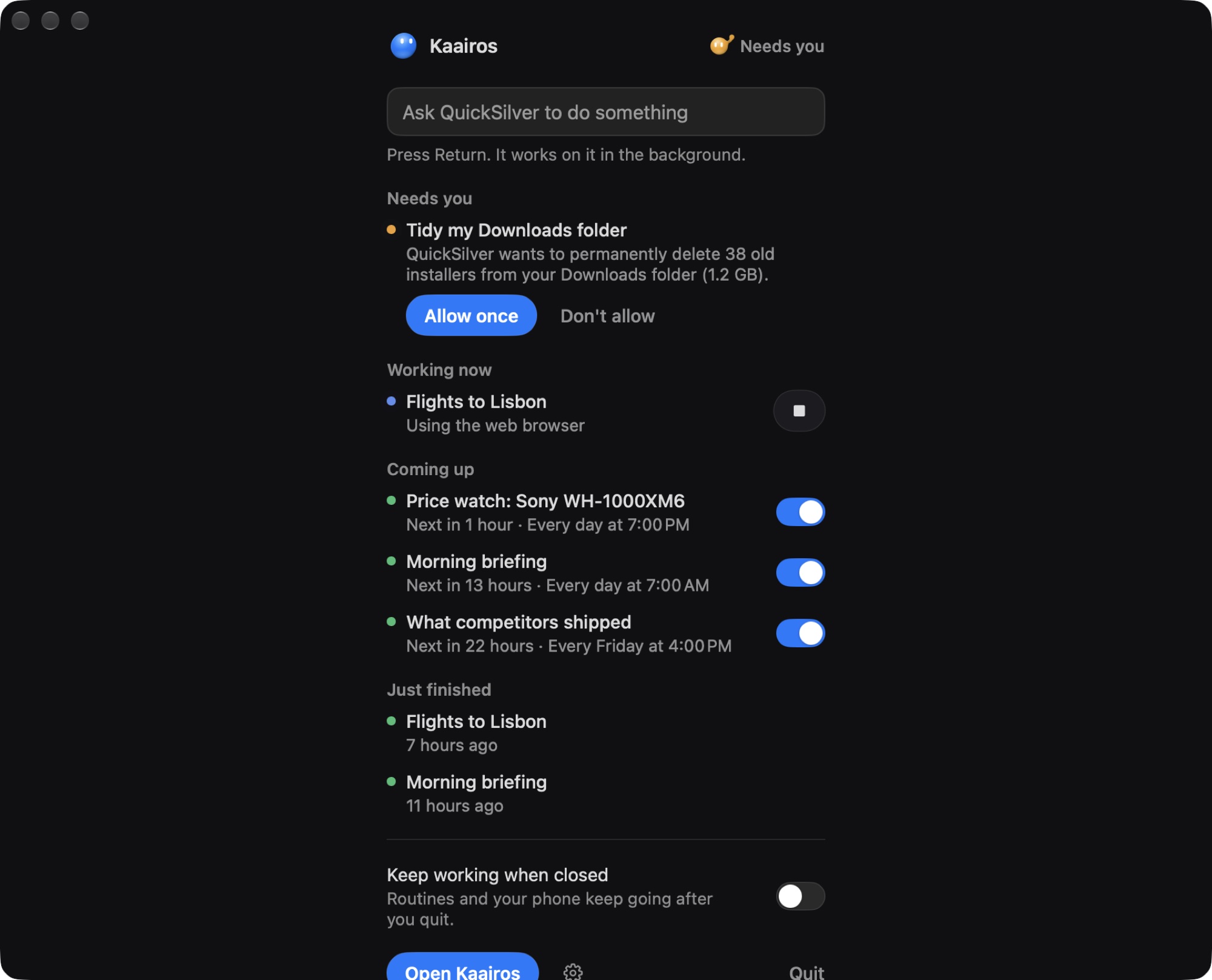
Keep working when closed
Routines and phone chats keep going after you quit Kaairos, through one small background service.
In short
Turn on Settings › General › Keep working when Kaairos is closed, or the Keep working when closed switch at the bottom of the menu bar panel or in Settings › Phone & messages. Kaairos installs a background service that starts at login and keeps your routines running and Telegram and WhatsApp answering after you quit. It's off until you turn it on. Your Mac still has to be on and awake.
Before you start
- Kaairos in your Applications folder, run as the app (the service runs Kaairos's own program).
- A Mac that stays awake when you need routines or replies (see System requirements).
Turn it on
- Open Settings › General.
- Turn on Keep working when Kaairos is closed (“Answers your phone and runs your routines after you quit. A small helper stays running; your Mac needs to be awake.”).
- Quit Kaairos whenever you like. Routines run on schedule and phone messages get answers.
What it installs
| Item | Where | Purpose |
|---|---|---|
| Launch agent | ~/Library/LaunchAgents/app.kaairos.service-XXXXXXXX.plist | Starts the service at login and restarts it after a crash. XXXXXXXX is 8 characters unique to your Kaairos data folder. |
| The service | Kaairos's own program, run with --service | Starts and minds the engine's messaging gateway, which also runs routines |
| Its plan | ~/.kaairos/app/service.json | Which programs the service runs (private to your account) |
| Service log | ~/Library/Logs/Kaairos/service.log | launchd's log for the service |
| Working folder | ~/Library/Application Support/Kaairos | launchd's folder for the service |
| Gateway log | ~/.kaairos/home/logs/gateway.log | What the gateway did |
After an app update, the service moves onto the new version's engine by itself.
What you'll see when it works
- The switch stays on. If macOS refuses to start the service, it flips back off; the reason is written to
~/.kaairos/logs/background-service.log. - The Work tab no longer shows “Routines run while Kaairos is open.” under your routines.
- After you quit, routines still run, and their results appear in Kaairos's Work tab next time you open it (and on your phone, if that's where they go).
Open, closed, and asleep
| Situation | Routines | Telegram and WhatsApp |
|---|---|---|
| Kaairos open | Run on schedule | Answered |
| Kaairos quit, Keep working when closed off | Don't run | Not answered until you open Kaairos |
| Kaairos quit, Keep working when closed on | Run on schedule | Answered |
| Mac asleep, off or logged out | Don't run | Not answered until the Mac is awake |
Closing the window isn't quitting: Kaairos stays in the menu bar and keeps working. The menu bar panel shows what's running, what needs you and what's coming up, and lets you ask from anywhere.
Turn it off
Turn the same switch off. Kaairos stops the gateway and, when nothing else needs the service, unloads the launch agent and deletes its file. While it's off, routines and phone replies only happen while Kaairos is open.
If you're deleting Kaairos, turn this off first. The service runs from Kaairos's own copy of its engine in ~/.kaairos, so it would keep running even after the app is in the Trash. If you've already deleted the app, see Uninstall for how to remove it by hand.
Common problems
- The switch turns itself back off. macOS didn't start the service. Open Settings › About Kaairos › Show Logs and look at
background-service.log; the message usually starts “macOS didn't start Kaairos's background service.” Make sure Kaairos is in Applications and try again. - “Kaairos can only keep working in the background when it runs as an app.” You're running a development copy; use the installed app.
- Routines don't run overnight. The Mac went to sleep. Keep it plugged in and stop it sleeping automatically.
- macOS lists Kaairos in Login Items & Extensions. That's the service. Turning it off in Kaairos removes it.
What leaves your Mac
Nothing new. The service does on your Mac what the open app would do: it runs routines and talks to Telegram and WhatsApp. What each task sends online is the same as with the window open.
Fair questions
Does it use much battery or memory?
The gateway itself is small. The work it does (a routine on the private AI, for example) uses what that task needs.
Will it start when I log in?
Yes, while it's on. It starts at login and restarts if it crashes.
Can it wake my Mac for a routine?
No. It runs routines when the Mac is awake.
Does quitting from the menu bar stop it?
No. Quit closes the app; the service keeps going until you turn the switch off.
Download and go
Your AI agent, already set up.
One button to set up. Its own private AI, free. Claude, ChatGPT or Gemini when you want more.
A Mac with Apple silicon (M1 or later), macOS 15 Sequoia or later. 14-day refund.