
Help
Approvals and undo
Decide how careful QuickSilver is, answer it when it asks, and put files back when you need to.
In short
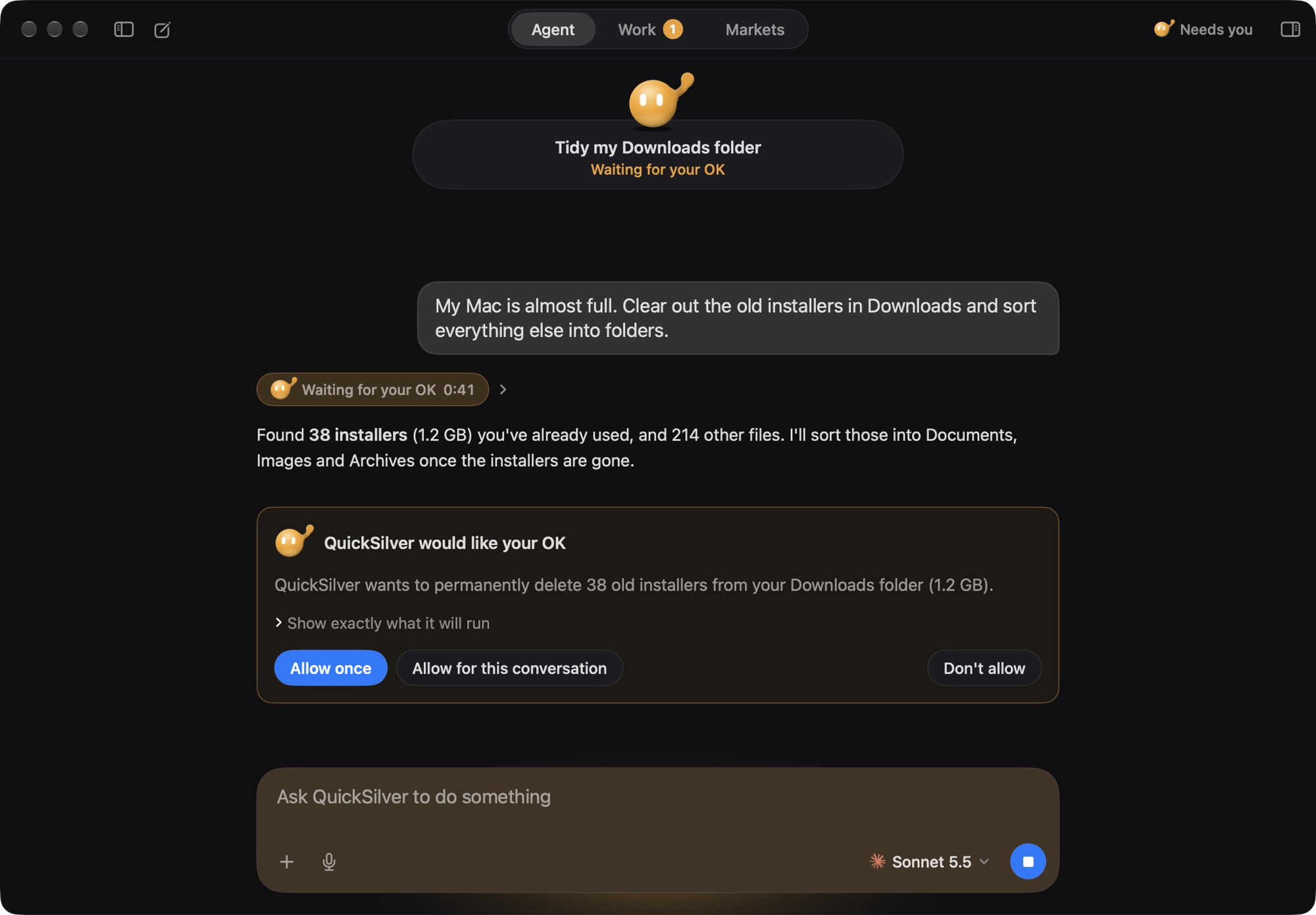
In Settings › General › How careful should QuickSilver be? pick Always ask first, Ask before anything risky (the default) or Just get it done. When QuickSilver wants your OK, it says what it wants in plain words and offers Allow once, Allow for this conversation or Don't allow; Show exactly what it will run reveals the precise command. Whatever level you pick, Kaairos keeps snapshots of files QuickSilver changes, which the engine's /rollback command can restore.
Choose a level
| Level | What the app says | Engine mode |
|---|---|---|
| Always ask first | Asks before every command that could delete, overwrite, install or change settings; edits files in your folders freely. | manual |
| Ask before anything risky (default) | Asks before deleting, moving or sending anything; a safety check clears the rest. Recommended. | smart |
| Just get it done | Never stops to ask; it still can't wipe your disk. | off |
Under the three choices: “Whatever you pick, QuickSilver can't wipe your disk or rewrite its own safety rules, and keeps a snapshot of files it edits so you can undo.” The engine's hard-line blocklist and its protected files stay on at every level.
With Ask before anything risky, a fast model double-checks risky steps (the Quick chores job in Settings › AI) and only the ones that need you come to you.
Answer a request
In the chat, a card says QuickSilver would like your OK with one sentence on what it wants, for example “Kaairos wants to permanently delete files.” or “Kaairos wants to run something with administrator rights.”
| Button | What it does |
|---|---|
| Allow once | Allows just this action. |
| Allow for this conversation | Allows actions like it, in this chat only. |
| Don't allow | Refuses. QuickSilver stops, looks for another way, or asks you. |
| Show exactly what it will run | Opens the exact command or change, and the engine's reason. |
QuickSilver may also ask a question (QuickSilver has a question, with choices or Type your answer and Send) or for a password or key (QuickSilver needs a password or key, with Paste it here, Send and Skip).
Where requests show up
- In the chat itself.
- In Work › Needs you, with Answer.
- In the menu bar panel, with Allow once, Don't allow or Answer.
- At the notch, with Allow and Don't allow, on Macs with a camera notch and Show QuickSilver at the notch on.
- In Telegram or WhatsApp, for tasks you started there: reply to approve or deny.
Over-the-limit Higgsfield costs come as their own card, This one costs N credits, with Make It and Not Now. See Skills and connected apps.
Undo a change
Kaairos turns on the engine's checkpoints. The first time QuickSilver writes or edits a file during a turn, the engine snapshots the working folder. It keeps up to 20 snapshots per folder and up to 500 MB in all, dropping the oldest first, and skips files larger than 10 MB.
- In the Telegram or WhatsApp chat with QuickSilver, send
/rollbackto list the snapshots, newest first. - Send
/rollbackfollowed by a number to restore that snapshot. A restore keeps any edits you made by hand since; the engine lists what it left alone.
In the Kaairos window you can ask QuickSilver to put back what it changed in the same chat, for example “Undo the changes you just made to Downloads.” It reverses its own steps where it can. Kaairos's window has no undo button of its own yet.
Snapshots cover files QuickSilver writes or edits with its file tools. Something deleted by a command, sent, bought or posted can't be taken back by a snapshot, which is why those always need your OK at the default level.
Common problems
- It asks too often. Choose Allow for this conversation for a chat full of similar steps, or switch levels.
- It never asks. Check you didn't choose Just get it done.
- A request disappeared. Check Work › Needs you, the menu bar panel and the notch; one answer anywhere clears it everywhere.
/rollbacklists nothing. QuickSilver didn't write files in that folder with its file tools, or the snapshots were pruned.
What leaves your Mac
Approvals happen on your Mac. With Ask before anything risky, the double-check of a risky step runs on the Quick chores model, which is an online AI if you've connected one. Snapshots stay in Kaairos's data folder on your Mac.
Fair questions
Does the level apply to routines and phone chats?
Yes. It's one setting for the engine, whichever way the task started.
What are “the few things it never does”?
The engine refuses things like wiping disks and reading your passwords at every level, and keeps its protected files and secret redaction on.
Does Allow for this conversation carry over to new chats?
No. It applies to that conversation only.
Can I see what it ran after the fact?
Yes. Open the conversation: each step is listed in plain words, and the Work tab shows its steps and cost.
Download and go
Your AI agent, already set up.
One button to set up. Its own private AI, free. Claude, ChatGPT or Gemini when you want more.
A Mac with Apple silicon (M1 or later), macOS 15 Sequoia or later. 14-day refund.