
Help
Costs and usage
Kaairos is a one-time purchase: $29 at launch, then $80. Here's what else can cost money, where Kaairos shows it, and how to keep it low.
In short
The private AI on your Mac is free to use. If you connect an online AI with your own key, that company bills you per use. Sign in with ChatGPT uses your existing plan and its limits, with no extra bill. Higgsfield pictures and videos use your Higgsfield credits. Kaairos shows the online AI cost of the last 30 days under the Work title, and the cost of each finished task beside it.
What costs what
| Cost | Who bills you | |
|---|---|---|
| Kaairos | $29 at launch, then $80, once, every 1.x update included | Stuvio (payments processed by Polar) |
| The private AI on your Mac | Free | Nobody |
| An online AI with your own key | Per use (per million tokens in and out) | That company |
| Sign in with ChatGPT | Your existing ChatGPT plan, within its limits | OpenAI, as today |
| Higgsfield pictures and videos | Credits from your Higgsfield account | Higgsfield |
| Telegram, WhatsApp | Free | Nobody |
See what you've spent
- Work tab: the line under Work reads like “Ready · 12 done this week · $1.84 of AI in 30 days”.
- Each task: in Today and Earlier this week, a finished task shows its steps and cost, such as “14 steps · $0.06” (costs under half a cent aren't shown).
- Model picker: each model shows its price per million tokens in and out; the private AI says “Free, stays on this Mac”.
These figures come from the engine's own accounting: the cost the AI company reports when it does, otherwise an estimate from tokens used and the model's list price. Treat them as a close guide. Your provider's billing page is the actual bill.
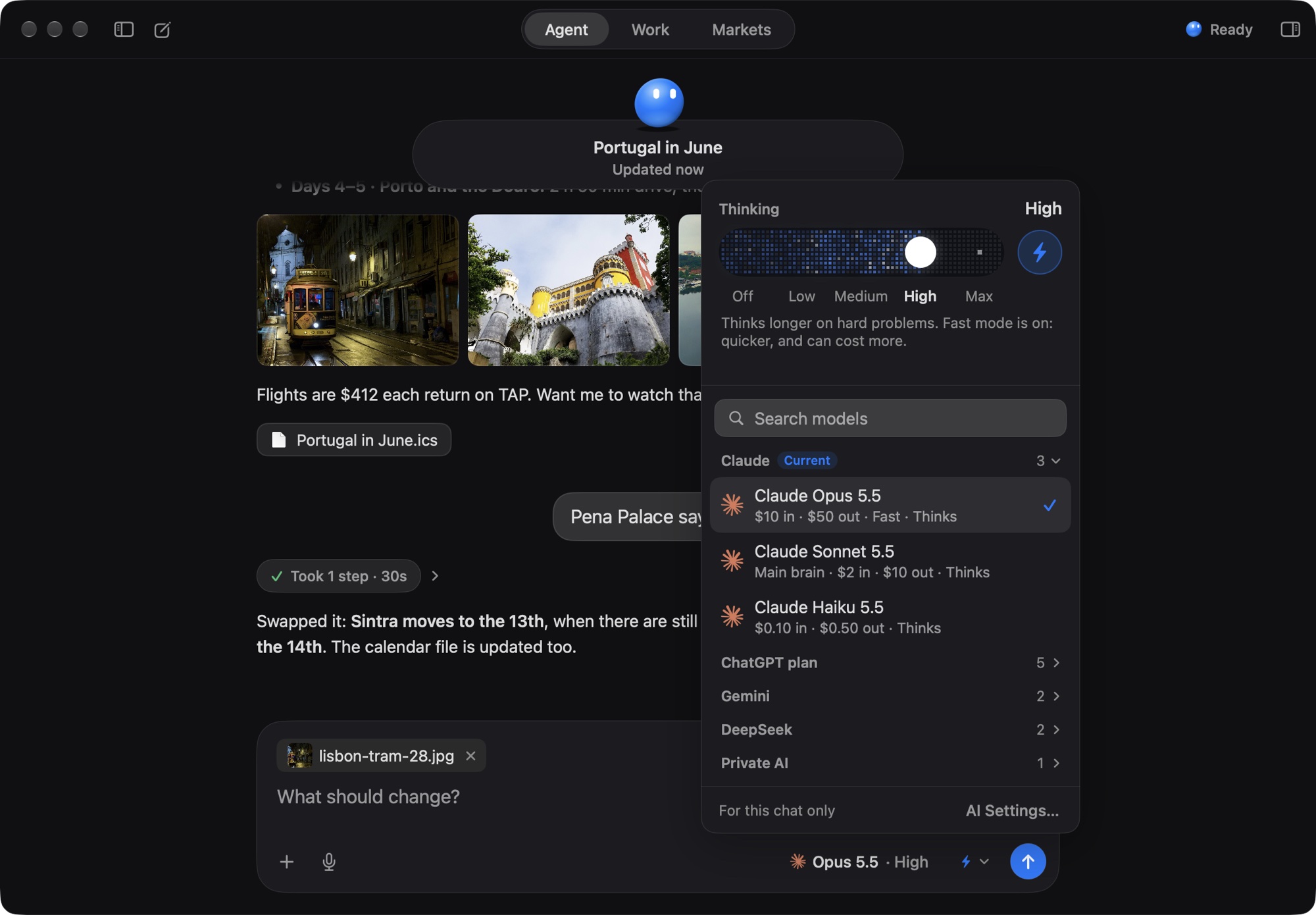
How Kaairos keeps costs down by default
- Main brain uses a strong mid-priced model (Claude Sonnet rather than Claude Opus), not the most expensive tier.
- Helpers and Quick chores run on fast, inexpensive models (such as Claude Haiku), which are many times cheaper per call.
- Routines run on the private AI when you have one, so they cost nothing.
- Backup is the private AI, so an outage doesn't push the turn to another paid AI.
- A model that costs much more than most asks first in the model picker: Use [model]? with Use It.
Change any of this in Settings › AI › Who does what.
Set limits
- Set a monthly spending limit or prepaid credit in your AI company's console. Anthropic, OpenAI, Google and OpenRouter all offer one, and Kaairos links to each key page from Add AI….
- Keep Routines on the private AI in Settings › AI.
- For Higgsfield, choose Ask before spending in Settings › Connectors: Every time, Over 25 credits (the default), Over 50, Over 100, or Never.
- Leave the model picker on the chat's usual AI unless a task needs more; the choice is for that chat only.
Signed in with ChatGPT
With a plan signed in, the plan does the everyday work and the AI you'd use without it becomes the backup. When the plan hits its limit, the reply says “Your ChatGPT plan hit its limit, so [backup] answered. ChatGPT takes over again when the limit resets.” If the backup is an API key, those turns are billed by that company.
Common problems
- The Work tab's figure differs from my bill. Some companies don't report a cost per call, so Kaairos estimates. Your provider's console is authoritative.
- Replies say another AI answered. Your main AI was out of credit or unreachable; top up or check its status page.
- My key stopped working. Many companies stop a key at zero credit. Add credit; Kaairos doesn't need the key re-entered.
What leaves your Mac
Usage is counted by the engine on your Mac. Kaairos sends no usage data to Stuvio.
Fair questions
Is there a subscription?
No. Kaairos is $29 at launch, then $80, once. The only ongoing costs are the ones you choose: an online AI or Higgsfield.
How much does a typical month cost with an online AI?
It depends on how much you use it and which models. With Kaairos's default routing and routines on the private AI, the Work tab shows your real 30-day figure.
Does the private AI cost electricity?
It uses your Mac's processor while it answers, like any heavy app. There's no fee.
Do failed tasks cost money?
Tokens an online AI processed before something failed are billed by that company.
Download and go
Your AI agent, already set up.
One button to set up. Its own private AI, free. Claude, ChatGPT or Gemini when you want more.
A Mac with Apple silicon (M1 or later), macOS 15 Sequoia or later. 14-day refund.